
1. Úvod
The Akko MetaKey is an innovative phone case integrated with a 37-key mini mechanical keyboard, designed to enhance your typing experience on compatible iPhone models. This manual provides detailed instructions for setting up, operating, and maintaining your Akko MetaKey to ensure optimal performance.
Note: Phone not included. Images are for display purposes only.

2. Nastavení
2.1 Kompatibilita
The Akko MetaKey is specifically designed for:
- iPhone 16 Pro Max
- iPhone 17 Pro Max
Please ensure your iPhone model matches the case variant you have purchased.
2.2 Attaching Your iPhone
- Carefully align your iPhone with the top section of the MetaKey case.
- Gently press your iPhone into the case until it is securely seated. Ensure all edges are properly fitted.
- For iPhone 16 Pro Max, the case dimensions are 205*85*13mm and it weighs 73g (excluding the weight block).
- For iPhone 17 Pro Max, the case dimensions are 205*85*13mm and it weighs 78.9g (excluding the weight block).


2.3 Connecting the Keyboard (Plug and Play)
The Akko MetaKey features a direct USB connection. Simply plug your iPhone into the case's integrated connector. This ensures a stable, lag-free link and allows you to charge your phone while using the keyboard.

3. Návod k obsluze
3.1 Keyboard Layout and Functions
The Akko MetaKey features 37 keys, including 26 Alpha keys and 11 Function keys. The keyboard provides a tactile mechanical typing experience.
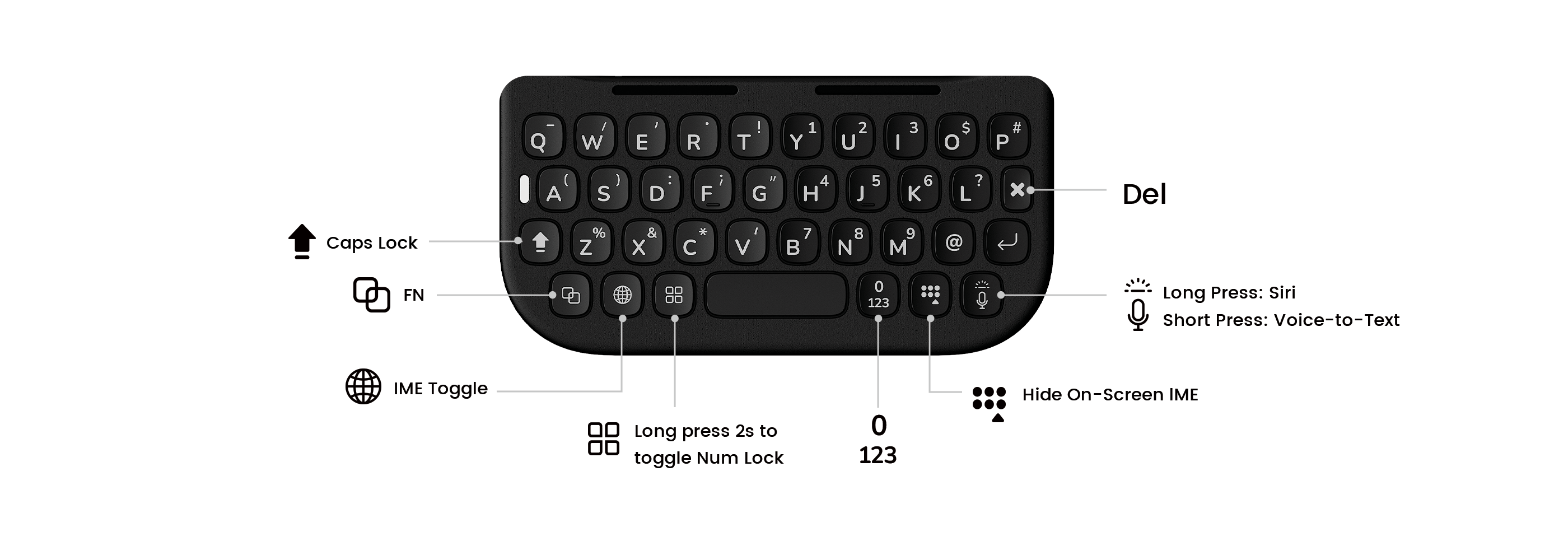
3.2 Speciální funkce kláves
- Caps Lock: Toggles uppercase/lowercase letters.
- FN (Function Key): Used in combination with other keys for special functions.
- IME Toggle: Switches between input methods.
- Num Lock: Long press for 2 seconds to toggle Numeric Lock.
- Siri: Long press the microphone key to activate Siri.
- Voice-to-Text: Short press the microphone key to activate Voice-to-Text.
- Del: Smaže znaky.
3.3 Video Browsing Mode
To activate Video Browsing Mode:
- Stiskněte FN + mezerník simultaneously to toggle Video Browsing Mode.
- Once enabled:
- Použijte Q row for Next Page (Scroll Down).
- Použijte A row for Previous Page (Scroll Up).

3.4 Command Shortcuts
Discover useful Command shortcuts for faster navigation:
- Generál:
- ⊞ + H = Home
- ⊞ + Space = Search
- Safari:
- ⊞ + N = New Tab
- ⊞ + W = Close Tab
- E-mail:
- Del = Delete Email
- ⊞ + R = Reply Email
3.5 Podsvícení
The Akko MetaKey features a white backlight under each key, along with an indicator, for convenient typing in low-light conditions.

3.6 Video s ukázkou produktu
4. Údržba
4.1 Material and Durability
The Akko MetaKey case is constructed from a combination of PU (Polyurethane) and TPU (Thermoplastic Polyurethane), offering enhanced durability and impact resistance for long-lasting performance.

4.2 Detachable Weight
The case includes a detachable 9g weight. You can choose to:
- Add the weight: For a more balanced feel during use.
- Remove the weight: For ultimate lightness and portability.

4.3 Magnetic Support
The built-in magnet array allows for seamless compatibility with various magnetic accessories such as power banks, stands, and car mounts, enhancing convenience and hands-free usage.

5. Řešení problémů
5.1 Klávesnice nereaguje
- Ensure your iPhone is correctly seated and connected via the integrated USB connector.
- Verify that the keyboard is properly recognized by your iPhone.
- Restart your iPhone and re-attach the case.
5.2 Input Method Issues
Důležité: Due to system restrictions in iOS, this external keyboard works only with Apple’s built-in input methods. If you are experiencing issues with third-party keyboard apps, switch to a default iOS keyboard.
5.3 Fyzické poškození
If the case or keyboard sustains physical damage, discontinue use and contact customer support for assistance.
6. Specifikace
| Název značky | AKKO |
| Model | MetaKey |
| Kompatibilita | iPhone 16 Pro Max, iPhone 17 Pro Max |
| Počet klíčů | 37 keys (26 Alpha keys, 11 Function keys) |
| Typ rozhraní | Kabelové (USB) |
| Operační styl | Mechanické |
| Typ podsvícení | Monochromatický (bílý) |
| Materiál | PU + TPU |
| Rozměry | 205 mm x 85 mm x 13 mm |
| Weight (iPhone 16 Pro Max) | 73g (Excludes weight block) |
| Weight (iPhone 17 Pro Max) | 78.9g (Excludes weight block) |
| Původ | pevninská Čína |
| Osvědčení | CE, WEEE |
| Klávesnice plné velikosti | Žádný |
| Podpora zápěstí | Žádný |
| Baterie je součástí dodávky | Žádný |
| Přepínače s možností výměny za provozu | Žádný |
7. Uživatelské tipy
- Ověřte kompatibilitu: Always double-check that you have the correct Akko MetaKey model for your specific iPhone (e.g., iPhone 16 Pro Max vs. 17 Pro Max). This product is not compatible with other iPhone models like the 15 Plus, 15 Pro Max, or standard 16 Pro.
- Jazyková podpora: The keyboard features an English layout. If you require typing in other languages, ensure your iPhone's built-in input methods support it, as the external keyboard relies on these.
- Optimal Typing: Experiment with adding or removing the detachable weight to find your preferred balance and typing comfort.
- Utilize Shortcuts: Familiarize yourself with the command shortcuts and special key functions to maximize productivity and efficiency.
8. Záruka a podpora
For any product inquiries, technical support, or warranty claims, please contact the Akko Official Store or your point of purchase. Keep your proof of purchase for any warranty-related services.