
1. Úvod
This manual provides instructions for the assembly, operation, and maintenance of your HOOBRO Industrial Printer Stand (Model BF22UPS01) and Computer Desk (Model BC40UDN01) bundle. Please read these instructions carefully before assembly and use to ensure safe and correct operation.
2. Bezpečnostní pokyny
- Uchovávejte všechny obalové materiály mimo dosah dětí.
- Před zahájením montáže se ujistěte, že jsou všechny díly přítomny a nepoškozené. Pokud některé díly chybí nebo jsou poškozené, nepokračujte v montáži.
- Výrobek sestavte na měkkém, čistém povrchu, abyste zabránili poškrábání.
- Všechny šrouby pevně utáhněte, ale nepřetahujte je, abyste zabránili stržení závitů nebo poškození součástí.
- Nepřekračujte maximální nosnost stanovenou pro každou součást.
- For the printer stand's power strip, ensure the power cord is fully inserted into a grounded outlet. Do not overload the outlets.
- Udržujte kapaliny v dostatečné vzdálenosti od elektrických součástí.
- Pravidelně kontrolujte všechny spoje a upevňovací prvky, abyste zajistili jejich bezpečné utažení.
3. Obsah balení
Verify that all components listed in your product's specific parts list (included in the packaging) are present. Typical components include:
- Kovové rámové komponenty
- Wooden top panels
- Mesh shelves (for printer stand)
- Power strip with USB ports and AC outlet (for printer stand)
- Casters (2 with brakes, 2 without)
- Nastavitelné nožičky
- Háčky
- Montážní materiál (šrouby, imbusový klíč)
4. Nastavení a montáž
Assembly is designed to be straightforward. Follow the detailed step-by-step instructions provided in your product's assembly guide. Each part is typically labeled for easy identification.
4.1. HOOBRO Industrial Printer Stand (Model BF22UPS01)
This 3-tier mobile printer stand features a rustic brown top, two mesh shelves, a built-in power outlet, and three side hooks. It can be assembled with either casters for mobility or adjustable feet for stationary use.

Figure 1: Assembled HOOBRO 3-Tier Mobile Printer Stand.
Postup generálního shromáždění:
- Vybalte všechny součásti a ověřte je podle seznamu dílů.
- Attach the side frames to the top wooden panel using the provided screws.
- Slide and secure the mesh shelves into the designated slots on the frame.
- Install either the casters (two with brakes on the front, two without on the back) or the adjustable feet into the bottom of the frame.
- Mount the power strip unit onto the side of the frame.
- Attach the three hooks to the side of the top panel.
4.2. HOOBRO Computer Desk (Model BC40UDN01)
This home office desk features a charcoal gray and black tabletop with a sturdy metal frame and three side hooks.

Figure 2: Assembled HOOBRO Computer Desk.
Postup generálního shromáždění:
- Vybalte všechny součásti a ověřte je podle seznamu dílů.
- Sestavte kovovou rámovou konstrukci podle schémat.
- Připevněte desku stolu k sestavenému rámu.
- Install the adjustable feet at the bottom of the desk legs.
- Attach the three hooks to the side of the desk frame.
5. Návod k obsluze
5.1. HOOBRO Industrial Printer Stand (Model BF22UPS01)
- Mobilita: If casters are installed, unlock the two braking casters to move the stand. Lock them when the stand is in the desired position to prevent accidental movement.
- Nastavitelné nožičky: If adjustable feet are installed, rotate them to level the stand on uneven surfaces.
- Napájecí zásuvky: Plug the stand's power cord into a standard 120V AC wall outlet. Use the 1 AC outlet, 1 Type-C USB port, and 1 standard USB port to power or charge your devices.
- Skladování: Utilize the three tiers for printers, paper, office supplies, or other items. The side hooks can hold headphones, cables, or small bags.
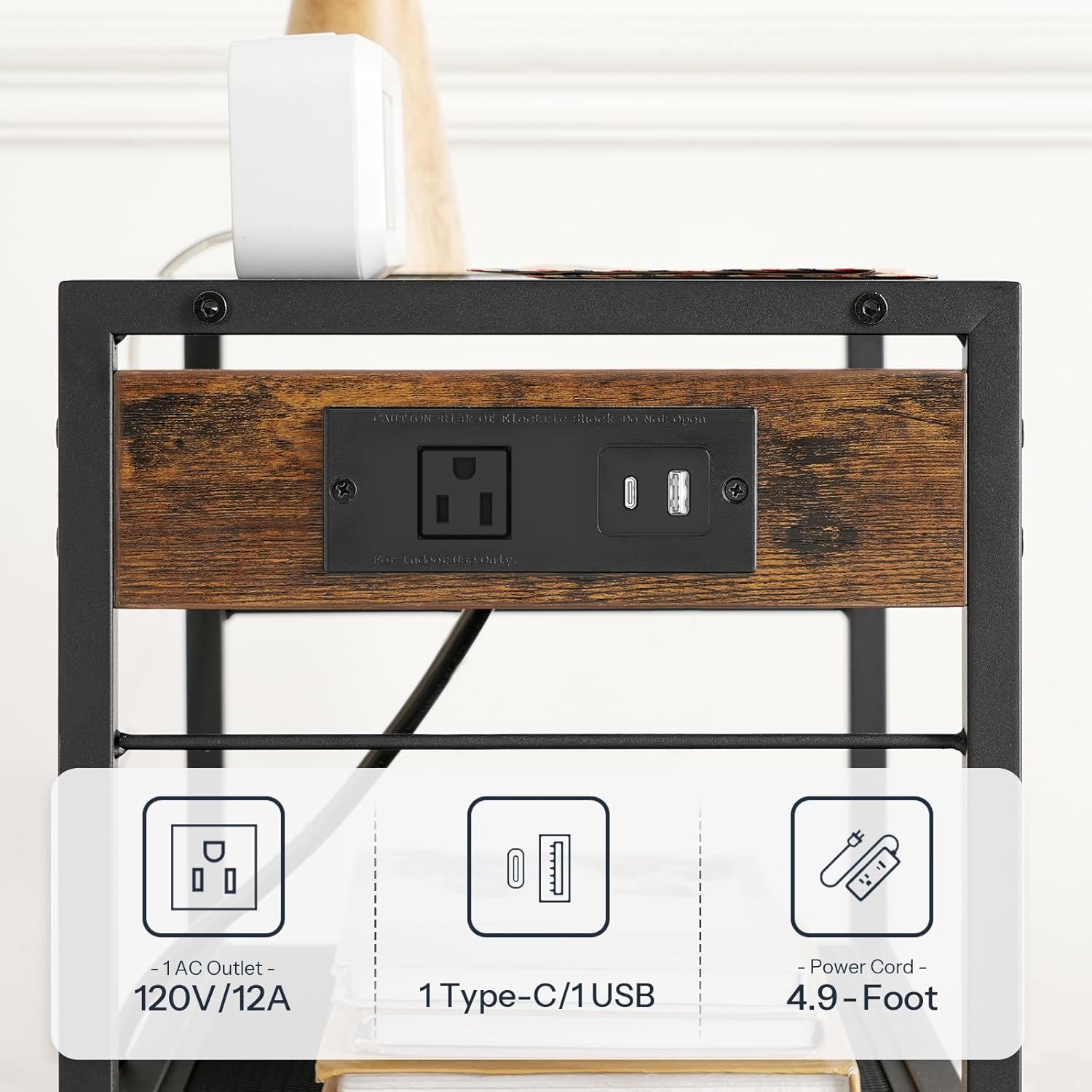
Figure 3: Detail of the printer stand's power outlet with 1 AC, 1 Type-C, and 1 USB port.

Figure 4: Printer stand in use, demonstrating its storage and utility next to a desk.
5.2. HOOBRO Computer Desk (Model BC40UDN01)
- Pracovní prostor: Use the spacious tabletop for your computer, monitor, and other work essentials.
- Háčky: The three side hooks provide convenient storage for headphones, backpacks, or other personal items.

Figure 5: Computer desk in use, highlighting the side hooks for accessories.
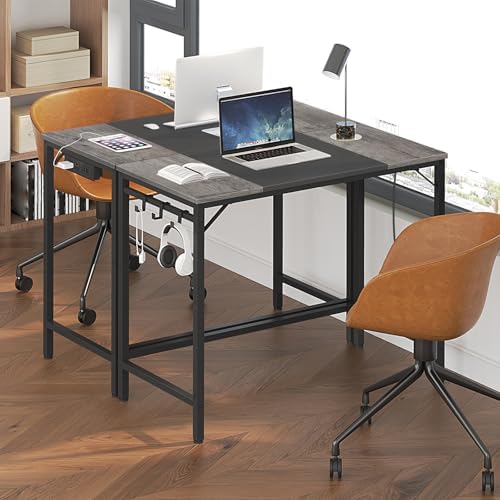
Figure 6: Computer desk providing a functional workspace.
6. Údržba
- Čištění: Otřete povrchy měkkým, damp hadříkem. Nepoužívejte agresivní chemikálie ani abrazivní čisticí prostředky, které by mohly poškodit povrchovou úpravu.
- Spojovací materiál: Pravidelně kontrolujte všechny šrouby a vruty, zda jsou pevně utažené. V případě potřeby je dotáhněte.
- Elektrické komponenty: Ensure the power cord is not pinched or damaged. Do not attempt to repair the power strip yourself; contact qualified personnel if issues arise.
7. Řešení problémů
- Nestabilita/Kolísání: Check that all screws are securely tightened. If using adjustable feet, ensure they are properly adjusted to level the unit on uneven floors. If using casters, ensure they are fully inserted.
- Nefunkční elektrické zásuvky: Ensure the power cord is fully plugged into a functional wall outlet. Check if the wall outlet itself is working by plugging in another device. Avoid overloading the power strip.
- Chybějící části: If any parts are missing upon unboxing, refer to the contact information in the Warranty and Support section.
8. Specifikace
8.1. HOOBRO Industrial Printer Stand (Model BF22UPS01)
| Funkce | Specifikace |
|---|---|
| Celkové rozměry (D x Š x V) | 42 cm x 28 cm x 64 cm (16.5" x 11" x 25.2") |
| Výška s kolečky | Přibližně 73.5 cm (28.9") |
| Nosnost horní police | 20 kg (44 lb) |
| Middle/Bottom Shelf Weight Capacity (each) | 7.7 kg (17 lb) |
| Zásuvka napájení | 1 x AC Outlet (120V/12A), 1 x Type-C USB, 1 x Standard USB |
| Délka napájecího kabelu | 1.5 m (4.9 stop) |

Figure 7: Detailed dimensions and weight capacities for the printer stand.
8.2. HOOBRO Computer Desk (Model BC40UDN01)
| Funkce | Specifikace |
|---|---|
| Celkové rozměry (D x Š x V) | 80 cm x 40 cm x 77 cm (31.5" x 15.7" x 30.3") |
| Hmotnostní kapacita | 15 kg (33 lb) |

Figure 8: Detailed dimensions and weight capacity for the computer desk.
9. Záruka a podpora
For warranty information, missing parts, or technical support, please refer to the contact details provided in your product packaging or visit the official HOOBRO website. Please have your model number (BF22UPS01-BC40UDN01) and purchase information ready when contacting support.