
1. Důležité upozornění
Please carefully check the store name and ensure you are purchasing products sold by "LUZHAN." We have received customer feedback stating that products received did not match the description and were of poor quality. Upon investigation, we found that these customers did not purchase the products from us. To prevent such incidents from happening again in the future and to avoid unnecessary misunderstandings, please carefully verify the store name LUZHAN.

Image: Important notice to verify seller name LUZHAN for authentic products.
2. Přesview
The XIAOMI POCO X8 Pro Max 5G is a high-performance smartphone designed for advanced users. It features a powerful Mediatek Dimensity 9500s processor, a vibrant 1.5K 120Hz AMOLED display, a large 8500mAh battery with 100W HyperCharge, and a 50 MP Light Fusion 600 camera system with OIS. This manual provides essential information for setting up and operating your device.

Obrázek: Přední a zadní strana view of the POCO X8 Pro Max 5G smartphone.
Video: Overview of the POCO X8 Pro Series, highlighting key features and design.
3. Nastavení
3.1 Co je v krabici
- XIAOMI POCO X8 Pro Max 5G Smartphone
- Nabíječka
- Ochranná fólie na displej (přednalepená nebo součástí balení)
3.2 Počáteční nastavení zařízení
- Zapnutí: Press and hold the power button located on the side of the device until the XIAOMI logo appears.
- Jazyk a region: Postupujte podle pokynů na obrazovce a vyberte preferovaný jazyk a region.
- Připojení k Wi-Fi: Select your Wi-Fi network and enter the password to connect to the internet. This is necessary for initial setup and software updates.
- Účet Google: Přihlaste se pomocí svého účtu Google nebo si vytvořte nový. To je nezbytné pro přístup k Obchodu Google Play a dalším službám Google.
- Přenos dat: If you are upgrading from another device, you may have the option to transfer your data (apps, photos, contacts) during this stage.
- Nastavení zabezpečení: Set up your preferred security method, such as a PIN, pattern, password, or fingerprint. The device supports an ultrasonic fingerprint sensor.
- Kompletní nastavení: Postupujte podle zbývajících pokynů k dokončení procesu nastavení.
3.3 SIM Card and eSIM Setup
The POCO X8 Pro Max 5G supports physical SIM cards and eSIM functionality.
- Physical SIM: Use the provided SIM ejector tool to open the SIM tray. Insert your Nano-SIM card(s) into the tray, ensuring proper orientation. Close the tray securely.
- eSIM: Pro aktivaci eSIM karty přejděte na Nastavení > Síť a internet > SIM karty and follow the instructions to add an eSIM profile provided by your carrier.
4. Návod k obsluze
4.1 Funkce displeje
Your device features a 6.83-inch 1.5K ultra-bright AMOLED display with a 120Hz refresh rate for smooth visuals and a 24x super resolution touch for enhanced responsiveness. It also includes eye protection features and Corning Gorilla Glass 7i for durability.
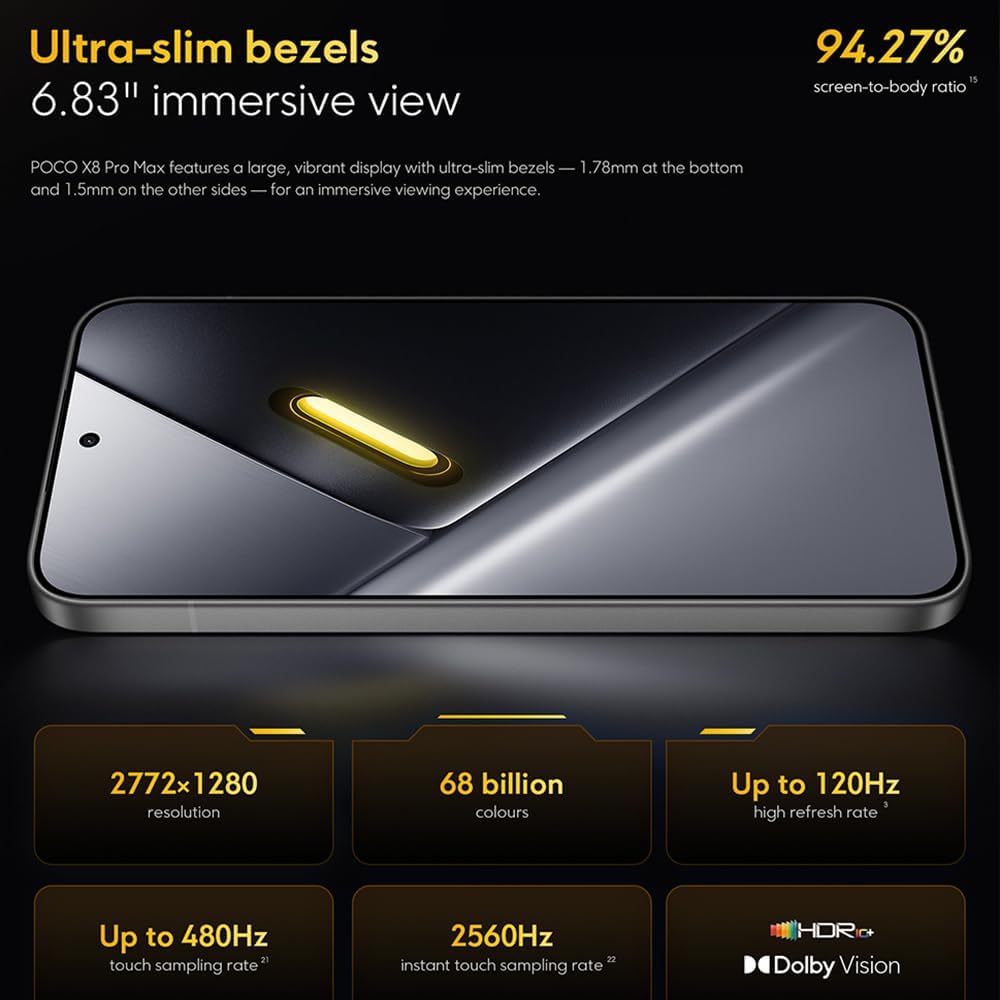
Image: The 6.83-inch 1.5K ultra-bright AMOLED display with minimal bezels.
4.2 Výkon
Powered by the Mediatek Dimensity 9500s chipset (3nm, 4+4 All Big Core architecture, NPU890 AI processor), the POCO X8 Pro Max 5G delivers high performance. The POCO 3D IceLoop cooling system ensures efficient heat dissipation, maintaining optimal performance during intensive tasks like gaming.

Image: Diagram illustrating the Mediatek Dimensity 9500s flagship platform.

Image: Illustration of the 5800mm² ultra-large LHP area for cooling.
4.3 Kamerový systém
The device features a 50 MP Light Fusion 600 main camera with OIS (Optical Image Stabilization) and an 8 MP ultra-wide camera. It supports portrait mode with bokeh + HDR and dynamic video-to-still conversion.

Image: Close-up of the 50 MP main camera and 8 MP ultra-wide camera system.
4.4 Baterie a nabíjení
Equipped with a massive 8500 mAh (typical) battery, the POCO X8 Pro Max 5G offers extended usage. It supports 100W HyperCharge, allowing for rapid recharging. A 16% ultra-high carbon-silicon content contributes to its high energy density.

Image: Illustration highlighting the massive 8500mAh battery capacity.

Image: Visual representation of the 100W HyperCharge technology.
4.5 zvuk
The device features symmetrical dual stereo speakers (1115F) for a balanced and immersive audio experience.
Software 4.6
The POCO X8 Pro Max 5G comes with Xiaomi HyperOS 3 installed, offering an optimized and user-friendly interface based on Android 16.
5. Údržba
5.1 Čištění vašeho zařízení
- K otření obrazovky a zadního panelu použijte měkký hadřík, který nepouští vlákna.
- Vyhněte se používání agresivních chemikálií, abrazivních materiálů nebo aerosolových sprejů.
- Na odolné šmouhy lehce otřeteampOtřete hadřík vodou nebo čističem obrazovek určeným pro elektroniku.
5.2 Odolnost proti prachu a vodě
The device is certified for IP68 dust and water resistance. This means it can withstand immersion in up to 2 meters of water for 30 minutes under specific laboratory conditions. However, water and dust resistance may deteriorate over time with normal wear and tear. The warranty does not cover liquid damage. Avoid exposing the device to hot water, saltwater, or other liquids.

Image: Visual representation of the IP68 dust and water resistance.
5.3 Aktualizace softwaru
Pravidelně kontrolujte a instalujte aktualizace softwaru, abyste zajistili, že vaše zařízení má nejnovější funkce, bezpečnostní záplaty a vylepšení výkonu. Tuto možnost obvykle najdete v Nastavení > O telefonu > Aktualizace systému.
6. Řešení problémů
6.1 Běžné problémy a řešení
- Zařízení se nezapne: Ujistěte se, že je baterie nabitá. Připojte zařízení k nabíječce a před opětovným zapnutím počkejte několik minut.
- Obrazovka nereaguje: Zkuste restartovat zařízení tak, že podržíte tlačítko napájení po delší dobu (např. 10–15 sekund), dokud se zařízení nerestartuje.
- Pády aplikací: Vymažte mezipaměť problematické aplikace (Nastavení > Aplikace > [Název aplikace] > Úložiště > Vymazat mezipaměť) nebo aplikaci znovu nainstalujte. Ujistěte se, že máte aktuální software zařízení.
- Slabá výdrž baterie: Check background app usage, reduce screen brightness, disable unnecessary features like GPS or Bluetooth when not in use, and ensure your software is updated.
- Problémy s připojením k síti: Restart your device. Check if your SIM card is properly inserted. Toggle Airplane Mode on and off. Reset network settings (Nastavení > Systém > Možnosti resetování > Obnovit Wi-Fi, mobilní připojení a Bluetooth).
6.2 Obnovení továrního nastavení
If you encounter persistent issues, a factory reset may be necessary. Varování: Tímto smažete všechna data v zařízení. Před pokračováním si zálohujte důležitá data. Přejděte na Nastavení > Systém > Možnosti resetování > Vymazat všechna data (obnovení továrního nastavení) a postupujte podle pokynů na obrazovce.
7. Specifikace
| Funkce | Specifikace |
|---|---|
| Značka | XIAOMI |
| Název modelu | POCO X8 Pro Max 5G |
| Operační systém | Android 16 (with Xiaomi HyperOS 3) |
| Kapacita paměti | 512 GB |
| Velikost obrazovky | 6.83 palce |
| Typ zobrazení | AMOLED, 1.5K, 120Hz refresh rate |
| Buněčná technologie | 5G |
| Barva | Noir (černá) |
| Typ konektoru | USB typ C |
| Biometrické zabezpečení | Fingerprint Recognition (Ultrasonic) |
| Kapacita baterie | 8500 mAh (lithium-polymer) |
| Nabíjení | 100W hypernabíjení |
| Hlavní fotoaparát | 50 MP Light Fusion 600 with OIS |
| Ultraširokoúhlý fotoaparát | 8 MP |
| Procesor | Mediatek Dimensity 9500s |
| Odolnost proti prachu a vodě | IP68 |
| Rok modelu | 2025 |
| Země původu | Čína |
8. Záruka a podpora
For detailed warranty information and customer support, please refer to the warranty card included with your product or visit the official XIAOMI webUschovejte si doklad o koupi pro případ reklamace.
Online resources and FAQs may also be available on the XIAOMI support portal.