
SmallRig RF20C
SmallRig RF20C RGB Portable LED Photo Torch User Manual
Model: RF20C (5335)
Značka: SmallRig
1. Úvod
The SmallRig RF20C RGB Portable LED Photo Torch is a versatile and powerful lighting tool designed for photographers, videographers, and content creators. It features 5-color LED beads, adjustable beam angle, and supports creative lighting effects with included gobos. This manual provides essential information for the safe and effective use of your device.
2. Bezpečnostní informace
- Nevystavujte zařízení vodě ani nadměrné vlhkosti.
- Zabraňte přímému vystavení očí LED světlu.
- Nerozebírejte ani neupravujte zařízení. Opravy by měl provádět pouze autorizovaný personál.
- Uchovávejte mimo dosah dětí.
- Ensure proper ventilation during extended use, as the device may become warm.
- Používejte pouze určený nabíjecí kabel a napájecí adaptér.
3. Obsah balení
Ověřte, zda jsou v balení přítomny všechny položky:
- RF20C Portable Focusable LED Video Light x 1
- Gobos x 20
- Silicone Gobo Holder x 1
- Skladovací taška x 1
- Uživatelská příručka x 1 (Tento dokument)
- Nabíjecí kabel x 1
4. Nastavení
4.1 Počáteční nabíjení
Before first use, fully charge the RF20C. Connect the provided USB-C charging cable to the device's charging port and to a compatible USB power adapter (PD 36W recommended). The device can be used while charging.

Figure 4.1: Internal battery illustration and runtime information.

Figure 4.2: Portable design, mounting options, cooling fan, and charging capability.
4.2 Attaching Gobos
To use the creative pattern gobos, first remove the plano-convex lens from the front of the light. Then, attach the silicone gobo holder and insert the desired gobo. This ensures optimal projection effects.

Figure 4.3: Gobo projection examples and installation tip.
5. Návod k obsluze
5.1 Zapnutí/vypnutí a základní ovládací prvky
The RF20C features a single multi-function button for control. To prevent accidental activation during transport, the device requires a specific action to turn on.
- Zapnutí: Rotate the control button to turn on the device.
- Vypnout: Stiskněte a podržte ovládací tlačítko po dobu 3 sekund.
- Změnit barvu: Short press the control button to cycle through the available colors (Red, 5600K White, Purple, Orange, Cyan).
- Upravit jas: Rotate the control button to increase or decrease the light brightness.
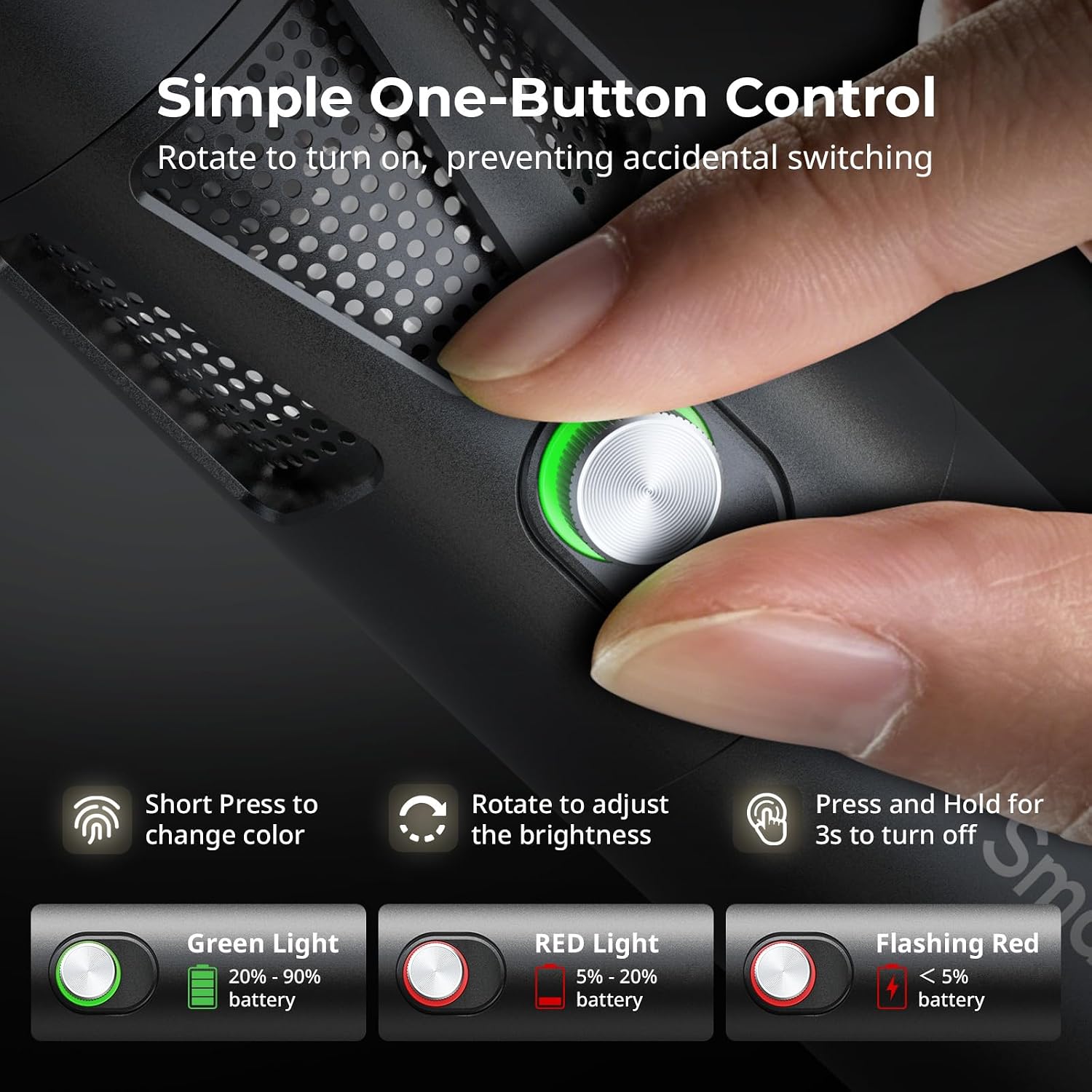
Figure 5.1: One-button control and battery indicator.

Figure 5.2: Available LED colors.
5.2 Nastavení úhlu paprsku
The front plano-convex lens allows for adjustment of the beam angle. Push or pull the lens to change the focus of the light from a narrow 24° beam to a wider 60° diffusion.
- Extend the lens: Narrows the beam (e.g., 24°).
- Retract the lens: Diffuses the beam (e.g., 60°).

Figure 5.3: Beam angle adjustment mechanism.
5.3 Indikátor baterie
The control button's LED indicates the battery status:
- Zelené světlo: Zbývá 20 % - 90 % baterie.
- Červené světlo: Zbývá 5 % - 20 % baterie.
- Blikající červené světlo: Zbývá méně než 5 % baterie.

Figure 5.4: Brightness comparison of RF20C.
6. Údržba
- Přístroj pravidelně čistěte měkkým, suchým hadříkem. Nepoužívejte agresivní chemikálie ani abrazivní materiály.
- Přístroj skladujte na chladném a suchém místě, mimo dosah přímého slunečního záření a extrémních teplot.
- When not in use for extended periods, charge the battery to approximately 50% every three months to prolong battery life.
- Keep the lens and LED surface free from dust and fingerprints for optimal light output.
7. Řešení problémů
| Problém | Možná příčina | Řešení |
|---|---|---|
| Zařízení se nezapne. | Slabá baterie; nesprávný postup zapnutí. | Charge the device. Ensure you rotate the control button to power on. |
| Světelný výkon je slabý. | Low battery; brightness set too low; dirty lens. | Charge the device. Rotate the control button to increase brightness. Clean the lens. |
| Gobo projection is blurry. | Plano-convex lens not removed; gobo not seated correctly. | Remove the plano-convex lens before attaching the silicone gobo holder. Ensure gobo is properly inserted. |
| Device becomes warm during use. | Normal operation, especially at high power; fan obstruction. | This is normal. Ensure the fan vents are not obstructed for proper heat dissipation. If excessively hot, reduce brightness or allow to cool. |
| Hluk ventilátoru je znatelný. | Normal operation for cooling. | The device uses a high-speed fan for efficient heat dissipation. This noise is part of normal operation. Consider distance from audio recording equipment. |
8. Specifikace
| Funkce | Detail |
|---|---|
| Model | RF20C (5335) |
| Moc | 20 W |
| Vstup | 20 V / 1.8 A (max. 36 W) |
| Barvy LED | Red, 5600K White, Purple, Orange, Cyan |
| Index podání barev (CRI) | ≥ 97 |
| Index konzistence televizního osvětlení (TLCI) | ≥ 99 (at 5600 K) |
| Jas | 5400 Lux @ 1m / 5600K |
| Kapacita baterie | 10000mAh (2 x 5000mAh / 7.4V / 37Wh) |
| Runtime (Full Power) | Až 1.5 hodin |
| Nabíjení | USB-C PD 36W Fast Charging, supports charging while operating |
| Nastavení úhlu paprsku | 24° až 60° |
| Materiál | Hliníková slitina, ABS |
| Rozměry produktu | φ49.0 x 200.0 mm / φ1.9 x 7.9 inches |
| Hmotnost produktu | 520.0 ± 20.0 g / 18.3 ± 0.7 oz |
| Technologie připojení | USB |
| Země původu | Čína |
9. Záruka a podpora
SmallRig products are designed and manufactured to the highest quality standards. This product is covered by a limited warranty from the date of purchase. For detailed warranty terms, technical support, or service inquiries, please refer to the official SmallRig webstránky nebo se obraťte na svého místního distributora.
Uschovejte si prosím doklad o koupi pro uplatnění záruky.
10. Scénáře použití
The SmallRig RF20C is suitable for various applications, including:
- Fotografování
- Nahrávání videa
- Živé vysílání
- Creative Accent Lighting
- Macro Work and Close-ups

Obrázek 10.1: Přamples of RF20C usage scenarios.
Ask a question about this manual
Ask about setup, troubleshooting, compatibility, parts, safety, or missing instructions. Manuals+ will review the question and use this page’s manual context to help answer it.