
Zavedení
This manual provides detailed instructions for the operation and maintenance of your RadioShack Portable CD Player Boombox. Please read this manual thoroughly before using the device to ensure proper function and to maximize your listening experience. This boombox combines classic CD playback with modern connectivity options including Bluetooth, FM radio, USB, and AUX input.
Co je v krabici

Figure 1: Box Contents. This image displays the items included with your purchase: the boombox unit, AC power cord, remote control, and telescopic antenna.
- 1x RadioShack Portable CD Player Boombox Unit
- 1x napájecí kabel
- 1x Dálkové ovládání
- 1x Telescopic Antenna (pre-attached)
- 1x Uživatelská příručka (tento dokument)
Note: 4 C batteries are required for portable operation and are not included.
Konec produktuview a funkce
The RadioShack Portable CD Player Boombox offers multiple audio playback options and user-friendly controls.

Obrázek 2: Klíčové vlastnosti. This diagram highlights the boombox's main functionalities including Bluetooth 5.0, various CD formats, USB MP3 playback, FM radio, AUX input, and playback modes.
- Přehrávání CD: Supports CD, CD-R, CD-RW, and CD-MP3 formats.
- Bluetooth připojení: Streamujte zvuk bezdrátově z kompatibilních zařízení.
- FM rádio: Built-in tuner with telescopic antenna and 18 preset stations.
- USB přehrávání: Přehrát MP3 filepřímo z USB disku.
- Vstup AUX: Připojte externí audio zařízení pomocí 3.5mm kabelu.
- Režimy přehrávání: Includes random, repeat, and program play functions.
- Dálkové ovládání: Pro pohodlné ovládání na dálku.
Nastavení
1. Napájení zařízení

Figure 3: Power Options. The boombox can be powered by the included AC cord or by 4 C batteries for portable use.
Your boombox can be powered in two ways:
- Napájení střídavým proudem: Connect the included AC power cord to the AC input jack on the back of the boombox and then plug it into a standard wall outlet (110V-240V).
- Napájení baterie: For portable use, open the battery compartment on the bottom of the unit and insert 4 "C" size batteries (not included), ensuring correct polarity (+/-). Close the compartment securely.
2. Nastavení antény (FM rádio)
For optimal FM radio reception, fully extend the telescopic antenna located on the back of the unit. Adjust its position for the best signal.
Návod k obsluze
Obecné ovládací prvky
- Tlačítko napájení (⏻): Stiskněte pro zapnutí nebo vypnutí jednotky.
- Knoflík hlasitosti: Otáčením ve směru hodinových ručiček hlasitost zvýšíte, proti směru hodinových ručiček ji snížíte.
- Funkční tlačítko (FUNC): Press to cycle through playback modes: CD, Bluetooth, FM, USB, AUX.
- Přehrát/Pozastavit (⏸/⏸) Knoflík: Spustí nebo pozastaví přehrávání.
- Stop (⏹) Knoflík: Zastaví přehrávání.
- Skip/Search (⏮ / ⏭) Tlačítka: Press briefly to skip tracks. Press and hold to search within a track.
Přehrávání CD
- Otevřete víko přihrádky na CD.
- Place a CD (CD, CD-R, CD-RW, or CD-MP3) onto the spindle with the label side facing up.
- Bezpečně zavřete víko přihrádky na CD.
- Stiskněte tlačítko ZAMĚSTNANEC button until "CD" mode is selected.
- CD se začne automaticky přehrávat. Pokud ne, stiskněte Přehrát/Pozastavit tlačítko.
Párování pomocí Bluetooth

Figure 4: Bluetooth Streaming. Easily stream audio from your smartphone or tablet to the boombox.
- Stiskněte tlačítko ZAMĚSTNANEC button until "BT" (Bluetooth) mode is selected. The display will show "BT" and flash, indicating it's in pairing mode.
- On your Bluetooth-enabled device (smartphone, tablet), go to its Bluetooth settings and search for available devices.
- Select "RadioShack Boombox" from the list.
- Once paired, the "BT" indicator on the boombox display will stop flashing and remain solid.
- You can now play audio from your device through the boombox.
Provoz FM rádia

Figure 5: FM Presets and Programmed Playback. Use the SCAN button to automatically save FM stations and REP/PROG for custom playback sequences.
- Stiskněte tlačítko ZAMĚSTNANEC button until "FM" mode is selected.
- Auto Scan and Save Presets: Stiskněte a podržte SKENOVAT button (often combined with Play/Pause). The radio will automatically scan for and save up to 18 available FM stations.
- Ruční ladění: Krátce stiskněte Přeskočit/Hledat tlačítka (⏮ / ⏭) to fine-tune the frequency.
- Výběr předvoleb: Krátce stiskněte PROG button (often combined with Repeat) to cycle through saved preset stations.
USB přehrávání
- Vložte USB flash disk obsahující MP3 filedo portu USB.
- Stiskněte tlačítko ZAMĚSTNANEC button until "USB" mode is selected.
- The boombox will automatically detect and begin playing MP3 files z USB disku.
- Použijte Přehrát/Pozastavit, Zastávkaa Přeskočit/Hledat tlačítka pro ovládání přehrávání.
Vstup AUX
- Připojte jeden konec 3.5mm audio kabelu (není součástí balení) do konektoru AUX IN na boomboxu.
- Druhý konec kabelu připojte do konektoru pro sluchátka nebo do audio výstupu externího audio zařízení (např. MP3 přehrávače, smartphonu).
- Stiskněte tlačítko ZAMĚSTNANEC tlačítko, dokud nezvolíte režim „AUX“.
- Ovládejte přehrávání a hlasitost z externího zvukového zařízení.
Použití dálkového ovládání
The included remote control allows for convenient operation of most functions from a distance. Ensure the remote has working batteries (typically 2x AAA, not included) and point it towards the front of the boombox.
- Moc: Zapněte/vypněte jednotku.
- FUNC: Select input mode (CD, BT, FM, USB, AUX).
- Hlasitost +/-: Upravte úroveň hlasitosti.
- Play/Pause, Stop, Skip/Search: Ovládání přehrávání.
- REP/PROG: Access repeat and program functions.
- SKENOVAT: Auto-scan FM stations.
- EQ/SLEEP: Adjust equalizer settings or set sleep timer (refer to specific remote markings for details).
Playback Modes (CD/USB)
- Opakování (OPAKOVÁNÍ): Stiskněte tlačítko REP button (on unit or remote) to cycle through repeat modes:
- Repeat One: Repeats the current track.
- Repeat All: Repeats all tracks on the CD/USB.
- Repeat Folder (for MP3 CDs/USB): Repeats all tracks in the current folder.
- Program (PROG): Allows you to program a specific order of tracks for CD or USB playback.
- In CD or USB mode, with playback stopped, press the PROG tlačítko.
- Použijte Přeskočit/Hledat buttons to select your desired track.
- Stiskněte PROG again to confirm and add the track to the program list.
- Repeat steps 2-3 to add more tracks.
- Stiskněte Přehrát/Pozastavit pro spuštění naprogramovaného přehrávání.
- Random/Shuffle: Some models may have a dedicated shuffle button (often labeled "RDM" or "SHUF") or it may be part of the REP/PROG cycle. This plays tracks in a random order.
Údržba
- Čištění: Use a soft, dry cloth to clean the exterior of the boombox. Do not use abrasive cleaners or solvents. For the CD lens, use a specialized CD lens cleaner disc.
- Skladování: When not in use for extended periods, remove batteries to prevent leakage. Store the unit in a cool, dry place away from direct sunlight and extreme temperatures.
- Výměna baterie: Replace all 4 "C" batteries simultaneously when they are depleted. Do not mix old and new batteries or different types of batteries.
- Péče o CD: CD držte za hrany. Udržujte je čisté a bez škrábanců. Pokud je nepoužíváte, uchovávejte je v obalech.
Odstraňování problémů
| Problém | Možná příčina | Řešení |
|---|---|---|
| Žádná síla | Napájecí kabel není připojen; Baterie jsou vybité nebo nesprávně vložené. | Ujistěte se, že je síťový kabel bezpečně zapojený. Vyměňte baterie za nové a zkontrolujte polaritu. |
| Žádný zvuk | Volume too low; Incorrect input mode; Headphones connected. | Increase volume. Press FUNC to select correct mode. Disconnect headphones. |
| CD přeskakuje nebo se nepřehrává | CD je znečištěné nebo poškrábané; CD je nesprávně vloženo; přihrádka na CD není zavřená. | Clean CD. Reinsert CD correctly. Close lid firmly. Try another CD. |
| Bluetooth není párování | Boombox not in BT mode; Device too far; Device already paired to another unit. | Ensure boombox is in BT mode and flashing. Move device closer. Disconnect from other devices. |
| Špatný příjem FM | Anténa není vysunutá nebo správně umístěná; Oblast se slabým signálem. | Zcela vysuňte a nastavte teleskopickou anténu. Zkuste jednotku přesunout na jiné místo. |
| USB se nepřehrává | USB disk nebyl správně vložen; Files not MP3 format; USB drive corrupted. | Znovu vložte USB disk. Ujistěte se, že fileJsou MP3. Zkuste jiný USB disk. |
Specifikace
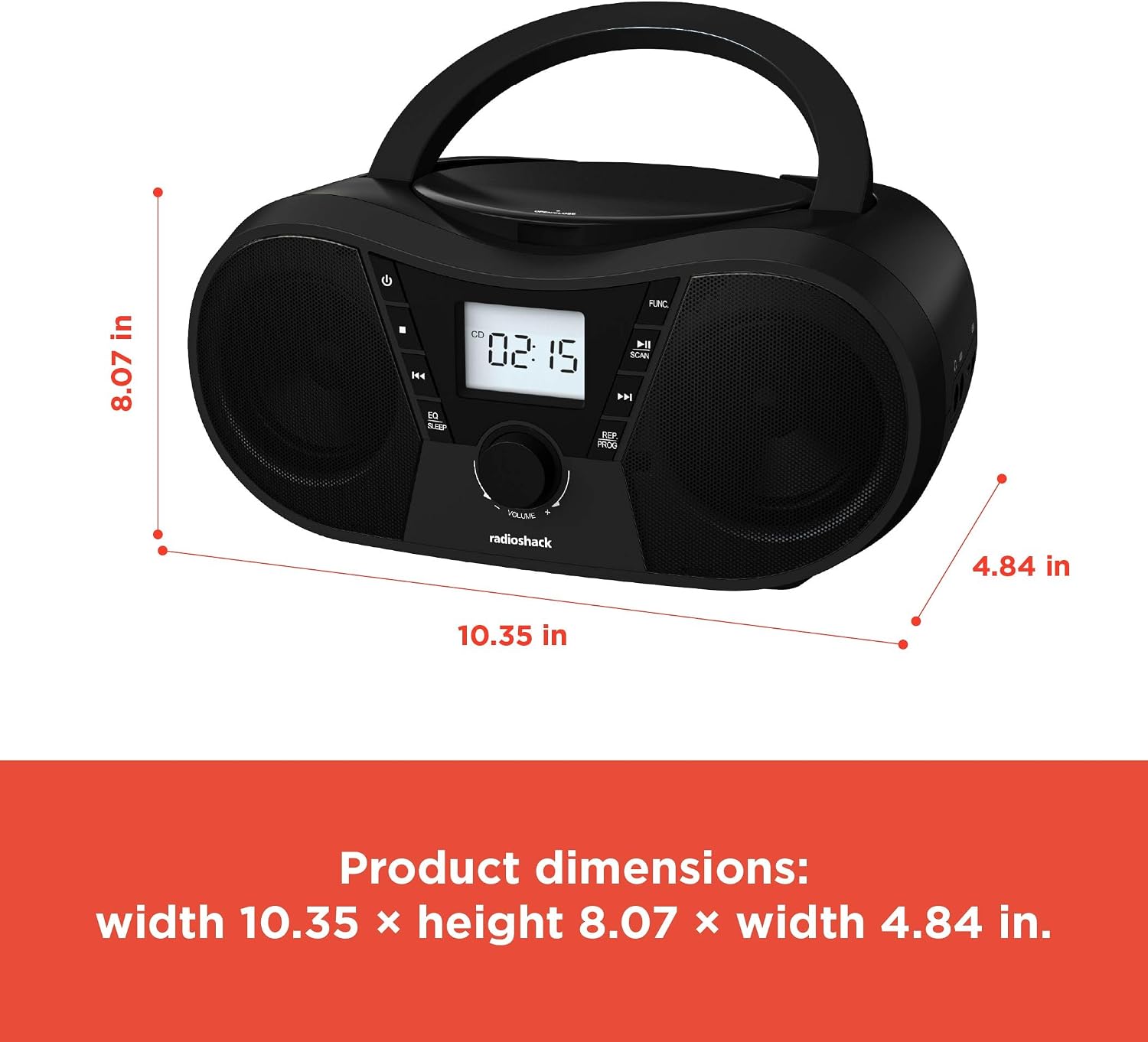
Obrázek 6: Rozměry produktu. The boombox measures approximately 10.35 inches wide, 8.07 inches high, and 4.84 inches deep.
| Funkce | Detail |
|---|---|
| Číslo modelu | 1402010 |
| Zdroj napájení | AC 110V-240V ~ 50/60Hz or 4 x "C" Batteries (DC 6V) |
| Podporovaná média | CD, CD-R, CD-RW, CD-MP3, USB (MP3), Bluetooth, FM Radio, AUX Input |
| Verze Bluetooth | 5.0 (kompatibilní) |
| Frekvenční rozsah FM | 87.5 - 108 MHz |
| Režim zvukového výstupu | Stereo |
| Počet reproduktorů | 2 (Built-in Stereo Speakers) |
| Wattage | 10 wattů |
| Frekvenční odezva | 20 Hz - 20000 XNUMX Hz |
| Rozměry (Š x V x H) | Přibližně 10.35 x 8.07 x 4.84 palce |
| Barva | Černý |
Záruka a podpora
This RadioShack Portable CD Player Boombox (Model 1402010) comes with a 1letá omezená záruka od data nákupu. Tato záruka se vztahuje na výrobní vady materiálu a zpracování při běžném používání.
For warranty claims, technical support, or customer service inquiries, please contact RadioShack customer support through their official webwebu nebo kontaktních informací uvedených v dokumentaci k nákupu.
Uschovejte si prosím doklad o koupi pro účely záruky.