
1. Úvod
This manual provides detailed instructions for the Waveshare ESP32-S3-CAM-OV5640 AI Development Board. It covers product features, setup procedures, operational guidelines, maintenance tips, troubleshooting, and technical specifications. This board is designed for intelligent terminal applications, integrating camera, display, and audio functionalities with AI capabilities.
2. Konec produktuview
2.1 Klíčové vlastnosti
- Equipped with Xtensa 32-bit LX7 dual-core processor, operating up to 240MHz.
- Integrated 2.4GHz Wi-Fi and Bluetooth LE dual-mode wireless communication.
- Built-in 512KB Static RAM and 384KB ROM, with onboard 8MB PSRAM and 16MB Flash.
- Onboard 24PIN standard DVP camera interface, compatible with OV3660, OV5640, GC0308, and GC2145 cameras.
- Onboard 18PIN display FPC interface, supporting external display connections.
- Supports multiple high-definition cameras for image capture and AI visual recognition.
- Integrates dual microphones, audio amplifier, and echo cancellation functionality.
- Allows access to online large model platforms for AI speech interaction.
- Adapting USB, I2C, and UART interfaces for versatile connectivity.
- Onboard Lithium Battery charging circuit, supporting 3.7V Lithium Battery for power supply.
- Reserved two buttons for custom functions.
2.2 Obsah balení
- ESP32-S3-CAM baseboard x1
- OV5640 camera x1
- 1217 8Ω 2W speaker x1
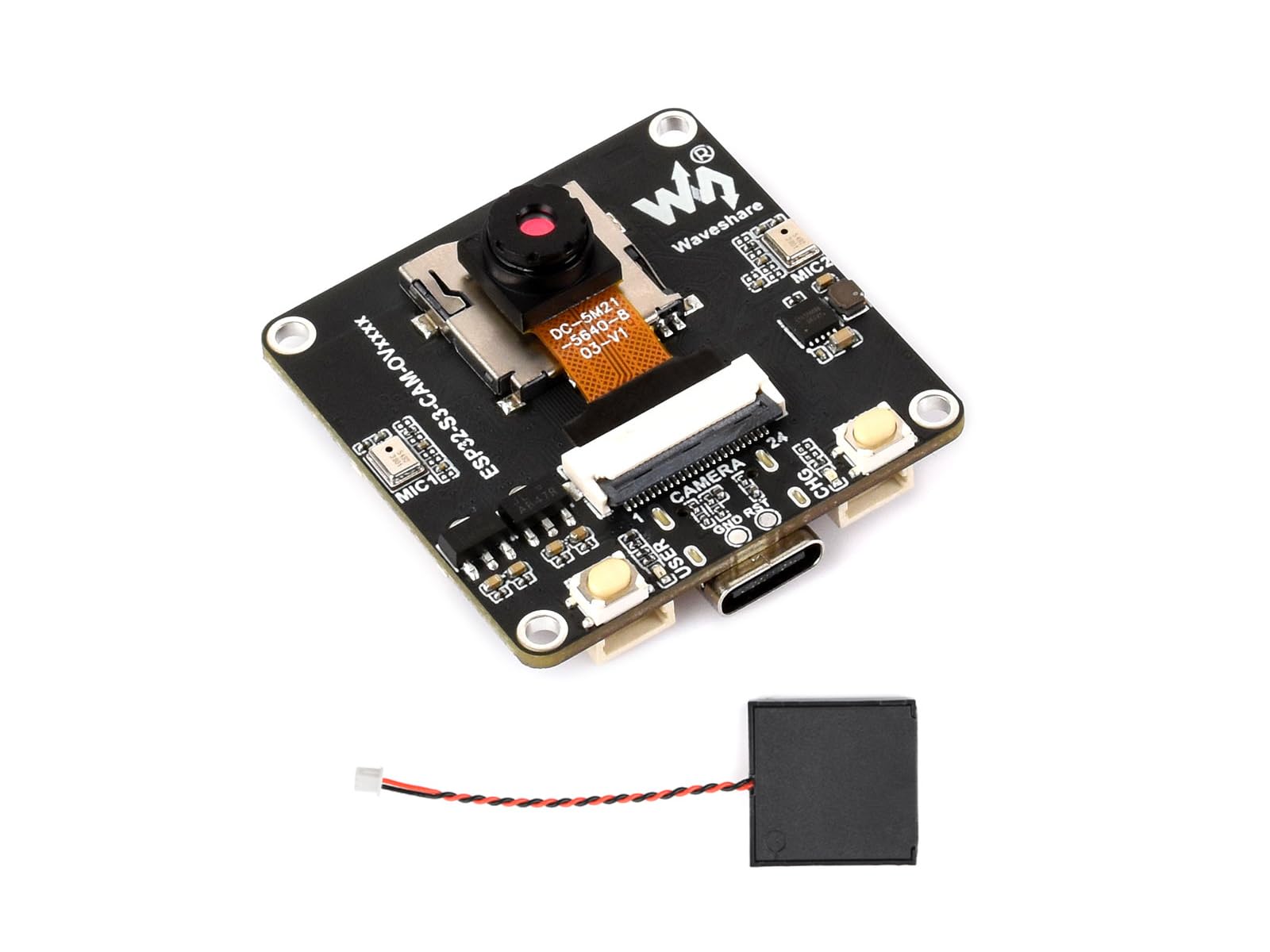
Figure 1: The Waveshare ESP32-S3-CAM-OV5640 AI Development Board, shown with the included OV5640 camera module and speaker. This image highlights the compact design and various interfaces available on the board.
3. Nastavení
Follow these steps to set up your ESP32-S3-CAM-OV5640 AI Development Board:
- Připojení modulu kamery: Carefully connect the OV5640 camera module to the 24PIN DVP camera interface on the development board. Ensure correct orientation and a secure connection.
- Připojte reproduktor: Attach the 1217 8Ω 2W speaker to the designated audio output pins on the board.
- Napájení:
- Napájení USB: Připojte desku k počítači pomocí kabelu USB-C. Tím zajistíte napájení a umožníte datovou komunikaci pro programování.
- Napájení baterie: For portable applications, connect a 3.7V Lithium Battery to the onboard charging circuit. Ensure correct polarity.
- Externí displej (volitelné): If using an external display, connect it to the 18PIN display FPC interface. Refer to the display's specific documentation for connection details.
- Softwarové prostředí: Install the necessary drivers and development environment (e.g., ESP-IDF, Arduino IDE with ESP32-S3 board support) on your computer. Refer to the Waveshare online development resources for detailed software setup guides.
4. Návod k obsluze
This section outlines basic operational procedures for the ESP32-S3-CAM-OV5640 board.
4.1 Programování a nahrání firmwaru
To upload firmware or programs to the ESP32-S3, connect the board via USB to your computer. Use your chosen development environment (e.g., Arduino IDE, PlatformIO, ESP-IDF) to compile and upload your code. Ensure the correct board and COM port are selected in your IDE settings.
4.2 Obsluha kamery
The OV5640 camera module can be initialized and controlled through software. Example code for image capture, video streaming, and AI visual recognition is typically provided in the development resources. The DVP interface allows for high-speed data transfer from the camera to the ESP32-S3 processor.
4.3 Zvukový vstup a výstup
The integrated dual microphones support audio input for speech recognition and AI interaction. The onboard audio amplifier drives the connected speaker for audio output. Libraries and examples for audio processing, noise reduction, echo cancellation, and speech synthesis are available in the development SDKs.
4.4 AI Speech Interaction
Leverage the board's capabilities to access online large model platforms for advanced AI speech interaction. This enables features such as voice commands, question answering, and natural language processing. Refer to specific platform integration guides for implementation details.
4.5 Edge Vision Detection
The board supports Edge Impulse object detection demos, allowing for real-time and multi-object detection directly on the device. This is ideal for applications requiring on-device AI processing without constant cloud connectivity.
5. Údržba
Proper maintenance ensures the longevity and reliable operation of your development board.
- Čištění: Use a soft, dry cloth to gently clean the board. Avoid using liquids or abrasive materials. For stubborn dust, use compressed air.
- Skladování: Store the board in a cool, dry environment, away from direct sunlight, extreme temperatures, and high humidity.
- Zacházení: Always handle the board by its edges to avoid touching components, especially the camera lens. Static electricity can damage electronic components; use anti-static precautions when handling.
- Aktualizace firmwaru: Pravidelně kontrolujte oficiální stránky Waveshare website or development resources for firmware updates to ensure optimal performance and access to new features.
6. Řešení problémů
Tato část se zabývá běžnými problémy, se kterými se můžete setkat.
| Problém | Možná příčina | Řešení |
|---|---|---|
| Deska se nezapíná. | Incorrect power connection, faulty USB cable, discharged battery. | Check USB cable connection and try another port/cable. Ensure battery is charged and connected with correct polarity. |
| Nelze nahrát firmware. | Incorrect COM port selected, missing drivers, board not in programming mode. | Install necessary USB drivers. Verify COM port in IDE. Ensure board is in bootloader mode (often by holding BOOT button while pressing and releasing RESET). |
| Camera not detected or no image. | Camera module incorrectly connected, faulty camera, software configuration error. | Check camera connection for proper seating and orientation. Verify camera initialization code in your program. Ensure the camera module is compatible. |
| No audio output from speaker. | Speaker incorrectly connected, audio amplifier not initialized, software volume too low. | Check speaker connection. Verify audio initialization and output code. Adjust software volume settings. |
7. Specifikace
| Funkce | Detail |
|---|---|
| Značka | Wavesshare |
| Název modelu | ESP32-S3 Cam OV5640 Dev Board |
| Procesor | Xtensa 32-bit LX7 dual-core, up to 240MHz |
| Paměť | 512KB SRAM, 384KB ROM, 8MB PSRAM, 16MB Flash |
| Bezdrátové připojení | 2.4GHz Wi-Fi, Bluetooth LE |
| Rozhraní fotoaparátu | 24PIN DVP (compatible with OV3660, OV5640, GC0308, GC2145) |
| Rozhraní displeje | 18PIN FPC (SPI/QSPI) |
| Zvuk | Dual microphones, audio amplifier, echo cancellation |
| Ostatní rozhraní | USB, I2C, UART |
| Napájení | USB-C, 3.7V Lithium Battery (onboard charging circuit) |
| UPC | 790885237072 |
| ASIN | B0GV43V5XP |
8. Záruka a podpora
Waveshare provides online development resources and technical support for the ESP32-S3-CAM-OV5640 AI Development Board. For detailed documentation, example code, and community forums, please visit the official Waveshare webmísto.
If you encounter any issues or require assistance, please contact Waveshare customer support through their official channels. Specific warranty terms and conditions may vary by region; refer to the Waveshare webstránky, kde najdete nejaktuálnější informace o záruce.
Online zdroje: www.waveshare.com