
1. Úvod
Thank you for choosing the Contixo F15 Astro Mini Drone. This compact and lightweight drone is designed for beginners and experienced pilots alike, featuring a 720P HD camera, live video display, optical flow hover, and easy-to-use controls. Please read this manual thoroughly before operating the drone to ensure safe and optimal performance.
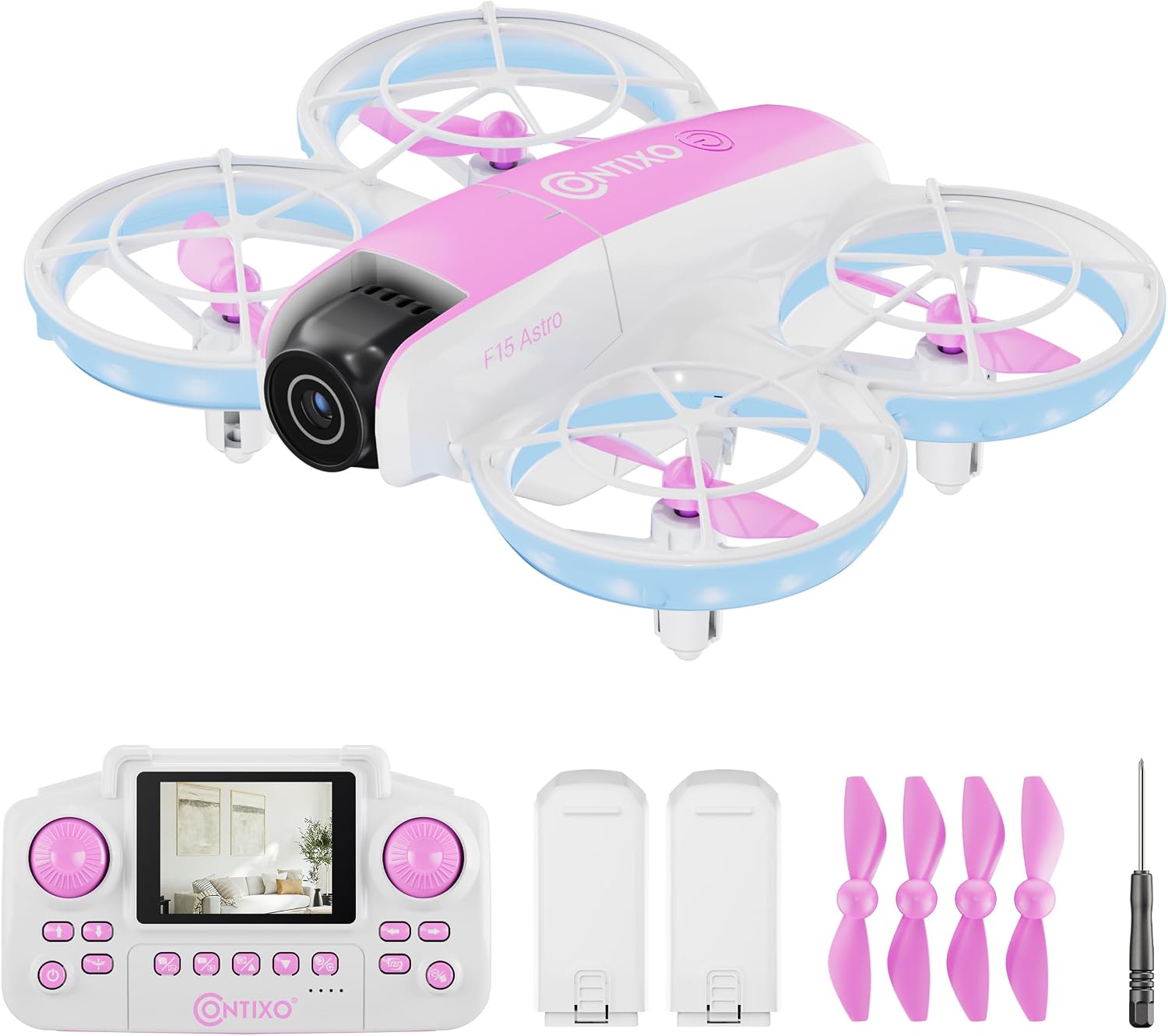
Image: The Contixo F15 Astro Mini Drone, showcasing its compact design and LED lighting.
2. Bezpečnostní pokyny
- Dron vždy provozujte v otevřených a volných prostorách, mimo dosah lidí, zvířat a překážek.
- Nelétejte v blízkosti letišť, omezeného vzdušného prostoru nebo elektrického vedení.
- Před každým letem se ujistěte, že jsou baterie dronu a baterie dálkového ovladače plně nabité.
- Dohlížejte na děti během provozu dronu.
- Vyhněte se létání za silného větru nebo nepříznivých povětrnostních podmínek.
- Nedotýkejte se vrtulí, když se otáčejí.
3. Obsah balení
Ověřte, zda jsou v balení přítomny všechny položky:
- 1x F15 Astro Mini Drone
- 1x Remote Controller with 2.4" Screen
- 2x baterie do dronu
- 4x náhradní vrtule
- 1x Šroubovák
- Kabel nabíjení 1x USB

Image: All components included in the Contixo F15 Astro Mini Drone package.
4. Komponenty dronuview
4.1 dron
- Kryty vrtule: Provide protection for propellers and enhance safety.
- Vrtule: Generate lift for flight.
- 720P HD kamera: Captures photos and videos, with adjustable tilt.
- LED světla: Indicate drone status and provide visibility.
- Přihrádka na baterie: Houses the drone's rechargeable battery.

Image: The Contixo F15 Astro Mini Drone highlighting its protected propeller design.
4.2 Dálkový ovladač
- 2.4" obrazovka: Displays live video feed from the drone's camera.
- Levý joystick: Ovládá nadmořskou výšku (nahoru/dolů) a rotaci (doleva/doprava).
- Pravý joystick: Ovládá pohyb vpřed/vzad a vlevo/vpravo.
- Tlačítko pro vzlet/přistání s jedním tlačítkem: Zahájí automatický vzlet nebo přistání.
- Tlačítko pro otočení o 360°: Activates aerial stunt mode.
- Photo/Video Buttons: Capture images or start/stop video recording.

Image: The Contixo F15 Astro remote control with its integrated 2.4-inch screen for live video display.
5. Nastavení
5.1 Nabíjení baterie dronu
- Vyjměte z dronu baterii.
- Connect the USB charging cable to the battery and a USB power source (e.g., computer, USB wall adapter).
- The indicator light on the charging cable will show charging status (refer to cable instructions for specific light patterns).
- Nabíjení obvykle trvá přibližně 60–90 minut.

Image: The Contixo F15 Astro Mini Drone and its two included rechargeable batteries.
5.2 Instalace baterie dronu
- Ujistěte se, že je dron vypnutý.
- Carefully insert the fully charged battery into the battery compartment on the drone's underside.
- Zajistěte kryt baterie.
5.3 Vložení baterií do dálkového ovladače
- Otevřete přihrádku na baterie na zadní straně dálkového ovladače.
- Vložte 3 baterie AAA (nejsou součástí balení) dle vyznačené polarity.
- Bezpečně uzavřete přihrádku na baterie.
5.4 Pairing Drone and Remote
- Umístěte dron na rovný a rovný povrch.
- Power on the drone. The drone's LED lights will flash.
- Zapněte dálkové ovládání.
- Push the left joystick up to its maximum position, then pull it down to its minimum position. The drone's LED lights will stop flashing and remain solid, indicating successful pairing.
5.5 Kalibrace gyroskopu
- After pairing, ensure the drone is still on a flat, level surface.
- Simultaneously push both joysticks down and to the bottom-right corner.
- The drone's LED lights will flash rapidly and then become solid, indicating successful calibration.
Video: A detailed guide on how to use the Contixo F15 Astro Drone, covering setup and basic operations.
6. Ovládání dronu
6.1 Vzlet a přistání s jedním klíčem
- Vzlet: After pairing and calibration, press the One-Key Takeoff/Landing button. The drone will automatically ascend and hover at a stable altitude.
- Přistání: During flight, press the One-Key Takeoff/Landing button again. The drone will slowly descend and land automatically.

Image: Visual representation of the one-touch takeoff and landing feature of the F15 Astro drone.
6.2 Základní ovládací prvky letu
- Levý joystick (plyn/stáčení):
- Tlačítko nahoru/dolů: Zvýšení/snížení nadmořské výšky.
- Push left/right: Rotate drone left/right.
- Right Joystick (Forward/Backward/Sideways):
- Push up/down: Fly forward/backward.
- Push left/right: Fly left/right (strafe).
6.3 Optical Flow Hover
The F15 Astro drone features Optical Flow Hover technology, which uses a downward-facing camera to detect patterns on the ground and maintain a stable position. This feature helps the drone hover steadily, making it easier to control, especially for beginners.
6.4 360° Stunts
Provedení otočení o 360°:
- Ujistěte se, že dron letí v dostatečné výšce (alespoň 2–3 metry).
- Press the 360° Flip button on the remote control.
- Immediately push the right joystick in the desired direction (forward, backward, left, or right) to execute the flip.

Image: The Contixo F15 Astro Mini Drone performing a 360-degree flip.
6.5 Camera Operation (720P HD)
The drone is equipped with a 720P HD camera that can capture photos and videos. The camera angle can be manually adjusted before flight.
- Živé video: The 2.4" screen on the remote control provides a real-time live video feed from the drone's camera.
- Fotit: Press the Photo button on the remote control to capture a still image.
- Nahrávání videa: Press the Video button once to start recording, and press it again to stop recording.

Image: The 720P HD camera of the F15 Astro drone, featuring an adjustable angle.
Video: A demonstration of the Contixo F15 Astro Drone's features and flight capabilities.
7. Údržba
7.1 Čištění
- K čištění dronu a dálkového ovladače používejte měkký, suchý hadřík.
- Do not use water or cleaning solvents, as they may damage the electronics.
7.2 Výměna vrtule
If a propeller is damaged, replace it with a spare propeller from the package. Use the included screwdriver to carefully remove the screw holding the damaged propeller and install the new one, ensuring it is securely fastened.
7.3 Péče o baterii
- Baterie skladujte na chladném a suchém místě.
- Baterie nepřebíjejte ani nevybíjejte.
- If the drone will not be used for an extended period, remove the batteries from both the drone and the remote control.
8. Řešení problémů
| Problém | Možná příčina | Řešení |
|---|---|---|
| Dron nereaguje na dálkové ovládání. | Není spárováno nebo je baterie vybitá. | Ensure drone and remote are powered on and paired correctly. Check battery levels. |
| Dron se během letu unáší. | Gyro not calibrated. | Kalibraci gyroskopu proveďte na rovném povrchu. |
| Špatná kvalita videa nebo žádný živý přenos. | Weak signal or camera issue. | Ensure drone is within range. Check for obstructions. Restart drone and remote. |
| Vrtule se netočí. | Překážka nebo poškození. | Check for hair or debris around propellers. Replace damaged propellers. |
9. Specifikace
- Značka: Contixo
- Název modelu: F15 Astro
- Fotoaparát: 720P HD, Adjustable Angle
- Remote Screen: 2.4 palců
- Kapacita baterie: 580 mAh (lithium-polymerová)
- Rozměry produktu: 10 cm D x 7 cm Š x 2 cm V
- Vlastnosti letu: Optical Flow Hover, One-Key Takeoff/Landing, 360° Stunts
10. Záruka a podpora
For warranty information, technical support, or any questions regarding your Contixo F15 Astro Mini Drone, please refer to the contact information provided on the product packaging or visit the official Contixo webmísto. Uschovejte si doklad o koupi pro případ záručních reklamací.
Video: Úvodní částview of the Contixo F15 Astro Drone, highlighting its key features.