
1. Úvod
The Senwa Vacuum V100 is an advanced robotic vacuum cleaner designed to provide efficient and effortless cleaning for your home. With powerful suction and intelligent navigation, it effectively cleans various surfaces, from hard floors to carpets, ensuring a spotless environment. Its compact design and user-friendly features make daily cleaning simple and convenient. The V100's effective filtration system captures dust and fine particles, contributing to improved air quality in your living space. This manual provides essential information for the safe and optimal use, maintenance, and troubleshooting of your Senwa Vacuum V100.
Klíčové vlastnosti:
- Powerful and Efficient Suction: Optimized motor ensures deep cleaning on floors, carpets, and difficult corners, removing dust and dirt in a single pass.
- Lightweight and Maneuverable Design: Easy to transport and use in any space, ideal for quick, effortless cleaning or frequent use.
- Multi-Surface Versatility: Works perfectly on different types of surfaces, adapting to the needs of homes or offices.
- Efektivní filtrační systém: Captures fine particles and helps maintain a cleaner environment, ideal for improving hygiene.
- Easy Maintenance and Durability: Accessible components for quick cleaning and long lifespan, designed for continuous and reliable use.
2. Bezpečnostní informace
Please read all safety instructions carefully before using your Senwa Vacuum V100. Keep this manual for future reference.
- Tento spotřebič mohou používat děti ve věku 8 let a starší a osoby se sníženými fyzickými, smyslovými nebo duševními schopnostmi nebo nedostatkem zkušeností a znalostí, pokud jsou pod dohledem nebo jsou poučeny o používání spotřebiče bezpečným způsobem a chápou související nebezpečí. .
- Děti by měly být pod dozorem, aby bylo zajištěno, že si se spotřebičem nebudou hrát.
- Čištění a uživatelskou údržbu nesmějí provádět děti bez dozoru.
- Do not use the vacuum cleaner in wet environments or on wet surfaces.
- Do not allow the vacuum cleaner to pick up large objects, liquids, burning or smoking objects (e.g., hot ashes, cigarettes).
- Use only the original charging adapter and charging dock provided by the manufacturer.
- Ujistěte se, že nabíjecí dok je umístěn u zdi na rovném povrchu bez překážek.
- Před čištěním odstraňte z podlahy všechny volné kabely, malé předměty nebo křehké předměty, abyste zabránili jejich zamotání nebo poškození.
- Do not operate the vacuum cleaner if it is damaged. Contact customer support for assistance.
- Turn off the vacuum cleaner and unplug it from the charging dock before performing any maintenance or cleaning.
3. Obsah balení
Carefully unpack your Senwa Vacuum V100 and check that all items are present and in good condition. If any items are missing or damaged, please contact customer support.
- Senwa Vacuum V100 Robot Vacuum Cleaner (Main Unit)
- Nabíjecí dok
- Napájecí adaptér
- Boční kartáče (2 páry)
- Hlavní kartáč (předinstalovaný)
- Popelnice (předinstalovaná)
- Vysoce účinný filtr (předinstalovaný)
- Nástroj na čištění
- Uživatelská příručka
4. Konec produktuview
Familiarize yourself with the components of your Senwa Vacuum V100.
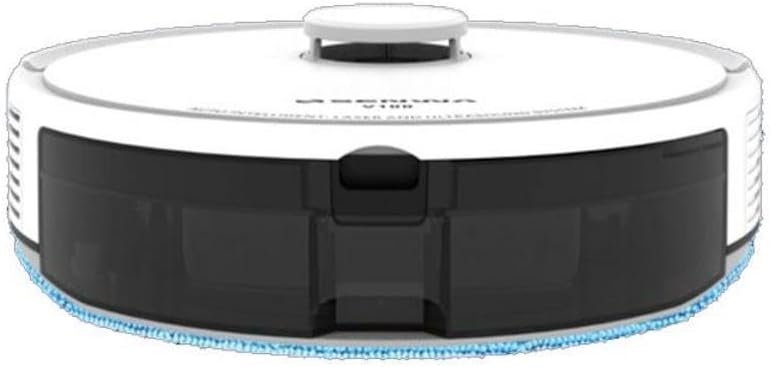
Figure 4.1: Top-Front View of Senwa Vacuum V100
This image shows the top and front of the robot vacuum, highlighting the main body, control button, and dustbin access panel.

Obrázek 4.2: Strana View of Senwa Vacuum V100
Tento obrázek zobrazuje boční profesionálafile of the robot vacuum, showing a driving wheel, a side brush, and a ventilation grille.

Obrázek 4.3: Strana View of Senwa Vacuum V100 with Dustbin Area
This image illustrates another side view, focusing on the area where the dustbin is typically accessed or removed.
Hlavní komponenty:
- Horní kryt: Chrání vnitřní komponenty.
- Ovládací tlačítko: Initiates or pauses cleaning, returns to charging dock.
- Popelnice: Sbírá nečistoty a úlomky.
- Boční kartáče: Smette nečistoty z okrajů a rohů do dráhy vysavače.
- Hlavní kartáč: Prohání a odstraňuje nečistoty z podlah.
- Hnací kola: Umožněte robotovi pohybovat se po různých površích.
- Kontakty pro nabíjení: Connect with the charging dock for power.
- Senzory: Detect obstacles, cliffs, and walls for navigation.
- Nabíjecí dok: Provides power to recharge the robot.
5. Nastavení
5.1 Vybalení a příprava
- Remove the robot vacuum and all accessories from the packaging.
- Odstraňte z robota a nabíjecí stanice veškeré ochranné fólie nebo nálepky.
- Attach the side brushes by pressing them onto the square posts on the bottom of the robot until they click into place.
5.2 Umístění nabíjecí stanice
- Umístěte nabíjecí stanici ke zdi na tvrdý a rovný povrch.
- Ujistěte se, že je po obou stranách doku alespoň 0.5 metru (1.6 stopy) volného prostoru a 1.5 metru (4.9 stopy) před ním.
- Connect the power adapter to the charging dock and plug it into a wall outlet. Ensure the power indicator on the dock lights up.
5.3 Počáteční nabíjení
- Place the robot vacuum onto the charging dock, ensuring the charging contacts on the robot align with those on the dock.
- The robot will begin charging. Allow it to fully charge before its first use (approximately 4-6 hours). The indicator light on the robot will change to indicate a full charge.
6. Návod k obsluze
6.1 Spuštění čisticího cyklu
- Ensure the robot is fully charged and clear any large obstacles from the cleaning area.
- Press the main control button on the top of the robot once to start an automatic cleaning cycle.
- The robot will automatically navigate and clean your floors.
6.2 Pozastavení/obnovení čištění
- To pause cleaning, press the main control button once during operation.
- To resume cleaning, press the main control button again.
6.3 Návrat k nabíjecí stanici
- To send the robot back to its charging dock, press and hold the main control button for a few seconds until the robot indicates it is returning.
- The robot will automatically return to the charging dock when its battery is low or when a cleaning cycle is complete.
6.4 Cleaning Modes (if applicable)
Your Senwa Vacuum V100 may feature different cleaning modes for various needs:
- Automatické čištění: Robot inteligentně plánuje čisticí trasu pro komplexní pokrytí.
- Bodové čištění: Soustředí čištění na konkrétní znečištěnou oblast.
- Čištění hran: Čistí podél stěn a hran nábytku.
Refer to the specific instructions for your model on how to activate these modes, typically via a mobile app or remote control (if included).
7. Údržba
Regular maintenance ensures optimal performance and extends the lifespan of your Senwa Vacuum V100.
7.1 Vyprázdnění odpadkového koše
Empty the dustbin after each cleaning cycle or when it is full.
- Stiskněte tlačítko pro uvolnění prachového koše a vytáhněte prachový koš.
- Otevřete víko popelnice a vysypte její obsah do odpadkového koše.
7.2 Čištění filtru
Clean the filter weekly or as needed. Replace every 3-6 months.
- Vyjměte filtr z nádoby na prach.
- Tap the filter gently to remove dust. Do not wash the high-efficiency filter with water.
- Rinse the primary filter (if applicable) with water and let it air dry completely before reinserting.
7.3 Čištění hlavního kartáče
Clean the main brush weekly.
- Sejměte kryt hlavního kartáče a vyjměte hlavní kartáč.
- Použijte čisticí nástroj k odstranění vlasů a nečistot zamotaných kolem kartáče.
- Nainstalujte zpět hlavní kartáč a kryt.
7.4 Čištění bočních kartáčů
Check side brushes regularly for wear and tear. Replace if damaged.
- Pull the side brushes off their posts.
- Odstraňte veškeré vlasy nebo nečistoty.
- Znovu nasaďte kartáče a ujistěte se, že zacvaknou na své místo.
7.5 Čištění senzorů a nabíjecích kontaktů
Wipe sensors and charging contacts monthly with a dry cloth.
- Gently wipe the cliff sensors (located on the bottom of the robot) and wall sensors (on the front bumper).
- Clean the charging contacts on both the robot and the charging dock.
8. Řešení problémů
If you encounter issues with your Senwa Vacuum V100, refer to the following common problems and solutions.
| Problém | Možná příčina | Řešení |
|---|---|---|
| Robot se nezapíná ani nenabíjí. | Battery is completely depleted; charging contacts are dirty; power adapter not connected. | Ensure the charging dock is powered. Clean charging contacts on both robot and dock. Place robot directly on dock. |
| Robot se často zasekává. | Too many obstacles; cliff sensors are dirty. | Clear loose cables, rugs, and small objects. Clean cliff sensors. |
| Slabý sací výkon. | Nádoba na prach je plná; filtr je ucpaný; hlavní kartáč je zamotaný. | Vyprázdněte nádobu na prach. Vyčistěte nebo vyměňte filtr. Vyčistěte hlavní kartáč. |
| Neobvyklý hluk během provozu. | Main brush or side brushes are tangled; foreign object inside. | Clean main brush and side brushes. Check for and remove any foreign objects. |
| Robot se nevrátí do nabíjecí stanice. | Charging dock is blocked or out of range; charging contacts are dirty. | Ensure charging dock has clear space. Clean charging contacts. Manually place robot on dock. |
If the problem persists after trying these solutions, please contact Senwa customer support.
9. Specifikace
| Funkce | Detail |
|---|---|
| Značka | Senwa |
| Model | V100 |
| Form Factor | Robotický |
| Barva | Bílý |
| ASIN | B0GTY5J56M |
| Zdroj napájení | Nabíjecí baterie |
| Doba nabíjení | Přibl. 4-6 hodiny |
| Filtrační systém | Vysoce účinný filtr |
| Režimy čištění | Auto, Spot, Edge (may vary by specific model features) |
10. Záruka a podpora
The Senwa Vacuum V100 comes with a standard manufacturer's warranty. Please refer to the warranty card included in your package for specific terms and conditions, including the warranty period and coverage details.
For technical support, service, or any questions regarding your product, please contact Senwa customer service through the contact information provided on your warranty card or the official Senwa website. When contacting support, please have your product model (V100) and ASIN (B0GTY5J56M) ready.


