
1. Úvod
Thank you for choosing the CHIVALZ A10a Thermal Printer. This compact and inkless portable printer is designed for convenient printing from your phone or laptop, supporting both 8.5'' x 11'' and A4 thermal paper. This manual provides essential information for the safe and efficient operation of your device. Please read it thoroughly before use and retain it for future reference.
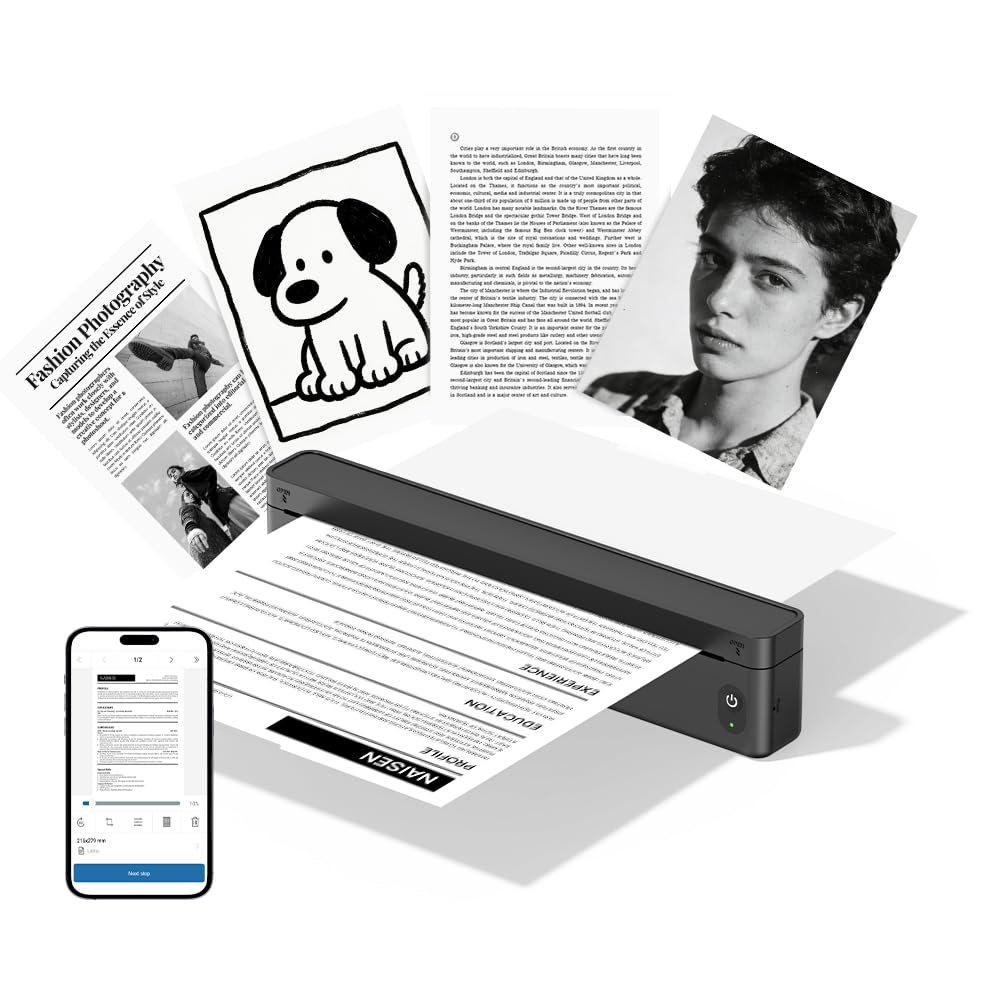
Obrázek 1.1: The CHIVALZ A10a Thermal Printer. This image displays the compact, black thermal printer, highlighting its portable design suitable for various environments.
2. Obsah balení
Please check the package contents upon unpacking. If any items are missing or damaged, contact customer support immediately.
- CHIVALZ A10a Thermal Printer
- USB nabíjecí kabel
- Startovací role termopapíru
- Uživatelská příručka (tento dokument)
3. Bezpečnostní informace
To ensure safe operation and prevent damage to the printer, please observe the following safety precautions:
- Nevystavujte tiskárnu vodě, vlhkosti ani extrémním teplotám.
- Zabraňte pádu tiskárny na zem ani jejímu vystavení silným nárazům.
- Používejte pouze dodaný nebo doporučený nabíjecí kabel.
- Nepokoušejte se tiskárnu rozebírat ani opravovat sami. Kontaktujte kvalifikovaný servisní personál.
- Udržujte tiskárnu mimo dosah dětí.
- Use only approved thermal paper to prevent damage to the print head.
4. Průvodce nastavením
4.1. Nabíjení tiskárny
- Připojte nabíjecí kabel USB k nabíjecímu portu tiskárny.
- Zapojte druhý konec kabelu USB do kompatibilního napájecího adaptéru USB (není součástí balení) nebo do portu USB počítače.
- The indicator light will show charging status (e.g., red for charging, green for fully charged). Allow approximately 2-3 hours for a full charge.
4.2. Vkládání termopapíru
- Opatrně otevřete kryt přihrádky na papír.
- Insert the thermal paper roll with the printing side facing up. Ensure the paper is aligned correctly and smoothly.
- Pull a small amount of paper out beyond the cutting edge.
- Pevně zavřete kryt přihrádky na papír, dokud nezacvakne na místo.
4.3. Installing the Printing Application
For optimal performance and features, download the dedicated printing application for your CHIVALZ A10a printer. Refer to the packaging or a quick start guide for the specific app name and download instructions (usually available on app stores for iOS/Android or a website for Windows/macOS).
4.4. Připojení přes Bluetooth
- Ensure the printer is charged and powered on. The Bluetooth indicator light should be blinking, indicating it's ready for pairing.
- On your phone or laptop, enable Bluetooth.
- Hledat available devices. The printer should appear as "CHIVALZ A10a" or a similar name.
- Vyberte tiskárnu, kterou chcete spárovat. Pokud se zobrazí výzva k zadání PIN kódu, zadejte „0000“ nebo „1234“.
- Once paired, the Bluetooth indicator light on the printer will become solid.
5. Návod k obsluze
5.1. Zapnutí/vypnutí
- Zapnutí: Stiskněte a podržte tlačítko napájení přibližně 3 sekundy, dokud se nerozsvítí kontrolky.
- Vypnout: Press and hold the power button for approximately 3 seconds until the indicator lights turn off.
5.2. Printing from Your Device
- Ensure the printer is powered on and successfully connected via Bluetooth to your phone or laptop.
- Open the document, image, or content you wish to print in your dedicated printing application or standard print dialogue.
- Vyberte možnost tisku.
- Choose "CHIVALZ A10a" from the list of available printers.
- Adjust print settings (e.g., paper size, orientation) as needed within the application.
- Confirm and initiate the print job.
6. Údržba
6.1. Čištění tiskové hlavy
Regular cleaning of the print head ensures optimal print quality. Clean the print head if print quality deteriorates or after every few paper roll changes.
- Vypněte tiskárnu a odpojte ji od napájení.
- Otevřete kryt přihrádky na papír.
- Jemně otřete tiskovou hlavu (tmavý proužek uvnitř přihrádky) měkkým hadříkem, který nepouští vlákna, lehceampzakončené isopropylalkoholem.
- Před zavřením krytu a zapnutím tiskárny nechte tiskovou hlavu zcela vyschnout.
6.2. Manipulace s papírem a jeho skladování
- Use only high-quality thermal paper recommended for your printer.
- Termopapír skladujte na chladném a suchém místě mimo dosah přímého slunečního záření a tepla, aby se zachovala jeho potisknutelnost.
- Avoid touching the thermal paper's surface excessively, as oils from your skin can affect print quality.
7. Řešení problémů
If you encounter issues with your CHIVALZ A10a printer, refer to the following common problems and solutions:
| Problém | Možná příčina | Řešení |
|---|---|---|
| Tiskárna se nezapne. | Slabá baterie nebo žádná energie. | Tiskárnu plně nabijte. Ujistěte se, že je nabíjecí kabel bezpečně připojen. |
| Špatná kvalita tisku (bledé, prázdné řádky). | Dirty print head; incorrect paper loading; old/damaged thermal paper. | Clean the print head (see Section 6.1). Ensure thermal paper is loaded correctly with the printing side up. Try a new roll of thermal paper. |
| Nelze se připojit přes Bluetooth. | Printer not in pairing mode; Bluetooth off on device; interference. | Ensure printer is on and Bluetooth indicator is blinking. Turn Bluetooth off and on again on your device. Move closer to the printer. Forget and re-pair the device. |
| Zaseknutý papír. | Improper paper loading; foreign object. | Turn off the printer. Open the paper compartment and carefully remove any jammed paper or obstructions. Reload paper correctly. |
| Printer stops printing mid-job. | Out of paper; low battery; connection lost. | Check paper supply and reload if necessary. Charge the printer. Verify Bluetooth connection. |
8. Specifikace
Below are the technical specifications for the CHIVALZ A10a Thermal Printer:
| Funkce | Detail |
|---|---|
| Název modelu | A10a |
| Značka | CHIVALZ |
| Rozměry produktu (D x Š x V) | 27.5 H x 7.6 Š x 6.4 V centimetrů |
| Technologie připojení | Bluetooth |
| Technologie tisku | Tepelný |
| Barva | Černý |
| Tiskový výstup | Monochromatický |
| Max Print Speed (B&W Pages per Minute) | 203 |
| Maximální velikost média | A4, 8.5'' X 11'' |
| Zahrnuté komponenty | Tiskárna |
9. Záruka a podpora
9.1. Záruka na produkt
The CHIVALZ A10a Thermal Printer comes with a 1letá omezená záruka from the date of purchase. This warranty covers manufacturing defects and workmanship under normal use. It does not cover damage caused by misuse, accidents, unauthorized modifications, or failure to follow the instructions in this manual.
9.2. Zákaznická podpora
For technical assistance, warranty claims, or any questions regarding your CHIVALZ A10a printer, please contact our customer support team:
- E-mail: support@chivalz.net
- Please provide your model number (A10a) and a detailed description of your issue when contacting support.