
Zavedení
Thank you for choosing the CHIVALZ PM220 Portable Thermal Label Printer. This manual provides essential information for setting up, operating, maintaining, and troubleshooting your device. Please read it thoroughly before use to ensure optimal performance and longevity of your printer.
The CHIVALZ PM220 is a compact, wireless thermal label printer designed for various labeling needs, including clothing, addresses, barcodes, and household products. It connects seamlessly with smartphones via Bluetooth for convenient printing.
Obsah balení
Než budete pokračovat v instalaci, ověřte si prosím, zda jsou v balení přítomny všechny položky:
- CHIVALZ PM220 Thermal Label Printer
- USB nabíjecí kabel
- One roll of thermal labels
- Uživatelská příručka (tento dokument)
Nastavení
1. Nabíjení tiskárny
Before initial use, fully charge the printer. Connect the provided USB charging cable to the printer's charging port and a compatible USB power adapter (not included) or a computer's USB port. The charging indicator light will show the charging status.
2. Vkládání termálních štítků
- Otevřete kryt přihrádky na štítky.
- Insert the thermal label roll with the printing surface facing upwards. Ensure the labels are aligned correctly with the feed mechanism.
- Pull a small portion of the label roll out past the print head.
- Bezpečně zavřete kryt přihrádky na štítky.
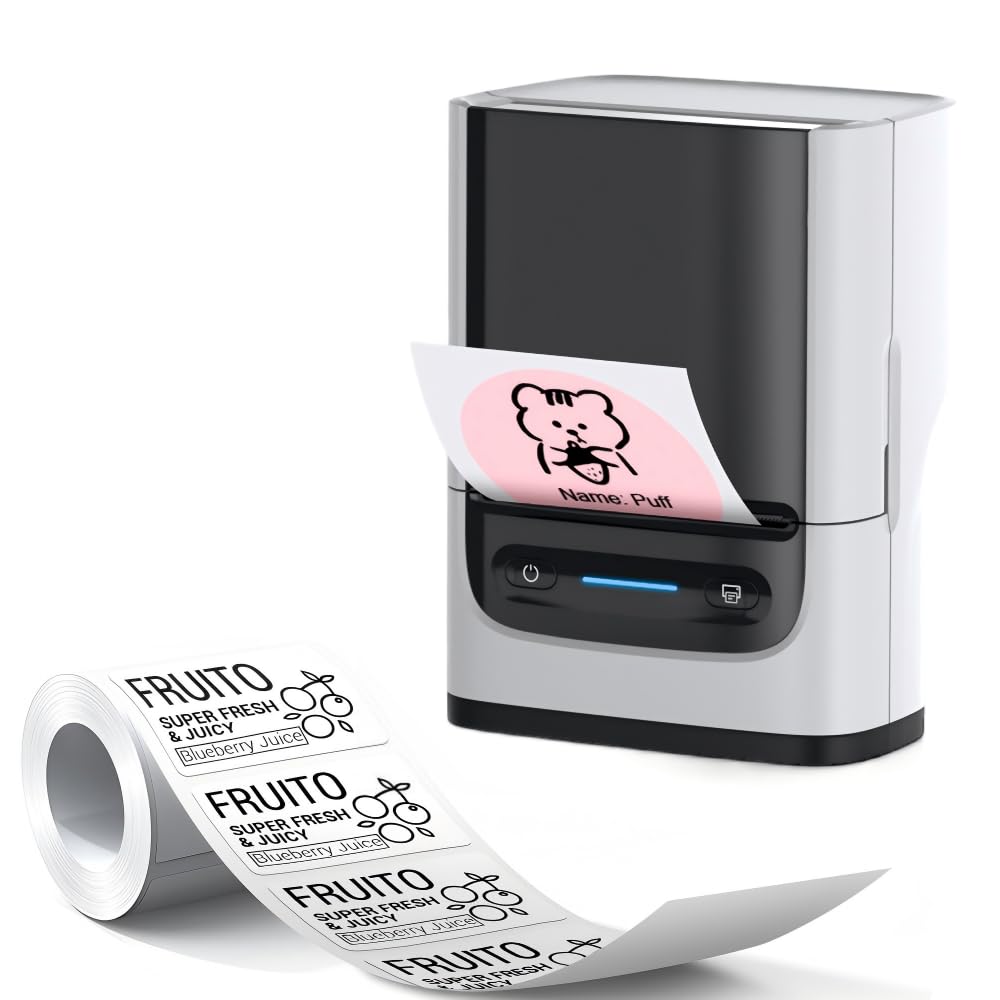
Image: The CHIVALZ PM220 printer with a thermal label roll correctly inserted into its compartment. The label roll is visible, extending slightly from the printer's output slot.
3. Installing the Mobile Application
Hledat the official CHIVALZ label printing application on your smartphone's app store (e.g., Apple App Store for iOS or Google Play Store for Android). Download and install the application.
4. Připojení přes Bluetooth
- Ensure your CHIVALZ PM220 printer is powered on.
- Povolte na svém smartphonu Bluetooth.
- Open the CHIVALZ label printing application.
- Within the app, navigate to the device connection settings. Select the CHIVALZ PM220 from the list of available Bluetooth devices. The printer's name typically includes "CHIVALZ" or "PM220".
- Follow any on-screen prompts to complete the pairing process. A successful connection will usually be indicated within the app.
Návod k obsluze
1. Zapnutí/vypnutí
- Zapnutí: Stiskněte a podržte tlačítko napájení přibližně 3 sekundy, dokud se nerozsvítí kontrolka.
- Vypnutí: Stiskněte a podržte tlačítko napájení přibližně 3 sekund, dokud kontrolka nezhasne.
2. Vytváření a tisk štítků
- Ensure the printer is connected to your smartphone via Bluetooth.
- Open the CHIVALZ label printing application.
- Select a label template or create a new label design. The app allows for text, images, barcodes, and QR codes.
- Customize your label content as needed.
- Předview štítek, abyste se ujistili, že vypadá podle očekávání.
- Tap the "Print" button within the application. Select the number of copies if applicable.
- The printer will feed and print the labels. Carefully tear off the printed labels along the perforation.
Údržba
1. Čištění tiskové hlavy
Regular cleaning of the print head ensures optimal print quality. Use a soft, lint-free cloth lightly dampened with isopropyl alcohol. Gently wipe the print head surface. Allow it to dry completely before using the printer.
- Frekvence: Clean the print head after every 5-10 rolls of labels or if print quality degrades.
- Pozor: Do not touch the print head with bare hands as oils can affect print quality.
2. Péče o baterie
Chcete -li prodloužit životnost baterie:
- Vyhněte se častému úplnému vybíjení baterie.
- Pokud tiskárnu delší dobu nepoužíváte, skladujte ji na chladném a suchém místě.
- Charge the printer at least once every three months if stored for a long time.
3. Ukládání štítků
Store thermal labels in a cool, dry place away from direct sunlight and heat sources. Exposure to heat or light can cause labels to fade prematurely.
Odstraňování problémů
| Problém | Možná příčina | Řešení |
|---|---|---|
| Tiskárna se nezapne. | Slabá baterie; Tlačítko napájení nebylo správně stisknuto. | Nabijte tiskárnu; Stiskněte a podržte tlačítko napájení po dobu 3 sekund. |
| Nelze se připojit přes Bluetooth. | Bluetooth off on phone/printer; Printer not discoverable; App issue. | Ensure Bluetooth is enabled on both devices; Restart printer and phone; Reinstall app. |
| Špatná kvalita tisku (bledé, prázdné řádky). | Print head dirty; Incorrect label orientation; Low battery. | Clean the print head; Re-insert labels correctly; Charge the printer. |
| Labels not feeding or jamming. | Labels incorrectly loaded; Label compartment not closed properly. | Open and re-load labels, ensuring proper alignment; Close cover firmly. |
| Printer stops responding. | Dočasná softwarová závada. | Perform a soft reset by powering off and on the printer. |
Specifikace
| Funkce | Detail |
|---|---|
| Značka | CHIVALZ |
| Název modelu | PM220 |
| Technologie připojení | Bluetooth |
| Technologie tisku | Tepelný |
| Barva | Bílý |
| Tiskový výstup | Monochromatický |
| Maximální rychlost černobílého tisku | 203 dpi (bodů na palec) |
| Rozměry produktu (D x Š x V) | 13 x 8 x 10 centimeters (approx. 5.1 x 3.1 x 3.9 inches) |
| Maximální velikost média | 4 x 6 palce |
| Zahrnuté komponenty | Role štítku |
| Výrobce | CHIVALZ |
| ASIN | B0GSGB976P |
Záruka a podpora
Informace o záruce
The CHIVALZ PM220 Thermal Label Printer comes with a standard manufacturer's warranty. Please refer to the warranty card included in your package or visit the official CHIVALZ webPodrobné podmínky týkající se záručního krytí a doby trvání naleznete na webových stránkách.
Zákaznická podpora
For technical assistance, troubleshooting not covered in this manual, or warranty claims, please contact CHIVALZ customer support. Contact details can typically be found on the official CHIVALZ webmístě nebo na obalu produktu.
When contacting support, please have your product model (PM220) and purchase information ready.


