
Zavedení
This manual provides detailed instructions for the safe and proper installation, operation, and maintenance of your PERLESMITH PSAT3B Tilting TV Wall Mount. Please read this manual thoroughly before beginning installation and retain it for future reference. This wall mount is designed for televisions ranging from 42 to 100 inches and supports a maximum weight of 160 lbs.
Bezpečnostní informace
VAROVÁNÍ: Nesprávná instalace může vést k vážnému zranění osob a poškození majetku. Pokud těmto pokynům nerozumíte nebo máte pochybnosti o bezpečnosti instalace, obraťte se na kvalifikovaného instalatéra.
- This product is intended for installation on wood studs (16"-24" spacing), solid concrete, or brick walls only. Do not install on drywall alone.
- Ensure the mounting surface can safely support the combined weight of the mount and your television.
- Nepřekračujte maximální nosnost 72.5 kg (160 liber).
- Verify your TV's VESA pattern (mounting hole spacing) is compatible with the mount (200x200mm to 600x600mm).
- Pro přesné nalezení dřevěných trámů vždy používejte detektor trámů.
- Během instalace používejte vhodné ochranné pomůcky, včetně ochrany očí.
- Během instalace držte děti a domácí zvířata mimo pracovní prostor.

The PERLESMITH PSAT3B Tilting TV Wall Mount provides a secure and flexible viewing solution for large televisions.
Obsah balení
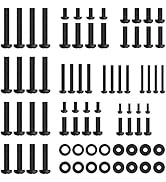
Please check to ensure all components are present and undamaged before installation. Refer to the included hardware bags for specific screw sizes and quantities.
- Sestava nástěnné desky
- TV držáky (2)
- Sada montážního hardwaru (různé šrouby, podložky, distanční podložky, hmoždinky)
- Úroveň
- Návod k použití
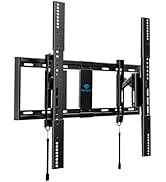
Nadview of the PERLESMITH PSAT3B wall mount components and included hardware.
Specifikace
| Funkce | Specifikace |
|---|---|
| Číslo modelu | PSAT3B |
| Typ montáže | Držák na zeď |
| Typ pohybu | Otočení, naklonění |
| Materiál | Legovaná ocel |
| Barva | Černý |
| Kompatibilní zařízení | Televize |
| Maximum Supported Screen Size | 100 palců |
| Minimum Supported Screen Size | 42 palců |
| Maximální nosnost | 160 lb (72.5 kg) |
| Kompatibilita VESA | 200x200mm až 600x600mm |
| Úhel náklonu | +5°/-15° |
| Úhel otočení | ±5° |
| Prodloužení od zdi | 3" (zasunutý) až 6.5" (vysunutý) |

This diagram illustrates the available VESA patterns and compatible wall types for the mount. Do not install on drywall alone.
Nastavení a instalace
Follow these steps carefully to ensure a secure installation. It is recommended to have two people for TV mounting.
Krok 1: Kontrola před instalací
- Ověřte typ zdi: Ensure your wall is suitable for mounting (16"-24" wood studs, concrete, or brick).
- Check TV Size: Confirm your TV is between 42-100 inches.
- Verify VESA Pattern: Measure the horizontal and vertical distance between the mounting holes on the back of your TV. This must be between 200x200mm and 600x600mm.
Always perform these checks before beginning the installation process.
Krok 2: Připevnění držáků k zadní straně televizoru
- Opatrně položte televizor displejem dolů na měkký, čistý povrch, abyste zabránili poškození obrazovky.
- Zarovnejte držáky televizoru s montážními otvory na zadní straně televizoru.
- Vyberte z dodané sady šrouby, podložky a distanční podložky, které pasují do otvorů VESA vašeho televizoru.
- Securely fasten the brackets to the TV using a screwdriver, ensuring they are centered and tight. Do not overtighten.
Krok 3: Nainstalujte nástěnnou desku
- Určete požadovanou výšku pro vaši televizi. Tužkou si na zdi označte střed požadovaného místa.
- Use a stud finder to locate the center of two adjacent wood studs (for wood stud installation) or mark drill points for concrete/brick.
- Hold the wall plate against the wall, aligning the center with your mark and ensuring it is level using the included bubble level. Mark the drill holes.
- Drill pilot holes at the marked locations. For wood studs, drill 7/32" (5.5mm) holes. For concrete/brick, drill 3/8" (10mm) holes and insert concrete anchors.
- Attach the wall plate to the wall using the lag bolts and washers. Tighten securely.
Krok 4: Zavěste televizi na nástěnnou desku
- S pomocí opatrně zvedněte televizor pomocí připojených konzolí.
- Zavěste držáky televizoru na horní okraj nástěnné desky.
- Opatrně spusťte televizor dolů, dokud se držáky zcela nezajistí do nástěnné desky.
- Engage the safety latches located at the bottom of the TV brackets to secure the TV to the wall plate. The magnetic pull tabs can be used to lock or release the TV.

Simplified three-step installation process for the PERLESMITH TV mount.

The mount extends 6.5 inches from the wall for easy cable access and retracts to 3 inches for a low-profile Podívejte.
Video demonstrating the ease of installation and functionality of the PERLESMITH Tilting TV Wall Mount.
Návod k obsluze
Nastavení sklonu
The PERLESMITH PSAT3B mount allows for a tilt range of +5° to -15°. To adjust the tilt, loosen the tilt knobs on the side of the TV brackets, adjust the TV to your desired angle, and then tighten the knobs securely. This helps reduce glare and optimize viewing úhly.
Otočné nastavení
The mount offers a ±5° swivel adjustment. This feature allows for minor horizontal adjustments to achieve a perfectly level screen after installation. Simply grasp the sides of the TV and gently rotate it to the desired position.
Nastavení vyrovnání
After installation, you can fine-tune your TV's alignment with a ±2° leveling adjustment. This ensures your TV is perfectly horizontal, even if the wall plate was not installed perfectly level.

The mount offers a ±5° swivel for optimal viewflexibilita.

Achieve a perfectly level TV with the ±2° leveling adjustment feature.

The secure latch system with magnetic pull tabs allows for quick and tool-free locking and unlocking of the TV.
Videoprezentaceasing the tilting functionality of the PERLESMITH TV Wall Mount.
Údržba
Pravidelná údržba zajistí dlouhou životnost a bezpečný provoz vašeho nástěnného držáku televizoru.
- Čištění: Otřete držák měkkým, suchým hadříkem. Nepoužívejte abrazivní čisticí prostředky ani rozpouštědla.
- Pravidelné kontroly: Pravidelně kontrolujte všechny šrouby a vruty, zda jsou pevně utažené. V případě potřeby je dotáhněte.
- Kontrola poškození: Pravidelně kontrolujte držák, zda nevykazuje známky opotřebení, poškození nebo koroze. Pokud zjistíte jakékoli problémy, přestaňte jej používat a kontaktujte zákaznickou podporu.
Odstraňování problémů
If you encounter issues during or after installation, refer to the following common solutions.
- TV není vodorovně: Use the ±2° leveling adjustment feature to fine-tune the TV's horizontal position. Ensure the wall plate was installed as level as possible.
- Obtížnost naklánění: Ensure the tilt knobs on the TV brackets are sufficiently loosened before attempting to adjust the tilt. Tighten them firmly after adjustment.
- TV Feels Loose: Double-check that all mounting bolts to the wall and screws to the TV are securely tightened. Ensure the safety latches are engaged.
- Mounting Holes Don't Align: Verify your TV's VESA pattern against the mount's specifications. If incompatible, the mount cannot be used.
- Chybějící části: If any parts are missing from the package, contact PERLESMITH customer support immediately.
Video review highlighting the features and installation process, which may assist with troubleshooting common issues.
Záruka a podpora
This PERLESMITH product comes with a 5-year warranty. For warranty claims or technical assistance, please contact PERLESMITH customer support. You can typically find contact information on the product packaging or the official PERLESMITH webmísto.
For additional support, you may visit the PERLESMITH store on Amazon: PERLESMITH Store