
1. Nastavení
1.1 Vybalení a obsah balení
Carefully remove the television and all components from the packaging. Ensure all items listed below are present.
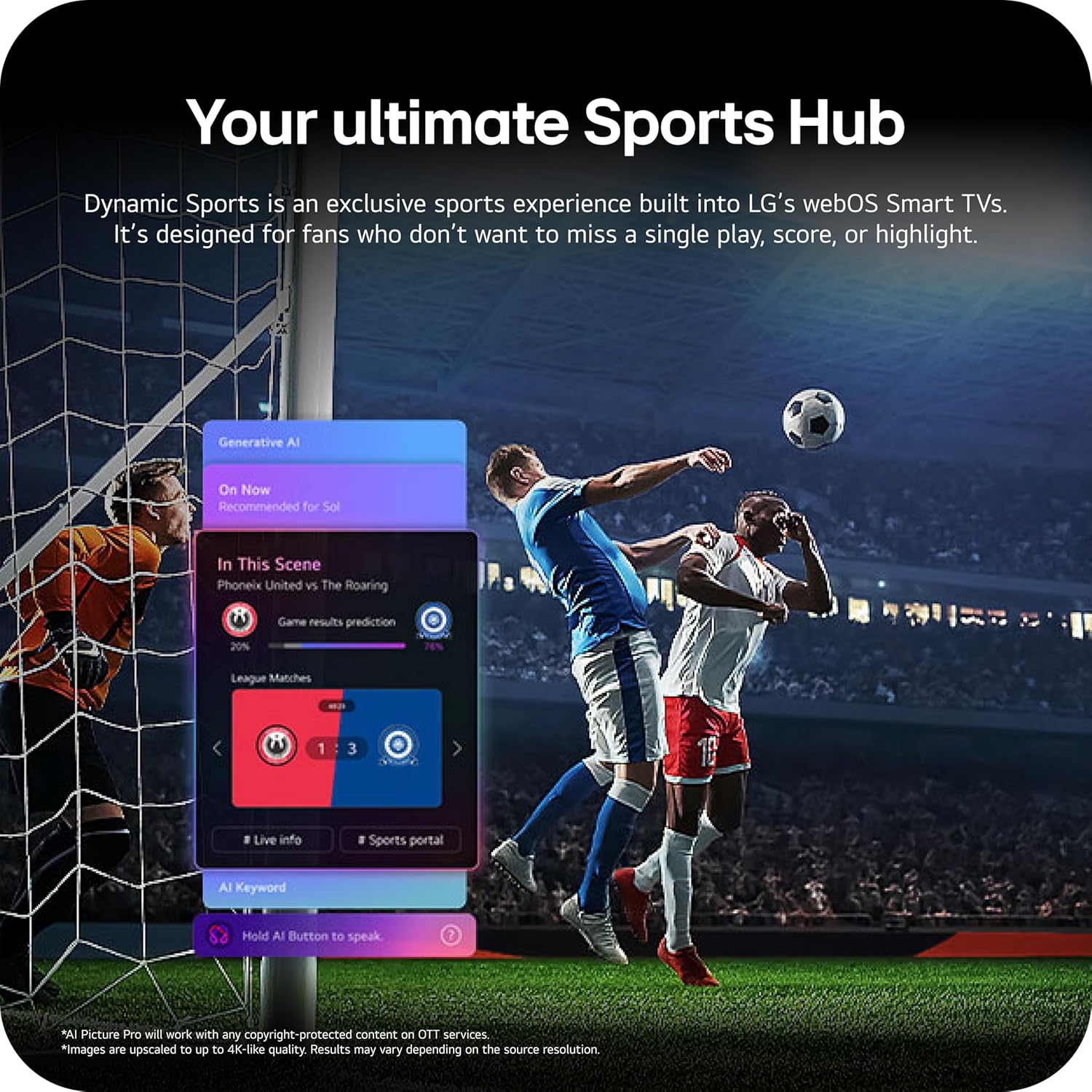
Image: The LG 65-inch OLED TV showing its dimensions with and without the stand, and a list of included accessories such as the Magic Remote, batteries, power cable, stand, and quick start guide.
Zahrnuté komponenty:
- Chytrý televizor LG 65-palcové třídy OLED evo AI 4K řady C6
- Magický dálkový ovladač
- Baterie do dálkového ovladače (2 AAA)
- Napájecí kabel
- Stánek
- Uživatelská příručka (tento dokument)
1.2 Fyzická instalace
The LG OLED65C6PUA can be installed using the included stand or mounted on a wall. Refer to the separate Installation Manual (PDF) for detailed wall mounting instructions.
Instalace stojanu:
- Umístěte televizor obrazovkou dolů na měkký, rovný povrch, abyste zabránili jeho poškození.
- Attach the stand to the designated area on the bottom of the TV using the provided screws. Ensure it is securely fastened.
- Opatrně zvedněte televizor a umístěte jej na stabilní, rovný povrch.
Rozměry:
- TV Dimensions with Stand (WxHxD): 56.7" x 34.6" x 9.1"
- TV Dimensions without Stand (WxHxD): 56.7" x 32.5" x 1.8"
- Stand Footprint: 18.5"
1.3 Konektivita
Connect your external devices to the appropriate ports on the rear and side of the television.

Image: The back panel of the LG OLED TV, displaying multiple HDMI ports, USB ports, Ethernet port, and antenna input for connecting various devices.
- HDMI porty (4): Connect Blu-ray players, gaming consoles, soundbars, and other HDMI-enabled devices.
- USB porty (2): Připojte paměťová zařízení USB pro přehrávání médií nebo aktualizace softwaru.
- Ethernet (LAN) port: Pro kabelové připojení k internetu.
- Anténní/kabelový vstup: Připojte anténu nebo kabelový televizní signál.
- Optical Digital Audio Out (S/PDIF): Pro připojení k externím audio systémům.
1.4 Počáteční zapnutí a nastavení sítě
- Zapojte napájecí kabel do televizoru a poté do zásuvky ve zdi.
- Stiskněte tlačítko napájení na dálkovém ovladači nebo na televizoru.
- Follow the on-screen instructions to complete the initial setup, including language selection, time zone, and network connection (Wi-Fi or Ethernet).
- An LG account may be required to access network-based smart services.
2. Návod k obsluze
2.1 Magic dálkový ovladač
The Magic Remote allows for intuitive control of your TV with point, click, scroll, and voice commands.

Image: The LG Magic Remote, featuring a central scroll wheel, directional buttons, and dedicated buttons for various functions and streaming services.
- Vypínač: Zapíná nebo vypíná televizor.
- Číselná tlačítka: Přímý přístup ke kanálu.
- Zvýšení/Snížení hlasitosti: Upravuje hlasitost.
- Kanál nahoru/dolů: Mění kanály.
- Tlačítko Domů: Přistupuje k webDomovská obrazovka operačního systému Smart TV.
- Pointer/Scroll Wheel: Prochází menu a vybírá položky.
- Tlačítko hlasového ovládání: Activates intelligent voice recognition.
2.2 webOS Smart TV Platform (AI Hub)
The webOS 2026 platform provides access to streaming services, apps, and AI-powered features.

Obrázek: Vizuální znázornění LG webOS Smart TV interface, highlighting AI features like Multi AI Search, AI Concierge, AI Voice ID, AI Picture Wizard, AI Chatbot, and AI Sound Wizard, all accessible via the remote's AI button.
- AI Hub: Press the AI button on your remote to access personalized recommendations and AI features.
- Streamovací služby: Access popular apps like Netflix, Disney+, Prime Video, Apple TV, and YouTube.
- Kanály LG: Enjoy over 400 free channels and 10,000+ movies & shows on-demand.
- Multi AI Search: Powered by Google Gemini & Microsoft Copilot for broader, more relevant search results.
2.3 Nastavení obrazu a zvuku
Optimalizujte své viewing and listening experience with advanced picture and sound technologies.

Image: A split screen on an LG OLED TV illustrating the difference between an anti-glare matte display and a Perfect Black & Perfect Color display, emphasizing the deep blacks and vibrant colors achieved by OLED technology.
- Zesilovač jasu: Enhances visuals for brighter, more vivid detail, powered by the α11 AI Processor Gen 3.
- Dokonalá černá a dokonalá barva: Over 8.3 million self-lit pixels deliver infinite contrast and accurate colors.
- Dolby Vision, HDR10, HLG: Podporuje více HDR formátů pro vylepšený kontrast a barvy.
- Režim filmaře: Preserves the director's original vision by disabling motion smoothing and other post-processing.
- Dolby Atmos: Poskytuje pohlcující, vícerozměrný zvuk.
- AI Picture & AI Sound: AI-assisted deep learning analyzes content to optimize picture and sound settings.
2.4 Herní funkce
Experience responsive and fluid gameplay with dedicated gaming enhancements.

Image: A dynamic image of a race car on a track, overlaid with logos for 165Hz refresh rate, NVIDIA G-Sync, and AMD FreeSync Premium, indicating the TV's advanced gaming capabilities.
- Obnovovací frekvence 165Hz: Provides ultra-smooth motion for gaming (up to 165Hz for PC gaming).
- Doba odezvy 0.1 ms: Minimizes input lag for quick reactions.
- NVIDIA G-Sync a AMD FreeSync Premium: Reduces screen tearing and stuttering for compatible graphics cards.
- Four HDMI 2.1 Inputs: Supports high bandwidth features required for next-gen gaming.
2.5 Dynamic Sports Hub
Access an exclusive sports experience built into LG's webOS Smart TVs.

Image: A soccer match displayed on an LG webOS Smart TV, with an overlay showing the 'Dynamic Sports Hub' interface, offering game results predictions, live info, and a sports portal.
The Dynamic Sports Hub is designed for fans to track scores, highlights, and relevant information without missing live action.
3. Údržba
3.1 Péče o OLED displeje
The OLED Care feature helps protect your OLED display and maintain picture quality over time.

Image: A simple graphic displaying the 'OLED Care' logo with the LG brand, indicating a feature designed for display maintenance.
Access OLED Care settings through the TV menu to manage features like Pixel Cleaning and Screen Shift, which help prevent image retention.
3.2 Čištění televizoru
- Před čištěním vždy odpojte televizor ze zásuvky.
- K jemnému otření obrazovky a skříně použijte měkký, suchý hadřík z mikrovlákna.
- Na odolné skvrny lehceampen the cloth with water or a specialized screen cleaner (ensure it is safe for OLED displays). Do not spray liquid directly onto the screen.
- Nepoužívejte abrazivní čisticí prostředky, vosky nebo rozpouštědla.
4. Řešení problémů
Tato část obsahuje řešení běžných problémů, se kterými se můžete setkat.
4.1 Žádné napájení / Televizor se nezapíná
- Ujistěte se, že je napájecí kabel bezpečně zapojený do televizoru i do funkční zásuvky.
- Check if the wall outlet is receiving power by plugging in another device.
- Zkuste stisknout tlačítko napájení na samotné televizi, ne jen na dálkovém ovladači.
4.2 Žádný obraz nebo zkreslený obraz
- Ověřte, zda je vybrán správný vstupní zdroj (např. HDMI 1, HDMI 2).
- Check all cable connections between the TV and external devices (HDMI, antenna, etc.). Ensure they are firmly seated.
- Pokud používáte anténu, zkontrolujte její připojení a umístění.
- Restartujte připojené zařízení (např. kabelový přijímač, herní konzoli).
4.3 Dálkové ovládání nefunguje
- Replace the batteries in the Magic Remote (requires 2 AAA batteries).
- Ujistěte se, že mezi dálkovým ovladačem a televizorem nejsou žádné překážky.
- Re-pair the Magic Remote if it has become disconnected. Point the remote at the TV and press the Wheel (OK) button.
4.4 Žádný zvuk nebo slabý zvuk
- Zkontrolujte hlasitost televizoru a ujistěte se, že není ztlumená.
- Pokud používáte externí audio zařízení (soundbar, receiver), ujistěte se, že jsou zapnutá a správně připojená.
- Check the audio output settings in the TV menu to ensure the correct output is selected (e.g., TV Speaker, Optical Out).
4.5 Problémy se síťovým připojením
- V případě Wi-Fi se ujistěte, že je router zapnutý a v dosahu. Zkuste router restartovat.
- For wired connection, ensure the Ethernet cable is securely connected to both the TV and the router.
- Check network settings in the TV menu to ensure correct configuration.
5. Specifikace
| Funkce | Specifikace |
|---|---|
| Název modelu | LGOLED65C6PUA |
| Číslo modelu | OLED65C6PUA |
| Velikost obrazovky | 65 palců |
| Technologie displeje | OLED |
| Rezoluce | 4K (3840 x 2160) |
| Obnovovací frekvence | 120 Hz (Native), up to 165Hz for PC gaming |
| Procesor | α11 AI Processor 4K Gen3 (Dual AI Engine) |
| Podporovaný formát HDR | Dolby Vision, HDR10, HLG |
| Doba odezvy | 0.1 milisekund |
| Operační systém | webOS 2026 |
| Technologie připojení | Bluetooth (v5.3), Ethernet, HDMI, USB, Wi-Fi |
| Celkový počet portů HDMI | 4 2.1 (HDMI XNUMX) |
| Celkový počet portů USB | 2 2.0 (USB XNUMX) |
| Zvukový výstup | Optický (S/PDIF) |
| Popis reproduktoru | Dolby Atmos (2.2 Channel) |
| Speciální funkce | AMD FreeSync, Built-In Speaker, Chromecast, Intelligent Voice Recognition, NVIDIA G-Sync |
| Napájení | 120 voltů |
| Hmotnost položky (bez stojanu) | 36.6 libry |
| Rozměry položky (se stojanem) | 9.1"H x 56.7"Š x 34.6"V |
| Standardní držák VESA | 300 x 200 mm |
6. Záruka a podpora
6.1 Záruka na produkt
This LG OLED TV (Model OLED65C6PUA) comes with a 1letá omezená záruka na díly a práci od data nákupu. Uschovejte si prosím doklad o koupi pro případné reklamace.
6.2 Další ochranné plány
Rozšířené plány ochrany lze zakoupit samostatně:
- Dvouletý ochranný plán: Poskytuje krytí na 48 měsíců.
- Kompletní ochrana: Měsíční předplatné pokrývající vybrané minulé i budoucí nákupy.
For details on coverage and terms, please refer to the respective plan documentation or contact the provider.
6.3 Zákaznická podpora
For technical assistance, troubleshooting beyond this manual, or warranty service, please contact LG Customer Support. You can find contact information on the official LG website or in the Quick Start Guide included with your TV.
Můžete se také obrátit na oficiální Uživatelská příručka (PDF) a Instalační manuál (PDF) pro podrobnější informace.