
Zavedení
This manual provides comprehensive instructions for the safe and efficient use of your Nothing Phone 4a. Please read this guide thoroughly before operating your device to ensure optimal performance and longevity. Keep this manual for future reference.
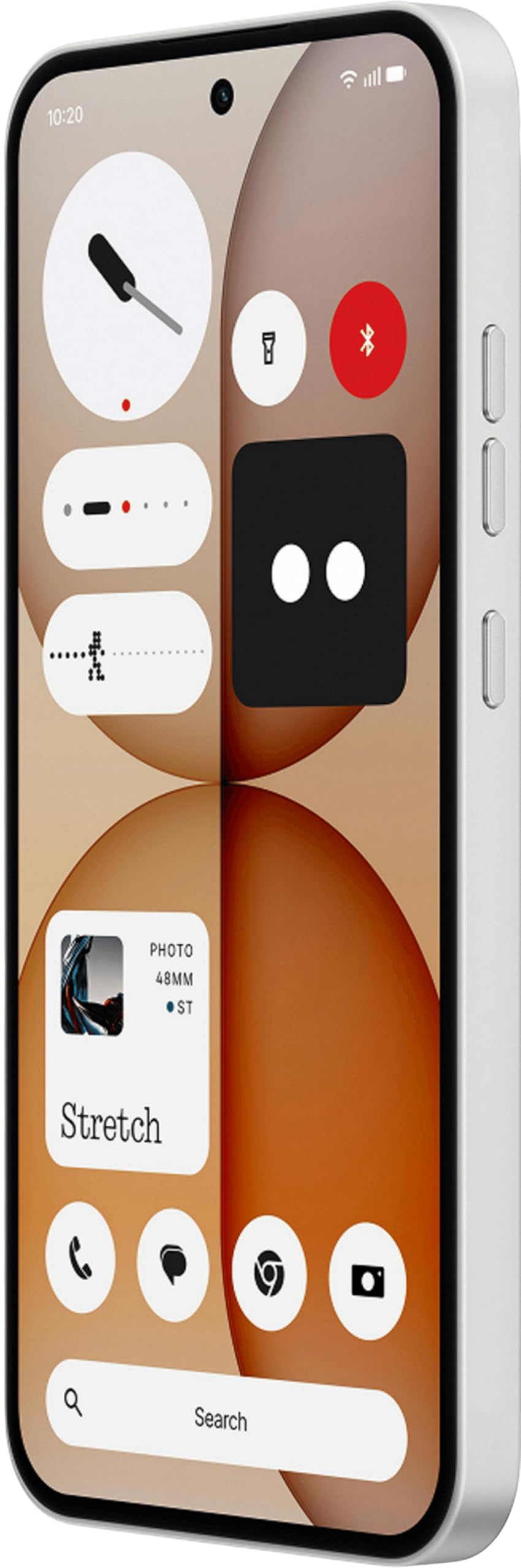
Image: The Nothing Phone 4a, a white smartphone featuring a sleek design with a visible transparent back panel, highlighting its unique aesthetic.
1. Nastavení
1.1 Rozbalení
Carefully remove all items from the packaging. The box contents typically include the Nothing Phone 4a device and a headset. Inspect all components for any signs of damage.
1.2 Instalace SIM karty
- Locate the SIM card tray on the side of your Nothing Phone 4a.
- Vložte nástroj pro vysunutí SIM karty (není součástí balení) do malého otvoru v zásobníku a otevřete jej.
- Place your Nano-SIM card into the tray with the gold contacts facing down. Ensure it fits securely. The Nothing Phone 4a supports a single SIM card.
- Jemně zatlačte zásobník zpět do telefonu, dokud nezacvakne na místo.
1.3 Počáteční zapnutí a nastavení
- Stiskněte a podržte tlačítko napájení, dokud se neobjeví logo Nothing (Nic).
- Follow the on-screen prompts to complete the initial setup. This includes selecting your language, connecting to a Wi-Fi network, and signing in with your Google account.
- Your Nothing Phone 4a runs on Android 14, providing a user-friendly interface and access to a wide range of applications.
1.4 Nabíjení zařízení
Before first use, it is recommended to fully charge your Nothing Phone 4a. Connect the USB Type-C cable to the phone's charging port and the other end to a compatible power adapter (not included). The device features a 5080 Milliamp Kapacita baterie v hodinách.
2. Operating Your Phone 4a
2.1 Základní navigace
- Dotyková gesta: Use taps, swipes, and pinches to interact with the screen.
- Domovská obrazovka: Access your apps and widgets. Swipe left or right to navigate between screens.
- Oznámení: Přejeďte prstem dolů z horní části obrazovky na view oznámení a rychlé nastavení.
2.2 Volání a odesílání zpráv
- Volání: Klepněte na ikonu Telefon, zadejte číslo a klepněte na tlačítko Volat.
- Zprávy: Klepněte na ikonu Zprávy, začněte novou konverzaci, zadejte číslo příjemce nebo vyberte z kontaktů a napište zprávu.
2.3 Připojení k sítím
- Wi-Fi: Přejděte do Nastavení > Síť a internet > Wi-Fi. Zapněte Wi-Fi a vyberte požadovanou síť.
- Mobilní data: Ensure your SIM card is installed correctly. Go to Settings > Network & internet > Mobile network and enable Mobile data. The Nothing Phone 4a supports 4G cellular technology.
2.4 Použití kamery
Open the Camera app from your home screen or app drawer. Tap the shutter button to take photos. Swipe to switch between different modes like video, portrait, and more. Adjust settings such as flash, timer, and aspect ratio as needed.
2.5 Správa aplikací
Download new applications from the Google Play Store. To uninstall an app, long-press its icon on the home screen or in the app drawer, then drag it to the "Uninstall" option.
2.6 Bezpečnostní funkce
Protect your device with various security options. Navigate to Settings > Security & privacy to set up screen locks (PIN, pattern, password), fingerprint unlock, or face recognition (if available on your model).
3. Údržba
3.1 Čištění zařízení
Use a soft, lint-free cloth to gently wipe the screen and body of your phone. Avoid using harsh chemicals or abrasive materials. The device is Water Resistant, but avoid submerging it in water.
3.2 Aktualizace softwaru
Pravidelně kontrolujte a instalujte aktualizace softwaru, abyste zajistili, že vaše zařízení má nejnovější funkce, bezpečnostní záplaty a vylepšení výkonu. Přejděte do Nastavení > Systém > Aktualizace systému.
3.3 Péče o baterii
To prolong battery life, avoid extreme temperatures. It is generally recommended to keep the battery charge between 20% and 80% for optimal long-term health. Avoid leaving the phone fully charged or fully discharged for extended periods.
3.4 Správa úložiště
Your Nothing Phone 4a comes with 128 GB of internal storage. Regularly review nainstalované aplikace, fotografie a videa. Smažte nepotřebné files or transfer them to cloud storage or a computer to free up space and maintain optimal performance.
4. Řešení problémů
4.1 Běžné problémy a řešení
- Zařízení nereaguje: Stiskněte a podržte tlačítko napájení po dobu přibližně 10–15 sekund pro vynucení restartu.
- Pády aplikací: Vymažte mezipaměť aplikace (Nastavení > Aplikace > [Název aplikace] > Úložiště a mezipaměť > Vymazat mezipaměť) nebo aplikaci znovu nainstalujte.
- Problémy s připojením k síti: Toggle Airplane Mode on and off. Restart your phone. Check your SIM card installation.
- Rychlé vybíjení baterie: Reduce screen brightness, close unused apps, and check battery usage in Settings to identify power-hungry apps.
4.2 Obnovení továrního nastavení
Pokud se potýkáte s přetrvávajícími problémy, může je vyřešit obnovení továrního nastavení. Varování: Tímto smažete všechna data v telefonu. Před pokračováním si zálohujte důležitá data. Přejděte do Nastavení > Systém > Možnosti resetování > Smazat všechna data (obnovení továrního nastavení).
5. Specifikace
| Funkce | Detail |
|---|---|
| Značka | Nic |
| Model | Phone 4a |
| Operační systém | Android 14 |
| Paměť RAM | 8 GB |
| Kapacita úložiště | 128 GB |
| Model CPU | Mobile CPU |
| Rychlost CPU | 2 GHz |
| Kapacita baterie | 5080 miliamp Hours (Lithium-Ion) |
| Typ zobrazení | AMOLED |
| Buněčná technologie | 4G |
| Typ konektoru | USB typ C |
| Typ SIM karty | Nano-SIM (jedna SIM karta) |
| Voděodolnost | Vodě odolný |
| Barva | Bílý |
| Rozměry | 16.2 x 7.6 x 0.9 centimetrů |
| Hmotnost | 230 gramů |
| Modelový rok | 2025 |
6. Záruka a podpora
6.1 Informace o záruce
Your Nothing Phone 4a comes with a 1-year manufacturer's warranty from the date of purchase. This warranty covers manufacturing defects. Please retain your proof of purchase for warranty claims. For detailed terms and conditions, refer to the warranty card included with your product or visit the official Nothing webmísto.
6.2 Zákaznická podpora
For technical assistance, troubleshooting, or service inquiries, please contact Nothing customer support. You can usually find contact information (phone numbers, email, or support portals) on the official Nothing webwebu nebo v nastavení zařízení v části „O telefonu“ nebo „Podpora“.