
1. Konec produktuview
The Edifier CC300 is a professional Bluetooth 6.0 communicator headset designed for reliable and high-quality audio communication in various professional environments. It features AI-enhanced dual-microphone noise filtering, a 30mm dynamic driver for clear sound, and multiple connectivity options for versatile use.
2. Obsah balení
- Edifier CC300 Headset
- USB-C dongle
- Nabíjecí kabel USB-A na USB-C
- Uživatelská příručka
3. Vlastnosti produktu
The Edifier CC300 headset is engineered for comfort and performance, featuring a lightweight design and a flexible microphone arm.

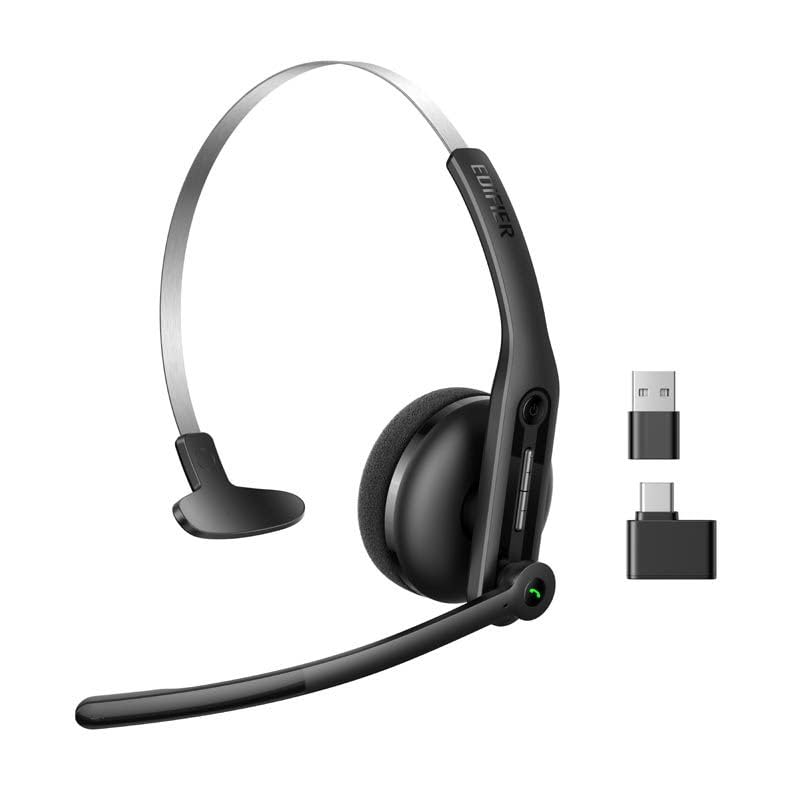
Obrázek 3.1: Edifier CC300 Headset with included USB-C dongle and charging cable.

Obrázek 3.2: Strana view of the Edifier CC300 Headset with the microphone arm extended.

Obrázek 3.3: The microphone arm can rotate 240 degrees for flexible positioning on either the left or right side.
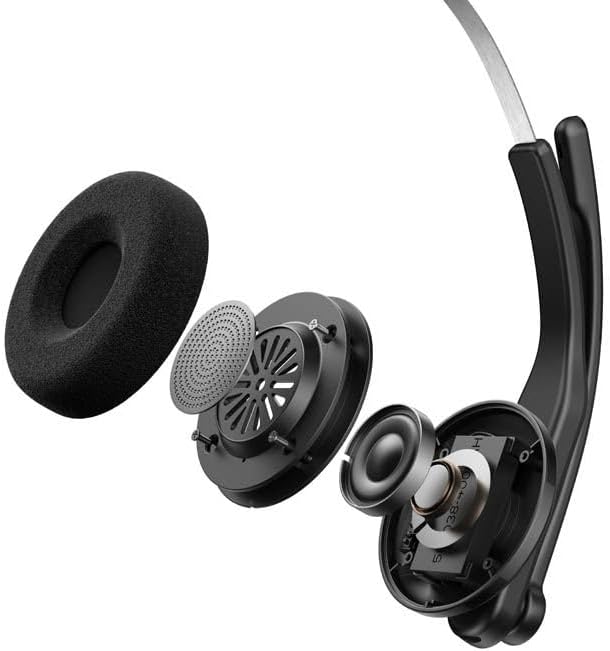
Obrázek 3.4: Explodoval view showing the internal components of the earcup, including the 30mm dynamic driver.
4. Nastavení
4.1 Počáteční nabíjení
Before first use, fully charge the headset using the provided USB-A to USB-C cable. Connect the USB-C end to the headset and the USB-A end to a power source (e.g., computer USB port or wall adapter). The charging indicator light will show the charging status.
4.2 Zapnutí/vypnutí
- Zapnutí: Stiskněte a podržte tlačítko napájení, dokud se nerozsvítí kontrolka.
- Vypnutí: Stiskněte a podržte tlačítko napájení, dokud kontrolka nezhasne.
4.3 Nošení headsetu
Adjust the headband for a comfortable fit. The microphone arm can be rotated 240 degrees to be positioned on either the left or right side of your face. Position the microphone approximately 2-3 cm from your mouth for optimal voice pickup.
5. Návod k obsluze
The Edifier CC300 features intuitive controls for managing calls and audio playback.

Obrázek 5.1: Diagram illustrating the control buttons and their functions on the Edifier CC300 Headset.
5.1 Funkce tlačítek
| Akce | Funkce |
|---|---|
| Press and hold (Power Button) | Zapnutí/vypnutí |
| Press 1x (Mute Button) | Activate/Deactivate Mute (during calls) |
| Press 1x (Volume Up) | Zvýšit hlasitost |
| Press and hold (Volume Up) | Další stopa |
| Press and hold (Volume Down) | Snížit hlasitost |
| Press 1x (Volume Down) | Předchozí stopa |
| Press 1x (Call Button) | Play/Pause Audio; Answer/End Call |
| Press and hold (Call Button) | Odmítnout hovor |
| Press 2x (Call Button) | Znovu vytočit poslední číslo |
6. Možnosti připojení
The Edifier CC300 offers three versatile connection methods:
Obrázek 6.1: Visual representation of the three connectivity options: Bluetooth, USB-C dongle, and wired USB-A.
6.1 Připojení Bluetooth
- Ujistěte se, že jsou sluchátka zapnutá a v režimu párování (kontrolka bliká).
- On your device (smartphone, laptop), enable Bluetooth and search for "EDIFIER CC300".
- Select the headset to pair. Once connected, the indicator light will turn solid blue.
6.2 USB-C Dongle Connection
- Plug the provided USB-C dongle into an available USB-C port on your computer.
- Power on the headset. It will automatically connect to the dongle for a stable, low-latency connection.
6.3 Wired USB-A Connection
- Connect the headset to your computer using the provided USB-A to USB-C cable.
- The headset will function as a wired audio device, providing zero interference.
7. Baterie a nabíjení
The CC300 headset is designed for extended use with a long-lasting battery.
- Životnost baterie: Up to 72 hours for audio playback, or 36 hours for talk time.
- Doba nabíjení: Přibližně 1.5 hodiny na plné nabití.
- Indikátor nabíjení: Refer to the LED indicator on the headset for charging status.
To charge, connect the headset to a power source using the USB-A to USB-C cable.
8. Údržba
- Čištění: K čištění sluchátek s mikrofonem používejte měkký, suchý hadřík. Nepoužívejte tekuté čisticí prostředky ani aerosoly.
- Skladování: Sluchátka skladujte na chladném a suchém místě mimo dosah přímého slunečního záření a extrémních teplot.
- Vyhněte se vlhkosti: Keep the headset away from water and high humidity to prevent damage.
- Zacházejte opatrně: Zabraňte pádu sluchátek na zem nebo jejich vystavení silným nárazům.
9. Řešení problémů
9.1 Žádný zvuk nebo špatná kvalita zvuku
- Ensure the headset is powered on and properly connected (Bluetooth, dongle, or wired).
- Zkontrolujte úroveň hlasitosti na sluchátkách i na připojeném zařízení.
- If using Bluetooth, ensure the headset is within range of your device.
- Zkuste restartovat sluchátka i připojené zařízení.
9.2 Mikrofon nefunguje
- Ensure the microphone is not muted (check the mute button).
- Verify that the headset is selected as the input device in your computer's or device's sound settings.
- Ensure the microphone arm is positioned correctly near your mouth.
9.3 Headset Not Pairing via Bluetooth
- Ujistěte se, že jsou sluchátka v režimu párování (kontrolka bliká).
- Vypněte Bluetooth na ostatních zařízeních v blízkosti, abyste předešli rušení.
- Zapomeňte na zařízení ze seznamu Bluetooth vašeho zařízení a zkuste spárování znovu.
10. Specifikace
| Funkce | Detail |
|---|---|
| Značka | Edifier |
| Název modelu | CC300 |
| Barva | Černý |
| Technologie připojení | Wireless (Bluetooth), Wired (USB-A), USB-C Dongle |
| Verze Bluetooth | 6.0 |
| Bluetooth protokoly | A2DP, AVRCP, HFP |
| Audio kodek | SBC |
| Typ ovladače | 30mm dynamický ovladač |
| Frekvenční odezva | 20Hz - 20KHz |
| Hladina akustického tlaku | 94 ± 3 dB(A) |
| Kapacita baterie | 400 XNUMX mAh |
| Doba přehrávání hudby | Přibl. 72 hodin |
| Doba hovoru | Přibl. 36 hodin |
| Doba nabíjení | Přibl. 1.5 hodin |
| Vstup napájení | 5V/500mAh |
| Hmotnost | 70 gramů |
| Speciální funkce | AI-enhanced Dual-Mic Noise Cancellation |
| Kompatibilní zařízení | Mobile Phones, Desktops, Laptops |
11. Záruka a podpora
11.1 Informace o záruce
The Edifier CC300 Headset comes with a 1-letá záruka from the date of purchase, covering manufacturing defects. Please retain your proof of purchase for warranty claims. The warranty does not cover damage caused by misuse, accidents, unauthorized modifications, or normal wear and tear.
11.2 Zákaznická podpora
For technical assistance, troubleshooting, or warranty inquiries, please contact Edifier customer support through their official website or the contact information provided with your product packaging. You may also visit the Obchod Edifier na Amazonu pro více informací.