
1. Úvod
This manual provides essential information for the safe and efficient operation of your PowMr 4000W Hybrid Solar Inverter. This device is designed to convert 24VDC battery power into 110/120VAC pure sine wave electricity, integrating a 140A MPPT charge controller for optimal solar energy utilization. It supports various battery types and off-grid system configurations. Please read this manual thoroughly before installation and use, and retain it for future reference.
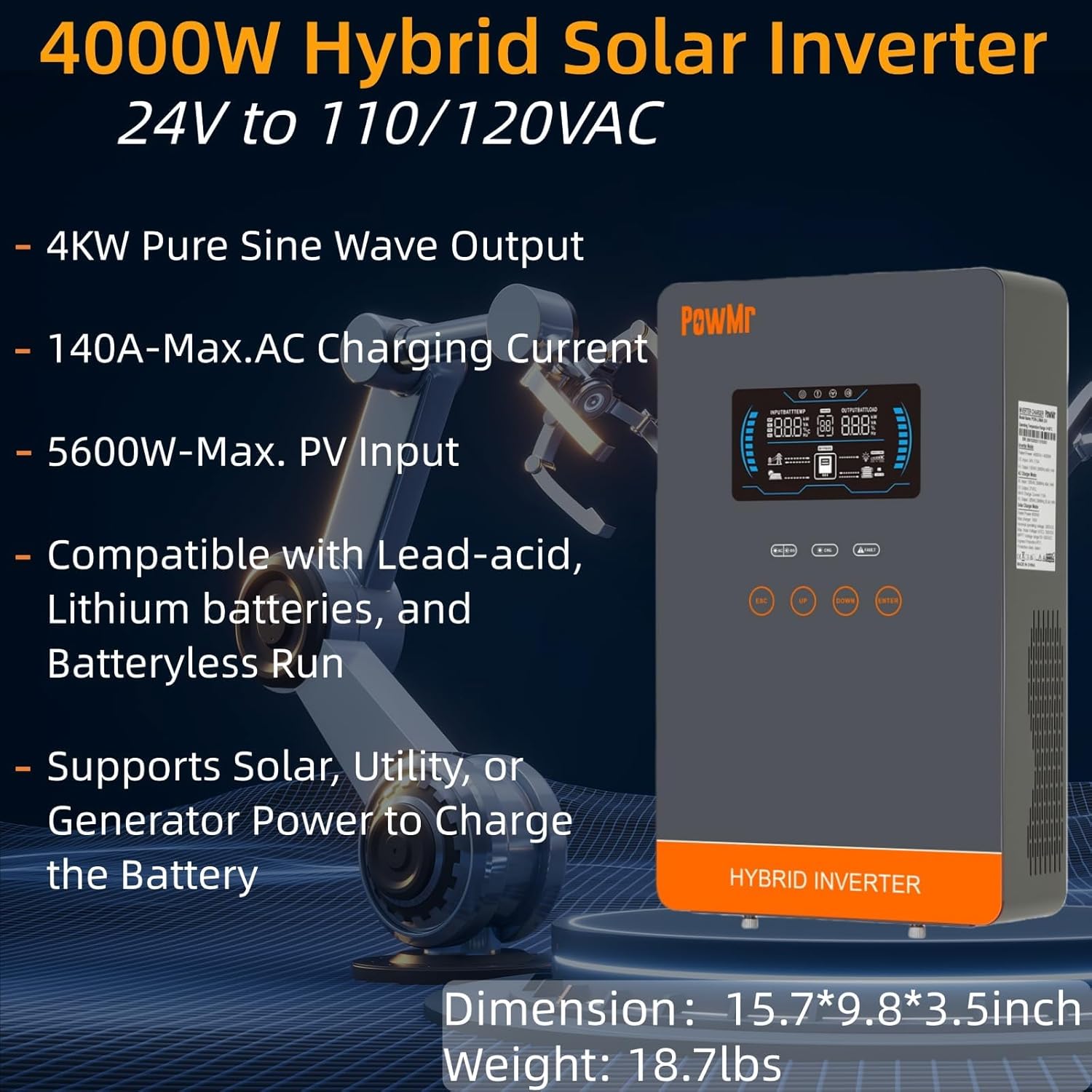
Image: The PowMr 4000W Hybrid Solar Inverter, highlighting its 4KW pure sine wave output, 140A max AC charging current, 5600W max PV input, compatibility with various batteries, and support for solar, utility, or generator power to charge the battery. Dimensions are 15.7"L x 9.8"W x 3.5"H and weight is 18.7lbs.
2. Bezpečnostní pokyny
Vždy dodržujte následující bezpečnostní opatření, abyste snížili riziko úrazu elektrickým proudem, požáru nebo zranění:
- Instalaci musí provádět kvalifikovaný personál.
- Ujistěte se, že veškeré kabely jsou správně dimenzovány a řádně izolovány.
- Nerozebírejte měnič. Uvnitř nejsou žádné součásti, které by mohl uživatel opravit.
- Chraňte měnič před hořlavými materiály, vlhkostí a přímým slunečním zářením.
- Zajistěte dostatečné větrání kolem střídače, aby nedošlo k jeho přehřátí.
- Před prováděním jakékoli údržby nebo zapojení vždy odpojte všechny zdroje napájení (fotovoltaika, baterie, střídavý proud).
- Během instalace a údržby používejte vhodné osobní ochranné prostředky (OOP).
3. Konec produktuview
3.1. Vlastnosti
- Výstup čisté sinusové vlny: Poskytuje stabilní a čistý výkon vhodný pro citlivou elektroniku.
- Integrovaný MPPT regulátor nabíjení: 140A MPPT for efficient solar charging.
- Široká kompatibilita baterií: Supports AGM, Gel, Lead-acid, Lithium-ion, and LiFePO4 batteries.
- Batteryless Mode: Can power loads directly from PV/AC grid without a connected battery.
- Více režimů nabíjení: Solar Only, Mains Only, Mains & Solar Hybrid.
- Více režimů výstupu zátěže: Utility Priority, Solar Priority, Solar and SBU Priority.
- Pokročilá ochrana: Zkrat, přes zvtage, pod svtage, overload, reverse polarity, over-temperature, and backfill protection.
- Uživatelsky přívětivé rozhraní: 6.25-inch LCD screen with touch controls for real-time data display.
- Komunikační porty: RS485 and RS232 for monitoring and control.
3.2. Identifikace součásti

Image: A detailed diagram of the PowMr Hybrid Solar Inverter, showing its front panel and connection ports. Key components labeled include: 1. LCD display, 2. Status indicator, 3. Charging indicator, 4. Fault indicator, 5. Function touch buttons, 6. On/off switch, 7. AC input, 8. AC output, 9. PV input, 10. Battery input, 11. RS485/RS232 communication port.
3.3. Ochranné prvky

Image: An illustration detailing the comprehensive protection features of the inverter, including Short Circuit Protection, Over-Load Protection, Over Current Protection, Backfill Protection, Over Voltage Protection, Over-Temperature Protection, Under Voltage Protection, and Over Charge Protection.
4. Obsah balení
Po vybalení se prosím ujistěte, že jsou všechny položky přítomny a nepoškozené:
- PowMr 4000W Hybrid Solar Inverter
- Návod k použití (tento dokument)
- Communication Cables (if applicable, check packaging)
- Mounting Hardware (if applicable, check packaging)
5. Instalace a nastavení
5.1. Montáž střídače
Select a suitable location for mounting the inverter. It should be:
- V interiéru, chráněno před přímým slunečním zářením, deštěm a prachem.
- Dobře větrané pro umožnění odvodu tepla.
- Blízko k baterii pro minimalizaci délky kabelu a hlasitostitage pokles.
- On a solid, non-flammable surface.
5.2. Schéma zapojení
Follow the wiring diagram carefully. Incorrect wiring can cause damage to the inverter, batteries, or connected loads, and may pose a safety hazard.

Image: A comprehensive wiring diagram illustrating connections for PV input, Mains/Generator input, AC output, and Battery input. It specifies voltage ranges, current ratings, and recommended wire gauges for each connection point.
5.3. Připojení baterie
The inverter is compatible with various 24V battery types. Ensure your battery bank matches the inverter's voltage požadavky.

Image: An illustration showing the inverter's compatibility with various battery types including AGM, GEL, FLD (Flooded), LI (Lithium-ion), SLD (Sealed Lead-Acid), and USER-defined settings. It also indicates a maximum battery charging current of 140A (utility charging + solar charging).
- Connect the battery cables to the inverter's battery terminals, ensuring correct polarity (positive to positive, negative to negative).
- Všechny spoje bezpečně utáhněte.
5.4. PV Array Connection
- Connect the solar panel array to the PV input terminals, observing correct polarity.
- Ensure the PV array's open circuit voltage a výkon jsou v rámci specifikací střídače.
5.5. AC Input/Output Connection
- Connect the AC utility grid or generator to the AC input terminals.
- Připojte střídavé zátěže k výstupním svorkám střídavého proudu.
- Ensure all AC connections are properly grounded.
6. Návod k obsluze
6.1. Zapnutí/vypnutí
- Zapnutí: Ensure all connections are secure. First, connect the battery, then the PV array, and finally the AC input. Press the On/Off switch.
- Vypnutí: Disconnect the AC input, then the PV array, and finally the battery. Press the On/Off switch.
6.2. LCD displej a ovládací prvky
The LCD screen displays real-time system data. Use the touch buttons to navigate menus and adjust settings.
6.3. Setting Charging and Output Modes
The inverter offers flexible charging and output modes to suit various energy management needs.

Image: An illustration detailing the three charging modes (1. Only Solar, 2. Only Utility, 3. Solar+Utility) and three output modes (1. Utility First, 2. Solar First (default), 3. SBU priority). Steps to set programs are also provided: 1. Long press and hold ENTER button for 3s, 2. Press UP and DOWN to select setting programs, 3. Press ENTER to confirm or ESC to exit.
6.3.1. Režimy nabíjení
- Pouze solární: Charges batteries exclusively from solar panels.
- Mains Only: Charges batteries exclusively from the AC utility grid or generator.
- Mains & Solar Hybrid: Prioritizes solar charging, supplementing with AC utility/generator if solar power is insufficient.
6.3.2. Load Output Modes
- Priorita užitné energie: Loads are primarily powered by the AC utility grid. Inverter switches to battery/solar if utility fails.
- Priorita solární energie: Loads are primarily powered by solar and battery. Inverter switches to utility if solar/battery power is insufficient.
- SBU Priority (Solar-Battery-Utility): Loads are primarily powered by solar, then battery, and finally by utility as a last resort.
7. Údržba
Pravidelná údržba zajišťuje optimální výkon a dlouhou životnost vašeho měniče.
- Čištění: Periodically clean the inverter's exterior with a dry cloth. Do not use liquid cleaners.
- Větrání: Ensure cooling fan vents are clear of dust and obstructions. The triple cooling fan design helps dissipate heat efficiently.
- Spojení: Každoročně kontrolujte všechna elektrická připojení, zda nejsou pevně utažená a zda nevykazují známky koroze.
- Prostředí: Maintain a clean, dry, and well-ventilated environment around the inverter. The dust-proof design helps prevent dust ingress.
8. Řešení problémů
If you encounter issues, refer to the following common problems and solutions. For persistent issues, contact customer support.
| Problém | Možná příčina | Řešení |
|---|---|---|
| Měnič se nezapíná | Žádné připojení baterie; Nízká kapacita baterietage; On/Off switch off | Check battery connections; Charge battery; Turn on switch |
| Žádný AC výstup | Přetížení; Zkrat; Porucha měniče | Reduce load; Check for short circuits; Restart inverter |
| Nabíjení fotovoltaiky nefunguje | PV array disconnected; Insufficient sunlight; PV voltagpříliš nízké/vysoké e | Check PV connections; Ensure adequate sunlight; Verify PV array specifications |
| Varování před přetížením | Connected loads exceed inverter capacity | Disconnect some loads; Ensure total load is within 4000W |
| Upozornění na vysokou teplotu | Poor ventilation; Ambient temperature too high | Clear vents; Improve airflow; Relocate inverter if necessary |
9. Specifikace
Technical specifications for the PowMr 4000W Hybrid Solar Inverter:
| Parametr | Hodnota |
|---|---|
| Číslo modelu | POW-LVM4K-24V-FBA2 |
| Jmenovitý výstupní výkon | 4000W |
| Vstupní objemtage (DC) | 24V DC |
| Výstupní objemtage (AC) | 110/120 VAC |
| Výstupní průběh | Čistá sinusová vlna |
| Max. PV Open Circuit Voltage | 350V DC |
| PV Array MPPT svtage Dosah | 55-350V DC |
| Max. FV vstupní výkon | 5600W |
| Rated Grid Input Voltage | 110/120 VAC |
| Max. Hybrid Charging Current (AC+PV) | 140A |
| Sdělení | RS485, RS232 |
| Typ zobrazení | LCD |
| Rozměry (D x Š x V) | 15.7 cm D x 9.8 cm Š x 3.5 cm V |
| Hmotnost | 18.7 lbs (approximate, derived from image) |
10. Záruka a podpora
10.1. Informace o záruce
The PowMr 4000W Hybrid Solar Inverter comes with an Záruka 18 měsíců from the date of purchase. This warranty covers defects in materials and workmanship under normal use. It does not cover damage caused by improper installation, misuse, accidents, unauthorized modifications, or natural disasters.
10.2. Zákaznická podpora
For technical assistance, warranty claims, or any questions regarding your PowMr inverter, please contact PowMr customer support through the retailer's platform or the official PowMr website. Please have your model number (POW-LVM4K-24V-FBA2) and purchase date available when contacting support.