
Konec produktuview
The AT&T EL2131-11 is a DECT 6.0 cordless landline phone designed for reliable communication. It features a powerful call blocker, caller ID, a full-duplex speakerphone, and a backlit display and keypad for enhanced visibility. This model includes one handset.
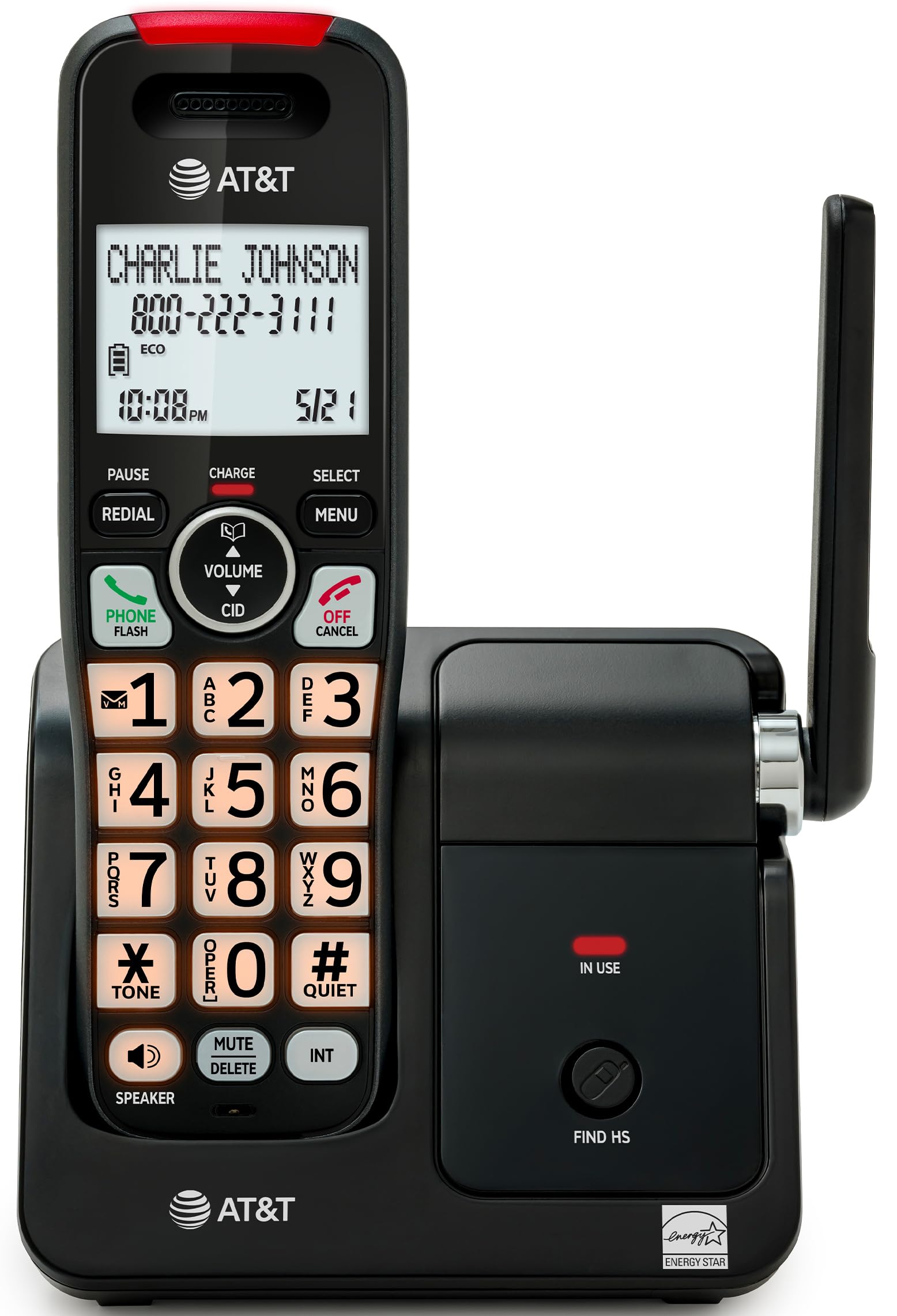
Image: The AT&T EL2131-11 cordless phone, showing the handset docked in its base unit.
Klíčové vlastnosti:
- Call Blocker: Blocks up to 50 unwanted numbers.
- ID volajícího: Uloží až 50 hovorů se zobrazením jména, čísla, času a data.
- Plně duplexní hlasitý odposlech: Allows both parties to speak and listen simultaneously.
- Podsvícený displej a klávesnice: Poskytuje jasnou viditelnost za zhoršených světelných podmínek.
- Tichý režim: Silences the ringer instantly.
- Režim ECO: Reduces power consumption and extends battery life.
- Technologie DECT 6.0: Ensures interference-free communication and extended range.
Nastavení
Co je v krabici:
- Základní jednotka
- 1 bezdrátové sluchátko
- Napájecí adaptér 1
- Kabel telefonní linky
- 2 článků baterie
- Rychlý průvodce
- Držák pro montáž na zeď
1. Instalace baterie
- Najděte přihrádku na baterie na zadní straně sluchátka.
- Insert the two supplied battery cells, ensuring correct polarity (+ and -).
- Bezpečně zavřete kryt bateriového prostoru.
2. Připojení základní jednotky
- Connect the small end of the power adapter to the power jack on the back of the base unit.
- Zapojte větší konec napájecího adaptéru do standardní elektrické zásuvky.
- Připojte jeden konec telefonního kabelu do zdířky TEL LINE na zadní straně základní jednotky.
- Zapojte druhý konec telefonního kabelu do telefonní zásuvky ve zdi.
3. Počáteční nabíjení
Place the handset in the base unit with the display facing forward. The handset will begin charging. Allow the handset to charge for at least 16 hours before initial use to ensure optimal battery performance.

Image: The handset charging in its base, with an overlay indicating a 5-day battery life on a single charge.
Návod k obsluze
Uskutečňování a přijímání hovorů
- Chcete-li zavolat: Stiskněte TELEFON / FLASHa poté vytočte číslo.
- Chcete-li přijmout hovor: Když telefon zazvoní, stiskněte TELEFON / FLASH or any dialing key (0-9, * or #).
- Ukončení hovoru: Stiskněte VYP/ZRUŠIT nebo vložte sluchátko zpět do základnové jednotky.
Používání hlasitého telefonu
Během hovoru stiskněte REPRODUKTOR button to activate the full-duplex speakerphone. Press it again to switch back to the handset earpiece.

Image: A man holding a small dog, speaking hands-free using the phone's speakerphone function. The phone's base unit is visible on a table.
ID volajícího
When a call comes in, the caller's information (name and number) will appear on the handset display if you subscribe to Caller ID service. The phone stores up to 50 caller ID records.

Image: A close-up of the phone's display showing a caller's name and number, along with the time and date.
Blokování hovorů
The call blocker feature allows you to block up to 50 unwanted numbers. To block a number:
- During a call or from the Caller ID log, press MENU.
- Scroll to 'Call Blocker' and press VYBRAT.
- Follow the on-screen prompts to add the number to the block list.

Image: A visual representation of the call blocker feature, showing a list of blocked numbers on the phone's display.
Tichý režim
To temporarily silence the ringer, press and hold the #KLID button on the handset. The ringer will be silenced for a set period, typically 1 to 12 hours, which can be adjusted in the settings.

Image: A close-up of the phone's display indicating that 'Quiet mode' is active.
Režim ECO
The ECO mode automatically adjusts power consumption to conserve battery life. This mode is typically active by default and indicated by an 'ECO' icon on the display.

Image: The phone's display showing the 'ECO' icon, indicating power-saving mode is active.
Redial
Chcete-li znovu vytočit poslední volané číslo, stiskněte tlačítko OPAKOVÁNÍ tlačítko.

Image: The phone's display showing the 'Redial' function with a previously dialed number.
Podsvícený displej a klávesnice
The handset features a backlit LCD display and illuminated keypad for easy readability and operation in various lighting conditions.

Image: A hand holding the phone, demonstrating its bright backlit screen and illuminated keypad in a low-light environment.
Údržba
Čištění telefonu
- Použijte měkký, mírně damp cloth to clean the surfaces of the phone and base unit.
- Do not use cleaning sprays or harsh chemicals, as they may damage the finish or electronic components.
- Ensure the phone is unplugged from the power outlet before cleaning.
Péče o baterie
- For optimal battery life, keep the handset in the base unit when not in use.
- If the phone will be unused for an extended period, remove the batteries to prevent leakage.
- Replace batteries when they no longer hold a charge effectively. Use only the specified battery type.
Odstraňování problémů
If you experience issues with your AT&T EL2131-11 phone, refer to the following common troubleshooting steps:
| Problém | Řešení |
|---|---|
| Žádný oznamovací tón |
|
| Sluchátko se nenabíjí |
|
| Nelze uskutečňovat/přijímat hovory |
|
| Špatná kvalita zvuku/statický šum |
|
Specifikace
| Funkce | Detail |
|---|---|
| Značka | AT&T |
| Číslo modelu | EL2131-11 |
| Typ telefonu | Bezdrátový |
| Technologie | DECT 6.0 |
| Barva | Černá a stříbrná |
| Materiál | Plast |
| Zdroj napájení | Napájení z baterie |
| Rozměry položky (D x Š x V) | 5.06 x 4.65 x 7.23 palců (základní jednotka) |
| Doba hovoru po telefonu | 10 hodiny |
| Pohotovostní doba telefonu | 5 dní |
| Identifikace volajícího | Ano |
| Víceřádkový provoz | Provoz na jedné lince |
| Typ systému odpovědí | Žádný |
| UPC | 650530034510 |

Image: The AT&T EL2131-11 base unit with handset, showing its height (7.23 inches), length (5.06 inches), and width (4.65 inches).
Informace o záruce
This AT&T EL2131-11 Cordless Landline Phone comes with a 1letá omezená záruka from the manufacturer. Please retain your proof of purchase for warranty claims. For specific terms and conditions, refer to the warranty card included in your product packaging or visit the official AT&T support webmísto.
Zákaznická podpora
For further assistance, technical support, or to inquire about replacement parts, please contact AT&T customer service. You can typically find contact information on the official AT&T website or in the quick start guide provided with your phone.
Online resources may include FAQs, detailed user manuals, and support forums.