
FUNYET NY-01
FUNYET 2026 14.1-inch Laptop User Manual
Model: NY-01
Zavedení
This manual provides essential information for setting up, operating, maintaining, and troubleshooting your FUNYET 2026 14.1-inch Laptop. Please read this manual thoroughly before using your device to ensure proper function and longevity.
Co je v krabici
Ověřte, zda jsou v balení přítomny všechny položky:
- FUNYET 2026 14.1-inch Laptop
- Power Adapter (12V2A DC)
- Návod k použití (tento dokument)
- Záruční list
Konec produktuview
The FUNYET 2026 laptop is designed for productivity and entertainment, featuring a powerful processor and versatile connectivity.
Klíčové vlastnosti
- Operační systém: Pre-installed Windows 11 Pro for enhanced multitasking and security.
- Procesor: Intel Celeron N5095 (4 cores, 4 threads, up to 2.9 GHz) for smooth performance.
- Paměť a úložiště: 16GB LPDDR4 RAM and 512GB M.2 SSD, with support for up to 1TB TF Card expansion.
- Zobrazit: 14.1-inch IPS Full HD (1920x1080) screen, offering clear and vibrant visuals, with a 180° foldable hinge for flexible viewIng.
- Konektivita: Dual-band 5G Wi-Fi and Bluetooth 5.0 for fast and stable wireless connections.
- Porty: Includes 2x USB 3.0, 1x 3.5mm Headphone Jack, 1x 3.5mm DC Adapter port, 1x Mini-HDMI, and 1x TF Card slot.
- Baterie: Integrated 5000mAh battery providing 4-5 hours of normal use and over 50 hours of standby time.
- Kamera a zvuk: Built-in 0.3-megapixel front camera and dual microphones for video calls and online meetings.
Identifikace součásti
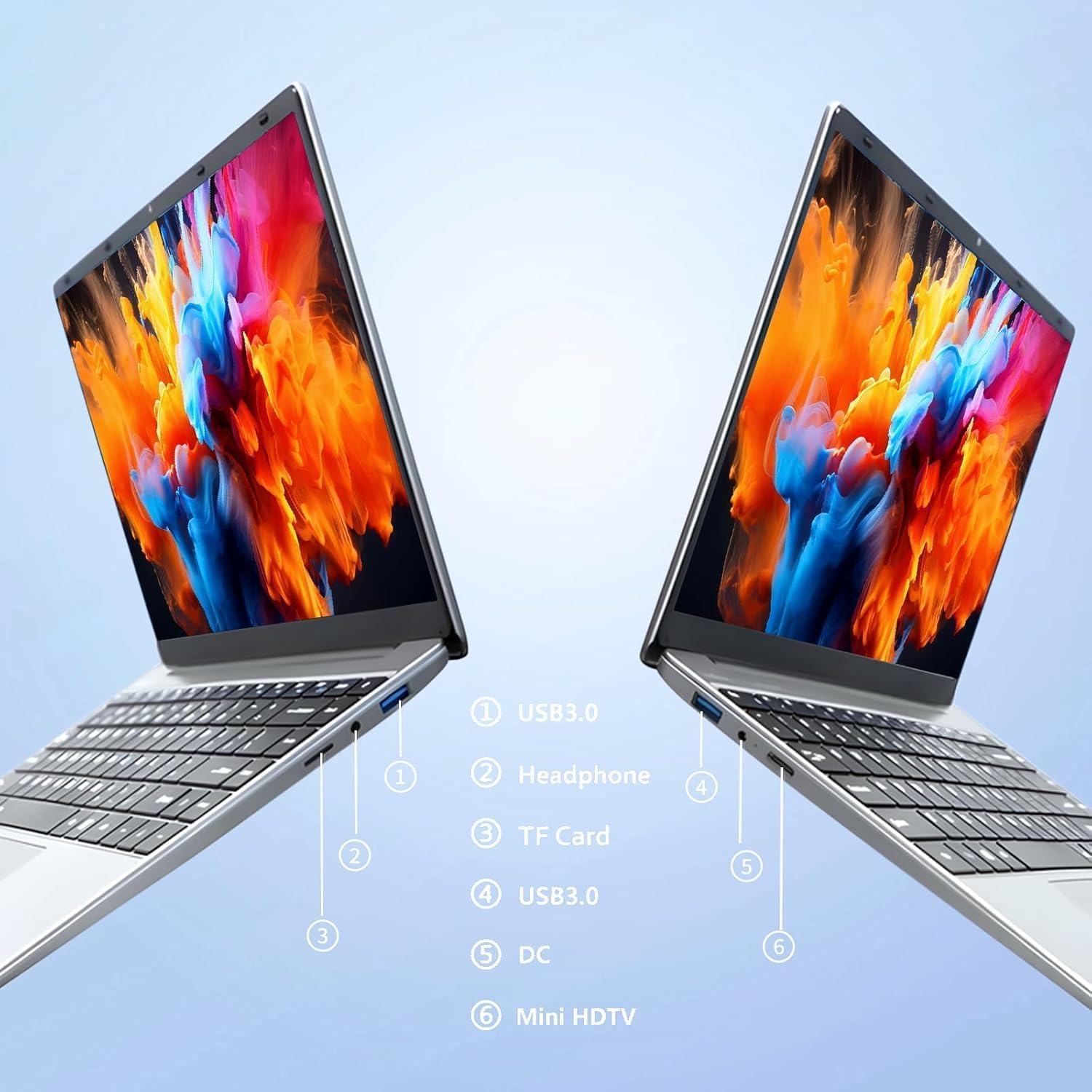
Obraz: Strana view of the laptop highlighting port locations.
This image illustrates the various ports available on the FUNYET 2026 laptop. On one side, you will find a USB 3.0 port, a 3.5mm headphone jack, and a TF Card slot. On the opposite side, there is another USB 3.0 port, the DC power input, and a Mini-HDMI port.

Obraz: Laptop screen displaying its 14-inch Full HD IPS features.
The laptop features a 14-inch Full HD (1920x1080) IPS display with a 16:9 aspect ratio and ultra-narrow bezels, providing a wide perspective and vivid images.

Obraz: Laptop demonstrating its 180-degree foldable hinge.
The laptop's hinge allows the screen to fold back 180 degrees, offering versatile viewúhly záběru a režimy použití.
Průvodce nastavením
1. Počáteční nabíjení
- Vybalte notebook a napájecí adaptér z krabice.
- Connect the power adapter to the DC input port on the side of the laptop.
- Zapojte napájecí adaptér do elektrické zásuvky.
- Allow the laptop to charge for at least 30 minutes before first use, or until the battery indicator shows a sufficient charge.
2. První zapnutí
- Otevřete víko notebooku.
- Press the power button, usually located on the keyboard deck or side.
- Postupujte podle pokynů na obrazovce a dokončete proces instalace systému Windows 11 Pro, včetně výběru jazyka, síťového připojení a vytvoření uživatelského účtu.
3. Připojení k Wi-Fi
- During the initial Windows setup, you will be prompted to connect to a Wi-Fi network. Select your network from the list and enter the password.
- If setting up later, click the Wi-Fi icon in the taskbar, select your network, and click "Connect".
Návod k obsluze
Správa napájení
- Zapnutí: Stiskněte tlačítko napájení.
- Režim spánku: Zavřete víko nebo krátce stiskněte tlačítko napájení.
- Vypnout: Klikněte na tlačítko Start, poté na Napájení a poté na Vypnout.
- Restartovat: Klikněte na tlačítko Start, poté na Napájení a poté na Restartovat.
Using the Touchpad and Touchscreen
- Touchpad: Use gestures for navigation. Single tap for left-click, two-finger tap for right-click, two-finger scroll for scrolling.
- Dotyková obrazovka: Tap to select, pinch to zoom, swipe to scroll.
Připojení externího displeje
Připojení externího monitoru nebo projektoru:
- Connect a Mini-HDMI cable from the laptop's Mini-HDMI port to the external display's HDMI input.
- If necessary, use a Mini-HDMI to HDMI adapter (not included).
- Stiskněte Klávesa Windows + P to open the Project menu and select your desired display mode (Duplicate, Extend, Second screen only).
Using TF Card Expansion
Insert a TF card into the designated slot for additional storage. The laptop supports up to 1TB TF card expansion.
Péče a údržba
- Čištění: K čištění obrazovky a šasi použijte měkký hadřík, který nepouští vlákna. V případě odolných skvrn lehceampOtřete hadřík vodou nebo čističem obrazovek. Vyhněte se agresivním chemikáliím.
- Péče o baterie: Chcete-li prodloužit životnost baterie, vyvarujte se častého úplného vybíjení baterie. Pokud notebook delší dobu nepoužíváte, skladujte jej na chladném a suchém místě.
- Teplota: Operate the laptop within a temperature range of 5°C to 35°C (41°F to 95°F). Avoid direct sunlight or extreme heat/cold.
- Větrání: Ensure the ventilation openings are not blocked to prevent overheating. Do not place the laptop on soft surfaces like beds or sofas during operation.
- Aktualizace softwaru: Pravidelně aktualizujte systém Windows a ovladače, abyste zajistili optimální výkon a zabezpečení.
Odstraňování problémů
Běžné problémy a řešení
| Problém | Možné řešení |
|---|---|
| Notebook se nezapne. | Ensure the power adapter is securely connected and plugged into a working outlet. Check if the battery is charged. Try holding the power button for 10-15 seconds for a hard reset. |
| Problémy s připojením k Wi-Fi. | Check if Wi-Fi is enabled in Windows settings. Restart your router and the laptop. Ensure you are within range of the Wi-Fi signal. Verify the Wi-Fi password. |
| Pomalý výkon. | Close unnecessary applications. Check for background processes in Task Manager. Ensure Windows is updated. Consider running a disk cleanup. |
| Externí displej nebyl detekován. | Ensure the Mini-HDMI cable is connected correctly. Check the input source on your external display. Press Klávesa Windows + P pro přepínání mezi režimy zobrazení. |
| Baterie se rychle vybíjí. | Adjust screen brightness. Close power-intensive applications. Check power settings in Windows and select a power-saving plan. Disconnect external peripherals when not in use. |
Technické specifikace
| Značka | FUNYET |
| Název modelu | NY-01 |
| Velikost obrazovky | 14.1 palce |
| Rezoluce | 1920 x 1080 (Full HD) |
| Technologie obrazovky | IPS LCD |
| Procesor | Intel Celeron N5095 (až 2.9 GHz) |
| BERAN | 16 GB LPDDR4 (2400 MHz) |
| Skladování | 512 GB M.2 SSD (expandable via TF Card up to 1TB) |
| Operační systém | Windows 11 Pro |
| Grafika | Intel Integrated Graphics |
| Bezdrátové připojení | 5G Wi-Fi (2.4 GHz, 5.8 GHz), Bluetooth 5.0 |
| Porty | 2x USB 3.0, 1x 3.5mm Headphone, 1x 3.5mm DC Adapter, 1x Mini-HDMI, 1x TF Card Slot |
| Webvačka | 0.3 Megapixel Front Camera |
| Kapacita baterie | 5000 mAh / 38.5 Wh |
| Rozměry (D x Š x V) | 32.2 x 21 x 2.1 cm (12.68 x 8.27 x 0.83 palce) |
| Hmotnost | 1.4 kg (3.09 liber) |
| Speciální funkce | 180° Foldable Hinge |
Záruka a podpora
Informace o záruce
Your FUNYET 2026 laptop comes with a 2-letá záruka from the date of purchase. Please retain your proof of purchase for warranty claims. The warranty covers manufacturing defects and malfunctions under normal use. It does not cover damage caused by misuse, accidents, unauthorized repairs, or normal wear and tear.
Navíc a 6-month free exchange/return policy may apply, subject to the terms and conditions of your purchase platform.
Zákaznická podpora
For any issues, questions, or technical assistance, please contact FUNYET customer support:
- Online podpora: Available 24/7. You can typically find support by logging into your Amazon account, navigating to "Your Account" -> "Your orders", and selecting "Ask Product Question" for your FUNYET laptop.
- E-mail: funyestore@outlook.com
- Telefon: +49 800-000-7147 (Please note operating hours may vary)

Obraz: Customer service contact details and warranty information.
This image provides a visual summary of the support options, including the 2-year warranty, 6-month exchange/return policy, and contact information for phone and email support.
Ask a question about this manual
Ask about setup, troubleshooting, compatibility, parts, safety, or missing instructions. Manuals+ will review the question and use this page’s manual context to help answer it.