
TONOR TW-220
TONOR 2.4G Dual Wireless Microphones TW-220 User Manual
Model: TW-220
Zavedení
Thank you for choosing the TONOR 2.4G Dual Wireless Microphones. This system is designed to provide a stable and clear audio experience for various applications such as karaoke, speeches, and performances. This manual will guide you through the setup, operation, and maintenance of your new wireless microphone system to ensure optimal performance and longevity.
Důležité bezpečnostní informace
- Před použitím produktu si pečlivě přečtěte všechny pokyny.
- Uschovejte tento návod pro budoucí použití.
- Nevystavujte zařízení vodě, vlhkosti ani extrémním teplotám.
- Zabraňte pádu zařízení nebo jeho vystavení silným nárazům.
- Use only the provided charging cable and recommended 5V/2A charger.
- Nepokoušejte se zařízení rozebírat ani opravovat sami. V případě potřeby servisu kontaktujte zákaznickou podporu.
- Uchovávejte mimo dosah dětí.
Obsah balení
Zkontrolujte prosím balení, zda jsou všechny položky přítomny:
- 2 x ruční mikrofony
- 1 x Receiver (with 6.35mm plug)
- 1 x nabíjecí kabel USB 3 v 1
- 1 x adaptér z 6.35 mm na 3.5 mm
- 1 x Návod k použití

Image: All components included in the TONOR 2.4G Dual Wireless Microphones package, showing two microphones, one receiver, a charging cable, and an adapter.
Konec produktuview
The TONOR TW-220 system consists of two handheld microphones and a compact receiver. Each microphone features a power button and indicator light. The receiver has a 6.35mm plug for direct connection to compatible audio equipment and a charging port.

Obrázek: Detailní záběr view of the TONOR 2.4G Dual Wireless Microphone and its receiver, highlighting their design and key features.
Průvodce nastavením
1. Nabíjení zařízení
Before first use, fully charge both microphones and the receiver. Use the included 3-in-1 USB charging cable and a 5V/2A charger (not included).
- Doba nabíjení: Přibližně 2 hodiny na plné nabití.
- Životnost baterie: Up to 30 hours for microphones, 20 hours for the receiver.
- Rychlé nabíjení: A 10-minute charge provides approximately 2 hours of use when the battery is low.

Image: Illustration of the microphones and receiver being charged simultaneously using the 3-in-1 USB cable. A note recommends a 5V/2A charger.
2. Připojení přijímače
The receiver features a 6.35mm (1/4") plug. Insert it directly into the MIC IN port of your compatible audio device (e.g., speaker, amplifier, PA system, karaoke machine, mixer). If your device has a 3.5mm (1/8") MIC IN port, use the included 6.35mm to 3.5mm adapter.
Note: This system is not compatible with phones, computers, or AUX/LINE-IN ports. Ensure you connect to a dedicated MIC IN port.
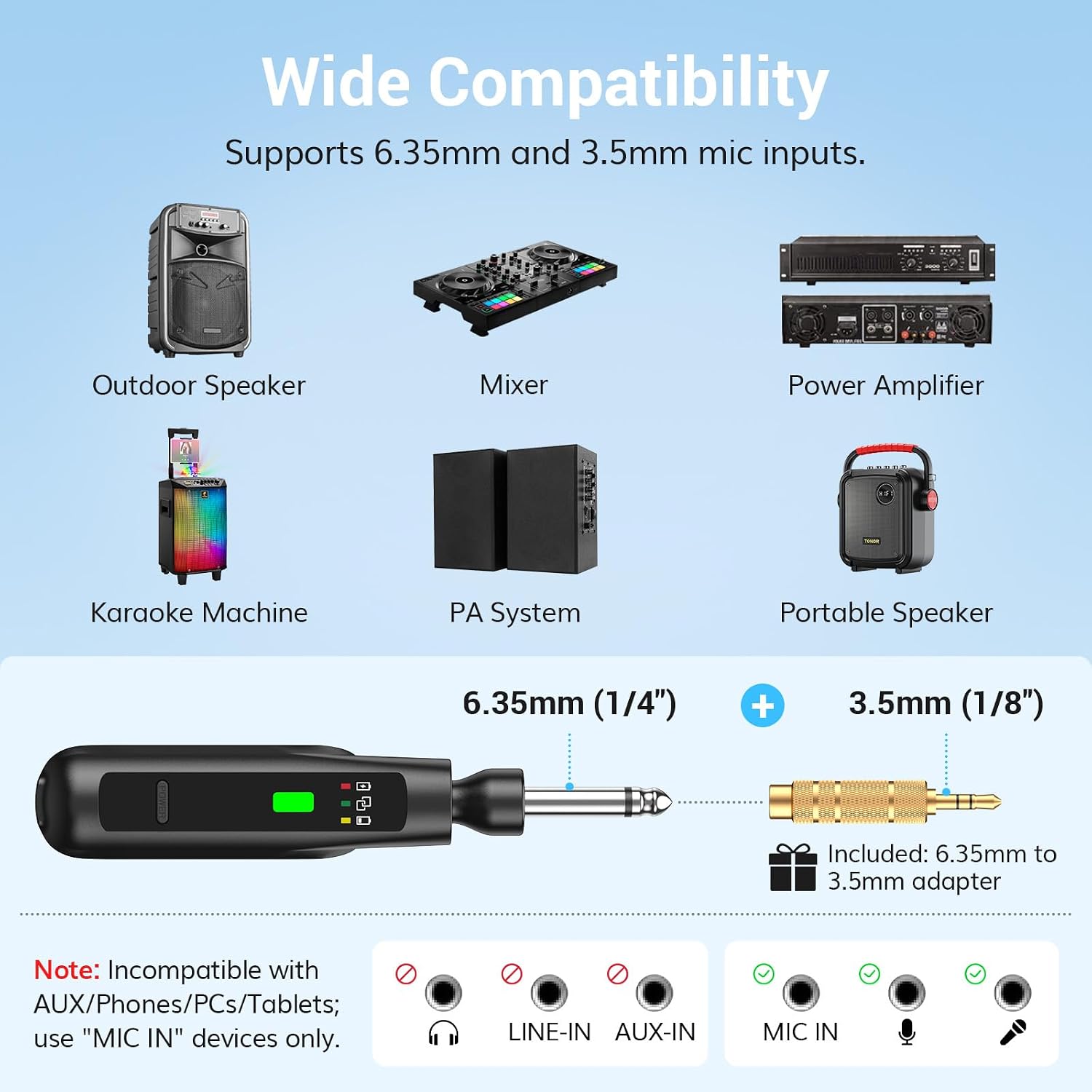
Image: A diagram illustrating the receiver's 6.35mm plug and the 3.5mm adapter, showing compatible devices like outdoor speakers, mixers, power amplifiers, karaoke machines, PA systems, and portable speakers. It also clearly indicates incompatibility with AUX/LINE-IN ports.

Image: The receiver's foldable design is shown, demonstrating how it can be adjusted for different angles and stored compactly. It is also shown plugged into a speaker's microphone input.
3. Zapnutí a párování
The microphones and receiver are designed for automatic pairing.
- Krok 1: Long press the power button on each microphone to turn it on. The indicator light will flash.
- Krok 2: Long press the power button on the receiver to turn it on.
- The microphones and receiver will automatically pair. Once paired, both indicator lights will turn solid green.

Image: A visual guide demonstrating the two-step "Plug and Play" process: long-pressing the microphone power button, then long-pressing the receiver power button, with an arrow indicating auto-pairing and solid green lights for successful connection.
Návod k obsluze
Použití mikrofonu
- Zapnutí/vypnutí: Dlouze stiskněte tlačítko napájení.
- Funkce ztlumení: Short press the power button to mute/unmute the microphone. The indicator light will flash when muted.
- Optimální výkon: For best sound quality and to minimize feedback, hold the microphone 2-4 inches (5-10 cm) from your mouth.
- Vzor kardioidního snímání: The microphone is designed to pick up sound primarily from the front, reducing background noise and feedback.

Image: A person singing into the TONOR microphone, illustrating the optimal holding distance and highlighting key specifications like latency, frequency response, S/N ratio, and cardioid pickup pattern.
Bezdrátový přenos
The system operates on 2.4G wireless technology, providing a stable connection up to 50 feet (15 meters) in open areas. Ensure there are no major obstructions between the microphone and receiver for optimal performance.

Image: A person singing outdoors with the TONOR wireless microphone, demonstrating the 50ft/15m transmission distance and highlighting features like anti-interference, stable signal, and zero audio lag.
Video: An official product video demonstrating the features and usage of the TONOR 2.4G Dual Wireless Microphones, including setup and sound quality.
Údržba
- Čištění: Mikrofony a přijímač otřete měkkým, suchým hadříkem. Nepoužívejte agresivní chemikálie ani abrazivní čisticí prostředky.
- Skladování: Pokud systém nepoužíváte, skladujte jej na chladném a suchém místě mimo dosah přímého slunečního záření a extrémních teplot.
- Péče o baterie: To prolong battery life, avoid fully discharging the batteries frequently. Charge them regularly, even if not in constant use.
Odstraňování problémů
| Problém | Možná příčina | Řešení |
|---|---|---|
| Žádný zvuk z mikrofonu |
|
|
| Rušení nebo špatná kvalita zvuku |
|
|
| Mikrofon se nenabíjí |
|
|
Specifikace
| Funkce | Detail |
|---|---|
| Značka | TONOR |
| Název modelu | TW220 |
| Technologie připojení | 2.4GHz wireless, USB |
| Typ konektoru | 6.35mm jack, 3.5mm jack (with adapter) |
| Speciální funkce | Funkce ztlumení |
| Kompatibilní zařízení | Ampzvlhčovač, karaoke stroj, reproduktor, partybox, PA systém, mixér |
| Barva | Černý |
| Hmotnost položky | 340 gramů |
| Tvarový faktor mikrofonu | Ruční |
| Zdroj napájení | Napájení z baterie |
| Počet baterií | Jsou vyžadovány 3 lithiové kovové baterie (součástí balení) |
| Počet kanálů | 2 |
| Rozměry položky | 12.76 x 5.31 x 2.09 palce |
| Provozní rozsah | Až 50 stop (15 m) |
| Výdrž baterie mikrofonu | Až 30 hodin |
| Životnost baterie přijímače | Až 20 hodin |
Informace o záruce
TONOR provides a warranty for DVA ROKY from the date of purchase for the TW-220 wireless microphone system. Please retain your proof of purchase for warranty claims.
Zákaznická podpora
If you encounter any issues or have questions regarding your TONOR 2.4G Dual Wireless Microphones, please contact TONOR customer support for assistance. Refer to the contact information provided on the official TONOR webwebu nebo v dokumentaci k nákupu.
For more information, visit the official TONOR store: Obchod TONOR na Amazonu
Ask a question about this manual
Ask about setup, troubleshooting, compatibility, parts, safety, or missing instructions. Manuals+ will review the question and use this page’s manual context to help answer it.