
Zavedení
This manual provides instructions for the RadioShack Mechanical Gaming Keyboard, Model 2607135. This keyboard features a 98-key layout, mechanical switches designed for durability, adjustable rainbow backlighting, 25-key anti-ghosting, and an integrated rotary knob for volume control. It is designed for plug-and-play operation via USB and is compatible with Windows operating systems.
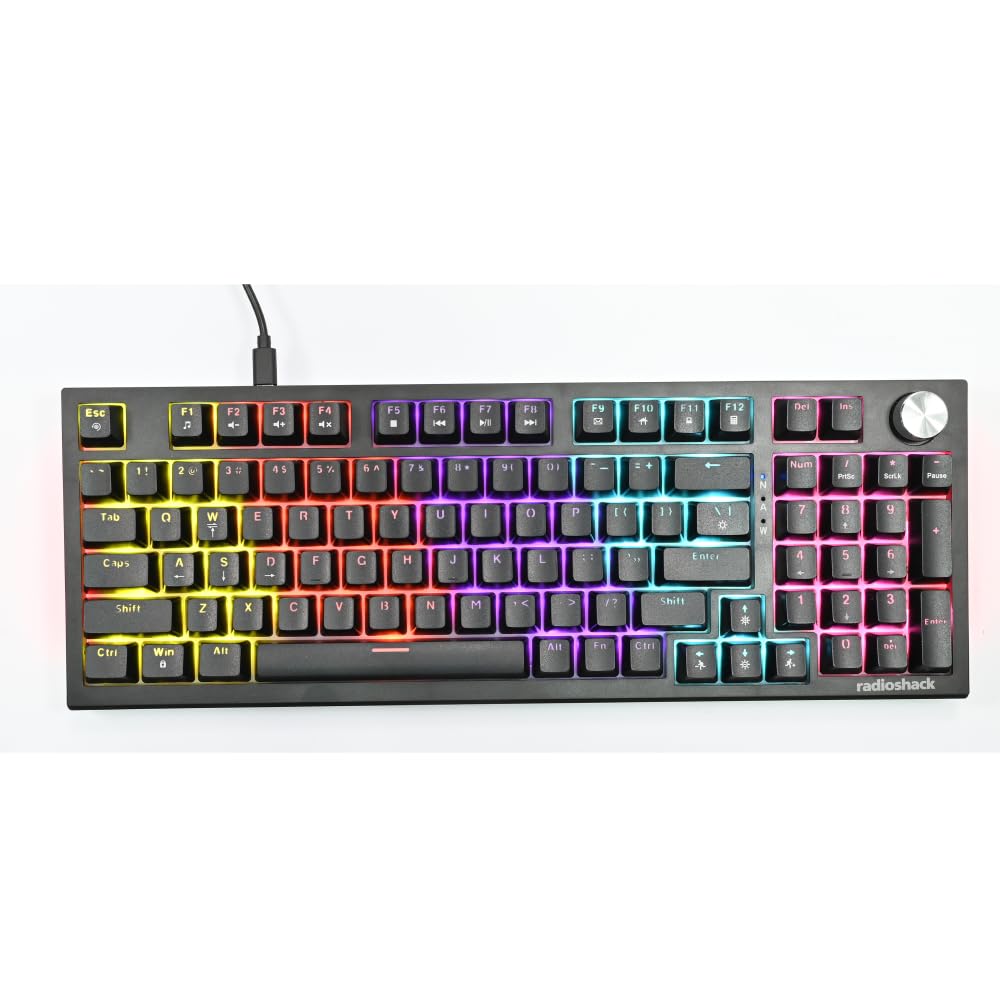
Image: The RadioShack Mechanical Gaming Keyboard, showcasing its 98-key layout and vibrant rainbow backlighting.
Obsah balení
Zkontrolujte prosím obsah balení, abyste se ujistili, že jsou přítomny všechny položky:
- 1x RadioShack Mechanical Gaming Keyboard
- 1x USB kabel
- 1x Uživatelská příručka (tento dokument)

Image: A graphic illustrating the contents of the product package, including the gaming keyboard and user manual.
Nastavení
- Rozbalte klávesnici: Carefully remove the keyboard and USB cable from its packaging.
- Připojení k počítači: Zasuňte konektor USB-A dodaného kabelu USB do volného portu USB v počítači.
- Instalace ovladače: The keyboard is plug-and-play. Your operating system (Windows XP-10 compatible) will automatically detect and install the necessary drivers. No additional software installation is required.
- Umístění: Place the keyboard on a stable, flat surface. Adjust the rear feet for your preferred typing angle.

Image: An illustration highlighting key features such as the 1.5m USB cable length and compatibility with Windows XP through 10.
Návod k obsluze
Keyboard Layout and Functions
The keyboard features a 98-key layout, providing a compact design while retaining essential keys, including a numeric keypad.
Funkce otočného knoflíku
The dedicated rotary knob located on the top right of the keyboard controls audio volume.
- Otáčet po směru hodinových ručiček: Zvyšuje hlasitost.
- Otočit proti směru hodinových ručiček: Snižuje hlasitost.
- Zmáčkni: Vypne/zapne zvuk.

Image: A close-up of a hand interacting with the rotary knob, demonstrating its use for volume adjustment.
Ovládání podsvícení
The keyboard features adjustable rainbow backlighting with multiple modes and side-light effects. Specific key combinations (often Fn + a function key) are used to cycle through lighting modes, adjust brightness, or change speed. Refer to the keycap legends for specific lighting control functions.
- Přepínání režimů: Typically Fn + Ins, Home, PgUp, Del, End, PgDn.
- Nastavení jasu: Typically Fn + Up/Down arrow keys.
- Nastavení rychlosti: Typically Fn + Left/Right arrow keys.

Image: A collage showing the keyboard with various backlighting patterns and side-light effects, illustrating the 17 available lighting modes.
Anti-Ghosting
The keyboard supports 25-key anti-ghosting, ensuring that multiple simultaneous key presses are registered accurately, which is crucial for gaming and fast typing.

Image: A user actively typing on the keyboard during a gaming session, emphasizing the accuracy provided by 25 anti-ghosting keys.
Údržba
- Čištění: Use a soft, dry cloth to wipe the surface of the keyboard. For deeper cleaning, use compressed air to remove dust and debris from between the keycaps. Avoid using liquid cleaners directly on the keyboard.
- Skladování: Pokud klávesnici delší dobu nepoužíváte, skladujte ji v čistém a suchém prostředí mimo dosah přímého slunečního záření a extrémních teplot.
- Vyvarujte se rozlití: Liquids can damage the internal components. Exercise caution to prevent spills on the keyboard.
Odstraňování problémů
Klávesnice nereaguje
- Ujistěte se, že je kabel USB bezpečně připojen k klávesnici i k počítači.
- Zkuste připojit klávesnici k jinému USB portu na počítači.
- Restartujte počítač.
- Otestujte klávesnici na jiném počítači, abyste zjistili, zda je problém s klávesnicí nebo s USB portem/ovladači počítače.
Podsvícení nefunguje
- Check if the backlighting has been turned off using the keyboard's function keys (e.g., Fn + brightness down key).
- Cycle through the lighting modes to see if it reactivates.
Keys Not Registering / Ghosting Issues
- Ensure the keyboard is clean and free of debris that might be obstructing key switches.
- The keyboard features 25-key anti-ghosting. If more than 25 keys are pressed simultaneously, some inputs may not register.
Specifikace
| Číslo modelu | 2607135 |
| Značka | RadioShack |
| Typ klávesnice | Mechanická herní klávesnice |
| Rozložení klíče | 98-klíč |
| Konektivita | USB-A (Corded Electric) |
| Trvanlivost přepínače | Až 50 milionů úhozů |
| Podsvícení | Rainbow (Adjustable modes, brightness, speed) |
| Anti-Ghosting | 25-klíč |
| Speciální funkce | Rotary Volume Knob, Ergonomic Design |
| Kompatibilní zařízení | Laptop, PC (Windows XP-10) |
| Zahrnuté komponenty | USB kabel |

Obrázek: Podrobný view of a mechanical switch, illustrating the 50-million keystroke life for long-term reliability.
Podpora
For further assistance or inquiries, please refer to the official RadioShack support channels or webmísto.