
1. Úvod
Thank you for choosing the Sharp 40HF2265E Full HD Google TV. This manual provides essential information for setting up, operating, and maintaining your television. Featuring integrated Google TV, HDR10 support, Dolby Digital audio, and Bluetooth connectivity, your new TV offers a rich entertainment experience. Please read this manual thoroughly before use to ensure proper operation and to maximize your viewpotěšení.

Obrázek 1.1: Přední strana view of the Sharp 40HF2265E Full HD Google TV.
2. Co je v krabici
Opatrně vybalte televizor a zkontrolujte, zda jsou součástí dodávky všechny následující položky:
- Televizor Sharp 40HF2265E
- Napájecí kabel
- Dálkové ovládání (vyžaduje 2 baterie AAA, nejsou vždy součástí balení)
- Uživatelská příručka (tento dokument)
- Záruční list
If any items are missing or damaged, please contact your retailer or Sharp customer support immediately.
3. Nastavení
3.1 Instalace stojanu
To install the TV stand, place the TV screen-down on a soft, flat surface to prevent scratches. Align the stand feet with the corresponding slots on the bottom of the TV and secure them with the provided screws. Ensure the stand is firmly attached before placing the TV upright.

Obrázek 3.1: Přední strana view of the TV with stand feet attached.
3.2 Montáž na stěnu
If you prefer to wall-mount your TV, you will need a VESA-compatible wall mount (not included). The Sharp 40HF2265E supports a VESA mounting standard of 200 x 200 mm. Refer to the wall mount's instructions for installation. Always ensure the wall can support the weight of the TV and the mount.

Obrázek 3.2: Zadní strana view of the TV, highlighting VESA mounting points and ports.
3.3 Připojení periferních zařízení
Connect your external devices to the appropriate ports on the back and side of the TV. The TV features multiple HDMI, USB, and other connectivity options.
- HDMI porty: Pro připojení Blu-ray přehrávačů, herních konzolí, set-top boxů atd.
- USB porty: Pro připojení paměťových zařízení USB pro přehrávání médií nebo pro aktualizace softwaru.
- Ethernetový port: Pro kabelové připojení k internetu.
- Anténní/kabelový vstup: Pro připojení antény nebo kabelové televize.
- Zvukový výstup: Pro připojení externích audio systémů.
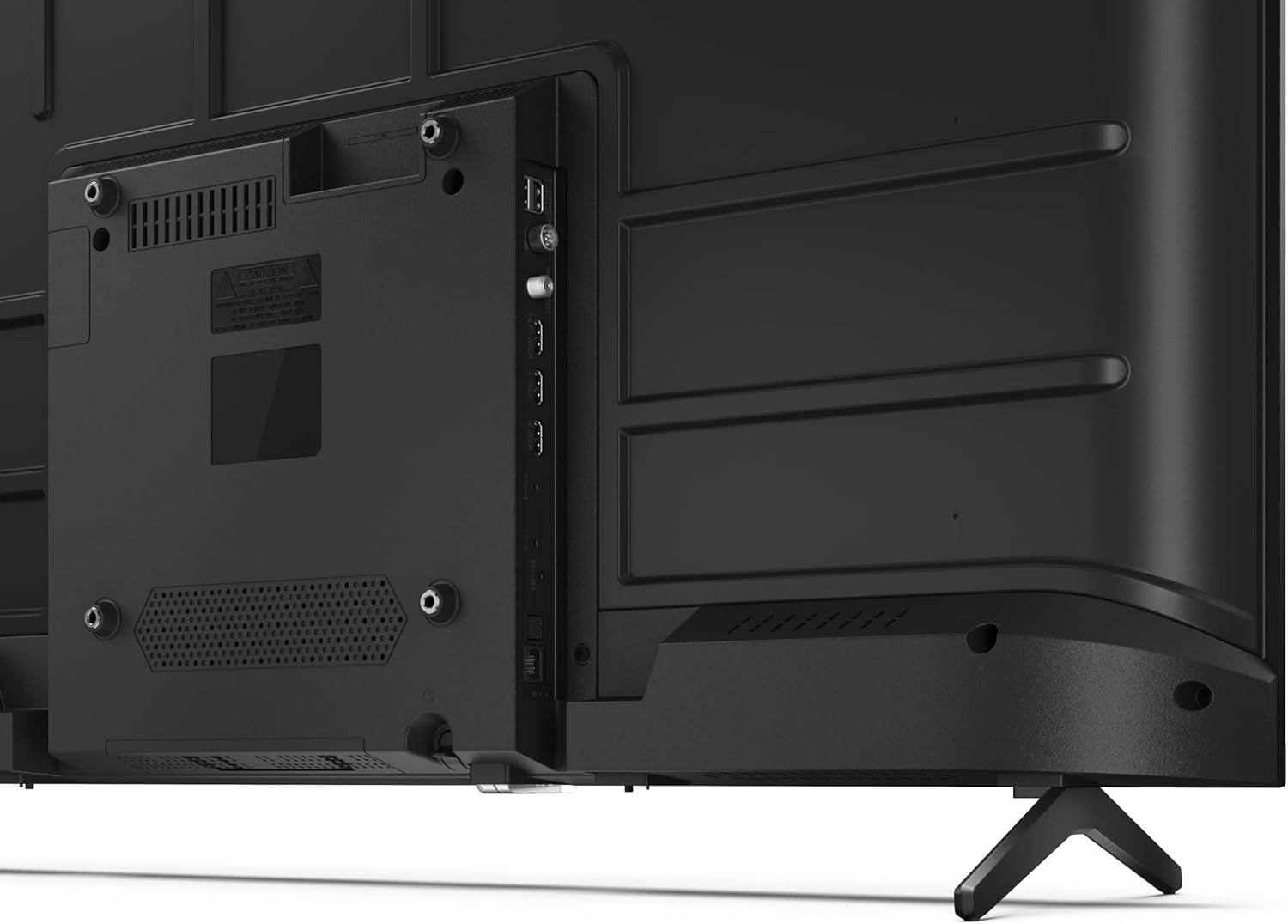
Obrázek 3.3: Detailní view z portů připojení televizoru.
3.4 Počáteční zapnutí a nastavení Google TV
After connecting all necessary cables, plug the power cable into an electrical outlet. Press the power button on the remote control or on the TV. Follow the on-screen instructions to complete the initial setup, including network connection, Google account login, and channel scanning.
4. Provoz
4.1 Funkce dálkového ovládání
The remote control allows you to navigate the TV's features. Common buttons include Power, Volume Up/Down, Channel Up/Down, Input Source, Home (Google TV), Navigation (directional arrows, OK), Back, and Google Assistant.
4.2 Rozhraní Google TV
Your Sharp TV runs on Google TV, providing a personalized home screen with content recommendations from your subscriptions. Use the remote's navigation buttons to browse movies, shows, apps, and your library.

Image 4.1: The Google TV home screen on the Sharp 40HF2265E.
4.3 Výběr vstupu
To switch between connected devices (e.g., HDMI 1, HDMI 2, TV tuner), press the 'Input' or 'Source' button on your remote control and select the desired input from the on-screen menu.
4.4 Nastavení obrazu a zvuku
Access the TV's settings menu to adjust picture modes (Standard, Vivid, Cinema, Game), brightness, contrast, color, and sound modes (Standard, Music, Movie, Speech). The TV supports HDR10 for enhanced contrast and color, and Dolby Digital for rich audio.

Image 4.2: Visual representation of HDR (High Dynamic Range) technology.
4.5 Asistent Google a Chromecast
Use the built-in Google Assistant for voice control. Press the Google Assistant button on your remote and speak your commands, such as searching for content, controlling smart home devices, or getting information. Chromecast allows you to cast content directly from compatible devices like smartphones or tablets to your TV.

Image 4.3: Google Assistant integration for voice commands.
4.6 Připojení Bluetooth
Pair Bluetooth-enabled devices such as headphones or soundbars with your TV for a wireless audio experience. Navigate to the TV's settings menu, select 'Remotes & Accessories', and then 'Pair new device' to connect.
5. Údržba
5.1 Čištění televizoru
Před čištěním vždy odpojte televizor ze zásuvky. K otření obrazovky a těla televizoru použijte měkký, suchý hadřík. V případě odolných skvrn jemně setřeteampOtřete hadřík vodou nebo specializovaným čističem obrazovek. Nikdy nepoužívejte abrazivní čisticí prostředky, vosky ani rozpouštědla.
5.2 Aktualizace softwaru
Your Google TV may receive automatic software updates. Ensure your TV is connected to the internet to receive these updates, which can improve performance and add new features. You can also manually check for updates in the settings menu.
6. Řešení problémů
Pokud narazíte na problémy s televizorem, podívejte se na následující běžná řešení:
- Bez napájení: Zkontrolujte, zda je napájecí kabel bezpečně zapojený do televizoru i do zásuvky. Ujistěte se, že zásuvka je funkční.
- Žádný obraz/zvuk: Ověřte, zda je vybrán správný vstupní zdroj. Zkontrolujte všechna kabelová připojení (HDMI, anténa). Zkuste restartovat televizor.
- Dálkové ovládání nefunguje: Vyměňte baterie (2 AAA). Ujistěte se, že mezi dálkovým ovladačem a infračerveným senzorem televizoru nejsou žádné překážky.
- Problémy s připojením k síti: For Wi-Fi, check your router and ensure the TV is within range. For wired connections, check the Ethernet cable. Try restarting your router and the TV.
- Problémy s kvalitou obrazu: Upravte nastavení obrazu (jas, kontrast, ostrost). Ujistěte se, že vstupní zdroj poskytuje vysoce kvalitní signál.
For more complex issues, consult the comprehensive troubleshooting section in the full digital manual or contact Sharp customer support.
7. Specifikace
Below are the technical specifications for the Sharp 40HF2265E Full HD Google TV:

Image 7.1: Dimensions of the Sharp 40HF2265E TV.
| Funkce | Specifikace |
|---|---|
| Značka | Ostrý |
| Číslo modelu | 40HF2265E |
| Název modelu | Řada HF |
| Modelový rok | 2025 |
| Velikost obrazovky | 40 palce (81 centimetrů) |
| Technologie displeje | LED |
| Rezoluce | 1080p (Full HD) |
| Obnovovací frekvence | 60 Hz |
| Poměr stran | 16:9 |
| Kontrastní poměr | 100000:1 |
| Screen Finish | Matný |
| Doba odezvy | 8 milisekund |
| Technologie podsvícení | LED |
| Supported HDR Format | HDR10, HLG |
| Vylepšení kvality obrazu | Dynamic Contrast, HDR10, HLG |
| Motion Enhancement Technology | Interpolace pohybu |
| Operační systém | Google TV |
| Internet Applications | Apple TV, Google TV, Hulu, Prime Video, YouTube |
| Speciální funkce | Bluetooth, Chromecast, Dolby Digital, HD Tuner |
| Technologie připojení | Ethernet, USB, Wi-Fi |
| Bezdrátová technologie | Bluetooth |
| Verze Bluetooth | 5.0 |
| Screen Mirroring Technology | Chromecast, Google Cast |
| Celkový počet portů HDMI | 3 |
| Total USB 2.0 Ports | 2 |
| Number of Composite Video Inputs | 1 |
| Zvukový vstup | Mini composite/CVBS + audio input |
| Total Audio Output Ports | 2 |
| Režim zvukového výstupu | Stereo |
| Kódování zvuku | DD |
| Integrated Surround Sound Format | Dolby AC-4, Dolby Digital, Dolby Digital Plus |
| Maximální výstupní výkon reproduktoru | 16 wattů (2x8 W) |
| Počet zvukových kanálů | 2.0 |
| Vysílací systém | DVB-T2/C/S/S2 |
| Kódování videa | MKV |
| Rozměry produktu (DxŠxV) | 8.4P x 89.2d x 50.9v cm |
| Hmotnost položky | 5.4 kg |
| Hmotnost bez stojanu | 5.4 kg |
| Šířka základny | 765 milimetrů |
| Standardní montáž VESA | 200 x 200 mm |
| Spotřeba energie | 37 wattů |
| svtage | 230 voltů |
| Remote Control Battery Size | AAA |
| Remote Control Battery Quantity | 2 |
| Parental Control Technology | Kindersicherung Über Google Tv |
| Dostupnost náhradních dílů v EU | 7 roky |
8. Záruka a podpora
8.1 Záruka na produkt
The Sharp 40HF2265E television comes with a 2-year manufacturer's warranty. Please refer to the included Warranty Card for detailed terms and conditions regarding coverage and service. Keep your proof of purchase for warranty claims.
8.2 Zákaznická podpora
If you require further assistance, have questions not covered in this manual, or need technical support, please contact Sharp customer service. Contact information can typically be found on the Warranty Card or the official Sharp webmísto.