
Zavedení
The Cosmic Byte Lumora Tri-Mode Controller is designed to provide a versatile and high-performance gaming experience across multiple platforms. This manual offers detailed instructions for setting up, operating, and maintaining your controller, ensuring you can fully utilize its advanced features.

Image: The Cosmic Byte Lumora controller showcasing its RGB-reveal design.
Vlastnosti produktu
The Lumora controller integrates several key features for enhanced gameplay:
- Stealth Black Finish with RGB-Reveal Artwork: The controller features a stealth black appearance when RGB lighting is off, revealing a vibrant graphic design when RGB is activated.
- Joysticky a spouštěče s Hallovým efektem: Advanced Hall Effect technology provides precise, drift-free control for joysticks and offers both analog and digital modes for triggers.
- Třírežimové připojení: Supports 2.4GHz wireless, Bluetooth, and wired USB-C connections with a 1000Hz polling rate for low-latency input.
- 6osý gyroskop: Built-in motion sensor for gyro-based input in compatible games, enhancing aiming and motion control.
- Dedicated Windows Software: Allows comprehensive customization of button mapping, macros, RGB lighting, vibration, trigger sensitivity, and joystick response.
- Mechanical Buttons with Macro & Turbo Support: Crisp mechanical ABXY buttons and D-Pad provide tactile feedback. Turbo mode and on-board macro recording are available.
- 3.5mm Audio Jack & Adjustable Trigger Travel: Integrated audio jack for wired headsets and a rear switch to adjust trigger pull distance.
- 1300mAh Battery, Replaceable Caps & Ergonomic Design: Offers up to 10 hours of playtime (RGB off), features replaceable joystick caps and D-Pad, ergonomic grips, and dual vibration motors.

Image: Visual representation of the RGB-reveal feature and Hall Effect components.
Nastavení
1. Počáteční nabíjení
Before first use, fully charge the controller using the provided USB-C cable. Connect the USB-C end to the controller and the USB-A end to a power source (e.g., PC, USB wall adapter). The charging indicator will show status and turn off when fully charged.
2. Connecting via Wired USB-C
- Connect the USB-C cable to the controller's port.
- Connect the other end of the cable to a USB port on your PC or compatible device.
- Ovladač bude automaticky detekován a připraven k použití.
3. Připojení přes bezdrátové připojení 2.4 GHz
- Insert the 2.4GHz wireless dongle into a USB port on your PC or compatible device.
- Zapněte ovladač.
- Press and hold the 2.4GHz pairing button (refer to controller diagram for location) until the indicator light flashes rapidly.
- The controller will automatically pair with the dongle. The indicator light will become solid when connected.
4. Připojení přes Bluetooth
- Zapněte ovladač.
- Press and hold the Bluetooth pairing button (refer to controller diagram for location) until the indicator light flashes rapidly.
- On your device (PC, Android, iOS, Mac), go to Bluetooth settings and search for new devices.
- Select "Cosmic Byte Lumora" from the list of available devices.
- The indicator light on the controller will become solid when successfully paired.

Image: Illustration of the tri-mode connectivity options: wired, 2.4GHz wireless, and Bluetooth.
Návod k obsluze
1. Zapnutí/vypnutí
- Zapnutí: Stiskněte tlačítko Domů.
- Vypnutí: Press and hold the Home button for 3-5 seconds. The controller will also automatically power off after a period of inactivity.
2. Ovládání RGB osvětlení
The RGB lighting can be toggled on or off, revealing or concealing the artwork. Specific lighting modes and colors can be customized via the dedicated Windows software.

Image: The controller demonstrating its appearance with RGB lighting off and on.
3. Joysticky a spouštěče s Hallovým efektem
The Hall Effect joysticks provide precise, smooth movement without drift. The Hall Effect triggers can operate in two modes:
- Analogový režim: For gradual input, ideal for racing games or precise acceleration.
- Digitální režim: For instant on/off input, suitable for shooting games where quick response is critical.

Obrázek: Detail view of the Hall Effect triggers on the controller.
4. 6osý gyroskop
The integrated 6-axis gyroscope enables motion-based controls in games that support this feature. This can be used for aiming, steering, or other interactive movements.
5. Macro and Turbo Functions
- Makro: Record a sequence of button presses to a dedicated macro button for complex actions with a single press. Refer to the Windows software section for detailed setup.
- Turbo: Activate Turbo mode on specific buttons to enable rapid, continuous input when held down.

Image: The controller highlighting the macro buttons and the turbo function indicator.
6. Adjustable Trigger Travel
A switch on the rear of the controller allows you to adjust the physical travel distance of the triggers. This enables quick toggling between a short pull for faster response and a longer pull for more nuanced control.
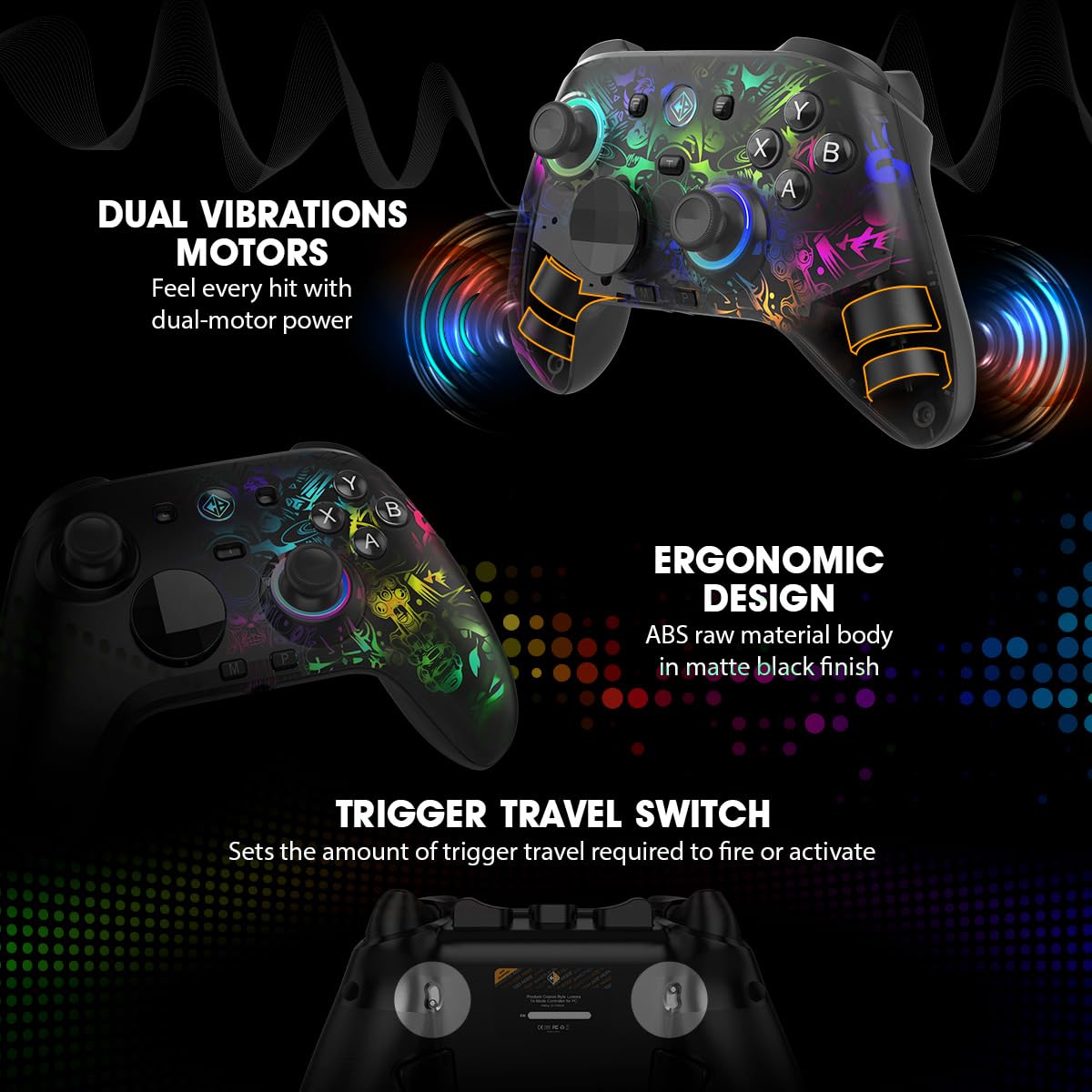
Image: The controller's rear view, illustrating the trigger travel switch.
7. 3.5 mm zvukový konektor
Connect a wired headset to the 3.5mm audio jack for direct audio output and microphone input in supported connection modes (e.g., wired USB-C, 2.4GHz wireless).

Image: The controller's bottom view, highlighting the 3.5mm audio jack and USB-C port.
Windows Software Customization
The dedicated Windows software allows for in-depth customization of your Lumora controller.
1. Downloading and Installation
Visit the official Cosmic Byte website to download the latest Lumora controller software. Follow the on-screen instructions for installation.
2. Možnosti přizpůsobení
- Mapování tlačítek: Přiřaďte funkce libovolnému tlačítku.
- Macro Configuration: Create and assign complex macro sequences.
- RGB osvětlení: Adjust colors, effects, and brightness of the RGB lighting.
- Intenzita vibrací: Customize the strength of the dual vibration motors.
- Citlivost spouště: Fine-tune the response curve of the Hall Effect triggers.
- Joystick Response: Adjust dead zones and response curves for joysticks.
- Aktualizace firmwaru: Keep your controller updated with the latest performance improvements and features.

Image: The controller alongside a depiction of its Windows software interface.
Údržba
1. Čištění
Wipe the controller regularly with a soft, dry cloth. For stubborn dirt, use a slightly damp cloth and ensure the controller is completely dry before use. Avoid using harsh chemicals or abrasive materials.
2. Péče o baterie
- Vyhněte se častému úplnému vybíjení baterie.
- Store the controller in a cool, dry place if not used for extended periods.
- K nabíjení používejte pouze dodaný kabel USB-C nebo jeho certifikovaný ekvivalent.
3. Replacing Joystick Caps and D-Pad
The joystick caps and D-Pad are replaceable. Gently pull the existing caps/D-Pad upwards to remove them and press the new ones firmly into place until they click.
Odstraňování problémů
1. Problémy s připojením
- Kabelové: Ensure the USB-C cable is securely connected to both the controller and the device. Try a different USB port or cable.
- Bezdrátové připojení 2.4 GHz: Ensure the dongle is properly inserted. Re-pair the controller by holding the 2.4GHz pairing button. Check for interference from other wireless devices.
- Bluetooth: Ensure Bluetooth is enabled on your device. Forget the device in your Bluetooth settings and re-pair. Ensure the controller is in Bluetooth pairing mode.
2. Joystick Drift or Incorrect Input
- Calibrate the joysticks using the dedicated Windows software.
- Ensure the controller's firmware is up to date.
- Clean around the base of the joysticks to remove any debris.
3. RGB osvětlení nefunguje
- Check RGB settings in the Windows software.
- Ujistěte se, že má ovladač dostatečné nabití baterie.
4. Baterie se nenabíjí
- Verify the USB-C cable and power source are functional.
- Ensure the charging port on the controller is clean and free of debris.
5. Software Not Detecting Controller
- Ensure the controller is connected to the PC via wired USB-C or 2.4GHz wireless.
- Restart the software and the controller.
- Reinstall the Windows software.
Specifikace
| Značka | Kosmický Byte |
| Název modelu | Lumora |
| Kompatibilní zařízení | Android, iOS, Mac, PC |
| Typ ovladače | Gamepad |
| Technologie připojení | Bluetooth, USB-C, bezdrátové připojení 2.4 GHz |
| Vlastnosti produktu | Ergonomic, Rumble, Wireless, Hall Effect Joysticks & Triggers, Mechanical Buttons, 6-Axis Gyro, Macro & Turbo, RGB Lighting |
| Hardwarová platforma | Stolní počítač, notebook, chytrý telefon |
| Typ zdroje napájení | Napájení z baterie |
| Hmotnost položky | 0.2 kg |
| Rozměry položky | 10 x 8 x 5 centimetrů |
| Kapacita baterie | 1300 XNUMX mAh |
| Míra hlasování | 1000 Hz (kabelové a bezdrátové 2.4 GHz) |
| Audio Jack | 3.5 mm |
| Země původu | Čína |
Informace o záruce
The Cosmic Byte Lumora Tri-Mode Controller comes with a 1-letá záruka against manufacturing defects from the date of purchase. This warranty covers defects in materials and workmanship under normal use. It does not cover damage caused by misuse, accidents, unauthorized modifications, or normal wear and tear. Please retain your proof of purchase for warranty claims.
Podpora
For further assistance, technical support, or warranty claims, please visit the official Cosmic Byte website or contact their customer service. You can typically find contact details and support resources on the manufacturer's webmísto.
Kontaktní údaje výrobce: Cosmic Byte, Prakash Warehousing, S. No.163, Hissa No 1-2-3-4-5A-5B/2/1, Phursungi, Pune 412308, Maharashtra, India.