
Zavedení
The QFX R-58 is a portable retro-style radio designed for versatile audio entertainment. It features AM, FM, and Shortwave (SW) radio bands, Bluetooth connectivity for wireless audio streaming, and a built-in MP3 player supporting USB and TF card media. Power options include a rechargeable internal battery, USB charging, and supplemental solar charging for extended use. This manual provides essential information for operating and maintaining your device.
Klíčové vlastnosti:
- Vícepásmové rádio: Access AM, FM, and Shortwave frequencies.
- Bluetooth připojení: Streamujte zvuk bezdrátově z kompatibilních zařízení.
- Přehrávání MP3: Play music directly from USB drives or TF (MicroSD) cards.
- Dobíjecí baterie: Integrated battery for portable use.
- Solární nabíjení: Supplemental solar panel for charging in well-lit conditions.
- Zatahovací anténa: Improves radio reception.
- Sluchátkový jack: Pro soukromý poslech.
Nastavení
1. Instalace baterie
The QFX R-58 uses a replaceable 18650 lithium-ion battery. Ensure the battery is correctly inserted before first use.
- Najděte přihrádku na baterie na zadní straně rádia.
- Slide the 'OPEN' latch to open the battery cover.
- Vložte baterii 18650 a dbejte na správnou polaritu (+/-).
- Pevně zavřete kryt baterie.
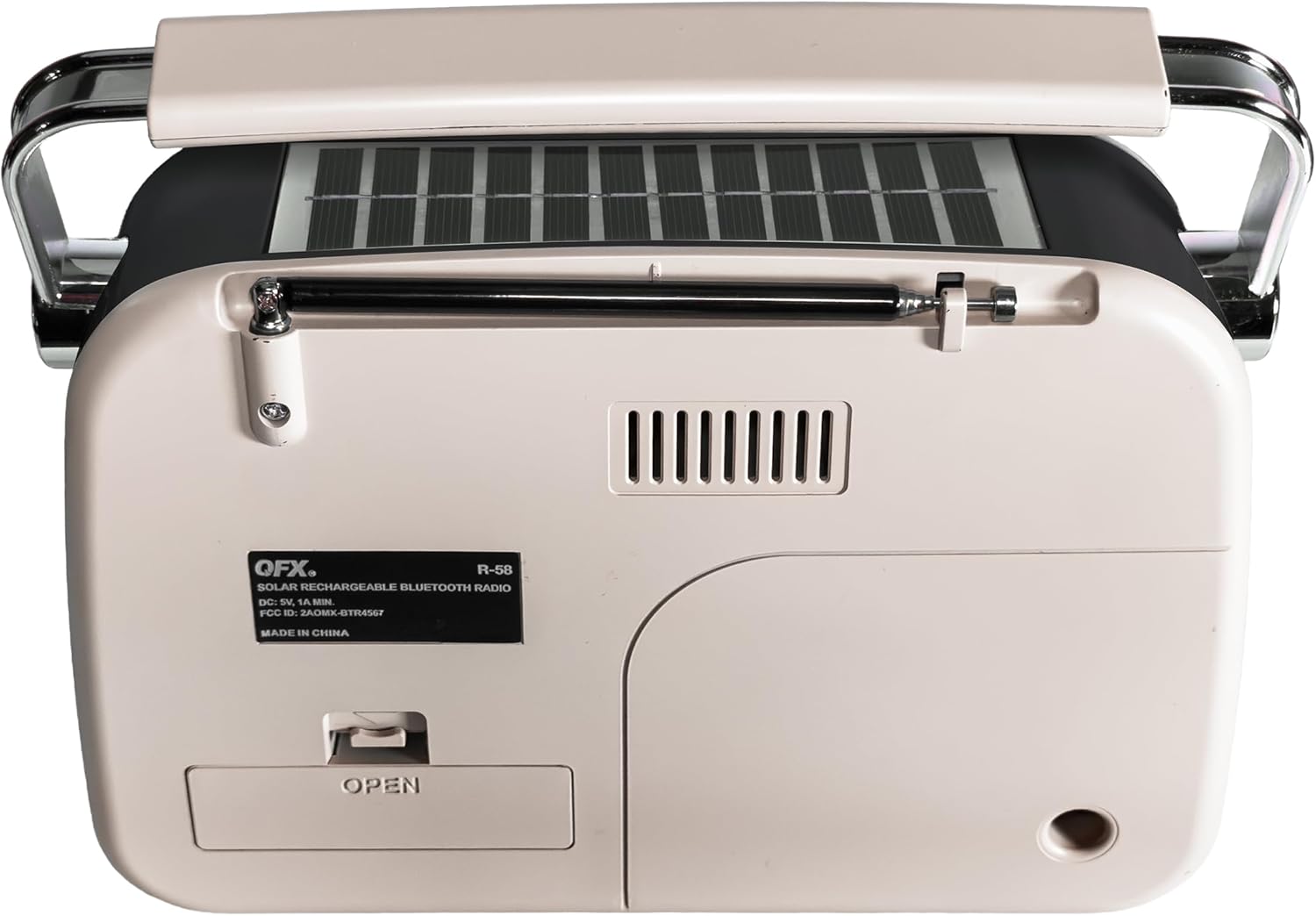
Obrázek 1: Zpět view of the QFX R-58 radio, highlighting the battery compartment.
2. Nabíjení baterie
The radio can be charged via USB-C or its integrated solar panel.
- Nabíjení USB-C: Connect a USB-C cable to the DC-5V input port on the side of the radio and to a compatible USB power source (e.g., wall adapter, computer). The 'CHARGE' indicator light will illuminate.
- Solární nabíjení: Place the radio with the solar panel facing direct sunlight. This provides supplemental charging and is most effective in bright conditions. The 'CHARGE' indicator light may glow dimly or brightly depending on light intensity.

Figure 2: Side panel with USB-C charging port and charge indicator.
3. Prodloužení antény
For optimal radio reception, extend the retractable antenna.
- Gently pull the antenna upwards from its housing until fully extended.
- Adjust the angle and direction of the antenna for the best signal reception.
Návod k obsluze
1. Zapnutí/vypnutí a ovládání hlasitosti
- Zapnout rádio ON, rotate the ON/OFF Volume Wheel upwards.
- Zapnout rádio VYPNUTO, rotate the ON/OFF Volume Wheel downwards until it clicks.
- Adjust the volume by rotating the ON/OFF Volume Wheel.
2. Selecting Modes (Radio/Music/Bluetooth)
Use the toggle switch on the side panel to select your desired mode:
- HUDBA: For USB/TF card MP3 playback.
- FM: Pro příjem FM rádia.
- DOPOLEDNE: For AM radio reception.
- SW: For Shortwave radio reception.
To activate Bluetooth mode, press the 'M' (Mode) button until you hear the Bluetooth pairing prompt.
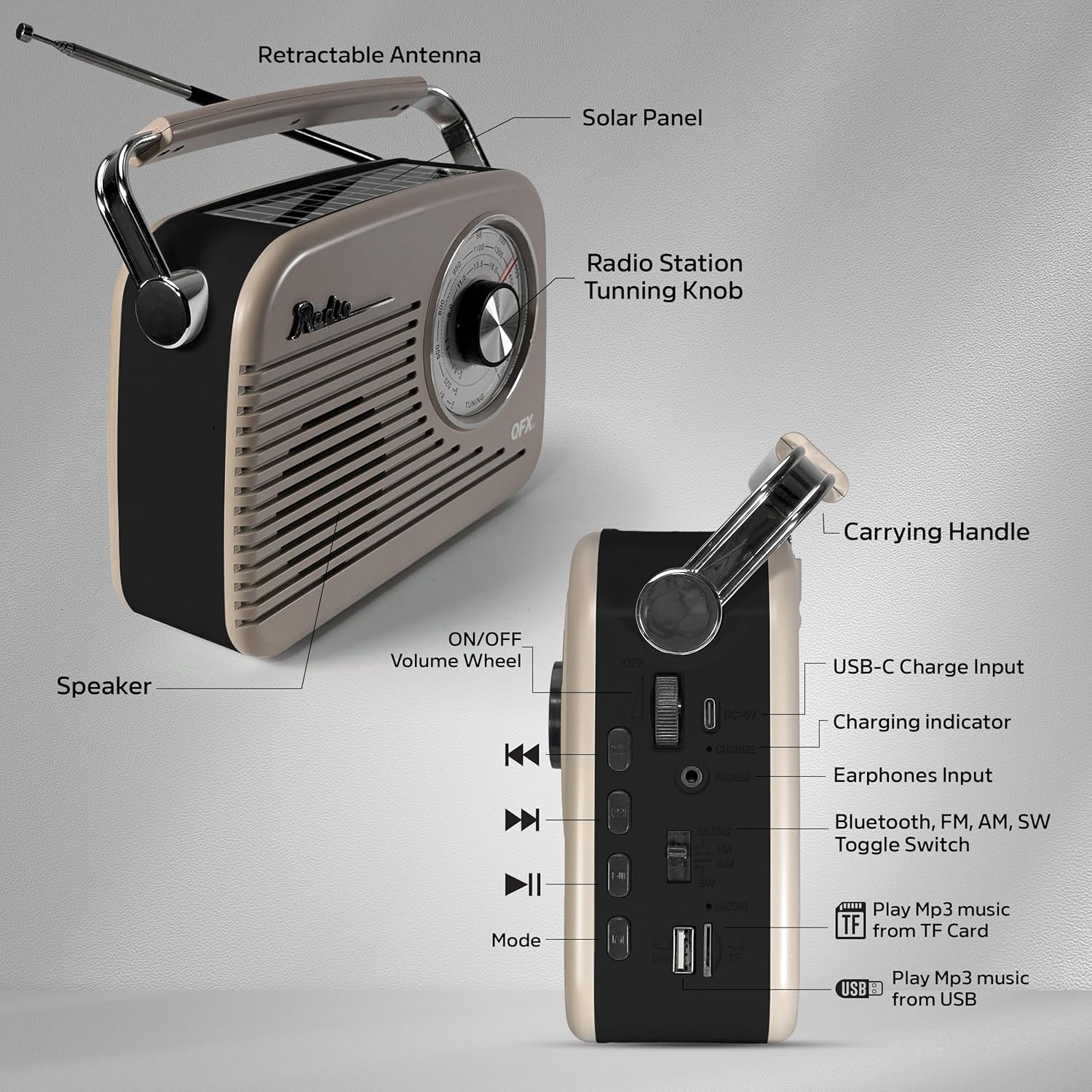
Figure 3: Labeled diagram of the QFX R-58 controls.
3. Radio Operation (AM/FM/SW)
- Select the desired band (FM, AM, or SW) using the toggle switch.
- Otočte Ladicí knoflík on the front panel to scan for radio stations.
- Extend and adjust the retractable antenna for optimal signal clarity.

Figure 4: Adjusting the radio tuning knob.
4. Párování Bluetooth
- Press the 'M' (Mode) button until the radio announces "Bluetooth". The Bluetooth indicator light will flash.
- Na svém mobilním zařízení povolte Bluetooth a vyhledejte dostupná zařízení.
- Select "QFX R-58" from the list of devices to pair.
- Once paired, the radio will confirm with an audible prompt, and the Bluetooth indicator light will remain solid.

Obrázek 5: Párování s mobilním zařízením přes Bluetooth.
5. USB/TF Card MP3 Playback
- Vložte USB flash disk do USB portu nebo TF (MicroSD) kartu do slotu pro TF kartu.
- Switch the mode toggle to 'MUSIC'. The radio will automatically detect and begin playing MP3 files.
- Pro správu hudby použijte tlačítka pro ovládání přehrávání (Předchozí, Přehrát/Pozastavit, Další).
6. Použití sluchátek
- Plug 3.5mm headphones into the 'PHONES' jack on the side panel for private listening.
- Vnitřní reproduktor se automaticky ztlumí, když jsou připojena sluchátka.
Údržba
- Čištění: Use a soft, dry cloth to clean the radio's exterior. Avoid abrasive cleaners or solvents.
- Péče o baterie: If the radio will not be used for an extended period, remove the 18650 battery to prevent leakage. Store the battery in a cool, dry place.
- Solární panel: Keep the solar panel clean and free of dust or debris to ensure efficient supplemental charging.
- Skladování: Store the radio in a dry environment, away from extreme temperatures and direct sunlight when not in use.
Odstraňování problémů
| Problém | Možná příčina | Řešení |
|---|---|---|
| Žádné napájení/Rádio se nezapne | Baterie je vybitá nebo nesprávně nainstalovaná. | Charge the battery via USB-C. Ensure the 18650 battery is correctly inserted with proper polarity. |
| Špatný příjem rádia | Anténa není vysunutá nebo je v oblasti slabý signál. | Fully extend the antenna and adjust its position. Try moving the radio to a different location. |
| Bluetooth není párování | Rádio není v režimu Bluetooth nebo je zařízení příliš daleko. | Ensure the radio is in Bluetooth mode (indicated by flashing light). Keep your device within 10 meters (33 feet) of the radio. |
| USB/TF karta nepřehrává | Incorrect mode selected or unsupported file formát. | Switch to 'MUSIC' mode. Ensure files are in MP3 format. Check if the USB drive or TF card is properly inserted. |
| Solar charging indicator is dim | Nedostatek slunečního světla. | Move the radio to an area with direct, strong sunlight. Note that solar charging is supplemental. |
Specifikace
| Funkce | Detail |
|---|---|
| Značka | QFX |
| Název modelu | R-58-IVY |
| Technologie připojení | Bluetooth |
| Typ reproduktoru | Jeden reproduktor |
| Další funkce | USB Port, TF Card Slot, Solar Panel |
| Rozměry položky (D x Š x V) | 9.06"H x 2.95"Š x 7.87"V |
| Hmotnost položky | 2.31 libry |
| UPC | 606540005392 |
Záruka a podpora
For warranty information and customer support, please refer to the documentation included with your purchase or visit the official QFX webUschovejte si doklad o koupi pro případné reklamace.