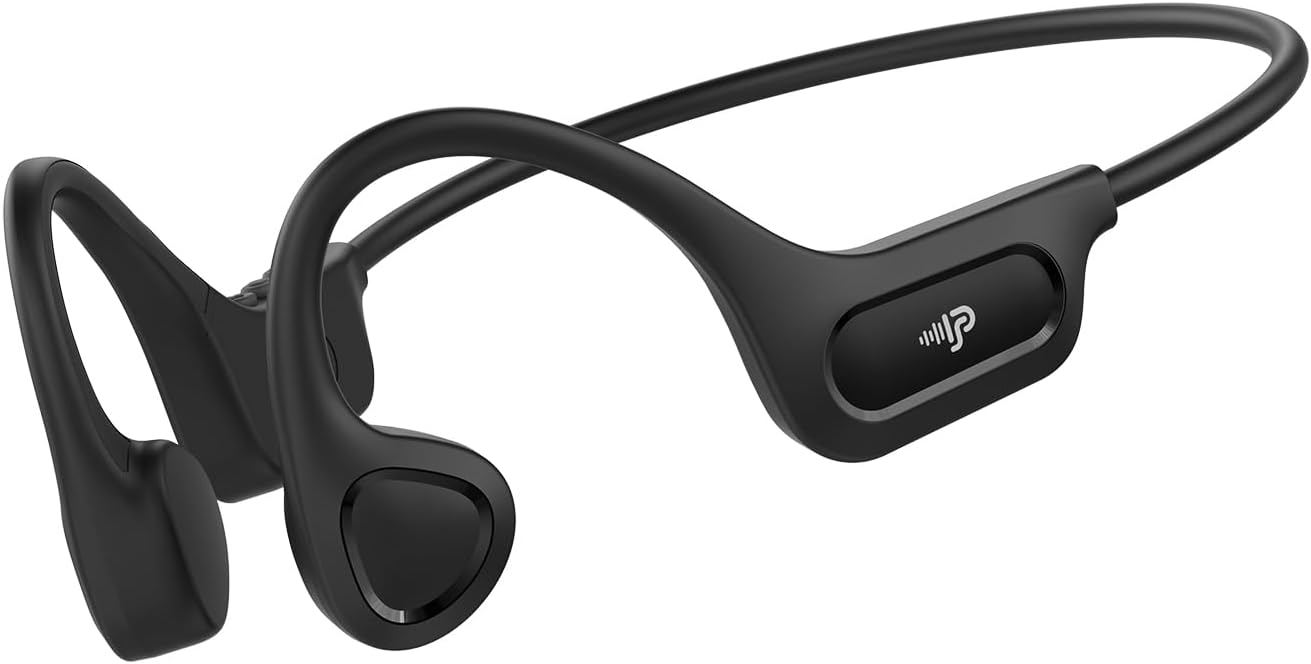
Uživatelská příručka sluchátek PSIER X18 s kostním vedením
Model: X18 | Brand: PSIER
1. Úvod
The PSIER X18 Bone Conduction Headphones offer an innovative audio experience by transmitting sound through your cheekbones, leaving your ears open to ambient sounds. This design enhances situational awareness, making them ideal for outdoor activities, sports, and office environments. Featuring Bluetooth 6.0 connectivity, a lightweight design, and IPX5 waterproofing, these headphones are built for comfort and durability.
Klíčové vlastnosti:
Technologie kostního vedení: Delivers audio through bone vibrations, keeping ear canals open.
Design s otevřeným uchem: Maintains awareness of surroundings for enhanced safety during activities.
Bluetooth 6.0: Provides stable and low-latency wireless connectivity.
Lehké pohodlí: Weighs only 23g with a flexible memory-titanium frame for a secure fit.
IPX5 Vodotěsnost: Resistant to sweat and rain, suitable for various weather conditions (not for swimming).
Prodloužená hrací doba: Až 10 hodiny přehrávání hudby na jedno nabití.
Video: Konecview of PSIER Bone Conduction Headphones, highlighting their suitability for active lifestyles and outdoor use, demonstrating the open-ear design and secure fit.
2. Co je v krabici
The package for your PSIER X18 Bone Conduction Headphones includes all necessary items to get started and ensure a comfortable experience.
PSIER X18 Bone Conduction Earbuds (1 pair)
Adjustable Strap (1)
Earplugs (1 pair)
Nabíjecí kabel typu C (1)
Uživatelský manuál (1)
3. Průvodce nastavením
3.1 Počáteční poplatek
Before first use, fully charge your headphones. Connect the provided Type-C charging cable to the charging port on the headphones and plug the other end into a USB power source. The LED indicator will show charging status and turn off when fully charged.
Image: PSIER X18 headphones connected to a Type-C charging cable.
3.2 Zapnutí/vypnutí
Zapnutí: Press and hold the multi-function button (usually the middle button on the control panel) for 2 seconds until the LED indicator flashes blue and a voice prompt says "Power On".
Vypnout: Press and hold the multi-function button for 3 seconds until the LED indicator flashes red and a voice prompt says "Power Off".
3.3 Párování Bluetooth
Ujistěte se, že jsou sluchátka vypnutá.
Press and hold the multi-function button for 5 seconds until the LED indicator flashes red and blue alternately, and a voice prompt says "Pairing". This indicates the headphones are in pairing mode.
Na svém zařízení (chytrý telefon, tablet, počítač) povolte Bluetooth a vyhledejte dostupná zařízení.
Select "X18" from the list of available devices.
Once connected, the LED indicator will flash blue slowly, and a voice prompt will confirm "Connected".
Video: Demonstrates powering on and pairing the PSIER Bone Conduction Headphones with a mobile device. The user presses the power button, then navigates to Bluetooth settings on their phone to connect to "X12" (note: model name in video is "X12", product is "X18").
3.4 Nošení sluchátek
Place the headphones with the transducers resting on your cheekbones, just in front of your ears. The neckband should rest comfortably behind your head. Adjust the fit using the included adjustable strap if needed to ensure a snug and secure fit, especially during active use.
Image: A person demonstrating the secure and comfortable fit of the PSIER X18 Bone Conduction Headphones during a run.
4. Návod k obsluze
4.1 Přehrávání hudby
Přehrát/pozastavit: Stiskněte jednou multifunkční tlačítko.
Další skladba: Dvakrát stiskněte multifunkční tlačítko.
Předchozí skladba: Třikrát stiskněte multifunkční tlačítko.
Zvýšit hlasitost: Stiskněte tlačítko Hlasitost +.
Snížit hlasitost: Stiskněte tlačítko Hlasitost -.
4.2 Správa hovorů
Přijmout/ukončit hovor: Stiskněte jednou multifunkční tlačítko.
Odmítnout hovor: Stiskněte a podržte multifunkční tlačítko po dobu 2 sekund.
Aktivovat Voice Assistant: Press the multi-function button twice quickly when not on a call.
4.3 Situational Awareness
The open-ear design allows you to hear your audio while remaining aware of your surroundings. This is crucial for safety during outdoor activities like running or cycling, where hearing traffic or other warnings is important.
Image: A person cycling with PSIER X18 headphones, highlighting the open-ear design for environmental awareness.
5. Údržba
5.1 Čištění
Otřete sluchátka měkkým, damp cloth after each use, especially after workouts, to remove sweat and dirt. Do not use abrasive cleaners or submerge the headphones in water.
5.2 Skladování
Store the headphones in a cool, dry place away from direct sunlight and extreme temperatures. Avoid placing heavy objects on them to prevent damage to the frame.
5.3 Vodotěsnost (IPX5)
The PSIER X18 headphones are IPX5 rated, meaning they are protected against low-pressure water jets from any direction. This makes them suitable for use during light rain and sweaty workouts. They are not designed for submersion in water or for swimming.
Image: PSIER X18 headphones being splashed with water, demonstrating their IPX5 water resistance.
6. Řešení problémů
6.1 Bez napájení
Ujistěte se, že jsou sluchátka plně nabitá.
Try using a different charging cable and power adapter.
6.2 Nelze spárovat se zařízením
Make sure the headphones are in pairing mode (LED flashing red and blue alternately).
Ujistěte se, že je na vašem zařízení povoleno Bluetooth a že je v dosahu (až 10 metrů).
Zapomeňte na „X18“ ze seznamu Bluetooth vašeho zařízení a zkuste spárování znovu.
Restartujte sluchátka i zařízení.
6.3 Low Sound Quality or No Sound
Upravte hlasitost na sluchátkách i na připojeném zařízení.
Ujistěte se, že jsou snímače správně umístěny na lícních kostech.
Check for any obstructions between the transducers and your skin.
Přesuňte se blíže k připojenému zařízení, abyste předešli rušení.
If using earplugs, ensure they are inserted correctly to enhance sound perception.
The PSIER X18 Bone Conduction Headphones come with a 1-year manufacturer's warranty covering defects in materials and workmanship. Please retain your proof of purchase for warranty claims.
8.2 Zákaznická podpora
For further assistance, troubleshooting, or warranty inquiries, please contact PSIER customer support through the retailer's platform or visit the official PSIER webstránky pro kontaktní údaje.
Ask a question about this manual
Ask about setup, troubleshooting, compatibility, parts, safety, or missing instructions. Manuals+ will review the question and use this page’s manual context to help answer it.