
1. Konec produktuview
The PUSOKEI 4K HD WiFi Action Camera is a versatile handheld video recorder designed for capturing high-quality footage in various environments, from sports activities to travel vlogs. It features a 180° rotating lens, a 1.31-inch display, and built-in WiFi for easy sharing and management of your recordings.
Klíčové vlastnosti:
- 4K HD Video Quality: Records clear and vibrant moments in 4K resolution.
- Kompaktní a přenosný design: Easy to carry for various recording needs.
- 1.31 Inch Screen: Intuitivní rozhraní pro snadnou navigaci a ovládání.
- Otočný objektiv o 180°: Allows for unique angles and creative compositions.
- WiFi připojení: Enables quick sharing, storage, and editing of footage via a mobile app.
- Nahrávání ve smyčce: Neustále nahrává a přepisuje nejstarší files, když je paměťová karta plná.
- LED výplňové světlo: Suitable for both day and night use, enhancing image quality in low light.
Obsah balení:
- 1 x PUSOKEI Handheld Camera
- 2 x USB kabely
- 1 x Návod k použití
Note: A Small Memory Card (up to 256GB) is required for recording and is not included in the package.

Image: PUSOKEI 4K HD WiFi Action Camera showcasing its main features like 4K HD resolution, 180° rotating lens, one-click recording, loop recording, business back clamp, ultra-low power consumption, and small memory card support.
2. Nastavení
2.1 Nabíjení baterie
The camera is equipped with a built-in high-capacity battery. Before first use, fully charge the camera using the provided USB Type-C cable.
- Connect one end of the USB Type-C cable to the camera's charging port.
- Connect the other end to a standard USB power adapter (not included) or a computer's USB port.
- Rozsvítí se kontrolka nabíjení. Po dokončení nabíjení zhasne nebo změní barvu.

Image: The PUSOKEI Action Camera highlighting its Type-C charging port and indicating extended battery life.
2.2 Vložení paměťové karty
A small memory card (MicroSD card) is required to store recordings. The camera supports cards up to 256GB.
- Najděte slot pro paměťovou kartu na boční straně fotoaparátu.
- Opatrně vložte kartu MicroSD zlatými kontakty dolů, dokud nezacvakne na místo.
- Chcete-li kartu vyjmout, lehce ji zatlačte, dokud nevyskočí.

Image: The PUSOKEI Action Camera illustrating the insertion of a small memory card, emphasizing support for up to 256GB for secure data transmission and storage.
2.3 Zapnutí/vypnutí
- Zapnutí: Press and hold the Power button (usually marked with a power symbol) for a few seconds until the screen illuminates.
- Vypnutí: Znovu stiskněte a podržte tlačítko napájení, dokud se obrazovka nevypne.
3. Návod k obsluze
3.1 Basic Controls and Screen Navigation
The camera features a 1.31-inch screen for live view and menu navigation. Use the physical buttons on the device to navigate through menus and select options.

Image: The PUSOKEI Action Camera displaying its 1.3-inch HD screen, illustrating its adjustable recording angle for wider viewa snadnost použití.
3.2 Nahrávání videa
- Ujistěte se, že je vložena naformátovaná paměťová karta.
- Press the Record button (often marked with a red dot or camera icon) to start recording.
- Opětovným stisknutím tlačítka Nahrávání nahrávání zastavíte.
- The camera records in 4K HD resolution by default, providing high-quality footage.

Image: Comparison showing the difference between standard quality and 4K quality footage captured by the PUSOKEI Action Camera, highlighting its 4K Ultra HD display capabilities.
3.3 Using the 180° Rotating Lens
The camera's lens can be manually rotated 180 degrees to capture footage from various angles, including forward-facing, backward-facing, or any angle in between.
- Gently rotate the lens module to your desired angle.
- The screen display will adjust automatically to the lens orientation.
- This feature is ideal for vlogging, self-recording, or capturing unique perspectives.
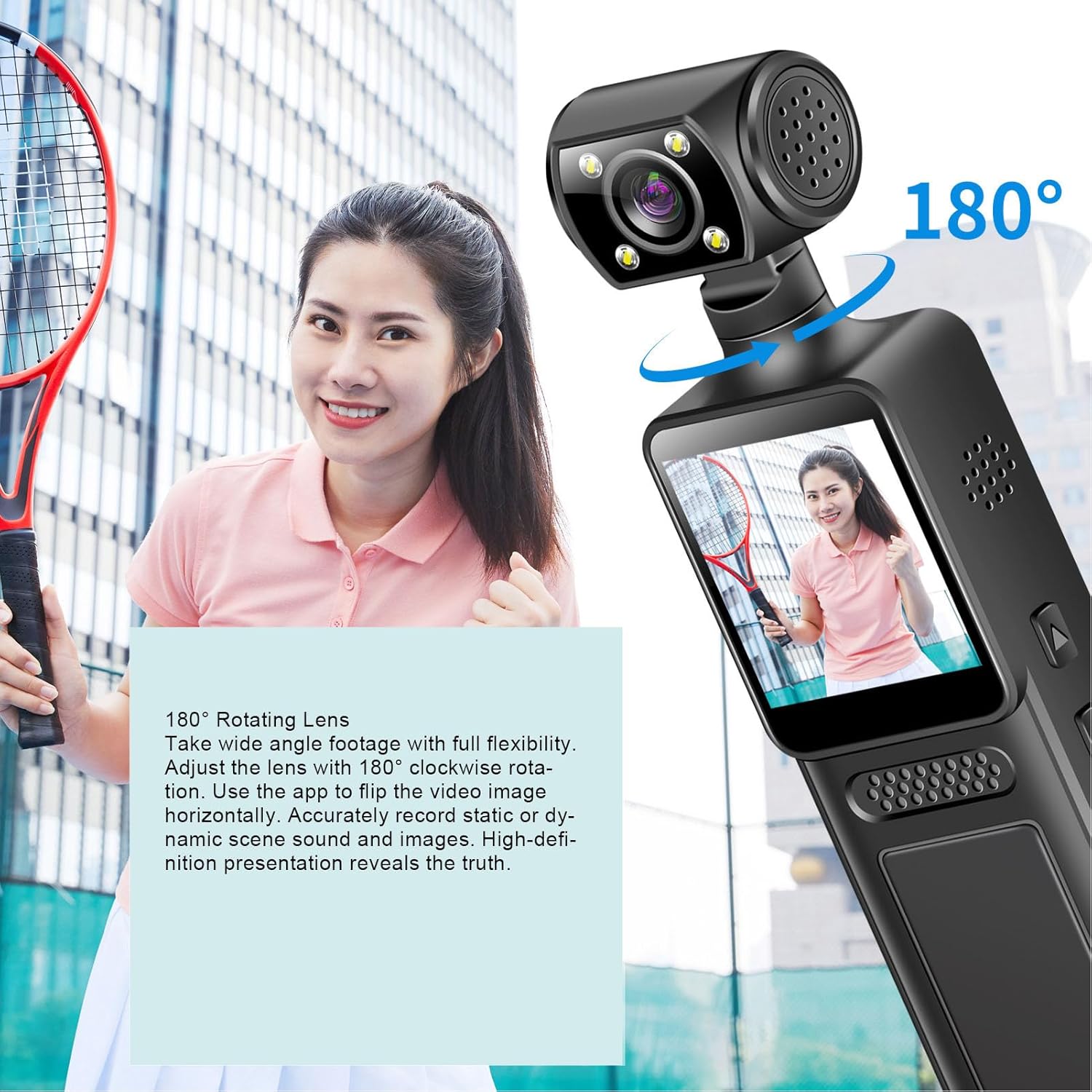
Image: The PUSOKEI Action Camera demonstrating its 180° rotating lens, allowing for wide-angle footage with full flexibility and the ability to flip video images horizontally via the app.
3.4 Připojení k Wi-Fi a používání aplikací
The camera features built-in WiFi for wireless connection to your smartphone or tablet. This allows for real-time viewing, downloading, and sharing of your footage.
- Download the official PUSOKEI camera app from your device's app store (iOS/Android).
- Turn on WiFi on your camera via the settings menu.
- On your smartphone, connect to the camera's WiFi network (SSID and password usually displayed on the camera screen).
- Open the app to automatically connect and view foo v reálném časetage, or download recordings to your phone.

Image: The PUSOKEI Action Camera demonstrating mobile wireless connectivity, showing how to connect to a smartphone app to view foo v reálném časetage or download recordings.
3.5 Nahrávání ve smyčce
The loop recording feature allows the camera to continuously record. When the memory card is full, the oldest filebudou automaticky přepsány novými nahrávkami.
- Access the camera's settings menu.
- Locate the "Loop Recording" option and enable or disable it as desired.
- Set the desired loop recording duration (e.g., 1, 3, 5 minutes) if available.
3.6 Using the LED Fill Light
The integrated LED fill light provides additional illumination for recording in low-light conditions, ensuring clear image quality.
- Locate the button or menu option to activate the LED fill light.
- Toggle the light on or off as needed for your recording environment.

Image: The PUSOKEI Action Camera demonstrating its LED fill light, suitable for both day and night use, ensuring clear video in dark environments and vivid color during daylight.
3.7 Body-Worn Camera Usage
The compact design and included back clamp allow the camera to be worn on clothing, making it suitable for sports, travel, or security applications.
- Attach the camera securely to your clothing using the integrated back clamp.
- Ensure the lens is oriented correctly for the desired recording angle.
- Verify the camera is recording before engaging in activities.
4. Údržba
Proper maintenance ensures the longevity and optimal performance of your PUSOKEI Action Camera.
4.1 Čištění fotoaparátu
- Čočka: Používejte měkký hadřík bez žmolků, speciálně určený pro objektivy fotoaparátů. Vyhněte se agresivním chemikáliím.
- Obrazovka: Wipe gently with a microfiber cloth. Do not press hard.
- Tělo: Use a soft, dry cloth to wipe the camera body. If necessary, slightly damphadřík navlhčete vodou a poté ihned otřete dosucha.
- Ujistěte se, že všechny porty jsou bez prachu a nečistot.
4.2 Péče o baterii
- Vyhněte se častému úplnému vybíjení baterie.
- Store the camera with a partially charged battery (around 50%) if not used for extended periods.
- Nevystavujte fotoaparát extrémním teplotám.
4.3 Skladování
- Store the camera in a cool, dry place away from direct sunlight and moisture.
- Use a protective case to prevent scratches and impacts.
5. Řešení problémů
Pokud narazíte na problémy s fotoaparátem, postupujte podle následujících běžných kroků pro řešení potíží.
| Problém | Možná příčina | Řešení |
|---|---|---|
| Fotoaparát se nezapne. | Slabá baterie; vadná baterie; problém s tlačítkem napájení. | Charge the battery fully. Try a different charging cable/adapter. If problem persists, contact support. |
| Nelze nahrávat video. | No memory card; memory card full; memory card error; incorrect settings. | Insert a memory card. Format the memory card (this will erase all data). Check available storage. Verify recording settings. |
| Špatná kvalita videa. | Znečištěný objektiv; špatné světelné podmínky; nesprávné nastavení rozlišení. | Clean the lens. Activate the LED fill light in low light. Ensure 4K resolution is selected in settings. |
| Problémy s připojením k Wi-Fi. | WiFi not enabled; incorrect password; app issues; interference. | Ensure camera WiFi is on. Re-enter WiFi password. Restart camera and phone. Try connecting in a different location. |
| Fotoaparát se zasekne nebo přestane reagovat. | Software glitch; memory card issue. | Perform a soft reset by holding the power button until it turns off. If unresponsive, use a pin to press the reset button (if available). Remove and reinsert the memory card. |
6. Specifikace
| Funkce | Detail |
|---|---|
| Číslo modelu | PUSOKEIpqi950c8n7 |
| Rozlišení videa | 4K HD |
| Velikost obrazovky | 1.31 palců |
| Rotace objektivu | 180 stupňů |
| Konektivita | WiFi, USB Type-C |
| Typ baterie | Vestavěná Li baterie |
| Kapacita baterie | 1000 XNUMX mAh |
| Podpora paměťových karet | Up to 256GB (MicroSD, not included) |
| Hmotnost položky | 6.1 unce |
| Rozměry balení | 6.3 x 3.15 x 1.97 palce |
| Výrobce | PUSOKEI |
7. Záruka a podpora
Informace o záruce a zákaznické podpoře naleznete v dokumentaci dodané s vaším nákupem nebo se obraťte přímo na prodejce/výrobce.
- Výrobce: PUSOKEI
- Kontakt: Please refer to the official PUSOKEI website or your purchase platform for specific support contact details.