
1. Bezpečnostní informace a varování
Před instalací a použitím si pečlivě přečtěte všechny bezpečnostní pokyny. Nedodržení těchto pokynů může vést k úrazu elektrickým proudem, požáru nebo vážnému zranění.
1.1 Všeobecné bezpečnostní pokyny
- Kvalifikovaná instalace: Instalaci musí provést kvalifikovaný elektrikář v souladu se všemi místními a národními elektrotechnickými předpisy a předpisy.
- Ověření napájení: Ověřte, že svtage and power supply match the product specifications (380V AC, 32A, 22kW).
- Kontrola poškození: Do not use the device if it is damaged. Inspect the wallbox, cable, and connectors for any signs of damage before each use.
- Žádná úprava: Do not disassemble or modify the charging terminal. Unauthorized modifications will void the warranty and may pose safety risks.
- Bezpečnost dětí: Udržujte zařízení mimo dosah dětí.
- Porucha: In case of malfunction, immediately discontinue use and contact technical service.
1.2 Manufacturer's Responsibility
The manufacturer cannot be held responsible for any material or personal damage resulting from incorrect installation, non-compliant use, unauthorized modification of the device, or non-compliance with safety regulations. Any intervention performed by an unqualified person voids the warranty.
2. Konec produktuview
The JATRHG K1 S1 EV Wallbox Kit is a robust and secure charging solution designed for electric vehicles, particularly suitable for outdoor public parking lots and similar high-traffic, weather-exposed environments. It features a 22kW, 32A three-phase charging terminal integrated into a support pole, along with a reinforced waterproof socket.
2.1 Klíčové vlastnosti
- Integrovaný design: Charging terminal integrated into a durable support pole for simplified installation and future expansion.
- Vysoký výstupní výkon: 22kW, 32A three-phase charging for fast and efficient EV charging.
- Prodloužený kabel: 8-meter charging cable for convenient reach.
- Reinforced Waterproof Socket: Provides an additional power outlet for outdoor electricity needs (e.g., garden tools, second EV charging).
- Inteligentní ovládání: Wi-Fi app connectivity for managing charging sessions, tracking history, and customizing settings.
- Odolná konstrukce: Designed for outdoor use with features like key lock, elasticity, waterproofing, LED indicators, and UV protection.
2.2 Komponenty produktu
The kit includes the wallbox charging terminal, support pole, 8-meter charging cable, and a reinforced waterproof auxiliary socket.
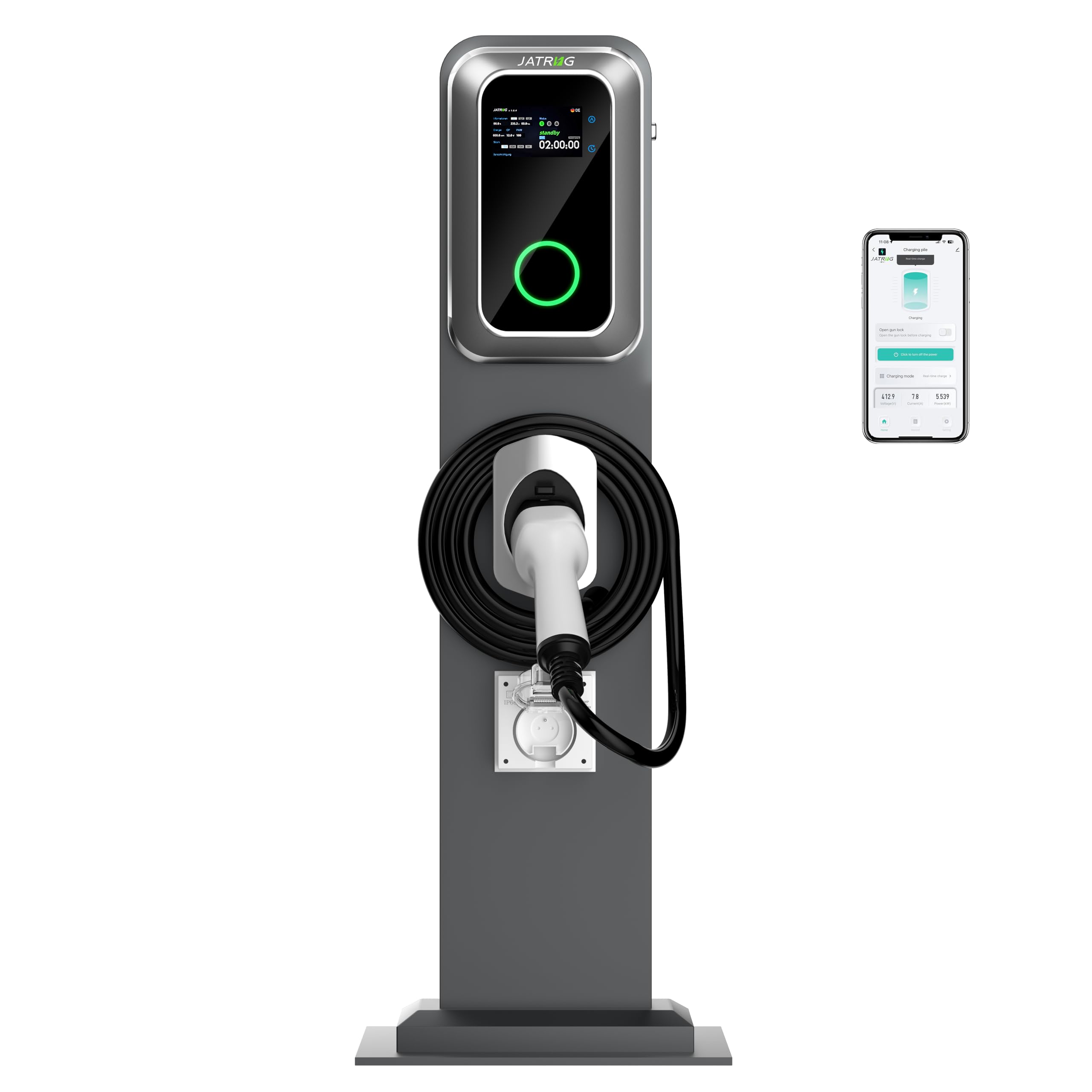
Image: The JATRHG K1 S1 EV Wallbox Kit, showing the integrated charging terminal, coiled 8-meter cable, and the auxiliary waterproof socket mounted on the support pole.

Image: The JATRHG K1 S1 EV Wallbox Kit installed in a residential driveway, demonstrating its aesthetic integration and practical use for home charging.
3. Nastavení a instalace
Installation of the JATRHG K1 S1 EV Wallbox Kit requires professional expertise. It must be carried out by a qualified electrician to ensure safety and compliance with electrical standards.
3.1 Kontrolní seznam před instalací
- Ensure the installation site is suitable for outdoor use and has adequate space.
- Verify that the electrical supply meets the 380V AC, 32A, 22kW three-phase requirements.
- Ověřte, zda jsou k dispozici veškeré potřebné nástroje a bezpečnostní vybavení.
- Review local building and electrical codes.
3.2 Installation Steps (Summary for Qualified Electricians)
- Mounting the Support Pole: Securely anchor the support pole to a stable surface using appropriate fasteners. Ensure it is level and plumb.
- Připojení kabeláže: Open the access panel on the wallbox. Connect the three-phase power supply (L1, L2, L3, Neutral, Ground) to the designated terminals inside the wallbox. Ensure all connections are tight and secure.
- Správa kabelů: Route the power cables and charging cable neatly within the pole structure.
- Auxiliary Socket Wiring: Connect the reinforced waterproof auxiliary socket to the internal wiring as per the electrical diagram.
- Testování: Before closing the panel, perform continuity and insulation resistance tests. Once confirmed safe, restore power and test the charging functionality.
- Konečná montáž: Close and secure all access panels.

Obrázek: Podrobný view of the internal wiring and cable management within the wallbox and support pole, illustrating the connection points for power input and the charging cable.
4. Návod k obsluze
The JATRHG K1 S1 EV Wallbox is designed for user-friendly operation, primarily controlled via its integrated display and a dedicated Wi-Fi app.
4.1 Zahájení nabíjení
- Connect Vehicle: Plug the charging cable into your electric vehicle's charging port. Ensure a secure connection.
- Zahájení nabíjení: The wallbox display will show charging status. You can initiate or schedule charging via the Wi-Fi app or, if available, directly from the wallbox interface.
- Sledovat průběh: The display and app will show real-time charging information, including voltage, current, power, and session duration.
4.2 Using the Wi-Fi App
The dedicated Wi-Fi app allows for comprehensive management of your charging terminal.
- Stáhnout a připojit: Download the app (refer to product packaging for QR code or app store name) and follow the in-app instructions to connect to your wallbox via Wi-Fi.
- Manage Sessions: Start, stop, or schedule charging sessions remotely.
- Track History: View detailed charging session history, including dates, times, duration, and energy consumed (kWh).
- Přizpůsobit nastavení: Adjust charging modes, current limits, and other preferences.
- Data v reálném čase: Access live electrical information such as voltage, proud a výkon.

Image: Screenshots of the JATRHG Wi-Fi app interface, demonstrating features like real-time charging status, voltage, current, power display, and a detailed record of past charging sessions.
4.3 Using the Reinforced Waterproof Socket
The auxiliary socket can be used independently for other outdoor electrical needs or to charge a second electric vehicle with a compatible portable charger.
- Ensure the socket cover is securely closed when not in use to maintain its waterproof rating.
- Only use appliances or chargers that are compatible with the socket's electrical specifications.
5. Údržba
Regular maintenance ensures the longevity and safe operation of your JATRHG EV Wallbox Kit.
- Čištění: Clean the exterior of the wallbox and pole with a soft, damp tkanina. Nepoužívejte abrazivní čisticí prostředky nebo rozpouštědla.
- Kontrola kabelů: Periodically inspect the charging cable and connectors for any signs of wear, cuts, or damage. Replace immediately if damage is found.
- Socket Cover: Ensure the waterproof cover for the auxiliary socket is always properly closed when not in use.
- Odborná kontrola: It is recommended to have a qualified electrician inspect the installation annually to ensure all electrical connections remain secure and the system operates safely.
6. Řešení problémů
Tato část obsahuje řešení běžných problémů, se kterými se můžete setkat. V případě problémů, které zde nejsou uvedeny, nebo pokud problémy přetrvávají, kontaktujte technickou podporu.
6.1 Běžné problémy a řešení
- No Power to Wallbox:
- Check the circuit breaker in your main electrical panel.
- Ensure the wallbox is properly connected to the power supply.
- Nabíjení se nezačíná:
- Ensure the charging cable is securely plugged into both the wallbox and the vehicle.
- Check the vehicle's charging settings.
- Verify there are no error messages on the wallbox display or in the app.
- Pomalé nabíjení:
- Check the charging mode settings in the app; ensure it's not set to a lower power mode.
- Verify the vehicle's charging capacity and settings.
- Ensure the electrical supply is stable and providing the expected voltage a aktuální.
- Problémy s připojením aplikace:
- Ujistěte se, že je vaše mobilní zařízení připojeno ke stabilní síti Wi-Fi.
- Restartujte aplikaci a/nebo mobilní zařízení.
- Check if the wallbox's Wi-Fi module is active.
7. Specifikace
Detailed technical specifications for the JATRHG K1 S1 EV Wallbox Kit.

Image: Diagram showing the key dimensions of the JATRHG K1 S1 EV Wallbox Kit, including the wallbox unit, support pole, and cable length.
| Specifikace | Hodnota |
|---|---|
| Výrobce | TAMITO SAS |
| Značka | JATRHG |
| Číslo modelu (OEM) | K1 |
| Reference výrobce | K1_220_8M |
| Hmotnost položky | 16 kg |
| Rozměry produktu | 20 x 37 x 135 cm (Wallbox: 24.5 x 8.5 x 36 cm) |
| Místo instalace | Venkovní |
| Ampvymazat | 32 Ampere |
| svtage | 380 voltů (střídavého proudu) |
| Wattage | 22 kW |
| Délka kabelu | 8 metrů |
| Speciální funkce | Key Lock, Elastic, Waterproof, LED, UV Protection |
8. Záruka a podpora
The JATRHG K1 S1 EV Wallbox Kit comes with a manufacturer's warranty. Please refer to your purchase documentation for specific warranty terms and duration.
8.1 Informace o záruce
- Záruka se vztahuje na vady materiálu a zpracování při běžném používání.
- Any intervention or repair performed by an unqualified person will void the warranty.
- Damage resulting from incorrect installation, non-compliant use, or unauthorized modification is not covered by the warranty.
8.2 Technická podpora
For technical assistance, warranty claims, or any questions regarding the operation or maintenance of your JATRHG EV Wallbox Kit, please contact the technical service department of JATRHG or your authorized dealer.
When contacting support, please have your product model number (K1_220_8M) and proof of purchase readily available.