
Zavedení
Děkuji za nákupasing the FERIETELF T29 Drone with Camera. This manual provides essential information for the safe operation, setup, and maintenance of your drone. Please read this manual thoroughly before operating the drone to ensure proper use and to prevent damage or injury.
The T29 Drone features a 1080P HD camera, WiFi FPV live video transmission, voice and gesture control, and a foldable design for portability. It comes with two batteries and a carrying case for convenience.
Bezpečnostní pokyny
Při provozu dronu vždy upřednostňujte bezpečnost. Nedodržení těchto pokynů může vést ke zranění, poškození dronu nebo poškození majetku.
- Provozujte dron v otevřeném prostoru, mimo dosah lidí, zvířat, budov a překážek.
- Do not fly near airports or restricted airspace. Check local regulations before flying.
- Udržujte s dronem neustále vizuální kontakt.
- Vyhněte se létání za silného větru nebo nepříznivých povětrnostních podmínek.
- Před každým letem se ujistěte, že jsou baterie plně nabité a správně nainstalované.
- Udržujte prsty a volné oblečení v dostatečné vzdálenosti od rotujících vrtulí.
- Neovládejte dron pod vlivem alkoholu nebo drog.
- Děti by měly dron ovládat pouze pod přímým dohledem dospělé osoby.
Obsah balení
Ověřte, zda jsou v balení přítomny všechny položky:
- Dron FERIETELF T29
- Dálkový ovladač
- 1080P HD kamera (integrovaná)
- Dobíjecí baterie pro drony (x2)
- USB nabíjecí kabel
- Náhradní vrtule
- Kryty vrtule
- Šroubovák
- Uživatelská příručka (tento dokument)
- Přepravní pouzdro
Nastavení
1. Rozložení dronu
Gently unfold the drone arms until they lock into position. Ensure all four arms are fully extended.
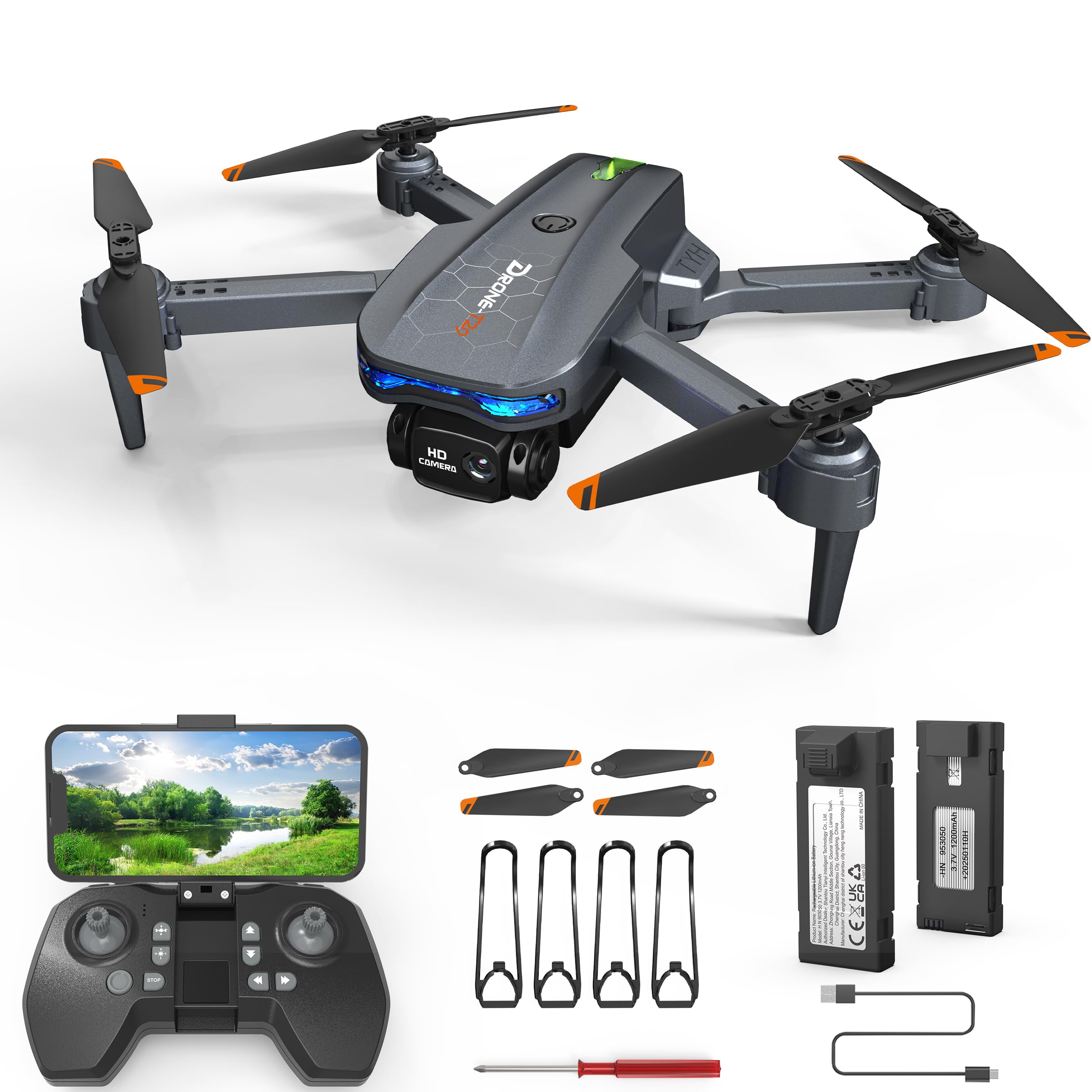
Image: The FERIETELF T29 Drone with its arms unfolded, ready for flight. The propellers are visible at the end of each arm.
2. Installing Propeller Guards
For beginner pilots, it is recommended to install the propeller guards. Attach each guard to the corresponding motor arm by snapping it into place.
3. Nabíjení baterie dronu
Connect the drone battery to the USB charging cable. Plug the USB cable into a 5V/1A USB adapter (not included). The indicator light on the cable will show charging status. A full charge typically takes 60-90 minutes.
- Indikátor nabíjení: Red light ON during charging, OFF when fully charged.
Důležité: Always use the provided charging cable. Do not leave batteries unattended while charging. Disconnect once fully charged.
4. Instalace baterie dronu
Insert the fully charged battery into the battery compartment on the back of the drone until it clicks securely into place.
5. Instalace baterií do dálkového ovladače
Open the battery cover on the back of the remote controller. Insert 3 x AAA batteries (not included) according to the polarity markings. Close the battery cover.
Návod k obsluze
1. Zapněte a spárujte
- Umístěte dron na rovný a rovný povrch.
- Stiskněte a podržte tlačítko napájení na dronu, dokud nezačnou blikat kontrolky.
- Turn on the remote controller. The indicator light on the remote will flash.
- Push the left joystick (throttle) up to the maximum position, then pull it down to the minimum position. The drone and remote lights will become solid, indicating successful pairing.
2. Kalibrace gyroskopu
After pairing, place the drone on a flat surface. Push both joysticks down and to the right simultaneously for 2-3 seconds. The drone lights will flash rapidly and then become solid, indicating successful calibration.
3. Connecting to WiFi FPV (First Person View)
- Download the "FERIETELF Drone" app from your smartphone's app store (iOS/Android).
- Zapněte dron.
- Go to your smartphone's WiFi settings and connect to the network named "FERIETELF-T29-XXXXXX".
- Open the FERIETELF Drone app. You should see the live video feed from the drone's camera.
4. Vzlet a přistání
- Vzlet jedním klíčem: Press the One-Key Take-off button on the remote controller. The drone will automatically ascend to a certain height and hover.
- Ruční vzlet: Push both joysticks down and outwards to start the propellers. Then, gently push the left joystick (throttle) upwards to ascend.
- Přistání jedním klíčem: Press the One-Key Landing button. The drone will slowly descend and land automatically.
- Manuální přistání: Gently pull the left joystick (throttle) downwards to descend. Once landed, pull both joysticks down and inwards to stop the propellers.
5 Základní ovládací prvky letu
| Joystick/Button | Funkce |
|---|---|
| Left Joystick (Up/Down) | Ascend / Descend (Throttle) |
| Levý joystick (vlevo/vpravo) | Rotate Left / Rotate Right (Yaw) |
| Pravý joystick (nahoru/dolů) | Fly Forward / Fly Backward (Pitch) |
| Pravý joystick (levý/pravý) | Fly Left / Fly Right (Roll) |
| Ořezová tlačítka | Adjust drone drift (forward/backward, left/right) |
6. Hlasové ovládání
With the app connected, activate voice control. Speak commands such as "Take off", "Land", "Forward", "Backward", "Left", "Right". Ensure you are in a quiet environment for best results.
7. Ovládání gesty
In the app, enable gesture control. Perform specific hand gestures in front of the drone's camera to trigger actions:
- "V" Gesture: Pořiďte fotku.
- Gesta dlaní: Spuštění/zastavení nahrávání videa.
Zajistěte dobré osvětlení a jasný view of your hand for accurate gesture recognition.
8. Bezhlavý režim
Press the Headless Mode button on the remote. In this mode, the drone's orientation is relative to the pilot, making it easier to control regardless of which way the drone is facing. Press again to exit.
9. Nastavení rychlosti
Press the Speed button to cycle through different speed modes (low, medium, high). Adjust according to your skill level and flying environment.
Údržba
- Čištění: Use a soft, dry cloth to clean the drone and remote controller. Do not use water or solvents.
- Kontrola vrtule: Regularly check propellers for damage (cracks, bends). Replace damaged propellers immediately using the provided screwdriver and spare parts.
- Péče o baterie:
- Baterie skladujte na chladném a suchém místě.
- Baterie nepřebíjejte ani nevybíjejte.
- Pokud se baterie delší dobu nepoužívá, nabijte je přibližně na 50 % jejich kapacity.
- Skladování: When not in use, fold the drone and store it in its carrying case to protect it from dust and damage. Remove batteries from the remote controller if storing for long periods.
Odstraňování problémů
| Problém | Možná příčina | Řešení |
|---|---|---|
| Dron nereaguje na dálkové ovládání. | Není spárováno; slabá baterie (dron/dálkový ovladač). | Re-pair drone and remote. Charge drone battery. Replace remote batteries. |
| Dron se během letu unáší. | Gyroscope not calibrated; uneven surface at take-off; wind interference. | Recalibrate gyroscope on a flat surface. Use trim buttons to adjust. Fly in calm conditions. |
| Vrtule se neotáčejí. | Drone not powered on; propellers obstructed; motor issue. | Ensure drone is on. Check for obstructions. Contact support if motors are faulty. |
| Žádný FPV video přenos. | Not connected to drone's WiFi; app not open; weak signal. | Verify WiFi connection. Restart app. Move closer to drone. |
| Krátká doba letu. | Baterie není plně nabitá; stará baterie; agresivní létání. | Ensure full charge. Consider replacing old batteries. Fly more conservatively. |
Specifikace
- Model: TY29
- Značka: FERIETELF
- Rozměry (rozložené): 30.5 x 25.4 x 4.8 cm (12 x 10 x 1.9 palce)
- Hmotnost: 185 gramů
- Fotoaparát: 1080p HD
- Konektivita: WiFi FPV
- Vlastnosti ovládání: Voice Control, Gesture Control, Headless Mode, One-Key Take-off/Landing
- Baterie: 2 x Lithium Ion (P76 type, included)
- Baterie do dálkového ovladače: 3 x AAA (nejsou součástí balení)
- Výrobce: SHANTOU TIANYI INTELLIGENT TECHNOLOGY CO.,LTD.
Informace o záruce
This product comes with a standard manufacturer's warranty. For specific details regarding warranty coverage, duration, and claims process, please refer to the warranty card included in your product packaging or contact FERIETELF customer support directly. Keep your proof of purchase for warranty validation.
Zákaznická podpora
If you encounter any issues or have questions not covered in this manual, please contact FERIETELF customer support. For the most up-to-date contact information, please visit the official FERIETELF webwebu nebo se podívejte na kontaktní údaje uvedené na obalu produktu.
Online zdroje: For additional tips, FAQs, and video tutorials, please visit the official FERIETELF support page.