
1. Konec produktuview
The ANMEATE 5" HD Video Baby Monitor (Model DY549) provides a secure and reliable way to monitor your baby. This system operates on a private 2.4GHz FHSS wireless connection, ensuring 100% privacy without requiring Wi-Fi or a mobile application. It features a 5-inch high-definition display, remote pan, tilt, and zoom capabilities, two-way audio communication, automatic infrared night vision, and a built-in room temperature sensor.
Mezi klíčové vlastnosti patří:
- 5palcový HD displej: Provides a clear, real-time video feed of your nursery.
- Remote Pan, Tilt, and Zoom: Ovládejte fotoaparát viewing angle (355° horizontal, 120° vertical) and zoom up to 4x directly from the parent unit.
- Obousměrný rozhovor: Communicate with your baby through the monitor's built-in microphone and speaker.
- Automatické noční vidění: Infrared LEDs activate automatically in low-light conditions for clear viewve tmě.
- Monitorování pokojové teploty: Displays the nursery's temperature on the parent unit.
- Ukolébavky a bílý šum: Built-in soothing sounds to help your baby sleep.
- Dlouhá výdrž baterie: The 5000mAh rechargeable battery offers up to 12 hours in display mode and 48 hours in audio/VOX mode.
- Zabezpečené připojení: Operates on a closed-loop system, eliminating external interference and hacking risks.
- Rozšiřitelný systém: Supports connection of up to two cameras for monitoring multiple areas.

2. Obsah balení
Zkontrolujte prosím obsah balení, abyste se ujistili, že jsou přítomny všechny položky:
- rodičovská jednotka (monitor)
- Dětská jednotka (kamera)
- Napájecí adaptér pro rodičovskou jednotku
- Napájecí adaptér pro dětskou jednotku
- Uživatelská příručka
- Montážní sada (šrouby a hmoždinky do zdi)
3. Průvodce nastavením
3.1 Nabíjení rodičovské jednotky
- Connect the smaller end of the parent unit power adapter to the charging port on the side of the parent unit.
- Plug the larger end of the power adapter into a power outlet.
- The LED indicator on the parent unit will illuminate, indicating it is charging. Charge the unit for at least 4 hours before first use to ensure optimal battery performance.
3.2 Napájení dětské jednotky (kamery)
- Connect the smaller end of the baby unit power adapter to the power port on the back of the baby unit.
- Plug the larger end of the power adapter into a power outlet.
- The baby unit will power on automatically.
3.3 Umístění dětské jednotky
Umístěte dětskou jednotku na místo, které poskytuje volný view of your baby. Ensure it is at least 3 feet (1 meter) away from your baby to avoid potential hazards and to ensure a clear signal. The camera can be placed on a flat surface or mounted to a wall or ceiling using the provided mounting kit.

3.4 Pairing (If necessary)
The parent unit and baby unit are pre-paired at the factory. If the connection is lost or you are adding an additional camera, follow these steps:
- Ujistěte se, že jsou obě jednotky zapnuté.
- Na rodičovské jednotce stiskněte tlačítko Menu tlačítko.
- Přejděte na Fotoaparát ikonu a vyberte ji.
- Choose an available camera channel (e.g., Camera 1, Camera 2).
- Stiskněte tlačítko Pár option. The parent unit will search for the baby unit.
- Do 10 sekund stiskněte Pár button on the back of the baby unit.
- Once successfully paired, the image from the baby unit will appear on the parent unit screen.
4. Návod k obsluze
4.1 Ovládání rodičovské jednotky
Familiarize yourself with the buttons on the parent unit:
- Vypínač: Press and hold to turn the unit on/off. Press briefly to turn the screen on/off.
- Tlačítko nabídky: Access monitor settings and features.
- Navigační tlačítka (nahoru/dolů/vlevo/vpravo/OK): Used to navigate menus and control camera pan/tilt/zoom.
- Tlačítka hlasitosti: Adjust the audio volume from the baby unit.
- Tlačítka jasu: Upravte jas obrazovky.
- Tlačítko Talk: Press and hold to speak to your baby through the camera.
- Tlačítko přiblížení: Magnify the image on the screen.
4.2 Otáčení, naklánění a zoom
Use the navigation buttons on the parent unit to remotely adjust the camera's view:
- Stiskněte tlačítko Nahoru/dolů/vlevo/vpravo buttons to pan (move horizontally) or tilt (move vertically) the camera.
- Stiskněte tlačítko Přiblížení button to cycle through zoom levels (e.g., 1x, 2x, 4x).

4.3 Obousměrná komunikace
Chcete-li mluvit s dítětem, stiskněte a podržte tlačítko Mluvit button on the parent unit. Release the button to stop speaking and listen to your baby.

4.4 Noční vidění
The baby unit automatically activates infrared night vision in low-light conditions, providing a clear black-and-white image on the parent unit. No manual adjustment is required.

4.5 Monitorování pokojové teploty
The baby unit includes a temperature sensor. The current room temperature is displayed on the parent unit's screen, allowing you to ensure a comfortable environment for your baby.

4.6 Ukolébavky a bílý šum
Access the menu on the parent unit to select and play built-in lullabies or white noise to soothe your baby.
4.7 Režim VOX (hlasová aktivace)
VOX mode conserves battery by turning off the parent unit screen when no sound is detected from the baby unit. The screen will automatically reactivate when sound above a set threshold is detected. Adjust VOX sensitivity in the menu settings.
4.8 Podpora více kamer
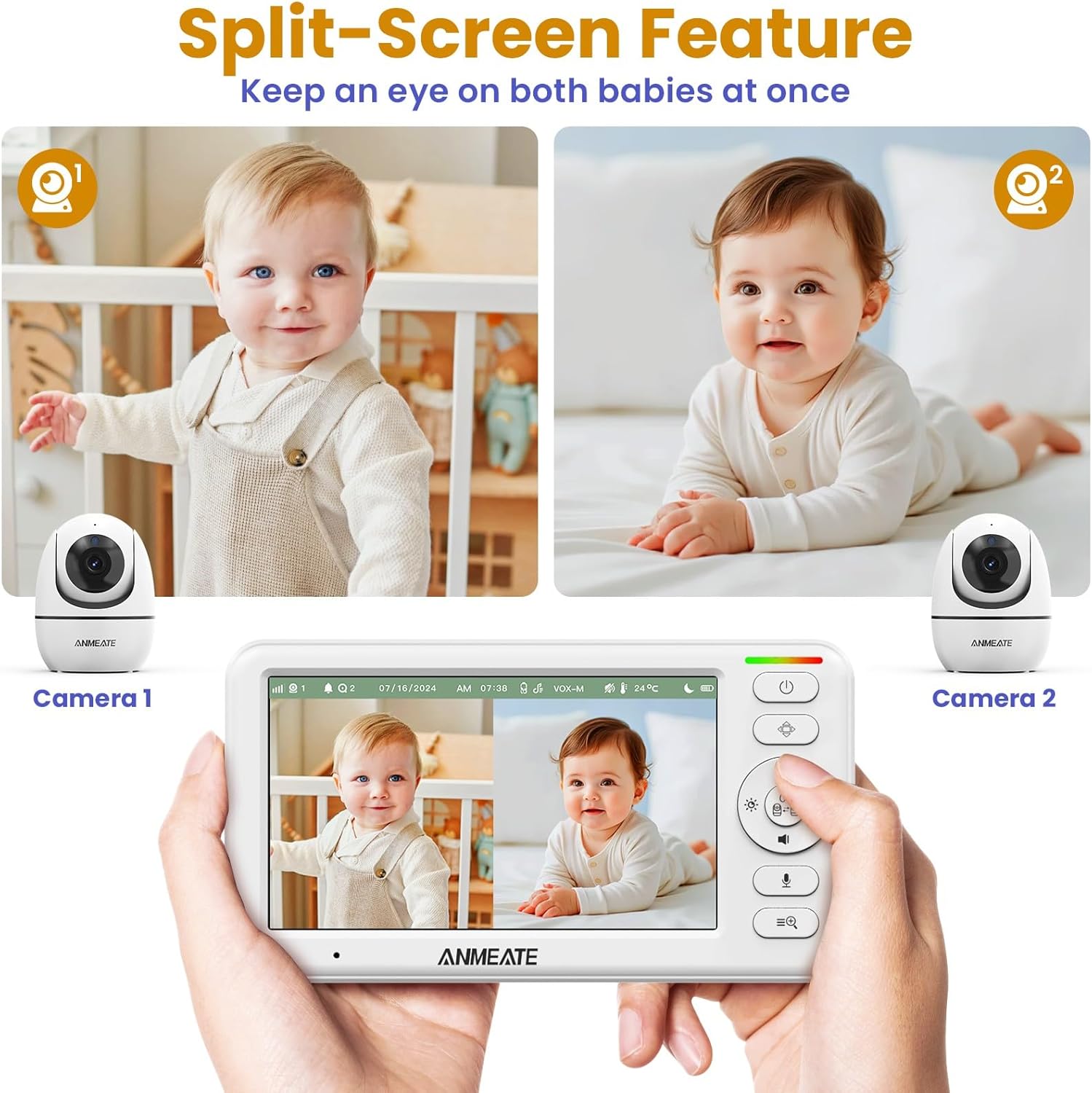
The ANMEATE monitor supports up to two cameras. You can view a single camera or use the split-screen feature to view both cameras simultaneously. Switch between cameras or activate scan mode (which cycles through connected cameras) via the menu.
5. Údržba
Správná údržba zajišťuje dlouhou životnost a optimální výkon vaší dětské chůvičky.
- Čištění: K čištění povrchů rodičovské a dětské jednotky používejte měkký, suchý hadřík. Nepoužívejte abrazivní čisticí prostředky ani rozpouštědla.
- Péče o čočky: Gently wipe the camera lens with a soft, lint-free cloth. Avoid touching the lens directly with your fingers.
- Péče o baterie: To prolong battery life, avoid fully discharging the parent unit frequently. Charge it regularly. If storing the unit for an extended period, charge it fully and then store in a cool, dry place.
- Skladování: Store the monitor in a dry, dust-free environment away from direct sunlight and extreme temperatures.
6. Řešení problémů
If you encounter issues with your ANMEATE baby monitor, refer to the following common solutions:
- No Picture/Sound on Parent Unit:
- Ensure both the parent unit and baby unit are powered on and properly connected to their power adapters.
- Check if the parent unit's battery is charged.
- Verify that the units are within range (up to 1000ft in open spaces). Obstacles like walls and furniture can reduce range.
- Try re-pairing the units as described in Section 3.4.
- Špatná kvalita obrazu:
- Ujistěte se, že je čočka fotoaparátu čistá.
- Upravte nastavení jasu na rodičovské jednotce.
- Move the baby unit closer to the parent unit to improve signal strength.
- Audio Feedback/Static:
- Move the parent unit further away from the baby unit.
- Reduce the volume on the parent unit.
- Ujistěte se, že žádná jiná elektronická zařízení nezpůsobují rušení.
- Parent Unit Battery Drains Quickly:
- Před použitím se ujistěte, že je jednotka plně nabitá.
- Activate VOX mode to conserve battery life by turning off the screen when quiet.
- Snižte jas obrazovky.
7. Specifikace
| Funkce | Detail |
|---|---|
| Značka | ANMEATE |
| Číslo modelu | DY549 |
| Velikost obrazovky | 5 palců |
| Rozlišení videa | 720P (Effective Video Resolution: 1080) |
| Technologie připojení | Bezdrátové (2.4 GHz FHSS) |
| Kapacita baterie | 5000 XNUMX mAh |
| Battery Life (Display On) | Až 12 hodin |
| Battery Life (Audio/VOX Mode) | Až 48 hodin |
| Rozsah | Up to 1000ft (open space) |
| Pan Angle | 355 stupňů |
| Úhel náklonu | 120 stupňů |
| Přiblížení | Up to 4x Digital Zoom |
| Rozsah nočního vidění | 15 stop |
| Snímač teploty | Ano |
| Oboustranný rozhovor | Ano |
| Lullabies/White Noise | Ano |
| Expandable Cameras | Až 2 kamer |
| Materiál | Plast |
| Rozměry položky | 6 x 4 x 3 palce |
| Hmotnost položky | 0.7 libry |
| UPC | 732827196399 |
8. Záruka a podpora
For warranty information and technical support, please refer to the warranty card included in your product packaging or contact ANMEATE customer service directly. Contact details are typically available on the manufacturer's official webwebu nebo prostřednictvím prodejce, u kterého byl produkt zakoupen.