
1. Úvod
This instruction manual provides essential information for the safe and efficient installation, operation, and maintenance of your DATOUBOSS 64.32kWh 48V 314Ah LiFePO4 Lithium Battery Bank. Please read this manual thoroughly before using the product and retain it for future reference. This battery system is designed for high-capacity energy storage in industrial, home solar, RV, and off-grid applications.
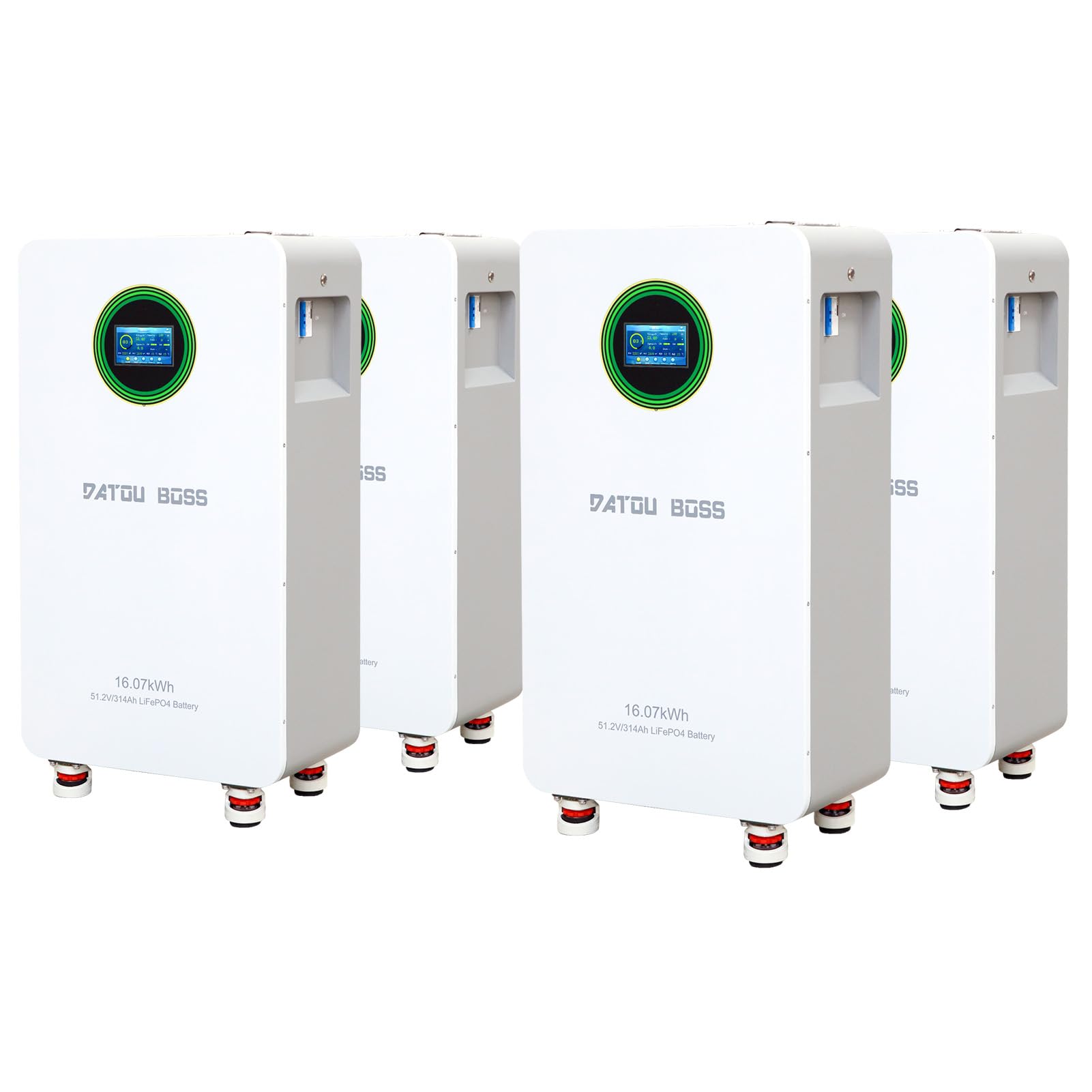
Obrázek 1: Přesview of the DATOUBOSS 48V 314Ah LiFePO4 Lithium Battery Bank, showcasinjeho kompaktní design.
2. Bezpečnostní pokyny
Adherence to the following safety guidelines is crucial to prevent injury, damage to the battery, and ensure optimal performance.
- Před instalací nebo údržbou vždy odpojte napájení.
- Ensure proper ventilation around the battery bank.
- Nevystavujte baterii ohni, vodě ani extrémním teplotám mimo stanovený provozní rozsah.
- Vyhněte se zkratování vývodů baterie.
- Only use compatible charging equipment and inverters.
- Instalaci by měl provádět kvalifikovaný personál.
- Wear appropriate personal protective equipment (PPE) such as insulated gloves and eye protection during installation.

Figure 2: Diagram illustrating the multiple protection functions of the DATOUBOSS battery, including overvoltage, overcharge, overdischarge, temperature, and overcurrent protection.
3. Obsah balení
Ověřte, zda jsou v balení přítomny všechny níže uvedené položky:
- DATOUBOSS 48V 314Ah LiFePO4 Battery Pack (4 units for 64.32kWh system)
- Montážní konzola
- Nástěnné držáky
- Positive Battery Connection Cable
- Negative Battery Connection Cable
- Komunikační kabel
- Šrouby
- Návod k použití (tento dokument)

Figure 3: Image displaying all items included in the DATOUBOSS battery package, such as the battery unit, mounting bracket, cables, and instruction manual.
4. Vlastnosti a komponenty produktu
4.1 Klíčové vlastnosti
- Vysoká kapacita: Each 314Ah LiFePO4 battery unit provides significant energy storage, totaling 64.32 kWh for a 4-pack system.
- Inteligentní systém správy budov (BMS): Integrated 210A Smart Battery Management System for robust protection and optimized performance.
- Dlouhá životnost cyklu: Designed for over 6000 deep cycles at 70% State of Health (SOH) at 25°C.
- Škálovatelnost: Supports parallel connection of up to 15 batteries for expanded energy storage.
- Komunikační porty: Equipped with standard CAN and RS485 ports for seamless integration with compatible inverters.
- Barevná dotyková obrazovka: For real-time monitoring and easy operation.
4.2 Externí komponenty
Familiarize yourself with the external components of the battery unit:

Figure 4: Detailed diagram labeling the external components of the DATOUBOSS battery, including the reset switch, indicators, DIP address, communication ports, battery terminals, push button switch, and air switch.
- Resetovací spínač: Used to reboot or shut down the unit.
- Indikátor přepínání: Displays the switch status.
- Provozní indikátor: Ukazuje provozní stav.
- Indikátor alarmu: Alerts for system warnings.
- Indikátor baterie: Displays remaining capacity.
- Battery Positive/Negative Terminals: Pro připojení napájení.
- DIP Address Switches: For setting addresses in parallel configurations.
- RS485, CAN, RS232 Ports: For external and parallel communication.
- Suchý kontakt: Normally open or normally closed signal drive relay.
- Tlačítkový spínač: Ovládá zapínání/vypínání napájení.
- Vzduchový spínač: Disconnects input and output for safety.
- Dotykový LCD displej: For monitoring and configuration.
5. Instalace
5.1 Výběr a příprava místa
- Neinstalujte bateriový blok na hořlavé stavební materiály.
- Install the battery box at eye level for easy LCD display readability.
- Maintain an ambient temperature between 0°C and 55°C for optimal operation.
- Install vertically on a wall.
- Ensure sufficient heat dissipation space and wiring removal space (at least 20cm/7.8in on sides and 50cm/19.6in above/below).
5.2 Montážní kroky

Figure 5: Illustration demonstrating the recommended installation method for the DATOUBOSS battery, including wall mounting steps and clearance requirements.
- Nejprve připevněte montážní konzolu ke zdi pomocí rozpěrných šroubů.
- Next, fix the bracket to the back shell of the battery unit with short screws.
- Finally, hang the battery unit onto the wall bracket.
Poznámka: This installation method is only suitable for concrete or other non-flammable surfaces.
5.3 Parallel Wiring and DIP Switch Configuration
When connecting multiple battery units in parallel, proper DIP switch configuration is essential for communication and address assignment.

Figure 6: Diagram explaining the DIP switch settings for addressing multiple DATOUBOSS battery units in a parallel configuration, along with a table of address assignments.
When connecting battery packs in parallel, use the DIP addressing function. If DIP6 is connected to ON, the system will use automatic address assignment. Otherwise, use the default automatic addressing function. The DIP switches on the BMS are used to set the address to distinguish different data packets.
Refer to the table in Figure 6 for specific DIP switch settings for each battery unit (PACK1 to PACK15).
6. Provoz
6.1 Zapnutí/vypnutí
- To power on, ensure all connections are secure, then activate the external air switch and press the internal push button switch.
- To power off, reverse the process: press the internal push button switch, then deactivate the external air switch.
6.2 Monitoring via Touch Screen
The integrated color touch screen provides real-time monitoring of battery status and parameters.
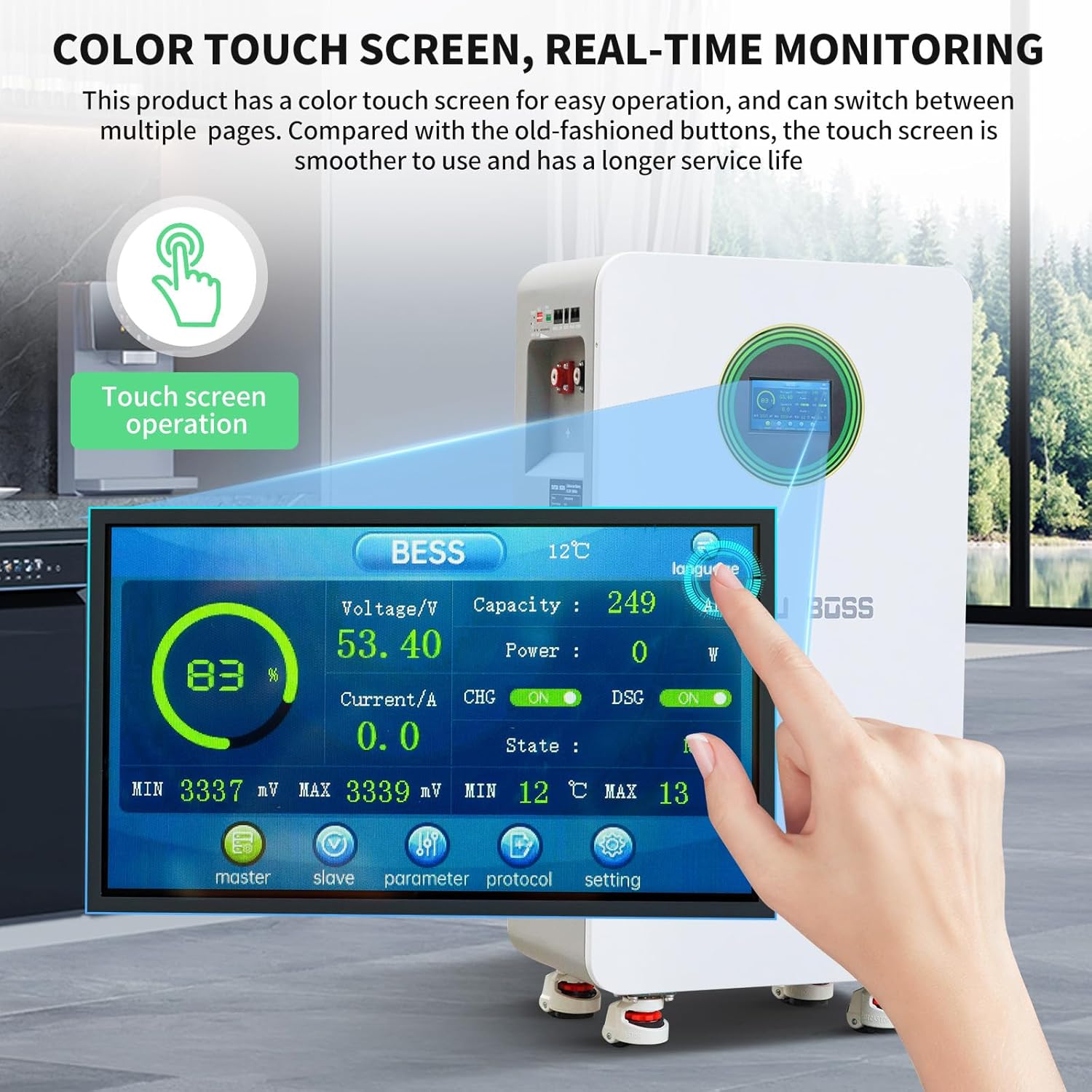
Figure 7: Image showing the color touch screen interface of the DATOUBOSS battery, displaying real-time monitoring data such as voltage, capacity, current, and state.
- The screen displays voltage, proud, kapacita procenttage, power, and charge/discharge status.
- Navigate through different pages to view detailed parameters, master/slave unit status, and communication protocols.
6.3 Communication with Inverters
The battery supports RS485 and CAN communication protocols for integration with compatible inverters. Ensure the correct communication cables are connected and the inverter settings match the battery's protocol.

Obrázek 8: Detail view of the RS485, CAN, and RS232 communication ports on the DATOUBOSS battery, compatible with various inverters.
7. Údržba
Regular maintenance ensures the longevity and optimal performance of your battery bank.
- Periodically inspect all cable connections for tightness and corrosion.
- Keep the battery unit clean and free from dust and debris.
- Monitor the battery's performance via the touch screen or connected inverter.
- Ensure adequate ventilation around the battery to prevent overheating.
- Avoid prolonged storage in a fully discharged state.
8. Řešení problémů
The DATOUBOSS battery is equipped with a Smart BMS that provides multiple protection functions. If an issue occurs, check the alarm indicator and the touch screen for error messages.
| Problém | Možná příčina | Rezoluce |
|---|---|---|
| Baterie se nenabíjí | Overcharge protection activated (54.0V) or charge low temperature protection (0°C). | Zkontrolujte objem nabíjenítage and ambient temperature. Allow battery to warm up if too cold. |
| Baterie se nevybíjí | Overdischarge protection activated (43.2V) or discharge low temperature protection (-15°C). | Recharge the battery. Allow battery to warm up if too cold. |
| System shuts down unexpectedly | Overcurrent protection (215A) or high temperature protection (50°C charge, 45°C discharge). | Reduce load. Ensure proper ventilation. Allow battery to cool down. |
| Zjištěn zkrat | External short circuit. | Identify and clear the short circuit. The system has a recovery method of 'Remove load and charge release'. |
| Chyba komunikace | Incorrect cable connection or protocol settings. | Verify communication cable integrity and ensure DIP switch settings match the inverter protocol. |
9. Technické specifikace
The following table outlines the key technical parameters of the DATOUBOSS 48V 314Ah LiFePO4 Lithium Battery.

Figure 9: A table providing detailed technical parameters for the DATOUBOSS LFP48-314-FSD battery, covering electrical, thermal, and communication specifications.
| Parametr | Specifikace |
|---|---|
| Model | LFP48-314-FSD |
| Kapacita baterie | 16.07 kWh (per unit) |
| Interní odpor baterie | ≤ 10 mΩ |
| Kapacita jedné baterie | 314Ah |
| Nominální provozní objtage | 51.2V |
| Maximální výstupní proud | 210A |
| Standardní vstupní proud | 150 A (maximálně 210 A) |
| Ochrana proti přetlaku | 58.4V |
| Obnova ochrany proti přebití | 54.0V |
| Ochrana proti nadměrnému vybití | 43.2V |
| Obnova po ochraně proti přebití | 48V (tunable, within 30 seconds) |
| Charging Over-Temperature Protection | 50 °C |
| Charge Over-Temperature Protection Recovery | 45°C (tunable) |
| Ochrana proti nízké teplotě nabíjení | 0°C (tunable) |
| Obnova kryoprotekce nabíjením | 5 °C |
| Ochrana proti přehřátí při vybíjení | 50 °C |
| Ochrana proti přehřátí při vybíjení | 45 °C |
| Ochrana proti nízké teplotě | -15 °C |
| Obnova ochrany při nízkých teplotách | -10 °C |
| Nabíjecí nadproud | 215A |
| Ochrana proti nadproudovému vybíjení | 215A |
| Ochrana proti zkratu | Recovery method: 'Charge Removal, Load Removal' |
| Množství dodané elektřiny | 40 % až 60 % |
| Vyrovnání | Pasivní rovnováha |
| Power Off Self-Consumption | ≤ 300uA |
| Životnost baterie (25 °C, 70 % SOH) | ≥ 8000 cyklů |
| Životnost baterie (45 °C, 70 % SOH) | ≥ 3000 cyklů |
| Komunikační protokoly | RS232, RS485, CAN |
| Rozměry (D x Š x V) | 453 x 260 x 879 mm |
| Hmotnost | 110 kg |
10. Záruka a podpora
For warranty information, technical support, or service inquiries, please refer to the warranty card included with your product or contact DATOUBOSS customer service directly. Ensure you have your product model number and purchase details available when contacting support.