
1. Konec produktuview
The Edifier W280NB Pro are neckband wireless headphones designed for immersive audio experiences with advanced features. They offer hybrid active noise cancellation, Hi-Res Audio support with LDAC, and a durable, comfortable design suitable for various activities.

Image: Edifier W280NB Pro headphones with key features highlighted.
Klíčové vlastnosti:
- Deep Hybrid Active Noise Cancellation: Up to -45dB noise reduction with 4 selectable modes (High ANC, Medium ANC, Ambient Aware, Wind Reduction).
- Studio-Quality Hi-Res Audio: 10mm dynamic drivers with titanium-coated composite diaphragms, supporting LDAC codec and Hi-Res Audio Wireless certification (20Hz-40KHz frequency response).
- Long-Lasting Battery & Fast Charging: Up to 23 hours of playback (ANC off), 14 hours (ANC on). 15 minutes of charging provides 5 hours of playtime. Full charge in 1.5 hours.
- Stabilní připojení Bluetooth 5.4: Ensures stable transmission, low power consumption, and multipoint connection for seamless device switching.
- All-Day Comfort & Secure Fit: Lightweight, flexible neckband with skin-friendly material and multiple sizes of ear wings for a secure fit. Magnetic earbuds for tangle-free storage.
- Durable & Clear Calls: IP55 dust and water resistance. Built-in AI noise-canceling microphones for clear communication in noisy environments.
2. Průvodce nastavením
2.1 Obsah balení
Před použitím se prosím ujistěte, že balení obsahuje všechny položky:
- Edifier W280NB Pro Neckband Wireless Headphones
- Nabíjecí kabel USB-C
- Multiple sizes of ear tips and ear wings
- Uživatelská příručka (tento dokument)
2.2 Nabíjení sluchátek
Charge the headphones fully before first use to ensure optimal battery performance.
- Connect the provided USB-C charging cable to the charging port on the neckband.
- Druhý konec kabelu připojte k napájecímu adaptéru USB (není součástí balení) nebo k portu USB počítače.
- The indicator light will show charging status (refer to the LED indicator section for details).
- A full charge takes approximately 1.5 hours. A 15-minute quick charge provides approximately 5 hours of playback.

Image: Visual representation of battery life (23 hours ANC off, 14 hours ANC on) and fast charging (15 mins = 5 hours).
2.3 Fitting the Headphones
Proper fit is crucial for comfort, sound quality, and effective noise cancellation.
- Select the ear tips and ear wings that best fit your ears. Experiment with different sizes for the most secure and comfortable seal.
- Umístěte si nákrčník kolem krku.
- Insert the earbuds into your ear canals and adjust the ear wings to sit snugly in your outer ear for stability.

Image: Diagram showing various ear tip and ear wing sizes for a secure and comfortable fit.
2.4 Párování Bluetooth
Pair your Edifier W280NB Pro headphones with your device via Bluetooth.
- Ujistěte se, že jsou sluchátka nabitá a vypnutá.
- Press and hold the multi-function button (usually the power button) until the indicator light flashes rapidly (e.g., blue and red alternately), indicating pairing mode.
- Na svém zařízení (chytrý telefon, tablet, notebook) povolte Bluetooth a vyhledejte dostupná zařízení.
- Select "Edifier W280NB Pro" from the list of found devices.
- Once connected, the indicator light will typically show a steady blue light or flash slowly.
Vícebodové připojení:
The W280NB Pro supports multipoint connection, allowing you to connect to two Bluetooth devices simultaneously.
- Spárujte sluchátka s prvním zařízením, jak je popsáno výše.
- Vypněte Bluetooth na prvním zařízení.
- Vraťte sluchátka do režimu párování a spárujte je s druhým zařízením.
- Re-enable Bluetooth on the first device. The headphones should now be connected to both devices, allowing seamless switching.

Image: Illustration of Bluetooth 5.4 technology for stable transmission and multipoint connection.
3. Návod k obsluze
3.1 Zapnutí/vypnutí
- Zapnutí: Press and hold the multi-function button for approximately 3 seconds until the indicator light illuminates.
- Vypnout: Press and hold the multi-function button for approximately 5 seconds until the indicator light turns off.
3.2 Ovládací tlačítka
The Edifier W280NB Pro features intuitive button controls on the neckband for easy management of music, calls, and noise cancellation modes.

Image: Diagram illustrating the functions of each button on the neckband for calls, music playback, and mode switching.
| Akce | Funkce |
|---|---|
| Multi-function Button (Power) | Press and hold 3s: Power On Press and hold 5s: Power Off Press and hold (pairing mode): Enter Bluetooth pairing Single press (during call): Answer/End Call Double press (during call): Reject Call |
| Zvýšení hlasitosti (+) | Single press: Increase Volume Press and hold: Next Track |
| Snížit hlasitost (-) | Single press: Decrease Volume Press and hold: Previous Track |
| Tlačítko Přehrát/Pozastavit | Single press: Play/Pause Music |
| Tlačítko režimu ANC | Single press: Cycle through ANC modes (High ANC, Medium ANC, Ambient Aware, Wind Reduction, ANC Off) |
3.3 Režimy aktivního potlačení hluku (ANC)
The W280NB Pro offers four distinct noise cancellation modes to adapt to your environment.

Image: Visual guide to the four ANC modes and their typical use cases.
- Vysoký ANC: Provides maximum noise reduction, ideal for very noisy environments like airplanes or subways.
- Medium ANC: Offers a balanced level of noise cancellation, suitable for offices or cafes.
- Ambient Aware: Allows you to hear your surroundings while still enjoying your audio, useful for urban environments or when needing to be aware of announcements.
- Snížení tlaku větru: Specifically designed to minimize wind noise during outdoor activities.
3.4 Uskutečňování a přijímání hovorů
The headphones feature AI noise-canceling microphones for clear call quality.
- Přijmout hovor: Jednou stiskněte multifunkční tlačítko.
- Ukončit hovor: Jednou stiskněte multifunkční tlačítko.
- Odmítnout hovor: Dvakrát stiskněte multifunkční tlačítko.

Image: A person using the headphones for a call, highlighting the AI-enhanced clear call feature.
3.5 Edifier Connect App
For advanced settings and customization, download the Edifier Connect app from your device's app store. The app allows you to:
- Přejmenujte své zařízení.
- Personalize ANC levels.
- Fine-tune audio with preset EQs or custom EQs.
- Locate lost headphones.
4. Údržba
4.1 Čištění
The W280NB Pro headphones are IP55 rated for dust and water resistance, but proper cleaning helps maintain their condition.
- Otřete nákrčník a sluchátka měkkým, suchým hadříkem, který nepouští vlákna.
- For ear tips, gently remove them and clean with a damp hadříkem a v případě potřeby jemným mýdlem. Před opětovným nasazením se ujistěte, že jsou zcela suché.
- Avoid using harsh chemicals, abrasive materials, or submerging the headphones in water.
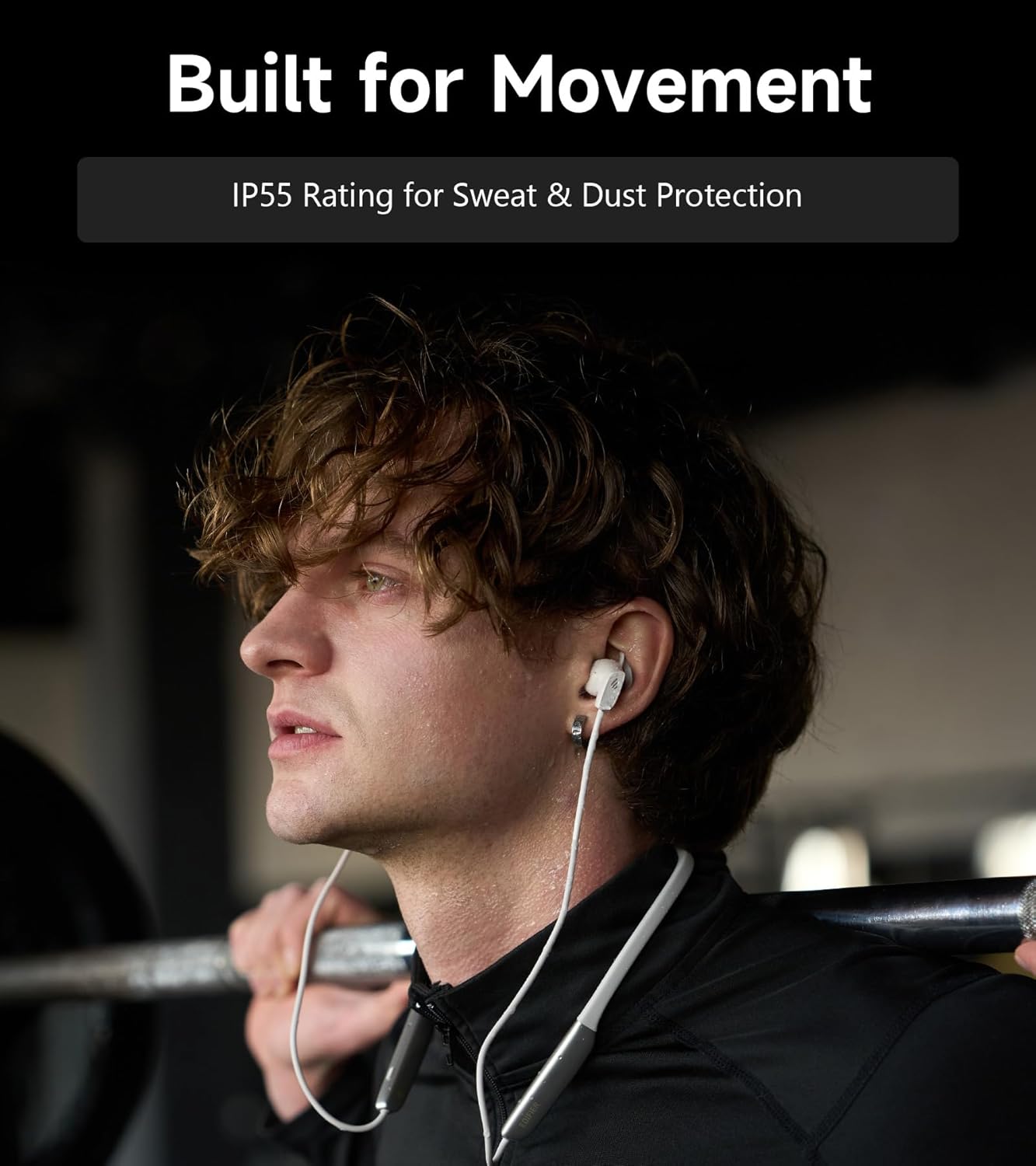
Image: A person wearing the headphones during a workout, illustrating the IP55 sweat and dust protection.
4.2 Skladování
When not in use, store your headphones properly to prevent damage.
- The earbuds are magnetic, allowing them to snap together for tangle-free storage around your neck or in a bag.
- Skladujte na chladném a suchém místě mimo dosah přímého slunečního záření a extrémních teplot.
4.3 Péče o baterii
- Vyhněte se častému úplnému vybíjení baterie.
- Sluchátka pravidelně nabíjejte, i když je delší dobu nepoužíváte, aby se zachovala jejich životnost.
5. Řešení problémů
If you encounter issues with your Edifier W280NB Pro headphones, refer to the following common problems and solutions.
| Problém | Možná příčina | Řešení |
|---|---|---|
| Sluchátka se nezapínají. | Slabá baterie. | Plně nabijte sluchátka. |
| Nelze spárovat se zařízením. | Sluchátka nejsou v režimu párování. Bluetooth na zařízení vypnutý. Zařízení je příliš daleko od sluchátek. | Ensure headphones are in pairing mode (flashing indicator). Povolte na svém zařízení Bluetooth. Přesuňte zařízení blíže ke sluchátkům (do 10 metrů). Try resetting the headphones (refer to manual for specific reset procedure if available, or power cycle). |
| Žádný zvuk nebo nízká hlasitost. | Příliš nízká hlasitost na sluchátkách nebo zařízení. Headphones not connected. Na zařízení byl vybrán nesprávný zvukový výstup. | Increase volume on both headphones and device. Ujistěte se, že jsou sluchátka úspěšně spárována a připojena. Check your device's audio settings to ensure output is set to Edifier W280NB Pro. |
| Špatná kvalita zvuku. | Špatné připojení Bluetooth. Nesprávné usazení ušních koncovek. Kvalita zdroje zvuku. | Přesuňte se blíže k připojenému zařízení. Ensure ear tips provide a secure seal. Zkuste jiný zdroj zvuku nebo file. |
| Aktivní potlačení hluku není účinné. | Nesprávné usazení ušních koncovek. Incorrect ANC mode selected. Extreme noise conditions. | Ensure ear tips provide a secure seal. Cycle through ANC modes to select the most appropriate one. ANC works best for low-frequency, constant noise. |
| Mikrofon nefunguje během hovorů. | Headphones not selected as input device. Mikrofon na zařízení je ztlumený. | Check your device's call settings to ensure Edifier W280NB Pro is selected for microphone input. Ujistěte se, že mikrofon na vašem zařízení není ztlumený. |
6. Specifikace
Detailed technical specifications for the Edifier W280NB Pro Neckband Wireless Headphones.
| Funkce | Detail |
|---|---|
| Značka | Edifier |
| Název modelu | W280NB Pro |
| Barva | Černý |
| Umístění uší | V uchu |
| Form Factor | Nákrčník |
| Impedance | 24 ohmů |
| Kontrola hluku | Aktivní potlačení hluku |
| Frekvenční rozsah | 20Hz-40KHz |
| Typ zvukového ovladače | Dynamic Driver (10mm with Titanium-Coated Diaphragm) |
| Technologie připojení | Bezdrátové (Bluetooth) |
| Verze Bluetooth | 5.4 |
| Dosah Bluetooth | 10 metrů (33 stop) |
| Battery Average Life (Playback) | 23 hodin (ANC vypnuto), 14 hodin (ANC zapnuto) |
| Doba nabíjení baterie | 1.5 hodiny |
| Úroveň odolnosti proti vodě | IP55 (Dust & Waterproof) |
| Kompatibilní zařízení | Chytré telefony, tablety, notebooky, chytré reproduktory |
| Materiál | Silicone (Enclosure) |
| UPC | 628430220005 |
7. Informace o záruce
The Edifier W280NB Pro Neckband Wireless Headphones come with a 1 roky záruka výrobce.
This warranty covers defects in materials and workmanship under normal use. It does not cover damage caused by misuse, accidents, unauthorized modifications, or normal wear and tear. Please retain your proof of purchase for warranty claims.
8. Zákaznická podpora
For further assistance, technical support, or warranty inquiries, please contact Edifier customer service.
- Webmísto: Visit the official Edifier webweb s nejčastějšími dotazy, zdroji podpory a kontaktními informacemi.
- E-mail/Telefon: Refer to the Edifier website or your product packaging for specific contact details in your region.