
Zavedení
Thank you for choosing the SEDETA 47 x 24 Inches Electric Standing Desk. This versatile workstation is designed to enhance your productivity and comfort, whether for office tasks, creative projects, or gaming. Its unique tiltable desktop, electric height adjustment, and mobile design offer flexibility for various environments and activities. Please read this manual carefully before assembly and use to ensure proper operation and safety.
Bezpečnostní informace
Always keep hands and fingers away from moving parts during height adjustment. Ensure the desk is properly anchored to the floor to prevent tipping when in use, especially at maximum height. Keep the area around the desk clear of obstacles to prevent tripping over cords or other items when using the wheels.
Konec produktuview
The SEDETA Electric Standing Desk features a 47 x 24 inch desktop with a unique 0-180° tiltable design, allowing it to function as a standard desk, drawing table, or even a writing board. It includes an electric lift system for height adjustment, a multifunctional control panel with memory presets, and a built-in power strip for convenience.

Image: The desk configured for office use (0-28.3"H), gaming (0-35"H), reading/painting (30-60° tilt), and as a writing board (90° tilt).
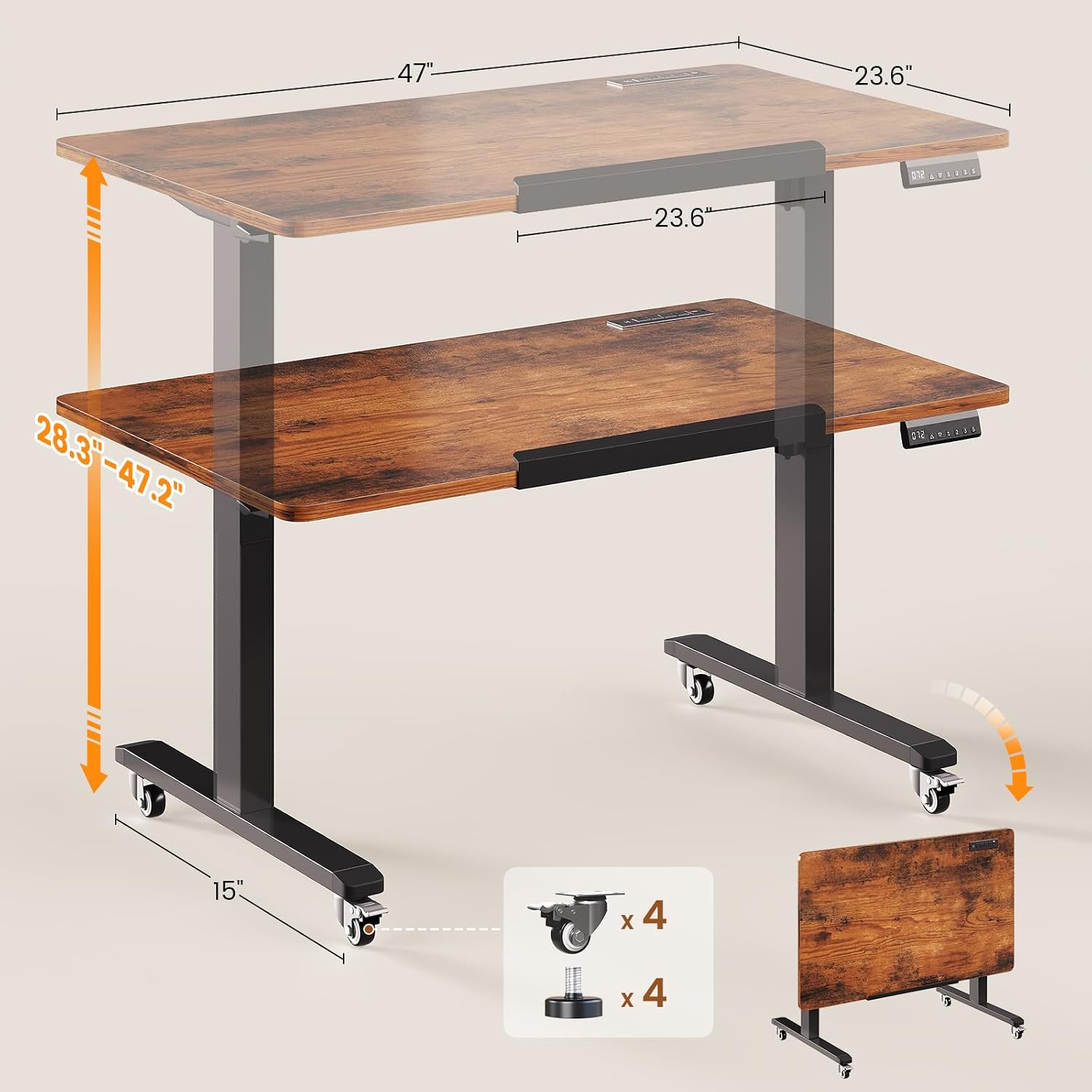
Image: Illustration of the desk's height adjustment from 28.3 to 47.2 inches and its compact foldable state.

Image: Visual representation of the desk's 180-degree rotation and foldable capability for storage.

Image: Detail of the integrated power strip featuring 4 AC outlets and 2 USB ports.
Oficiální videa produktů
Video: Demonstrates the folding and standing desk features of the SEDETA desk. This video shows the desk in action, highlighting its versatility and ease of transformation.
Video: Overview of the SEDETA Standing Desk, showcasing its various functions and design. This video provides a general look at the desk's capabilities and aesthetic.
Nastavení
Basic assembly is required for this desk. While the design is user-friendly, please note that not all assembly tools are included. Ensure you have the necessary tools before beginning. Follow the detailed assembly instructions provided in the packaging for a smooth setup process.
- Vybalte všechny součásti a ověřte je podle seznamu dílů.
- Assemble the desk frame according to the diagrams.
- Připevněte pracovní desku k sestavenému rámu.
- Install the control panel and connect all necessary cables.
- Choose between installing the wheels for mobility or the adjustable feet for stationary use.
- Zapojte stůl do elektrické zásuvky.
Návod k obsluze
Nastavení výšky
The desk features an electric lift system with a quiet motor (under 40dB) for smooth height transitions. The height can be adjusted from 28.3 inches to 47.2 inches.
- Použijte Up a Dolů šipkami na ovládacím panelu ručně upravte výšku stolu.
- LED displej zobrazuje aktuální výšku.
- Chcete-li uložit preferovanou výšku, nastavte stůl do požadované úrovně a poté stiskněte tlačítko M button followed by one of the number buttons (1, 2nebo 3). The desk will beep to confirm the setting.
- Chcete-li vyvolat uloženou výšku, jednoduše stiskněte odpovídající číselné tlačítko (1, 2nebo 3).
Desktop Tilt Function
The desktop can be tilted from 0° to 180° to suit various activities such as drawing, writing, or using it as a whiteboard.
- Locate the tilt adjustment mechanism on the side of the desktop.
- Release the locking mechanism and carefully adjust the desktop to your desired angle.
- Secure the locking mechanism to hold the desktop firmly in place.
Mobilita a stabilita
The desk comes with four smooth-rolling casters, two of which are lockable, allowing for easy movement and secure positioning. Alternatively, adjustable feet can be installed for a stationary setup.
- To move the desk, unlock the two lockable casters.
- To secure the desk in place, lock the two casters.
- If using adjustable feet, ensure they are level to prevent wobbling.
Vestavěná zásuvka
A convenient power strip is integrated into the desk, providing power for your devices.
- The power strip includes 4 AC outlets (120V/12A) and 2 USB ports (5V/2A).
- Use the switch on the power strip to turn power on or off to the outlets.
Údržba
- Regularly wipe the desktop with a soft, damp cloth to remove dust and spills. Avoid harsh chemicals.
- Pravidelně kontrolujte všechny šrouby a spoje, abyste se ujistili, že jsou utažené a zajištěné.
- Udržujte motor a elektrické součásti bez prachu a vlhkosti.
- Inspect power cords for any damage and replace if necessary.
Odstraňování problémů
| Problém | Možná příčina | Řešení |
|---|---|---|
| Stůl se nepohybuje nahoru ani dolů. | Odpojený napájecí kabel; přetížení motoru; chyba ovládacího panelu. | Check power connection. Unplug for 10 minutes and replug. Reset the control panel (press RST button). |
| Stůl se pohybuje nerovnoměrně nebo vydává neobvyklé zvuky. | Loose connections; uneven load; obstruction. | Check all assembly connections. Redistribute weight evenly on the desktop. Ensure no obstructions are in the path of the lifting columns. |
| Desktop tilt mechanism is stiff. | Dust or debris in mechanism; overtightened. | Clean the mechanism. Ensure it is not overtightened. Apply a small amount of lubricant if necessary. |
| Nefunkční elektrické zásuvky. | Power switch off; circuit breaker tripped. | Ensure the power strip switch is on. Check your wall outlet's circuit breaker. |
Specifikace
| Funkce | Detail |
|---|---|
| Značka | SEDETA |
| Číslo modelu | B0GHQC73NJ |
| Rozměry produktu | 47.2"H x 23.6"Š x 28.3"V |
| Minimální výška | 28.3 palce |
| Maximální výška | 47.2 palce |
| Materiál pro stolní počítače | Umělé dřevo |
| Základní materiál | Legovaná ocel |
| Zvedací mechanismus | Elektrický |
| Speciální funkce | Foldable 180° Tiltable desktop |
| Zásuvka napájení | 4 AC zásuvky (120 V/12 A), 2 USB porty (5 V/2 A) |
| Úroveň hluku | <40dB |
| Montáž Vyžadována | Ano |
Záruka a podpora
SEDETA is committed to providing excellent customer service. This product comes with a 3-year service guarantee. If you encounter any issues during purchase, assembly, or use, please do not hesitate to contact our customer support team. We are dedicated to providing satisfactory solutions.
For further assistance, please visit the official SEDETA store or contact our support channels.