
1. Nastavení
1.1 Unboxing Your TCL X11L TV
The TCL X11L TV is delivered in a protective wooden crate to ensure its safety during transit. Carefully remove the outer plastic wrapping using a utility knife. The crate is designed for easy disassembly by removing side clips and panels. Due to the TV's size and weight (approximately 168.4 lbs without the crate), it is highly recommended to have at least two people for safe unboxing and installation.
Video: TCL X11L Overview - Toto video poskytuje obecný přehledview of the TCL X11L TV, including its unboxing process and key features. It demonstrates the careful steps required to unpack the TV from its protective crate.
1.2 Obsah balení
Upon opening the packaging, ensure all the following items are present:
- TCL 85 Inch Class X11L TV
- Napájecí kabel
- Dálkové ovládání (2 baterie AAA součástí balení)
- Uživatelská příručka (tento dokument)
- Záruční list
- TV stolky (2 kusy)
- Šrouby pro televizní stojany

Image: Package Contents and Dimensions - This image displays the TCL 85 Inch Class X11L TV along with its remote control and a diagram illustrating the product's dimensions and listing the items included in the box.
1.3 Fyzické rozměry
The dimensions of the TCL 85X11L TV are as follows:
- TV with Stand: 74.00" Š x 45.30" V x 15.00" H
- TV without Stand: 74.00" Š x 43.50" V x 0.80" H
- Velikost obrazovky: 85 palců (úhlopříčka 84.6 palce)
1.4 Instalace stojanu
Instalace televizních stojanů:
- Carefully lay the TV screen-down on a soft, clean surface to prevent damage.
- Zarovnejte každý stojan s odpovídajícími otvory pro šrouby na spodní straně televizoru.
- Secure each stand using the provided screws. Ensure they are tightened firmly but do not overtighten.
1.5 Montáž na stěnu
The TCL 85X11L TV supports VESA wall mounting. The VESA mount standard is 600 x 400 mm. Ensure you use a compatible wall mount that can support the TV's weight (168.4 lbs without stand). The mounting holes are located on the upper portion of the TV's back panel. Consult a professional installer if you are unsure about the wall mounting process.

Image: TV Back Panel - This image shows the back of the TCL 85X11L TV, highlighting the VESA mounting points and the textured panel design.
1.6 Připojení periferních zařízení
The TV features a variety of ports for connecting external devices:
- HDMI porty: 4 HDMI 2.1 ports, supporting 4K@144Hz and 1080p/288Hz gaming. One port supports eARC for enhanced audio return.
- USB porty: 1 USB 3.0 port and 1 USB 2.0 port for media playback from flash drives.
- LAN (Ethernet): Pro kabelové připojení k internetu.
- Kabel/ANTÉNA: Pro připojení antény nebo kabelové televize.
- Zvukový výstup (optický): For digital audio output to soundbars or receivers.
- Bezdrátové připojení: Bluetooth and Wi-Fi for wireless connections.
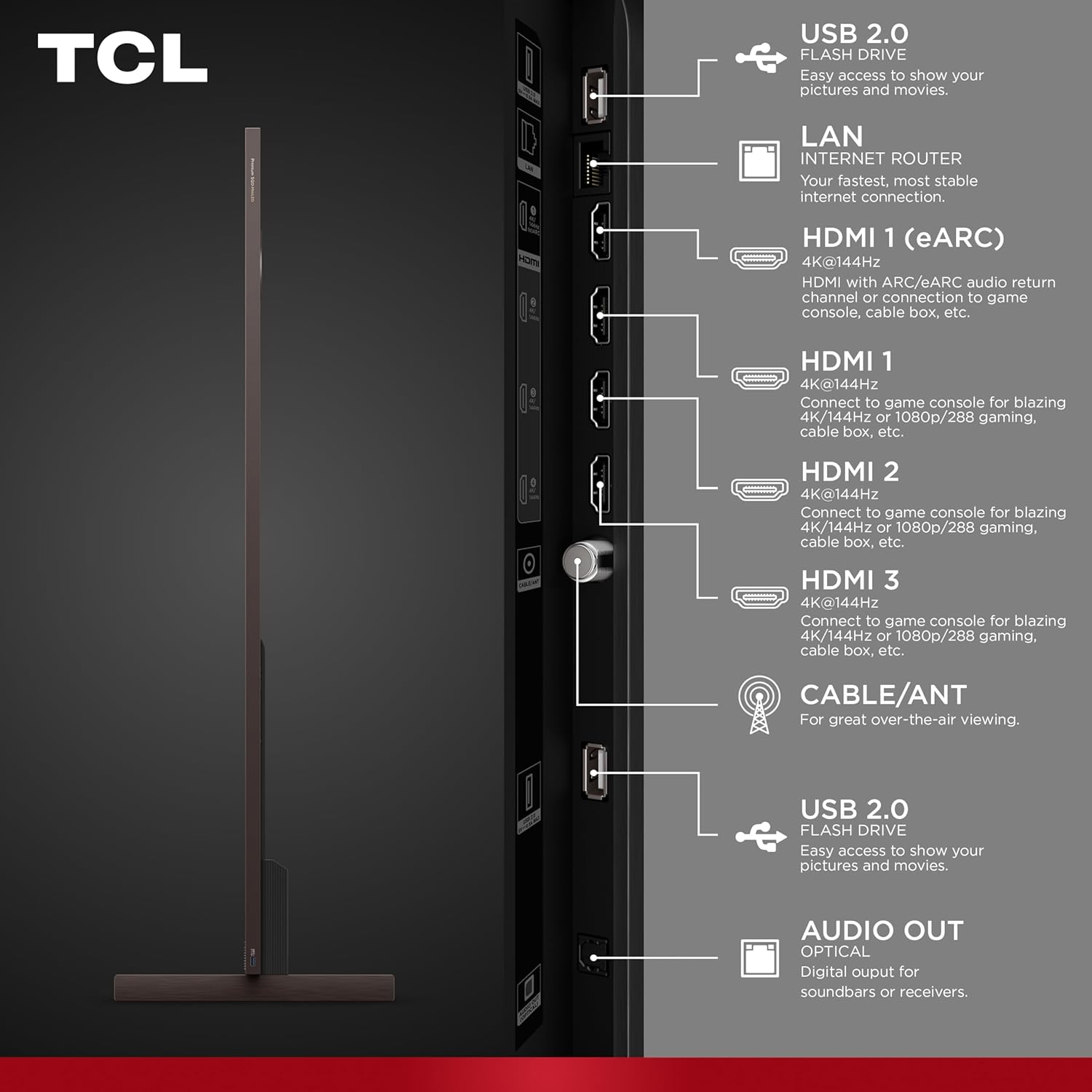
Image: TV Side Ports - This image provides a close-up view of the side-mounted input/output ports on the TCL 85X11L TV, including HDMI, USB, LAN, and Cable/ANT connections.
2. Operating Your TCL X11L TV
2.1 Funkce dálkového ovládání
The included remote control provides intuitive navigation and quick access to various TV functions. Key features include:
- Vypínač: Zapíná/vypíná televizor.
- Navigační podložka: Pro navigaci v menu a výběr.
- Tlačítko hlasového ovládání: Activates Google Gemini for voice commands.
- Picture Mode Button: Quickly cycles through various picture presets.
- Brightness Up/Down Buttons: Adjusts screen brightness directly.
- Vyhrazená tlačítka aplikací: Rychlý přístup k oblíbeným streamovacím službám.
2.2 Google TV with Gemini AI
The TCL X11L runs on Google TV, offering a personalized and integrated entertainment experience. Gemini AI enhances this by providing interactive assistance:
- Personalizovaná doporučení: Discover movies and shows based on your viewnávyky.
- Hlasové příkazy: Use your voice to search for content, control smart home devices, and get information.
- AI Generative Responses: Gemini can provide information and creative content based on your prompts.

Image: Google Gemini AI Interface - This image shows the TCL 85X11L TV displaying the Google Gemini AI interface, demonstrating its interactive capabilities for search and content discovery.
2.3 Nastavení a kvalita obrazu
The X11L TV incorporates advanced display technologies for superior picture quality:
- SQD-Mini LED: Combines Super Quantum Crystals (Super QLED) with the TCL Halo Control System for vivid colors and precise dimming.
- TCL Deep Color System: Utilizes Super QLED for 100% BT.2020 Color, an UltraColor Filter, and an Advanced Color Purity Algorithm for accurate and vibrant colors.
- WHVA 2.0 Ultra Panel: Poskytuje široký viewing angles and high static contrast with an anti-reflective ZeroBorder™ design.
- Řada přesného stmívání LD20000: Up to 20,000+ local dimming zones for pure black levels and minimal blooming.
- 10,000 Peak Nits: Delivers exceptional brightness for HDR content in various lighting conditions.
- New TSR AI Processor: Dynamically optimizes picture clarity, contrast, color, motion, upscaling, and backlighting.
- Podpora HDR: Dolby Vision IQ, HDR10+, and HDR10 for enhanced dynamic range.

Image: SQD-Mini LED Technology - This image illustrates the SQD-Mini LED technology of the TCL 85X11L TV, emphasizing its role in delivering ultimate performance.

Image: TCL Deep Color System - This image demonstrates the TCL Deep Color System, showcasing its ability to produce more vivid images with 100% BT.2020 Color*.

Image: WHVA 2.0 Ultra Panel - This diagram illustrates the layers of the WHVA 2.0 Ultra Panel, highlighting the Ultra Color Filter, Butterfly-patterned Liquid Crystal, and Low Reflection Film for wide viewing úhly.

Image: Brightness Comparison - This image compares the brightness of the TCL 85X11L TV (10,000 nits peak brightness) against 5,000 nits brightness and a conventional display, illustrating brighter, deeper, and more realistic pictures.

Image: New TSR AI Processor - This image features the TSR AI Processor chip, representing how AI elevates viewing experiences by finely controlling picture quality.
2.4 Sound Settings and Quality
The X11L TV features an Expandable Home Theater Audio system by Bang & Olufsen:
- Integrated Spatial Sound: Complete with built-in subwoofers, surround channels, and a center channel.
- Podpora Dolby Atmos: Poskytuje pohlcující zvukový zážitek.
- Beosonic: Allows personalized sound profiles (Bright, Relaxed, Energetic, Warm).
- Ekvalizér: Adjust treble, bass, center speaker, and surround speaker levels.
- Vyrovnávač hlasitosti: Dynamically adjusts volume to avoid sudden changes.

Image: Expandable Home Theater Audio - This image shows a living room setup with the TCL 85X11L TV and an expandable home theater audio system by Bang & Olufsen, emphasizing immersive sound.
2.5 Herní funkce
For gamers, the TCL X11L offers the TCL Game Pack:
- Game Accelerator 288 VRR: Eliminates screen tearing and lag for smoother motion.
- Herní lišta: Provides quick access to game settings.
- AMD FreeSync Premium Pro: Ensures a responsive and immersive gaming experience.
- Automatický herní režim (ALLM): Automatically enables game mode for lowest input lag.
- Nativní obnovovací frekvence panelu 144 Hz: For best-in-class motion clarity.

Image: TCL Game Pack in Action - This image shows the TCL 85X11L TV displaying a fast-paced video game, illustrating the benefits of the TCL Game Pack for smoother motion and lower latency.
Video: TCL_Hughes Brothers Challenge - This video features the Hughes brothers discussing the TCL TV's gaming and smart features, highlighting its performance for sports and entertainment.
3. Údržba
3.1 Obecná péče a čištění
To ensure the longevity and optimal performance of your TCL X11L TV, follow these maintenance guidelines:
- Čištění obrazovky: Jemně otřete obrazovku měkkým hadříkem, který nepouští vlákna. V případě odolných skvrn lehceampOtřete hadřík vodou nebo specializovaným čističem obrazovek. Nepoužívejte agresivní chemikálie, alkohol ani abrazivní materiály.
- Rám a zadní panel: Use a soft, dry cloth to clean the TV frame and back panel.
- Větrání: Abyste zabránili přehřátí, ujistěte se, že ventilační otvory televizoru nejsou zablokované.
- Napájecí kabel: Pravidelně kontrolujte napájecí kabel, zda není poškozen. Pokud je poškozen, přestaňte přístroj používat a kontaktujte zákaznickou podporu.
- Vyhněte se tekutinám: Do not spray liquids directly onto the TV.
4. Řešení problémů
If you encounter issues with your TCL X11L TV, refer to the following common troubleshooting steps:
- Bez napájení: Ensure the power cable is securely connected to both the TV and a working power outlet. Try plugging another device into the outlet to confirm it has power.
- Žádný obraz/zvuk: Ověřte, zda je vybrán správný vstupní zdroj. Zkontrolujte všechna kabelová připojení (HDMI, audio), zda nejsou uvolněná nebo poškozená.
- Dálkové ovládání nefunguje: Zkontrolujte baterie v dálkovém ovladači a v případě potřeby je vyměňte. Ujistěte se, že mezi dálkovým ovladačem a infračerveným senzorem televizoru nejsou žádné překážky.
- Špatná kvalita obrazu: Check the resolution settings of your input source. Ensure the TV's picture mode is set appropriately (e.g., Standard, Movie, Game).
- Žádné internetové připojení: Verify your Wi-Fi network is active or the Ethernet cable is properly connected. Restart your router/modem.
- Zkreslení zvuku: Check the TV's sound settings and ensure no audio enhancements are causing distortion. If using external audio, check its connections and settings.
- Blooming/Halos: While the TCL Halo Control System minimizes these, if observed, ensure your content is high quality and try adjusting local dimming settings if available.
For persistent issues, please refer to the full user manual available online or contact TCL customer support.
5. Specifikace
| Funkce | Specifikace |
|---|---|
| Velikost obrazovky | 85 palce |
| Značka | TCL |
| Technologie displeje | Mini LED, QLED |
| Rezoluce | 4K (3840 x 2160) |
| Obnovovací frekvence | 144 Hz (Native), 288 VRR (Game Accelerator) |
| Maximum Display Brightness | 10,000 nitů (vrchol) |
| Stmívací zóny | Až do řady Precise Dimming LD20000 |
| Podporovaný formát HDR | Dolby Vision IQ, HDR10+, HDR10 |
| Procesor | New TSR AI Processor |
| Operační systém | Google TV with Gemini AI |
| Technologie připojení | Bluetooth, HDMI, Wi-Fi |
| Total Number of HDMI Ports | 4 (HDMI 2.1, 1 s eARC) |
| Celkový počet portů USB | 2 (1 USB 3.0, 1 USB 2.0) |
| Audio systém | Audio by Bang & Olufsen, Dolby Atmos, 5.1 Channels |
| Standardní držák VESA | 600 x 400 mm |
| Rozměry produktu (D x Š x V) | 0.8 cm H x 74 cm Š x 43.5 cm V (bez stojanu) |
| Číslo modelu | 85X11L |
| Modelový rok | 2026 |
6. Záruka a podpora
6.1 Záruka výrobce
The TCL 85 Inch Class X11L TV comes with a 1letá omezená záruka výrobce. This warranty covers defects in materials and workmanship under normal use. Please refer to the Warranty Card included in your package for full terms and conditions.
6.2 Plány rozšířené ochrany
Optional extended protection plans are available for purchase to provide additional coverage beyond the standard manufacturer's warranty. For example, a Dvouletý ochranný plán is available for $329.99.
6.3 Zákaznická podpora
For technical assistance, troubleshooting, or warranty claims, please contact TCL Customer Support. Contact information can be found on the Warranty Card or the official TCL webmísto.