
Zavedení
This manual provides detailed instructions for the setup, operation, and maintenance of your AT&T DECT 6.0 Cordless Phone, model BL108-3. Please read this guide thoroughly to ensure proper use and to take full advantage of all features, including Smart Call Blocker, Bluetooth Connect to Cell, and the digital answering machine.
Obsah balení
Ověřte, zda váš balíček obsahuje následující položky:
- Základní jednotka
- 3 bezdrátová sluchátka
- 3 napájecí adaptéry
- 2 Chargers (for additional handsets)
- Kabel telefonní linky
- 6 článků baterie
- Rychlý průvodce
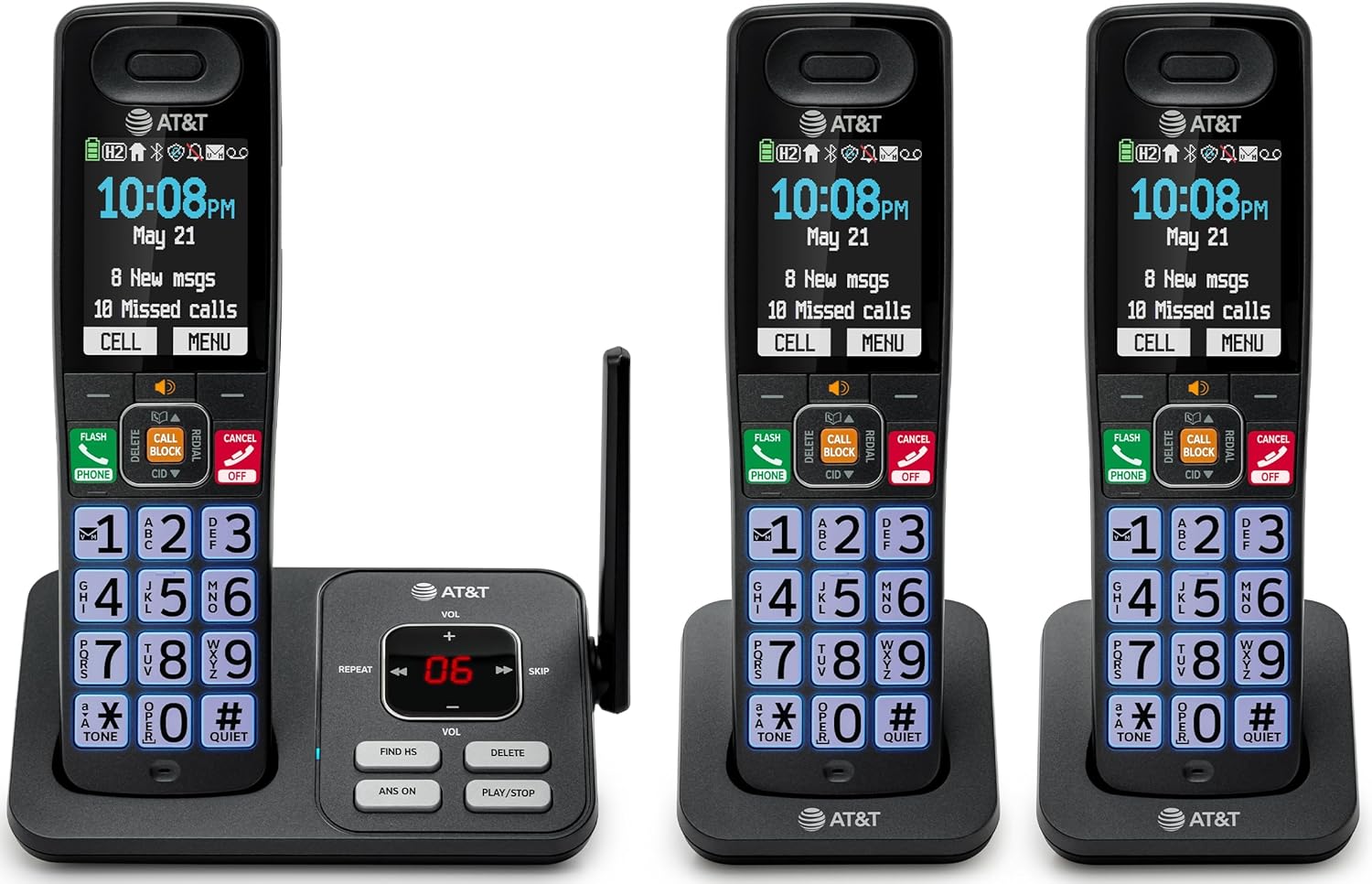
Image: The complete AT&T BL108-3 cordless phone system, showing the base unit and three handsets.
Nastavení
1. Base Unit and Power Connection
- Umístěte základní jednotku na rovný a stabilní povrch.
- Připojte jeden konec telefonního kabelu do zdířky TEL LINE na základní jednotce.
- Připojte druhý konec telefonního kabelu do telefonní zásuvky ve zdi.
- Plug one power adapter into the POWER jack on the base unit.
- Plug the other end of the power adapter into an electrical outlet not controlled by a wall switch.
2. Instalace a nabíjení baterie telefonu
- Otevřete kryt přihrádky na baterie na zadní straně každého sluchátka.
- Insert the provided battery cells, ensuring correct polarity (+ and -).
- Zavřete kryt prostoru pro baterie.
- Place each handset in its respective charger or the base unit cradle. The CHARGE light on the handset will illuminate.
- Před prvním použitím nechte sluchátka nabíjet alespoň 10 hodin.
3. Additional Charger Setup
- Plug the power adapters for the additional chargers into electrical outlets not controlled by a wall switch.
- Place the additional handsets into these chargers to charge.
Návod k obsluze
Uskutečňování a přijímání hovorů
- Pro uskutečnění hovoru: Stiskněte TELEFONa poté vytočte číslo.
- Přijetí hovoru: Stiskněte TELEFON nebo jakékoli tlačítko vytáčení.
- Ukončení hovoru: Stiskněte VYP/ZRUŠIT or place the handset in the cradle.
Inteligentní blokování hovorů
The Smart Call Blocker feature automatically filters out robocalls. You can also manually block unwanted numbers.
- To block a number during a call: Press the dedicated HOVOROVÝ BLOK klíč.
- The block directory can store up to 1,000 entries.

Image: A close-up of the handset displaying the "Smart Call Block" screen, with the "CALL BLOCK" button highlighted on the base unit.
Připojení Bluetooth k mobilu
Pair your smartphone with the BL108-3 system to make and receive mobile calls through any of the cordless handsets.
- Na základní jednotce stiskněte MENU, then navigate to "Bluetooth" and select "Pair Cell".
- Povolte na svém smartphonu Bluetooth a vyhledejte dostupná zařízení.
- Select the AT&T phone from the list on your smartphone to pair.
- Once paired, mobile calls can be made and received using the cordless handsets.

Image: A visual representation of the "Connect to Cell" feature, showing a handset on a nightstand wirelessly connected to a smartphone.
Video: Demonstrates the seamless Bluetooth connection to a cell phone, allowing calls to be made and received through the AT&T cordless handset.
Digitální záznamník
The integrated digital answering system records up to 22 minutes of messages.
- To play messages: Press PLAY/STOP na základnové jednotce nebo sluchátku.
- To skip messages: Press PŘESKOČIT.
- To delete messages: Press VYMAZAT.

Image: The phone's base unit and handset displaying an incoming message on the answering system, with a visual of a message being left.
Oznámení ID volajícího
The handset speaks the caller's name aloud, allowing you to screen calls without picking up the phone.
- Ujistěte se, že máte u svého poskytovatele telefonních služeb předplacenou službu identifikace volajícího.
- The feature is active by default.

Image: The handset and base unit showing a call coming in, with a speech bubble indicating "Call from Johnson" to illustrate the Caller ID Announce feature.
Intercom Between Handsets
You can use the handsets to communicate with each other, or transfer calls.
- To initiate an intercom call: Press INTERCOM on a handset, then select the desired handset number.
- To transfer a call: During an external call, press INTERCOM, select the handset, and then hang up after the other handset answers.

Image: Two handsets, one on the base and one on a charger, with arrows indicating communication between them, illustrating the intercom feature.
Telefonní seznam
Do telefonního seznamu si můžete uložit až 1500 jmen a čísel pro rychlé vytáčení.
- To add an entry: Press MENU, navigate to "Phonebook", then "Add New Entry".
- To dial from phonebook: Press TELEFON, pak DIR, select the entry, and press TELEFON znovu.

Image: The handset screen showing a phonebook list with alphabetical navigation, demonstrating the phonebook directory feature.
Full-Duplex Handset Speakerphone
Allows both parties to speak and be heard simultaneously during a speakerphone call.
- To activate speakerphone during a call: Press REPRODUKTOR.
- To switch back to handset mode: Press TELEFON.

Image: A person using the handset in speakerphone mode while working on a laptop, with speech bubbles indicating a two-way conversation.
Tichý režim
Temporarily silences all handset and base unit ringers for a set period.
- To activate: Press and hold #KLID na sluchátku.
- Deaktivace: Stiskněte a podržte #KLID znovu.

Image: The handset screen showing "Quiet mode on" with a sleeping person in the background, illustrating the Quiet Mode feature.
Režim ECO
Reduces power consumption for optimal battery performance.
- ECO mode is typically enabled by default to conserve energy.
- Refer to the full user manual for options to adjust or disable this feature if needed.

Image: The handset and base unit in a setting with wind turbines in the background, and the screen showing "ECO mode", symbolizing energy efficiency.
Vestavěná svítilna
For safety at night or in emergencies, the handset includes a built-in flashlight.
- To activate the flashlight: Locate the flashlight button on the side of the handset and press it.

Image: A close-up of the handset's side, showing the flashlight beam and the "FLASHLIGHT" label, indicating its location and function.
Údržba
- Čištění: Telefon a základnu čistěte měkkým hadříkemamp hadříkem. Nepoužívejte čisticí spreje ani agresivní chemikálie.
- Péče o baterie: For optimal battery life, fully charge the handsets for 10 hours before first use. If the phone will be unused for an extended period, remove the batteries.
- Podmínky prostředí: Nevystavujte telefon extrémním teplotám, přímému slunečnímu záření nebo vlhkosti.
Odstraňování problémů
| Problém | Řešení |
|---|---|
| Žádný oznamovací tón |
|
| Sluchátko se nenabíjí |
|
| Špatná kvalita hovoru nebo statický šum |
|
| Cannot make/receive Bluetooth calls |
|
Specifikace
| Funkce | Detail |
|---|---|
| Značka | AT&T |
| Číslo modelu | BL108-3 |
| Typ telefonu | Bezdrátový (DECT 6.0) |
| Barva | Černý |
| Součástí balení jsou sluchátka | 3 |
| Zobrazit | 2.4" Color Backlit Display |
| Typ systému odpovědí | Digitální (až 22 minut nahrávání) |
| Blokování hovorů | Smart Call Blocker (up to 1,000 entries) |
| Bluetooth | Connect to Cell (smartphone pairing) |
| Pohotovostní doba telefonu | 6 dní |
| ID volajícího | Yes, with Announce feature |
| Kapacita telefonního seznamu | Up to 1500 names and numbers |
| Hlasitý telefon | Full-Duplex Handset Speakerphone |
| Rozměry (základní jednotka) | 5.63 x 2.99 x 7.4 palce (D x Š x V) |
| Zdroj napájení | Elektrický kabel |
| Materiál | Plast |
| UPC | 650530034121 |

Image: Diagram showing the dimensions of the AT&T BL108-3 base unit and a handset.
Informace o záruce
Your AT&T BL108-3 Cordless Phone comes with a 1letá omezená záruka. Please retain your purchase receipt as proof of purchase. For detailed warranty terms and conditions, refer to the full user manual or contact AT&T customer support.
Podpora
For further assistance, technical support, or to order replacement parts, please visit the official AT&T support website or contact their customer service. You can often find FAQs and additional resources online.
- Online podpora: Návštěva AT&T Wireless Support (or search for AT&T Landline Phone Support).
- Služby zákazníkům: Refer to your Quick Start Guide for specific contact numbers.