
1. Úvod
The Generic CM300 is a versatile 9-function digital multimeter designed for accurate electrical measurements in various environments. It features a 6000-count backlit LCD for clear readings, Non-Contact Voltage (NCV) detection for safety, and a CAT III 600V safety rating. This manual provides instructions for safe and effective use of your CM300 multimeter.
2. Bezpečnostní informace
VAROVÁNÍ: Při používání elektrických testovacích zařízení vždy dodržujte bezpečnostní opatření. Nedodržení těchto opatření může vést ke zranění nebo poškození měřiče.
- The CM300 is rated for CAT III 600V. Do not exceed these voltage limity.
- Always inspect test leads for damage before use. Replace if insulation is compromised.
- Ensure the function switch is in the correct position for the measurement being performed.
- Nepokoušejte se měřit objemtage or current on circuits exceeding the meter's maximum ratings.
- Use caution when working with live circuits. Avoid contact with bare wires or terminals.
- Mějte prsty za chrániči prstů na měřicích sondách.
- Pro zajištění přesných údajů vyměňte baterie ihned po zobrazení indikátoru slabé baterie.
3. Konec produktuview
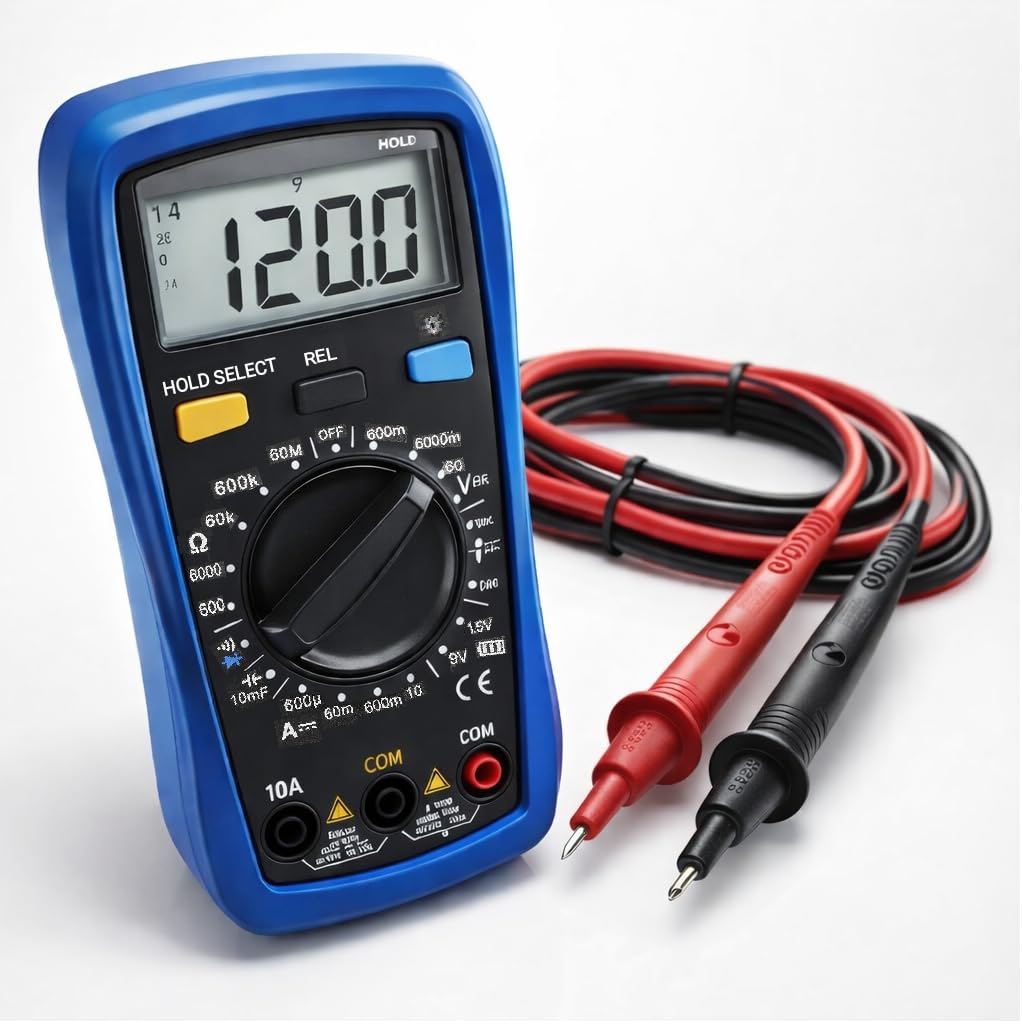
The CM300 Digital Multimeter includes the main unit and two 42-inch test probes (one red, one black).

Figure 3.1: CM300 Multimeter Rotary Dial and Display
Tento obrázek ukazuje detailní view of the CM300 multimeter's central rotary dial, which is used to select different measurement functions. The backlit LCD display is visible above the dial, and various input jacks are located at the bottom of the device.
3.1 Komponenty
- LCD displej: 6000-count backlit display for clear readings.
- Funkce otočného přepínače: Volí režimy měření.
- Vstupní konektory: For connecting test probes (COM, VΩmA, 10A).
- Test Probes: Red (positive) and Black (common/negative).
- Snímač NCV: Located at the top of the meter for non-contact voltage detekce.
- tlačítka: HOLD/SELECT, REL, BACKLIGHT.
4. Nastavení
4.1 Instalace baterie
- Ujistěte se, že je multimetr VYPNUTÝ.
- Vyhledejte přihrádku na baterie na zadní straně měřiče.
- Pomocí šroubováku otevřete kryt prostoru pro baterie.
- Insert two AAA batteries, observing correct polarity (+/-).
- Nasaďte kryt prostoru pro baterie a zajistěte jej šroubem.
4.2 Připojení měřicích sond
- Zasuňte černý měřicí vodič do zdířky „COM“ (Common).
- Pro většinu měření (objemtage, resistance, continuity, capacitance, diode, battery test), insert the red test lead into the "VΩmA" jack.
- Pro měření proudu (do 10 A) zasuňte červený měřicí vodič do zdířky „10 A“.
5. Návod k obsluze
Before each measurement, ensure the test leads are correctly connected and the function switch is set to the appropriate range.
Obrázek 5.1: Měření střídavého proudutage with CM300
This image illustrates the CM300 multimeter in use, displaying a voltage reading. A person is holding the blue multimeter while the red and black test probes are inserted into a standard wall outlet, demonstrating an AC voltage měření.
5.1 Zapnutí/vypnutí
Rotate the function switch from "OFF" to any desired measurement function to power on the meter. Rotate it back to "OFF" to power off.
5.2 AC/DC Voltage Measurement (V~ / V--)
- Set the function switch to the "V~" (AC Voltage) or "V--" (DC Voltage) pozice.
- Připojte měřicí sondy paralelně k měřenému obvodu nebo součástce.
- Přečtěte si svtage hodnota na LCD displeji.
5.3 DC Current Measurement (A--)
- VAROVÁNÍ: Ensure the red test lead is in the "10A" jack for current measurements up to 10A, or "VΩmA" for lower current ranges.
- Set the function switch to the "A--" position.
- Otevřete obvod, kde má být měřen proud, a zapojte měřič do série.
- Odečtěte aktuální hodnotu na LCD displeji.
5.4 Měření odporu (Ω)
- Set the function switch to the "Ω" position.
- Před měřením odporu se ujistěte, že je obvod bez napětí.
- Připojte měřicí sondy k měřené součástce.
- Odečtěte hodnotu odporu na LCD displeji.
5.5 Diode Test (->|-)
- Set the function switch to the "->|-" (Diode) position.
- Připojte červenou sondu k anodě a černou sondu ke katodě diody.
- Přední svazektage drop will be displayed. Reverse the probes; an open circuit (OL) should be displayed for a good diode.
5.6 Capacitance Measurement (10mF)
- Set the function switch to the "10mF" (Capacitance) position.
- VAROVÁNÍ: Discharge capacitors before testing to prevent electric shock or damage to the meter.
- Připojte měřicí sondy na svorky kondenzátoru.
- Odečtěte hodnotu kapacity na LCD displeji.
5.7 Audible Continuity ()))
- Set the function switch to the ")))" (Continuity) position.
- Ujistěte se, že je obvod bez napětí.
- Připojte měřicí sondy k obvodu nebo součástce.
- If resistance is below approximately 50Ω, the buzzer will sound, indicating continuity.
5.8 Test baterie (1.5 V / 9 V)
- Set the function switch to the "1.5V" or "9V" battery test position.
- Připojte červenou sondu ke kladnému pólu a černou sondu k zápornému pólu baterie.
- Na displeji se zobrazí objem baterietage.
5.9 Nekontaktní svtage (NCV)
- Set the function switch to the "NCV" position.
- Move the top of the meter near a live conductor.
- The meter will beep and the NCV indicator will light up when AC voltage je detekováno.
5.10 Pozastavení dat (HOLD)
Press the "HOLD" button to freeze the current reading on the display. Press it again to release and resume live readings.
5.11 Relative Mode (REL)
Press the "REL" button to store the current reading as a reference value. Subsequent measurements will be displayed as the difference from this reference. Press again to exit relative mode.
5.12 Podsvícení
Press the "BACKLIGHT" button to turn on the display backlight for better visibility in dim conditions. Press again to turn it off.
6. Údržba
6.1 Čištění
Otřete měřič reklamouamp hadříkem a jemným čisticím prostředkem. Nepoužívejte abrazivní prostředky ani rozpouštědla. Před použitím se ujistěte, že je měřič suchý.
6.2 Výměna baterie
Refer to Section 4.1 for battery installation instructions. Replace batteries when the low battery indicator appears on the display.
6.3 Výměna pojistky
If the current measurement function stops working, the fuse may need replacement. This procedure should only be performed by qualified personnel. Contact support for assistance.
7. Řešení problémů
| Problém | Možná příčina | Řešení |
|---|---|---|
| Měřič se nezapne. | Vybité nebo nesprávně vložené baterie. | Zkontrolujte polaritu baterií; vyměňte baterie. |
| Zobrazuje se „OL“ (přetížení). | Input value exceeds selected range or meter's maximum. | Select a higher range or ensure input is within meter's limits. |
| Nepřesné údaje. | Low battery, incorrect function selected, or damaged test leads. | Replace batteries, verify function switch, inspect and replace test leads if damaged. |
| Žádný pípnutí kontinuity. | Circuit resistance too high, or open circuit. | Check the circuit for breaks; ensure resistance is below 50Ω. |
8. Specifikace
| Funkce | Specifikace |
|---|---|
| Model | CM300 |
| Zobrazit | 6000-Count Backlit LCD |
| AC/DC Voltage Dosah | 1mV - 600V |
| Rozsah DC proudu | Až 10A |
| Rozsah odporu | Až 60 MΩ |
| Rozsah kapacity | Up to 10,000 µF |
| Hodnocení bezpečnosti | CAT III 600V, ETL Certified |
| Zdroj napájení | 2 x AAA baterie |
| Zahrnuté komponenty | CM300 Digital Multimeter, two 42 in. test probes |
| Rozměry | 8 x 4 x 2.5 palce |
| Hmotnost | 4 libry |
| Speciální funkce | NCV, Data Hold, Relative Mode, Backlight, Audible Continuity, Diode Test, Battery Test |
9. Záruka a podpora
The Generic CM300 Digital Multimeter comes with a 30-day return policy. For technical support or warranty inquiries, please contact your retailer or the manufacturer.


