
1. Úvod
Děkuji za nákupasing the FreeWolf G6 Wireless Gaming Mouse. This manual provides detailed instructions for setting up, operating, and maintaining your device. Please read this manual carefully before use to ensure optimal performance and longevity of your mouse.
2. Bezpečnostní informace
- Chraňte zařízení před vodou a jinými kapalinami, abyste předešli úrazu elektrickým proudem nebo poškození.
- Nepokoušejte se myš rozebírat ani opravovat sami. Veškerý servis svěřte kvalifikovanému personálu.
- Avoid exposing the mouse to extreme temperatures or direct sunlight.
- Baterii zlikvidujte v souladu s místními předpisy. Nespalujte.
3. Obsah balení
- FreeWolf G6 Wireless Gaming Mouse
- USB nabíjecí kabel
- 2.4G USB přijímač (uložený v myši)
- Uživatelská příručka
4. Konec produktuview
Familiarize yourself with the various components and buttons of your FreeWolf G6 mouse:

Image: Diagram illustrating the button layout and features of the FreeWolf G6 Wireless Gaming Mouse. Key components include the Left Button, Right Button, Middle Button (scroll wheel), CPI Cycle button, Light Switch, Webpage Button, Backward button, Forward button, Desktop Button, Fire Button, Receiver Storage Compartment, BT Connection Button, and Power Switch Button (2.4G-OFF-BT).
- Levé tlačítko: Standardní funkce levého kliknutí.
- Pravé tlačítko: Standardní funkce kliknutí pravým tlačítkem myši.
- Prostřední tlačítko (rolovací kolečko): Funkce rolování a kliknutí prostředním tlačítkem myši.
- CPI Cycle Button: Adjusts the mouse's DPI sensitivity.
- Světelný spínač: Controls the mouse's LED lighting.
- Webpage Button: Navigates to a webpage (functionality may vary by software).
- Tlačítko zpět: Naviguje zpět web prohlížeče popř file průzkumníci.
- Tlačítko vpřed: Naviguje vpřed web prohlížeče popř file průzkumníci.
- Tlačítko na ploše: Návrat na plochu jedním kliknutím.
- Spouštěcí tlačítko: Programmable button, often used for rapid-fire actions in games.
- Receiver Storage Compartment: Stores the 2.4G USB receiver when not in use.
- BT Connection Button: Zahájí režim párování Bluetooth.
- Power Switch Button (2.4G-OFF-BT): Selects connection mode or turns off the mouse.
5. Nastavení
5.1 Nabíjení myši
The FreeWolf G6 mouse features a built-in rechargeable lithium battery. Before first use, or when the battery is low, connect the mouse to a power source using the provided USB charging cable.

Image: The FreeWolf G6 mouse connected via its USB cable to a laptop, indicating the charging process. The mouse features a built-in rechargeable battery for extended use.
- Připojte menší konec nabíjecího kabelu USB k nabíjecímu portu na přední straně myši.
- Connect the larger end of the USB cable to a USB port on your computer or a USB wall adapter.
- The mouse's indicator light will show charging status (e.g., breathing light, solid light, or off when fully charged).
5.2 Bezdrátové připojení 2.4G
- Vyhledejte 2.4G USB přijímač uložený v přihrádce na spodní straně myši.
- Zapojte USB přijímač do volného USB portu na vašem počítači.
- Slide the Power Switch Button on the bottom of the mouse to the '2.4G' position.
- Váš počítač by měl automaticky detekovat a nainstalovat potřebné ovladače. Myš je připravena k použití.
5.3 Připojení Bluetooth
- Slide the Power Switch Button on the bottom of the mouse to the 'BT' position.
- Press and hold the BT Connection Button on the bottom of the mouse for 3-5 seconds until the indicator light starts flashing, indicating pairing mode.
- V počítači nebo zařízení přejděte do nastavení Bluetooth a vyhledejte nová zařízení.
- Select 'FreeWolf G6' (or similar name) from the list of available devices to pair.
- Once paired, the indicator light on the mouse will stop flashing and remain solid or turn off. The mouse is now connected via Bluetooth.
6. Návod k obsluze
6.1 Zapnutí/vypnutí
Use the Power Switch Button on the bottom of the mouse to turn it on or off, or to select the desired connection mode (2.4G or BT).
6.2 Nastavení DPI
The mouse features 5 adjustable DPI levels, allowing you to customize cursor sensitivity for different tasks or games. Press the CPI Cycle Button (viz Produkt nahořeview, item 4) to cycle through the available DPI settings.
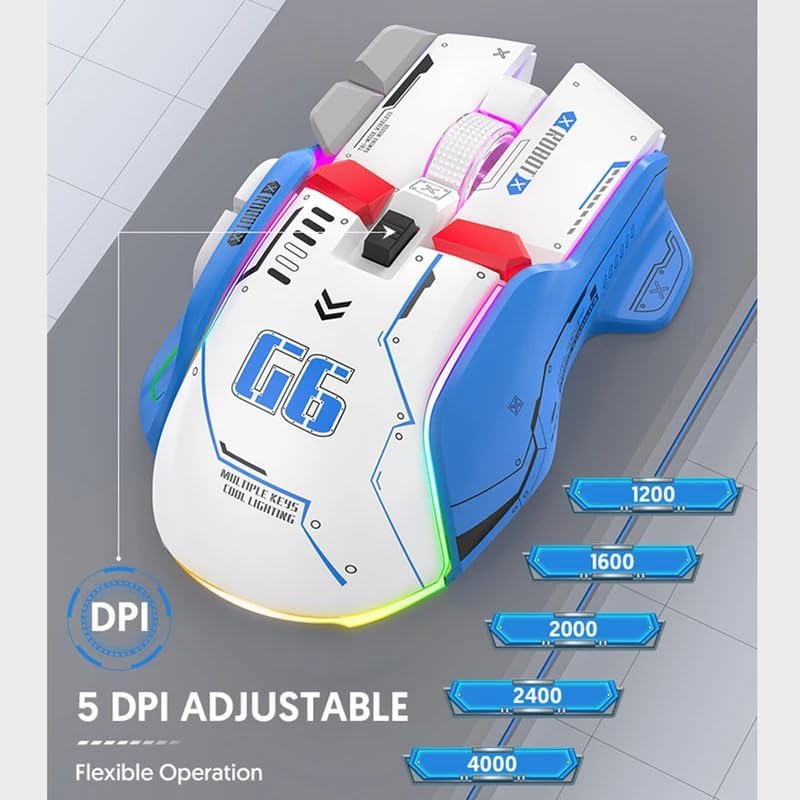
Image: The FreeWolf G6 mouse displaying its 5 adjustable DPI settings: 1200, 1600, 2000, 2400, and 4000 DPI. This allows for flexible operation and sensitivity control.
- Available DPI levels: 1200, 1600, 2000, 2400, 4000.
- Each press of the CPI Cycle Button will switch to the next DPI level.
6.3 Funkce tlačítek
Beyond the standard left, right, and middle clicks, the FreeWolf G6 offers several additional buttons for enhanced functionality. Refer to the Product Overview section (Section 4) for the location of each button.
- Webpage Button: Typically used for specific browser functions or can be customized.
- Tlačítka Zpět/Vpřed: Navigovat web stránky nebo složky.
- Tlačítko na ploše: Instantly minimizes all open windows to show the desktop.
- Spouštěcí tlačítko: Often used in gaming for rapid, repeated clicks.
6.4 Ergonomický design
The FreeWolf G6 features a symmetrical design with a high curve back, engineered to provide a comfortable grip for various hand positions and reduce strain during extended use.

Image: A hand gripping the FreeWolf G6 mouse, illustrating its symmetrical design, high curve back, and slip-resistant surface for comfortable and secure handling.
6.5 Tichý provoz
The FreeWolf G6 is designed for silent clicking, minimizing noise during use, which is beneficial in quiet environments or during late-night gaming sessions.
7. Údržba
- Čištění: K otření povrchu myši použijte měkký, suchý hadřík. V případě odolných nečistot použijte lehceamp Lze použít hadřík, ale dbejte na to, aby se do zařízení nedostala vlhkost.
- Skladování: When not in use for extended periods, turn off the mouse and store it in a cool, dry place.
- Péče o baterie: Nevystavujte baterii častému úplnému vybíjení. Myš pravidelně nabíjejte, aby baterie vydržela.
8. Řešení problémů
- Myš nereaguje:
- Ensure the mouse is powered on and the correct connection mode (2.4G or BT) is selected.
- Zkontrolujte úroveň nabití baterie a v případě potřeby ji dobijte.
- For 2.4G connection, ensure the USB receiver is securely plugged into a working USB port.
- For Bluetooth connection, ensure Bluetooth is enabled on your device and the mouse is properly paired. Try re-pairing if necessary.
- Pohyb kurzoru je nepravidelný nebo pomalý:
- Vyčistěte optický senzor na spodní straně myši.
- Adjust the DPI setting using the CPI Cycle Button.
- Ujistěte se, že myš používáte na vhodném povrchu (není silně reflexní ani průhledný).
- Časté výpadky spojení:
- Pro snížení rušení přibližte myš k přijímači/zařízení.
- Avoid using the mouse near other wireless devices that may cause interference.
- Ujistěte se, že je baterie dostatečně nabitá.
9. Specifikace
| Funkce | Detail |
|---|---|
| Model | G6 |
| Technologie připojení | Bluetooth, 2.4G Wireless (Tri-Mode) |
| Typ napájení | Rechargeable (Built-in Lithium Battery) |
| Počet tlačítek | 9 |
| Počet válečků | 1 (rolovací kolečko) |
| Úrovně DPI | 1200, 1600, 2000, 2400, 4000 (nastavitelné) |
| Provozní režim | Optoelektronické |
| Speciální funkce | Silent Operation, One-Click Return Desktop, Backlight, Portable |
| Orientace rukou | Právo |
| Kompatibilní zařízení | Osobní počítač |
| Hrubá hmotnost | 195 g |
10. Záruka a podpora
This product comes with a standard manufacturer's warranty. For detailed warranty information or technical support, please refer to the documentation included with your purchase or contact the retailer. Keep your proof of purchase for warranty claims.