1. Úvod
Děkuji za nákupasing the Generic D9 4K Digital Camera. This manual provides essential information for setting up, operating, and maintaining your camera. The D9 camera is designed to capture ultra-clear 4K videos and high-resolution 64MP photos, featuring built-in Wi-Fi, a 28X digital zoom, and a 4800mAh battery for extended usage. Please read this manual thoroughly before using the camera to ensure optimal performance and longevity.
2. Bezpečnostní informace
- Nevystavujte fotoaparát vodě nebo vlhkosti.
- Zabraňte pádu fotoaparátu na zem nebo jeho vystavení silným nárazům.
- Chraňte fotoaparát před přímým slunečním zářením a vysokými teplotami.
- Používejte pouze schválené příslušenství a napájecí adaptéry.
- Nepokoušejte se fotoaparát sami rozebírat nebo opravovat.
- Uchovávejte mimo dosah dětí.
3. Obsah balení
Zkontrolujte prosím balení, zda neobsahuje následující položky:
- 1 x D9 4K Video Camera
- 1 x kabel typu C
- 1 x Čisticí hadřík
- 1 x Uživatelská příručka
Note: An HDMI Cable may also be included, as per product specifications.
4. Konec produktuview
The D9 4K Digital Camera features a compact design with advanced functionalities for capturing high-quality media.

Obrázek 4.1: Přední view of the D9 4K Digital Camera, showcasing its lens and compact body.
4.1 Klíčové vlastnosti
- Nahrávání 4K videa: Capture stunning videos in ultra-high definition.
- Rozlišení fotografie 64 MP: Take incredibly detailed still images.
- Vestavěné Wi-Fi: Seamlessly connect to your smartphone or tablet for remote control and file převod.
- 28x digitální zoom: Magnify distant subjects with clarity.
- 3.0-inch 180° Rotatable Screen: Perfect for vlogging and self-recording.
- Vestavěná baterie 10 000 mAh: Poskytuje přibližně 6 hodin používání.
- WebFunkce vačky: Connect via USB for high-quality live streaming or video calls.
- Built-in & Bonus Fill Light: Enhance lighting for clearer shots in various conditions.

Obrázek 4.2: The 3.0-inch screen of the D9 camera, shown rotated 180 degrees for flexible viewnahrávání a samonahrávání.

Obrázek 4.3: The D9 camera demonstrating its built-in fill light feature, improving illumination for subjects.
4.2 Rozměry kamery
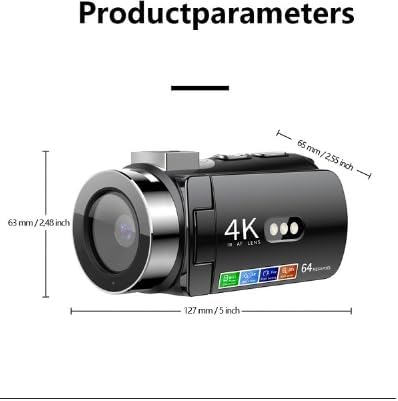
Obrázek 4.4: Dimensions of the D9 camera: approximately 127 mm (5 inches) in length, 63 mm (2.48 inches) in height, and 65 mm (2.55 inches) in width.
5. Nastavení
5.1 Nabíjení baterie
The D9 camera comes with a built-in 4800mAh battery.
- Connect the provided Type-C cable to the camera's charging port.
- Connect the other end of the Type-C cable to a compatible USB power adapter (not included) or a computer's USB port.
- The charging indicator light will illuminate. Once fully charged, the indicator light will change or turn off.
- A full charge provides approximately 6 hours of usage time.
5.2 Vložení paměťové karty
The camera supports memory cards from 8GB to 128GB. Ensure the memory card is formatted to FAT32.
- Locate the memory card slot on the camera.
- Vložte paměťovou kartu správným směrem kontaktů, dokud nezacvakne.
- Chcete-li kartu vyjmout, jemně na ni zatlačte, dokud nevyskočí.
Note: A memory card is required for recording videos and taking photos.
6. Návod k obsluze
6.1 Zapnutí/vypnutí
- Zapnutí: Stiskněte a podržte tlačítko napájení, dokud se obrazovka nerozsvítí.
- Vypnutí: Stiskněte a podržte tlačítko Napájení, dokud se obrazovka nevypne.
6.2 Basic Recording Modes
Use the mode button to switch between video recording and photo capture modes.
- Nahrávání videa: In video mode, press the Record button to start recording. Press again to stop. Videos are saved in AVI format at 4K resolution.
- Fotografování: In photo mode, press the Shutter button to take a picture. Photos are saved in JPG format at up to 64MP resolution.
6.3 Using Digital Zoom
The camera features a 28X digital zoom. Use the zoom controls (usually marked with 'W' for Wide and 'T' for Telephoto) to adjust the magnification.
6.4 Připojení k Wi-Fi
Connect your D9 camera to a smartphone or tablet (iOS and Android) via Wi-Fi for remote control, live previewa file převod.
- Povolte Wi-Fi na fotoaparátu v nabídce nastavení.
- Download the dedicated camera app (refer to the camera's screen or manual for app name, if available, otherwise search for "D9 Camera" app).
- On your smartphone/tablet, connect to the camera's Wi-Fi network (SSID will be displayed on the camera screen).
- Open the app to control the camera remotely, view živé footage a převod files.
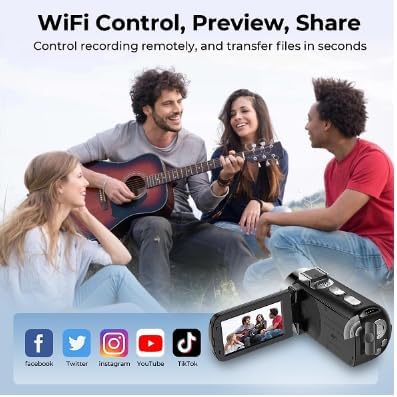
Obrázek 6.1: Illustration of the D9 camera's Wi-Fi capabilities, enabling remote control, preview, and sharing to platforms like Facebook, Twitter, Instagram, YouTube, and TikTok.
6.5 WebFunkce vačky
The D9 camera can be used as a high-quality webkamera pro živé vysílání nebo videohovory.
- Connect the camera to your computer using the provided Type-C USB cable.
- Vyberte "Webcam Mode" or "PC Camera" on the camera's screen if prompted.
- Váš počítač by měl fotoaparát rozpoznat jako webcam. Select it as the video source in your preferred video conferencing or streaming software.
6.6 Using the Fill Light
The camera includes a built-in fill light to brighten scenes. Activate it through the camera's menu or a dedicated button (refer to camera interface for specific control).
7. Údržba
- Čištění: Use the provided cleaning cloth to gently wipe the lens and screen. For stubborn smudges, use a lens cleaning solution designed for optical surfaces.
- Skladování: Fotoaparát skladujte na chladném a suchém místě mimo dosah přímého slunečního záření a extrémních teplot. Pokud jej skladujete delší dobu, vyjměte paměťovou kartu.
- Péče o baterie: Pro dlouhodobé skladování nabijte baterii přibližně na 50 % každé několik měsíců, abyste ji udrželi v dobrém stavu.
8. Řešení problémů
| Problém | Možná příčina / řešení |
|---|---|
| Fotoaparát se nezapne. | Battery may be depleted. Charge the camera using the Type-C cable. |
| Nelze nahrávat fotografie/videa. | Memory card may be full, not inserted correctly, or not formatted (FAT32). Check card status or replace. |
| Problémy s připojením k Wi-Fi. | Ensure Wi-Fi is enabled on the camera and your mobile device. Check that you are connected to the correct camera network. Restart both devices. |
| Špatná kvalita obrazu/videa. | Ensure the lens is clean. Check lighting conditions and use the fill light if necessary. Adjust camera settings if available. |
9. Specifikace
| Funkce | Detail |
|---|---|
| Číslo modelu | GPCV6400 |
| Rozlišení fotografie | 64 mil., 56 mil., 48 mil., 36 mil., 24 mil., 20 mil., 16 mil., 12 mil., 10 mil., 8 mil. |
| Rozlišení videa | 4K |
| Obrazový snímač | 1.68 |
| Obrazovka displeje | 3.0 inch (480x854) LED |
| Digitální zoom | 28X |
| Kapacita baterie | 4800mAh (17.76Wh, 3.7V) |
| Nabíjecí rozhraní | Typ-C |
| Podpora paměťových karet | 8GB to 128GB (FAT32 format) |
| Formát videa | AVI |
| Formát obrázku | JPG |
| Formát zvuku | WAV |
| Hudební formát | MP3 |
| Frekvence světelného zdroje | 50Hz, 60Hz |
| Wi-Fi Master Model | GPCV6400 |
| Klíče | 11 |
| Barva | Černý |
| Minimální ohnisková vzdálenost | 8.0 |
| Maximální ohnisková vzdálenost | 64.0 |
10. Záruka a podpora
This Generic D9 4K Digital Camera comes with a manufacturer's warranty of 1 měsíc od data nákupu. Uschovejte si prosím doklad o koupi pro případné reklamace.
For technical support or warranty inquiries, please contact your retailer or the manufacturer directly. Refer to the product packaging or purchase documentation for contact information.