
1. Úvod
The VIDCASTIVE 4K Mini Body Camera L20 is a compact, wearable camera designed for capturing high-quality point-of-view (POV) video and photos. Its small size, magnetic and clip mounts, and 4K resolution make it suitable for various activities, including outdoor sports, daily vlogging, and personal recording. This manual provides essential information for setting up, operating, maintaining, and troubleshooting your camera.

Image: The VIDCASTIVE 4K Mini Body Camera L20.
2. Co je v krabici
Ověřte, zda jsou v balení přítomny všechny položky:
- Fotoaparát
- USB-C kabel
- 12-Piece Accessory Kit (various mounts and clips)
- Uživatelská příručka
- Memory Card (64GB V30-rated, pre-installed)

Image: All included accessories for the VIDCASTIVE 4K Mini Body Camera L20.
3. Konec produktuview
The VIDCASTIVE L20 features a compact design with a 1.47-inch display for real-time viewing and playback. It records in 4K/30fps and includes a 750mAh rechargeable battery for up to 150 minutes of continuous recording.
Komponenty fotoaparátu
- Čočka: Main camera lens for capturing video and photos.
- 1.47palcový displej: Pro navigaci v menu, živě viewa přehrávání.
- Vypínač: To turn the camera on/off and confirm selections.
- Tlačítko režimu: To switch between video, photo, and playback modes, and navigate menus.
- Port USB-C: Pro nabíjení a přenos dat.
- Slot pro kartu Micro SD: Pro vložení paměťové karty.
- Mikrofon: Pro nahrávání zvuku.
4. Nastavení
4.1 Nabíjení fotoaparátu
Before first use, fully charge the camera. Connect the provided USB-C cable to the camera's USB-C port and the other end to a USB power adapter (not included) or a computer's USB port. The camera supports recording while charging.

Image: The camera connected to a power source via USB-C cable for charging.
4.2 Vložení paměťové karty
The camera comes with a pre-installed 64GB V30-rated high-speed Micro SD card. If you need to insert or replace the card, ensure the camera is powered off. Open the Micro SD card slot cover and gently insert the card with the gold contacts facing the front of the camera until it clicks into place. Close the cover securely.

Image: A Micro SD card being inserted into the camera's slot.
4.3 Zapnutí/vypnutí
- Zapnutí: Stiskněte a několik sekund podržte tlačítko napájení, dokud se obrazovka nerozsvítí.
- Vypnutí: Stiskněte a podržte tlačítko napájení po dobu několika sekund, dokud se obrazovka nevypne.
4.4 Počáteční nastavení
Upon first power-on or after a reset, you may need to set the date, time, and language. Use the Mode button to navigate through options and the Power button to confirm selections on the 1.47-inch display.
5. Návod k obsluze
5.1 Nahrávání videa
From the main menu, select 'Video Record'. Press the Power button to start recording. A red indicator light will flash, and a timer will appear on the screen. Press the Power button again to stop recording. Videos are saved to the Micro SD card in MP4 format.
5.2 Fotografování
From the main menu, select 'Photo Shot'. Press the Power button to capture a photo. Photos are saved to the Micro SD card.
5.3 Přehrávání
From the main menu, select 'Playback'. Use the Mode button to navigate through your recorded videos and photos. Press the Power button to view vybraný file.
5.4 Připojení k Wi-Fi a používání aplikací
The camera features built-in WiFi for connecting to your smartphone via a dedicated companion app. This allows for live preview, wireless video transfer, and direct sharing. Refer to the app's instructions for detailed pairing and usage.

Image: The camera displaying WiFi connection information, with a smartphone showing the companion app interface.
5.5 Možnosti montáže
The camera is designed for versatile mounting with its magnetic body and included accessory kit. Common mounting methods include:
- Magnetický držák: Attach directly to metallic surfaces or use with the magnetic necklace mount for hands-free recording on clothing.
- Montáž klipu: Securely attach to shirt pockets, backpack straps, or other fabric edges.
- Držák na helmu: Use the helmet adapter for POV recording during cycling or other activities.
- Držák na kolo: Attach to bicycle handlebars for stable recording.
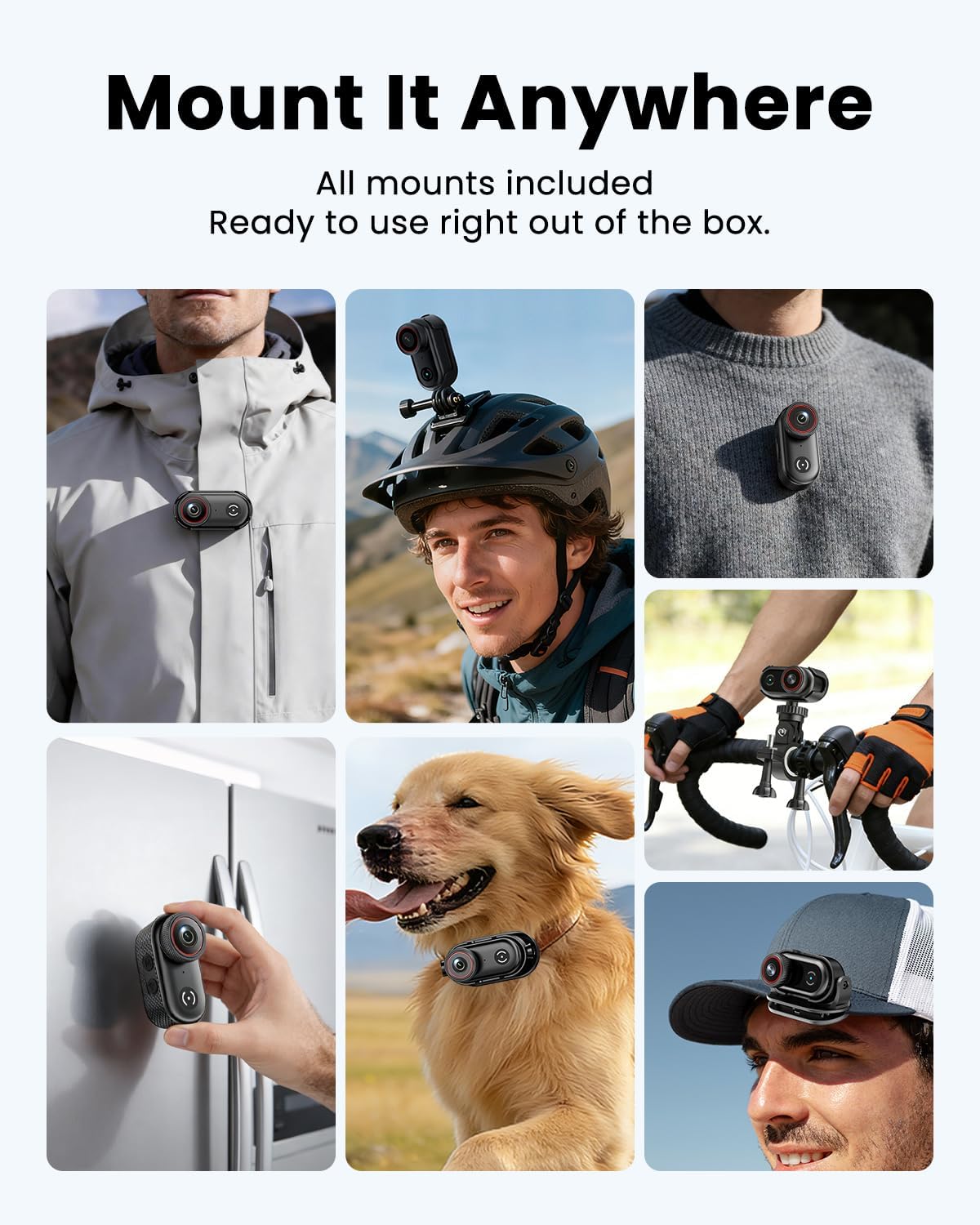
Image: The camera clipped onto a shirt for wearable recording.

Image: The camera mounted on a bicycle helmet.

Image: The camera mounted on bicycle handlebars.
6. Údržba
6.1 Čištění
Use a soft, dry cloth to clean the camera body. For the lens, use a specialized lens cleaning cloth and solution. Avoid using harsh chemicals or abrasive materials.
6.2 Skladování
Store the camera in a cool, dry place away from direct sunlight and extreme temperatures. Ensure the battery is partially charged (around 50%) if storing for extended periods to prolong battery life.
6.3 Správa paměťových karet
Pravidelně zálohujte své footage and format the Micro SD card in the camera's settings to maintain optimal performance and prevent data corruption. A V30-rated card is recommended for 4K recording.
7. Řešení problémů
If you encounter issues with your VIDCASTIVE L20 camera, refer to the following common solutions:
- Kamera se nezapíná: Ujistěte se, že je baterie nabitá. Připojte fotoaparát ke zdroji napájení a zkuste to znovu.
- "Please plug in SD card" message: Verify that the Micro SD card is correctly inserted. Try re-inserting the card or using a different compatible V30-rated card. Ensure the card is not damaged.
- Špatná kvalita videa/fotografií: Ensure the lens is clean. Check the recording resolution settings. Ensure sufficient lighting.
- Špatná kvalita zvuku: Ujistěte se, že mikrofon není nijak zakrytý.
- Camera freezing or unresponsive: Press and hold the Power button for 10-15 seconds to force a restart. If the issue persists, perform a factory reset via the camera's settings menu (note: this will erase custom settings).
- Problémy s připojením k Wi-Fi: Ensure the camera's WiFi is enabled and your smartphone is within range. Restart both the camera and your phone. Reinstall the companion app if necessary.
Pokud problémy přetrvávají i po vyzkoušení těchto kroků, kontaktujte prosím zákaznickou podporu.
8. Specifikace
| Funkce | Specifikace |
|---|---|
| Značka | VIDCASTIVNÍ |
| Číslo modelu | L20 |
| Rozlišení záznamu videa | 4K |
| Formát záznamu videa | MP4 |
| Velikost obrazovky | 1.47 palce |
| Průměrná životnost baterie | 2.5 Hours (150 minutes) |
| Velikost instalované paměti Flash | 64 GB (V30-rated) |
| Technologie připojení | USB, WiFi |
| Technologie fotosenzoru | CMOS |
| Maximální clona | 2.8 f |
| Úroveň odolnosti proti vodě | Není odolný vůči vodě |
| Stabilizace obrazu | Anti-Shake (Digital) |
| Hmotnost položky | 0.37 Kilograms (approx. 1.59 oz / 45g) |
9. Záruka a podpora
9.1 Informace o záruce
The VIDCASTIVE 4K Mini Body Camera L20 comes with a 1-letá záruka výrobceTato záruka se vztahuje na vady materiálu a zpracování při běžném používání. Uschovejte si prosím doklad o koupi pro případ uplatnění záruky.
9.2 Zákaznická podpora
For technical assistance, warranty claims, or any questions regarding your product, please contact VIDCASTIVE customer support through the retailer's platform or the official VIDCASTIVE website. Provide your model number (L20) and a detailed description of the issue for faster service.