
1. Úvod
The SKYKING TA532A Digital Differential Manometer is a professional-grade instrument designed for precise differential pressure diagnostics and data logging. This device is suitable for HVAC technicians, service engineers, industrial maintenance teams, and quality control professionals. It provides reliable pressure readings in multiple units and supports real-time data storage and analysis. The integrated data logging capabilities and PC software facilitate capturing, storing, and analyzing pressure values over time, exporting data reports, and optimizing system performance. This makes the TA532A ideal for commissioning, troubleshooting, and compliance reporting in various environments, including air duct and filter diagnostics, cleanroom pressure monitoring, and industrial airflow testing.
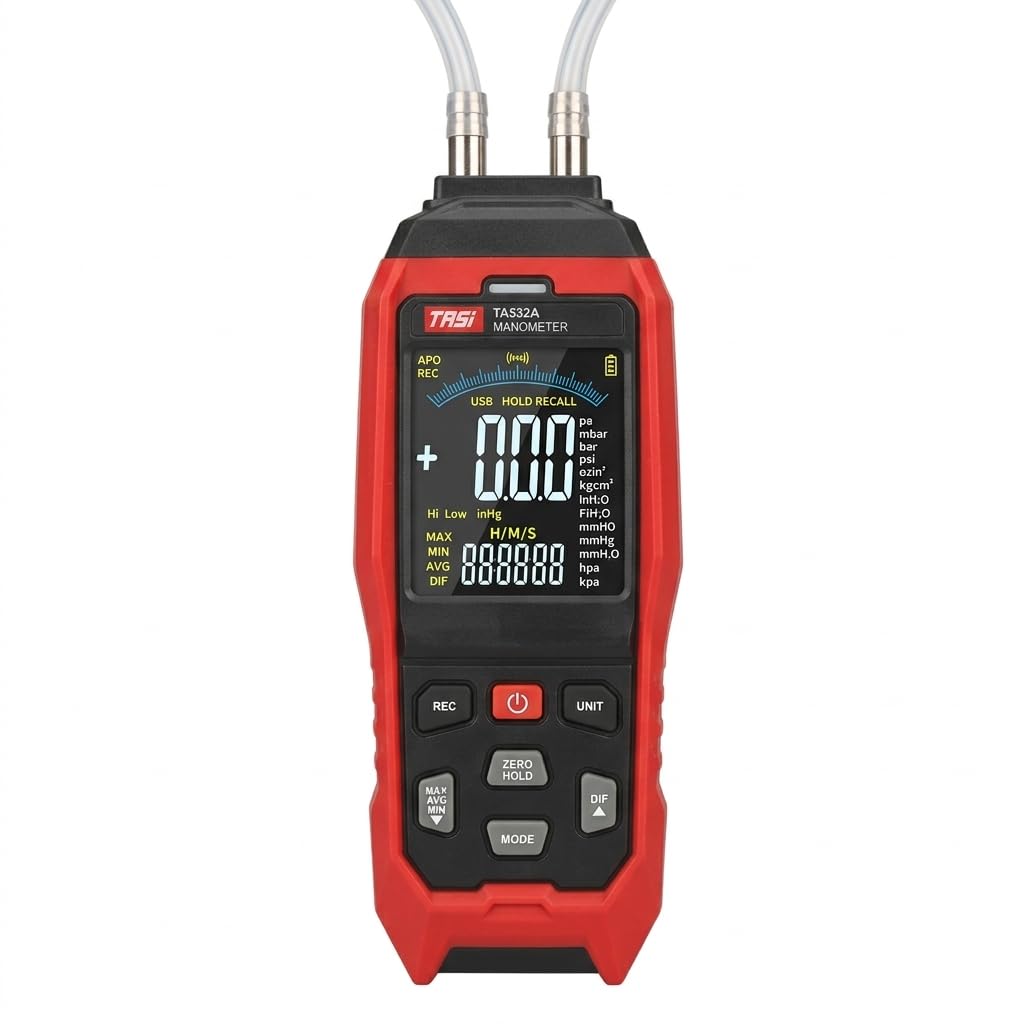
Obrázek 1: Přední strana view of the SKYKING TA532A Digital Differential Manometer.
2. Bezpečnostní informace
Před použitím zařízení si prosím přečtěte a pochopte všechny bezpečnostní pokyny. Nedodržení těchto pokynů může vést ke zranění nebo poškození přístroje.
- Do not attempt to measure pressures exceeding the specified range of ±40.00 kPa.
- Ensure proper connection of pressure tubes to avoid leaks or incorrect readings.
- Nevystavujte zařízení extrémním teplotám, vlhkosti ani korozivnímu prostředí.
- Pokud zařízení nebudete delší dobu používat, vyjměte baterie, abyste zabránili jejich vytečení.
- Používejte pouze určené zdroje napájení a příslušenství.
- Do not disassemble or modify the instrument. Refer servicing to qualified personnel.
3. Obsah balení
Ověřte, zda jsou v balení přítomny všechny položky:
- SKYKING TA532A Manometer
- Pressure Tubes (2 pieces, silicone, 500mm length)
- Batteries (3 x 1.5V AA/LR06)
- USB Micro Interface Cable (for PC connection)
- Uživatelská příručka (tento dokument)
4. Vlastnosti produktu
The TA532A Manometer includes the following key features:
- High-Precision Differential Pressure Measurement: Provides accurate readings for HVAC systems, ductwork, filter diagnostics, cleanrooms, and industrial applications.
- Integrated Data Logging & PC Software Support: Records and stores pressure readings over time; allows data export and analysis on a PC via USB.
- Wide Pressure Unit Selection: Supports multiple units including psi, kPa, mbar, inH₂O, mmH₂O, mmHg, inHg, FTH₂O, kgcm², ozin², hpa, pa.
- Large Backlit VA Color LCD Display: Clear, easy-to-read screen shows simultaneous high/low differential pressure values and stored readings.
- Duální vstupní porty: For high (P1) and low (P2) pressure, enabling accurate differential value determination.
- Max/Min & Data Hold Functions: Captures peak pressure values and freezes readings for analysis.
- Portable & Rugged Handheld Design: Lightweight, ergonomic build with durable housing for field use.
- Nulová kalibrace: Ensures measurement accuracy.
- High/Low Alarms: User-configurable alerts for pressure thresholds.

Figure 2: Displaying advanced functionalities of the TA532A Manometer, including alarms, data hold, Min/Max/Avg, zero calibration, and differential mode.
5. Nastavení
5.1 Instalace baterie
- Vyhledejte přihrádku na baterii na zadní straně zařízení.
- Otevřete kryt baterie.
- Insert three 1.5V AA/LR06 batteries, observing the correct polarity (+/-).
- Pevně zavřete kryt baterie.
5.2 Connecting Pressure Tubes
The manometer features two input ports: P1 (High) and P2 (Low).
- Connect the silicone pressure tubes to the P1 and P2 ports as required for your measurement application.
- Ensure a snug fit to prevent pressure leaks.

Figure 3: Illustration of P1 (High) and P2 (Low) input ports for differential pressure measurement.
6. Návod k obsluze
6.1 Zapnutí/vypnutí
- Stiskněte tlačítko MOC tlačítko pro zapnutí zařízení.
- Stiskněte a podržte MOC tlačítko pro vypnutí zařízení.
- The device has an auto-power-off function (15 minutes, can be disabled).
6.2 Kalibrace nuly
Before each measurement, especially for differential pressure, it is recommended to perform a zero calibration.
- Ensure both P1 and P2 ports are open to atmospheric pressure (not connected to any pressure source).
- Stiskněte tlačítko NULOVÉ HOLD button to calibrate the device to zero. The display should show "0.00" or very close to it.
6.3 Výběr jednotky
The TA532A supports 11 selectable pressure units.
- Stiskněte tlačítko JEDNOTKA button repeatedly to cycle through the available pressure units (pa, mbar, bar, psi, ozin², kgcm², inH₂O, mmH₂O, mmHg, inHg, FTH₂O, hpa, kpa).
- Vybraná jednotka se zobrazí na obrazovce.

Figure 4: The display indicating the wide range of 11 selectable pressure units available on the TA532A Manometer.
6.4 Differential Pressure Measurement (DIF Mode)
To measure the pressure difference between two points:
- Connect the higher pressure source to the P1 (Hi) port and the lower pressure source to the P2 (Lo) port.
- Stiskněte tlačítko DIF button to activate differential pressure mode. The display will show the real-time difference between P1 and P2.
- Ensure zero calibration is performed before connecting to pressure sources for accurate differential readings.

Figure 5: A technician measuring pressure drop (ΔP) across an HVAC air filter using the TA532A Differential Manometer.
6.5 Funkce Data Hold
Zmrazení aktuální hodnoty na displeji:
- Stiskněte tlačítko DRŽET button (often combined with ZERO). The reading will be held.
- Stiskněte tlačítko DRŽET button again to release and resume real-time measurement.
6.6 Max/Min/Avg Mode
To track maximum, minimum, and average pressure values:
- Stiskněte tlačítko MAX / MIN / PRŮM button (often labeled MODE or similar, then cycle).
- The display will show the maximum, minimum, or average reading recorded since the mode was activated.
- Press again to cycle through MAX, MIN, AVG, and exit.
7. Advanced Measurement Modes
7.1 Data Recording (Data Logging)
The TA532A can record up to 10,000 groups of data.
- Stiskněte tlačítko REC button to start data recording. An indicator (e.g., "REC") will appear on the display.
- The device will automatically store readings at a set interval (refer to the full manual for interval settings).
- Stiskněte tlačítko REC dalším tlačítkem nahrávání zastavíte.
7.2 Připojení softwaru PC
To transfer recorded data to a computer for analysis:
- Install the provided PC software on your computer (software typically included on a mini-CD or available for download).
- Connect the manometer to your PC using the supplied USB micro interface cable.
- Launch the PC software and follow the on-screen instructions to download, view, and analyze the recorded data.
- The software allows for data export in various formats for reporting.
8. Údržba
8.1 Čištění
- Otřete zařízení měkkým, damp tkanina. Nepoužívejte abrazivní čisticí prostředky nebo rozpouštědla.
- Ensure no moisture enters the pressure ports or other openings.
8.2 Skladování
- Store the manometer in a cool, dry place, away from direct sunlight and extreme temperatures.
- Pokud zařízení skladujete delší dobu, vyjměte baterie, abyste zabránili vytečení a možnému poškození zařízení.
- Storage conditions: -10°C to 50°C, max 70% RH.
8.3 Výměna baterie
Replace batteries when the low battery indicator appears on the display to ensure accurate measurements and proper device function.
- Postupujte podle kroků pro instalaci baterie v části 5.1.
- Staré baterie zlikvidujte v souladu s místními předpisy.
9. Řešení problémů
| Problém | Možná příčina | Řešení |
|---|---|---|
| Zařízení se nezapne. | Vybité nebo nesprávně vložené baterie. | Zkontrolujte polaritu baterií, vyměňte je za nové. |
| Nepřesné údaje. | No zero calibration, leaky connections, exceeding pressure range. | Perform zero calibration, check tube connections, ensure pressure is within range. |
| Displej zobrazuje „OL“ nebo „Err“. | Overload or out of range measurement. | Disconnect from pressure source, ensure pressure is within specified limits. |
| PC software not detecting device. | Incorrect USB connection, driver issues, software not running. | Ensure USB cable is securely connected, install necessary drivers, restart software and device. |
10. Specifikace
| Model | TA532A |
| Rozsah | ± 40.00 kPa |
| Přesnost | ±1% FS (Full Scale) |
| Výběr jednotky | pa, mbar, bar, psi, ozin², kgcm², inH₂O, mmH₂O, mmHg, inHg, FTH₂O, hpa, kpa |
| Zobrazit | VA color screen display, 4 digits, max 9999 |
| Senzor | Integrated low-pressure and high-precision pressure sensor |
| Data Hold | Ano |
| Max / Min / Prům | Ano |
| Difference (DIF) | Ano |
| Nulová kalibrace | Ano |
| Záznam dat | 10,000 skupiny |
| Připojení k PC | Yes (USB micro interface) |
| Automatické vypnutí | 15 mins (can be disabled) |
| Provozní podmínky | 0°C ~ 40°C, max 80% RH, indoor altitude < 2000m |
| Podmínky skladování | -10°C ~ 50°C, max 70% RH (remove battery) |
| Napájení | 3 x 1.5V AA (LR06) / USB micro interface 5V |
| Velikost produktu | 203 x 67 x 35 mm |
| Hmotnost produktu | Approx. 209g (not including battery) |
| Silikonová hadice | Inner diameter: 8mm; Outer diameter: 12mm; Wall thickness: 2mm; Length: 500mm x 2 pieces |

Figure 6: Detailed technical specifications for the TA532A Manometer.
11. Podpora
For technical assistance, troubleshooting beyond this manual, or inquiries regarding your SKYKING TA532A Digital Differential Manometer, please contact your local distributor or the manufacturer's customer support. Refer to your purchase documentation for specific contact details.
Manufacturer: Shenzen Electrical Techno Co
Importer: Skyking Instruments, Mumbai, India