
1. Úvod
Děkuji za nákupasing the Sharp PS-916 Bluetooth Party Speaker System. This system includes two identical portable Bluetooth speakers designed to deliver powerful audio with versatile connectivity options. Please read this manual carefully before using the product to ensure proper operation and to maximize your listening experience.
Obsah balení:
- 2 x Sharp PS-916 Party Speakers
- 1 x nabíjecí kabel
- 1 x Dálkové ovládání
- 1 x Uživatelská příručka

Image: The Sharp PS-916 system includes two speakers for a complete stereo experience.
2. Nastavení
2.1 Nabíjení reproduktorů
The PS-916 speakers are equipped with rechargeable batteries, providing up to 12 hours of playback. Before initial use, fully charge both speakers.
- Connect the charging cable to the DC IN port on the rear of each speaker.
- Plug the other end of the charging cable into a suitable power adapter (not included) or USB power source.
- Rozsvítí se kontrolka nabíjení. Po dokončení nabíjení změní barvu nebo zhasne.
2.2 Zapnutí/vypnutí
To power on or off each speaker, press and hold the ON/STAND BY INPUT tlačítko umístěné na ovládacím panelu.
2.3 Párování Bluetooth (jeden reproduktor)
- Ensure the speaker is powered on and in Bluetooth mode. The Bluetooth indicator will flash, indicating it is ready for pairing.
- Na svém mobilním zařízení povolte Bluetooth a vyhledejte dostupná zařízení.
- Select "Sharp PS-916" from the list of devices.
- Po připojení přestane indikátor Bluetooth blikat a zůstane svítit nepřerušovaně.
2.4 Párování True Wireless Stereo (TWS) (dva reproduktory)
TWS allows you to connect two PS-916 speakers wirelessly for a stereo sound experience.
- Power on both PS-916 speakers.
- Ensure neither speaker is currently connected to a Bluetooth device.
- Na jednom z reproduktorů (to bude primární reproduktor) stiskněte tlačítko TWS button. The speaker will enter TWS pairing mode.
- The primary speaker will automatically search for the secondary speaker. Once connected, you will hear an audible confirmation, and the TWS indicator lights on both speakers will illuminate.
- Nyní připojte mobilní zařízení k primárnímu reproduktoru přes Bluetooth, jak je popsáno v části 2.3. Zvuk bude přehráván stereofonně z obou reproduktorů.
3. Provoz
3.1 Ovládací panel Overview

Image: Main control panel for the Sharp PS-916 speaker.
- ON/STAND BY INPUT: Power on/off, switch input modes (Bluetooth, USB, TF, AUX, FM).
- PLAY/PAUSE (►/∕∕): Přehrát nebo pozastavit přehrávání zvuku.
- PREVIOUS (◀◀): Přechod na předchozí skladbu.
- NEXT (▶▶): Přejít na další skladbu.
- HLASITOST KNOFLÍKU: Otáčením upravíte hlavní hlasitost.
- TWS: Initiate or disconnect True Wireless Stereo pairing.
- EKVALIZÉR: Cycle through preset equalizer modes.
- BAS: Activate or deactivate bass boost.
- SVĚTLO: Change or turn off the LED light effects.
- MIC CONTROL: Adjust microphone volume or echo (if applicable).
3.2 vstupních portů
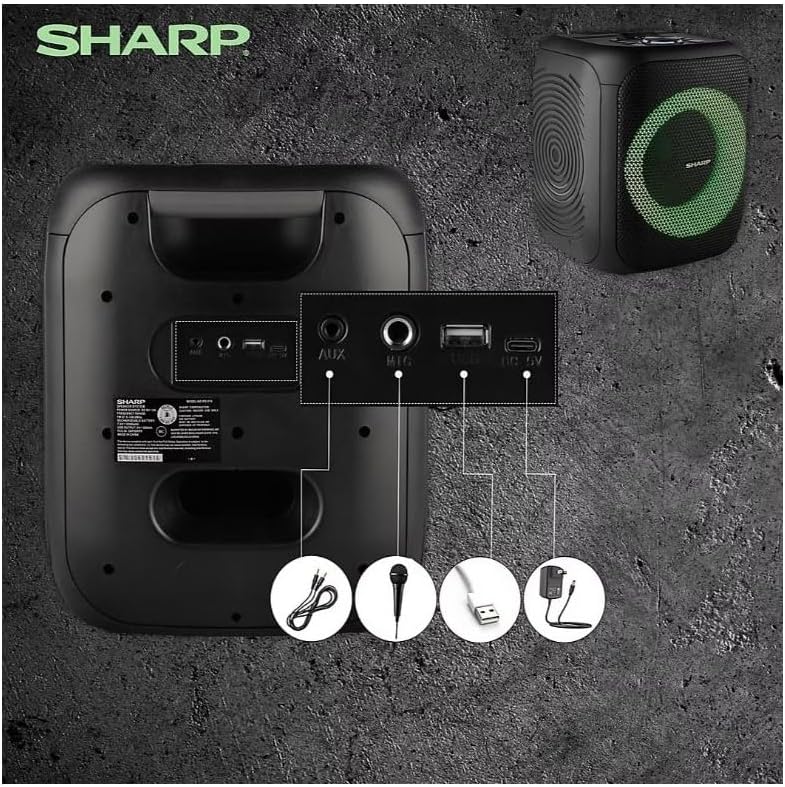
Image: Rear panel with various input and charging ports.
- AUX IN: Připojte externí zvuková zařízení pomocí 3.5mm audio kabelu.
- MIC IN: Connect a microphone (sold separately) for karaoke or announcements.
- USB: Vložte USB flash disk pro přehrávání zvuku.
- TRANSFLASH KARTA: Insert a TF (microSD) card for audio playback.
- DC IN: Connect the charging cable to power and charge the speaker.
3.3 Playing Audio from USB/TF Card
- Insert a USB flash drive or TF card into the corresponding port.
- Stiskněte tlačítko ON/STAND BY INPUT button repeatedly until the display shows the USB or TF mode.
- Přehrávání se spustí automaticky. Použijte PLAY/PAUSE, PŘEDCHOZÍa DALŠÍ tlačítka pro ovládání přehrávání.
3.4 Použití AUX vstupu
- Connect one end of a 3.5mm audio cable to the AUX IN port on the speaker.
- Druhý konec připojte ke konektoru pro sluchátka nebo audio výstupu vašeho externího zařízení.
- Stiskněte tlačítko ON/STAND BY INPUT button repeatedly until the display shows AUX mode.
- Ovládejte přehrávání a hlasitost z externího zařízení.
3.5 Provoz FM rádia

Image: The PS-916 features an integrated FM Tuner.
- Stiskněte tlačítko ON/STAND BY INPUT button repeatedly until the display shows FM mode.
- Stiskněte a podržte PLAY/PAUSE tlačítko pro automatické prohledávání a ukládání dostupných FM stanic.
- Použijte PŘEDCHOZÍ a DALŠÍ tlačítka pro procházení uloženými stanicemi.
3.6 LED světelných efektů
Stiskněte tlačítko SVĚTLO button to cycle through different LED light modes or to turn the lights off.
4. Údržba
4.1 Čištění
- Před čištěním reproduktor vždy vypněte a odpojte jej od zdroje napájení.
- K otření vnějších povrchů použijte měkký, suchý hadřík.
- Nepoužívejte tekuté čisticí prostředky, aerosoly ani rozpouštědla, protože by mohly poškodit povrchovou úpravu nebo vnitřní součásti.
4.2 Skladování
- Reproduktory skladujte na chladném a suchém místě mimo dosah přímého slunečního záření a extrémních teplot.
- Pokud baterii skladujete delší dobu, nabijte ji každé několik měsíců přibližně na 50 %, aby se zachovala její životnost.
5. Řešení problémů
If you encounter issues with your Sharp PS-916 speakers, please refer to the following common problems and solutions:
| Problém | Možné řešení |
|---|---|
| Reproduktor se nezapne. | Ujistěte se, že je baterie nabitá. Připojte nabíjecí kabel a zkuste to znovu. |
| Z reproduktoru nevychází žádný zvuk. | Zkontrolujte úroveň hlasitosti na reproduktoru i na připojeném zařízení. Ujistěte se, že je vybrán správný vstupní režim. |
| Zařízení Bluetooth se nemůže spárovat. | Ensure the speaker is in Bluetooth pairing mode (indicator flashing). Move your device closer to the speaker. Disconnect from other Bluetooth devices. |
| Párování TWS selhalo. | Ensure both speakers are powered on and not connected to any other Bluetooth devices. Try initiating TWS pairing again. |
| Zkreslený zvuk. | Reduce the volume on both the speaker and your connected device. Ensure the audio source is not distorted. |
6. Specifikace
| Funkce | Detail |
|---|---|
| Značka | Ostrý |
| Název modelu | PS-916 |
| Konfigurace reproduktorů | 8" Woofer, 1" Tweeter (per speaker) |
| Špičkový výstupní výkon | 400 wattů (na reproduktor) |
| RMS výstupní výkon | 40 wattů (na reproduktor) |
| Technologie připojení | Bluetooth |
| Další vstupy | USB, TF Card, 3.5mm AUX, Microphone Input |
| Životnost baterie | Až 12 hodin |
| Speciální funkce | True Wireless Stereo (TWS) Pairing, Bass Boost, LED Light Effects, FM Tuner |
| Barva | Černý |
| Hmotnost položky | 6.5 liber (na reproduktor) |
| UPC | 728434122111 |
| GTIN | 728434122111 |
7. Záruka a podpora
7.1 Informace o záruce
This Sharp PS-916 product comes with a 90-day limited warranty. This warranty covers manufacturing defects under normal use. It does not cover damage caused by misuse, accidents, unauthorized modifications, or normal wear and tear.
7.2 Zákaznická podpora
For technical assistance, warranty claims, or further inquiries, please refer to the contact information provided with your purchase documentation or visit the official Sharp support webmísto.