
1. Úvod
Thank you for choosing the iScooter i14 Electric Scooter with Seat. This manual provides essential information for the safe assembly, operation, and maintenance of your new electric scooter. Please read it thoroughly before your first ride and keep it for future reference. Proper use and care will ensure optimal performance and longevity of your scooter.
2. Bezpečnostní informace
Your safety is paramount. Always wear a helmet and appropriate protective gear (knee pads, elbow pads) when riding. Familiarize yourself with local laws and regulations regarding electric scooter use. Do not ride in adverse weather conditions or on slippery surfaces. Avoid riding under the influence of alcohol or drugs. Regular maintenance checks are crucial for safe operation.
- Vždy používejte helmu a ochranné pomůcky.
- Check brakes, tires, and all fasteners before each ride.
- Dodržujte místní dopravní předpisy a předpisy.
- Nepřekračujte maximální nosnost 264 liber.
- Vyhněte se jízdě v silném dešti, sněhu nebo na zledovatělých vozovkách.
3. Obsah balení
Po vybalení zkontrolujte, zda jsou přítomny všechny komponenty:
- Elektrický skútr i14
- Nabíječka
- Uživatelská příručka (tento dokument)
- Sada nářadí
4. Nastavení a montáž
Follow these steps to assemble your iScooter i14 Electric Scooter. A detailed assembly video is provided below for visual guidance.
4.1 Vybalení a úvodní kontrola
Opatrně vyjměte všechny součásti z obalu. Zkontrolujte, zda nedošlo k poškození během přepravy.

Figure 4.1: The iScooter i14 Electric Scooter with Seat.
4.2 Front Wheel and Fender Installation
Attach the front wheel and fender to the scooter's fork using the provided tools. Ensure all bolts are securely tightened.
4.3 Sestavení řídítek
Insert the handlebar stem into the main frame and secure it. Adjust the handlebar height to your preference and tighten the quick-release clamp. Attach the handlebar to the stem and secure it with the provided screws.

Figure 4.2: Adjusting the height of the handlebar for comfortable riding.
4.4 Instalace sedadla
Insert the seat post into the designated slot on the scooter frame. Adjust the seat height for comfortable riding and secure it with the quick-release lever. Ensure the seat is firmly in place.

Figure 4.3: Adjusting the seat height to suit individual rider preferences.
4.5 Rear Basket Attachment
Secure the rear storage basket to the designated mounting points on the scooter's rear rack using the provided hardware. Ensure it is stable and can safely carry items.

Figure 4.4: The spacious rear basket for carrying personal belongings.
4.6 Videonávod k montáži
Video 4.1: This video demonstrates the assembly process for the iScooter i14 Electric Scooter with Seat, including unboxing, attaching the front wheel, handlebar, seat, and rear basket.
5. Návod k obsluze
Understand the controls and features of your iScooter i14 for a safe and enjoyable ride.
5.1 Power On/Off and Key Ignition
Insert the mechanical key into the ignition slot and turn it to the 'ON' position to power on the scooter. The LCD display will illuminate. Turn the key to 'OFF' to power down.
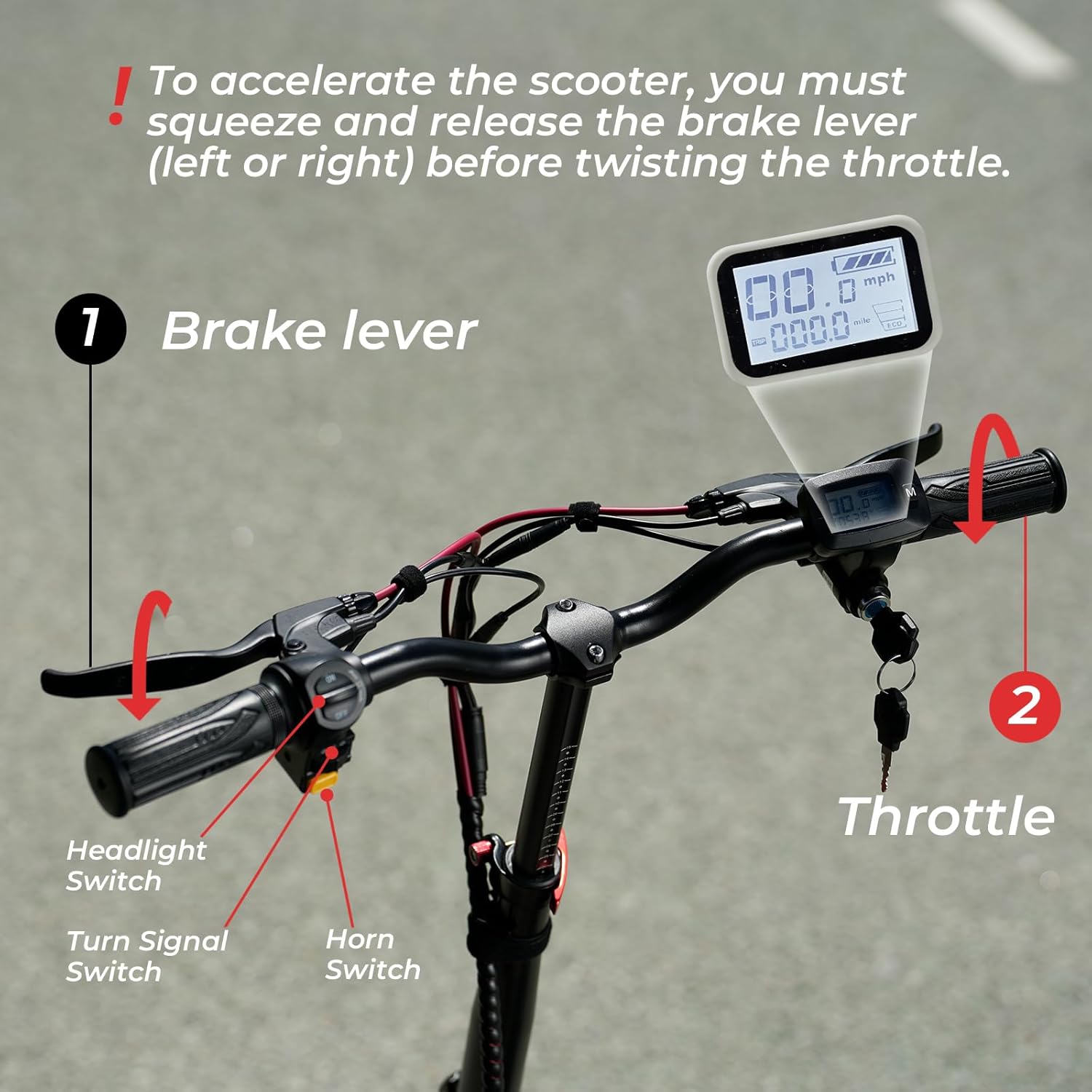
Obrázek 5.1: Přesview of the handlebar controls, including the LCD display, key ignition, and switches.
5.2 rychlostní režimy
The iScooter i14 offers 3 adjustable speed modes: 9 MPH, 21 MPH, and 28 MPH. To switch between modes, press the 'M' button on the display twice. Select the appropriate speed mode based on your riding environment and experience level.
5.3 Ovládání plynu
To accelerate, you must first squeeze and release either the left or right brake lever before twisting the throttle. This safety feature prevents accidental acceleration. Twist the throttle gently to control your speed.
5.4 Světla, klakson a směrová světla
Use the dedicated switches on the handlebar to activate the front and rear LED lights for visibility, the horn for alerts, and the turn signals to indicate your direction to others.

Figure 5.2: The bright front LED light enhances visibility during low-light conditions.

Figure 5.3: The rear LED light ensures you are seen from behind, improving safety.
5.5 Brzdový systém
The scooter is equipped with front and rear disc brakes, along with an electric lock system, for powerful and reliable stopping performance. Apply both brake levers gently and evenly to slow down or stop. Avoid sudden, harsh braking, especially at high speeds.

Figure 5.4: The robust disc brake system provides effective stopping power.
6. Provoz nabíjení
To charge your iScooter i14, locate the charging port on the scooter's deck. Connect the charger to the port, then plug the charger into a standard wall outlet. The indicator light on the charger will typically turn red during charging and green when fully charged. A full charge takes approximately 8 hours.
Video 6.1: This video demonstrates the charging process for the iScooter i14 Electric Scooter.
7. Údržba
Pravidelná údržba zajistí dlouhou životnost a bezpečný provoz vašeho skútru.
- Tlak v pneumatikách: Check the pressure of the 14-inch pneumatic tires regularly. Maintain the recommended PSI as indicated on the tire sidewall for optimal ride comfort and range.
- Kontrola brzd: Periodically inspect the front and rear disc brakes for wear and proper function. Adjust brake cables if necessary to ensure responsive braking.
- Čištění: Vyčistěte skútr pomocí reklamyamp hadříkem. Nepoužívejte vysokotlaké vodní trysky přímo na elektrické součástky.
- Péče o baterie: Store the scooter in a cool, dry place. If storing for extended periods, charge the battery to approximately 50-70% and recharge every 1-2 months to prevent deep discharge.
- Spojovací materiál: Regularly check all screws, bolts, and quick-release mechanisms to ensure they are tight and secure.
8. Řešení problémů
Zde jsou některé běžné problémy a jejich možná řešení:
| Problém | Možná příčina | Řešení |
|---|---|---|
| Koloběžka se nezapne | Low battery; Key not fully turned; Loose connections | Charge battery; Ensure key is in 'ON' position; Check all visible cable connections. |
| Motor se nezapíná | Brake lever not released before throttle; Faulty throttle; Motor issue | Ensure brake lever is released; Contact customer support if issue persists. |
| Brzdy se zdají slabé | Opotřebované brzdové destičky; Uvolněné brzdové lanko; Vzduch v hydraulickém systému (pokud je k dispozici) | Inspect brake pads for wear and replace if needed; Adjust brake cable tension; Consult a professional for hydraulic brake issues. |
| Neobvyklé zvuky během provozu | Uvolněné součásti; Úlomky v kolech/brzdách; Problém s motorem | Check all fasteners; Inspect wheels and brakes for obstructions; Contact customer support. |
9. Specifikace
| Funkce | Specifikace |
|---|---|
| Značka | iScooter |
| Název modelu | i14 |
| Výkon motoru | 800W |
| Nejvyšší rychlost | 28 MPH |
| Maximální dosah | 34 mil |
| Baterie | 48V 10.4Ah |
| Doba nabíjení | 8 hodiny |
| Velikost pneumatiky | 14 palce |
| Typ pneumatiky | Pneumatický |
| Typ odpružení | Dvojité odpružení (přední a zadní) |
| Styl brzdy | Double Disc Brakes & EABS Braking Systems |
| Hmotnostní limit | 264 libry |
| Hmotnost položky | 72 libry |
| Rozměry produktu (DxŠxV) | 43 cm D x 17 cm Š x 45 cm V |
| Materiál rámu | Hliník |
| Speciální funkce | 800W Motor, 28MPH Top Speed, 34MILES Long Range, Dual Suspension, Adjustable Height, Adjustable Seat |
| Doporučená použití | Dojíždění |
10. Záruka a podpora
10.1 Informace o záruce
iScooter offers a 12-month or 180-day warranty on different components of your product. Please refer to the specific warranty terms provided with your purchase for detailed coverage.
10.2 Zákaznická podpora
For any questions, concerns, or assistance with your iScooter i14, please contact our customer support team:
- Call centrum: +1 (855) 916-2366
- Živý chat/e-mail: support@iscooterglobal.com
Our customer support team is available to assist you.

Figure 10.1: iScooter customer support details for assistance.