
1. Úvod
Thank you for choosing the SEDETA 59-inch Modern Office Desk. This desk is designed to provide a spacious and organized workspace with integrated features such as LED lighting, a built-in power strip, and ample storage. This manual provides essential information for safe assembly, operation, and maintenance of your new desk. Please read these instructions carefully before beginning assembly and retain them for future reference.

Image 1.1: The SEDETA 59-inch Modern Office Desk, showcasinjeho celkový design a vlastnosti.
2. Bezpečnostní informace
Always assemble the desk according to the instructions provided. Ensure all screws are tightened securely, especially at the table top joints, to maintain stability. This desk is heavy and has a large surface area, so it may tip over if not assembled correctly or if heavy objects are placed on it. Always use caution when assembling, using, or moving the desk.
- Uchovávejte všechny malé díly a obalové materiály mimo dosah dětí a domácích zvířat.
- Nestůjte ani nesedejte na stůl.
- Rovnoměrně rozložte váhu po povrchu stolu a policích.
- Ujistěte se, že je prodlužovací kabel zapojen do uzemněné zásuvky. Nepřetěžujte prodlužovací kabel.
- Nevystavujte stůl nadměrné vlhkosti nebo přímému slunečnímu záření.
3. Obsah balení
Before assembly, verify that all components listed in the included parts list are present and undamaged. If any parts are missing or damaged, please contact customer support.
Typické komponenty:
- Desktop panels
- Legs and support frames
- Drawer panels and slides
- Komponenty stojanu na monitor
- Built-in power strip unit
- LED světelný pásek a ovladač
- Sada kování (šrouby, hmoždinky, zámky s vačky atd.)
- Návod k montáži
4. Montážní návod
Assembly is required for this product. All necessary hardware and a detailed instruction booklet are included in the package. Please follow the step-by-step instructions provided in the separate assembly guide for proper construction. It is recommended to have a second person assist with certain steps due to the size and weight of the components.
Tipy pro generální shromáždění:
- Připravte si pracovní prostor: Clear a spacious area, preferably on a soft surface like a carpet, to prevent scratching the desk components.
- Identifikujte všechny části: Lay out all components and hardware. Compare them with the parts list in your assembly guide to ensure everything is present.
- Postupujte krok za krokem: Adhere strictly to the sequence of steps in the assembly manual. Do not skip steps.
- Hand-Tighten First: Initially hand-tighten screws and fasteners. Fully tighten all connections only after the entire section or unit is assembled, ensuring proper alignment.
- Zabezpečená připojení: Pay special attention to securing all leg and desktop connections to ensure stability.
- Sestava zásuvky: Pro hladký chod se ujistěte, že jsou výsuvy zásuvek správně orientovány a nainstalovány.
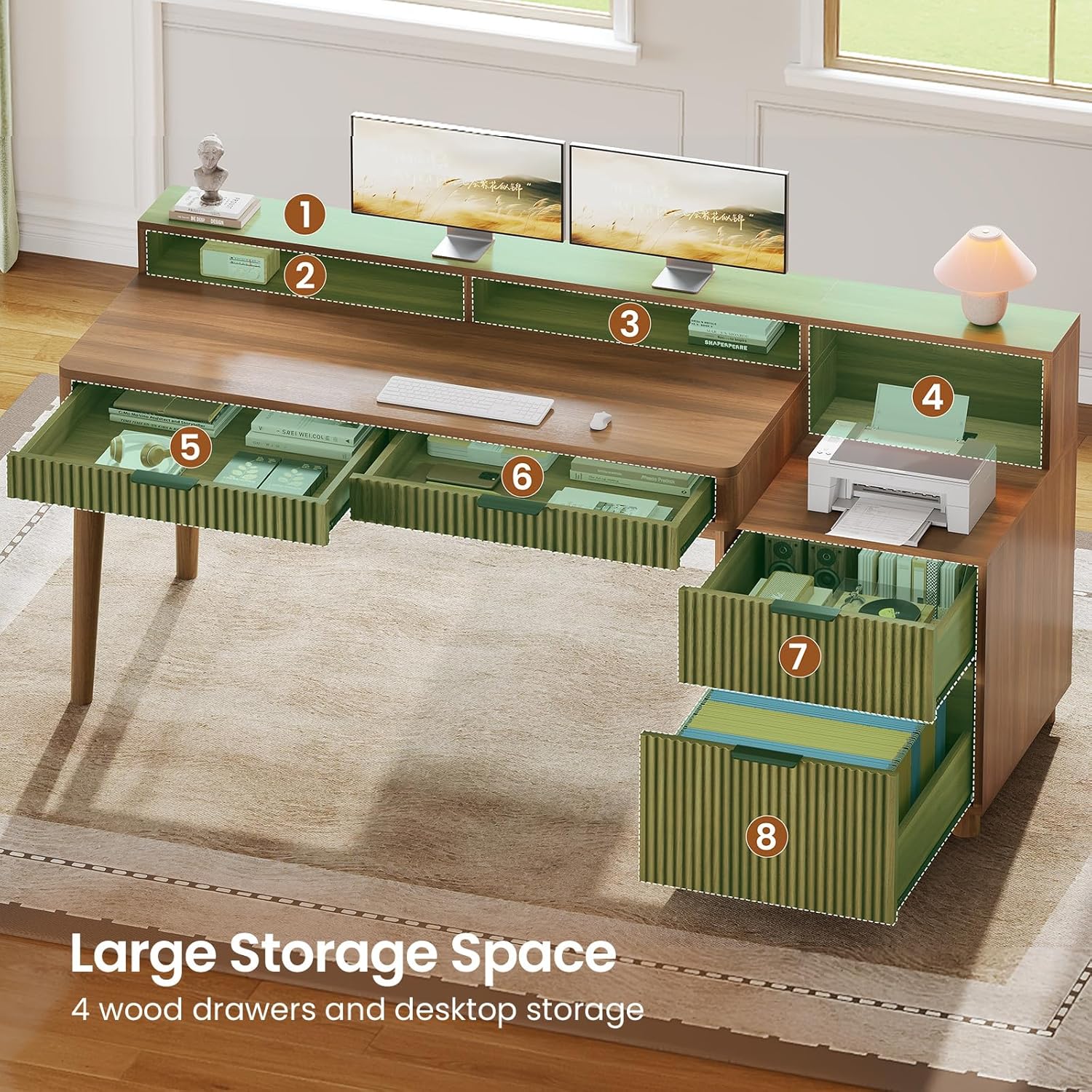
Obrázek 4.1: Overview of the desk's large storage capacity, including drawers and open shelves, which will be assembled during setup.
5. Návod k obsluze
5.1. LED Light Strips
The desk features an RGB LED light strip for customizable ambiance. The lights can be controlled via a dedicated mobile application.
- Zapnutí/vypnutí: Connect the LED light strip to the power source. Use the included controller or the mobile app to turn the lights on or off.
- Kontrola APP: Download the specified mobile application (refer to the LED light instruction sheet for app name and QR code). Pair your device with the LED lights via Bluetooth.
- Výběr barvy a režimu: Through the app, you can choose from over 60,000 colors and 29 flashing modes, including music sync and timing modes.

Image 5.1: The desk illuminated by RGB LED lights, demonstrating app control and various lighting modes.
5.2. Vestavěná zásuvka
The desk includes a recessed power strip for convenient charging and powering of your devices.
- Specifikace: The power strip features four 120V/12A AC outlets and two 5V/2A USB ports.
- Používání: Plug the desk's main power cord into a wall outlet. Use the integrated power switch to turn the outlets on or off.
- Nabíjení: Connect your electronic devices to the AC outlets or USB ports for power and charging.
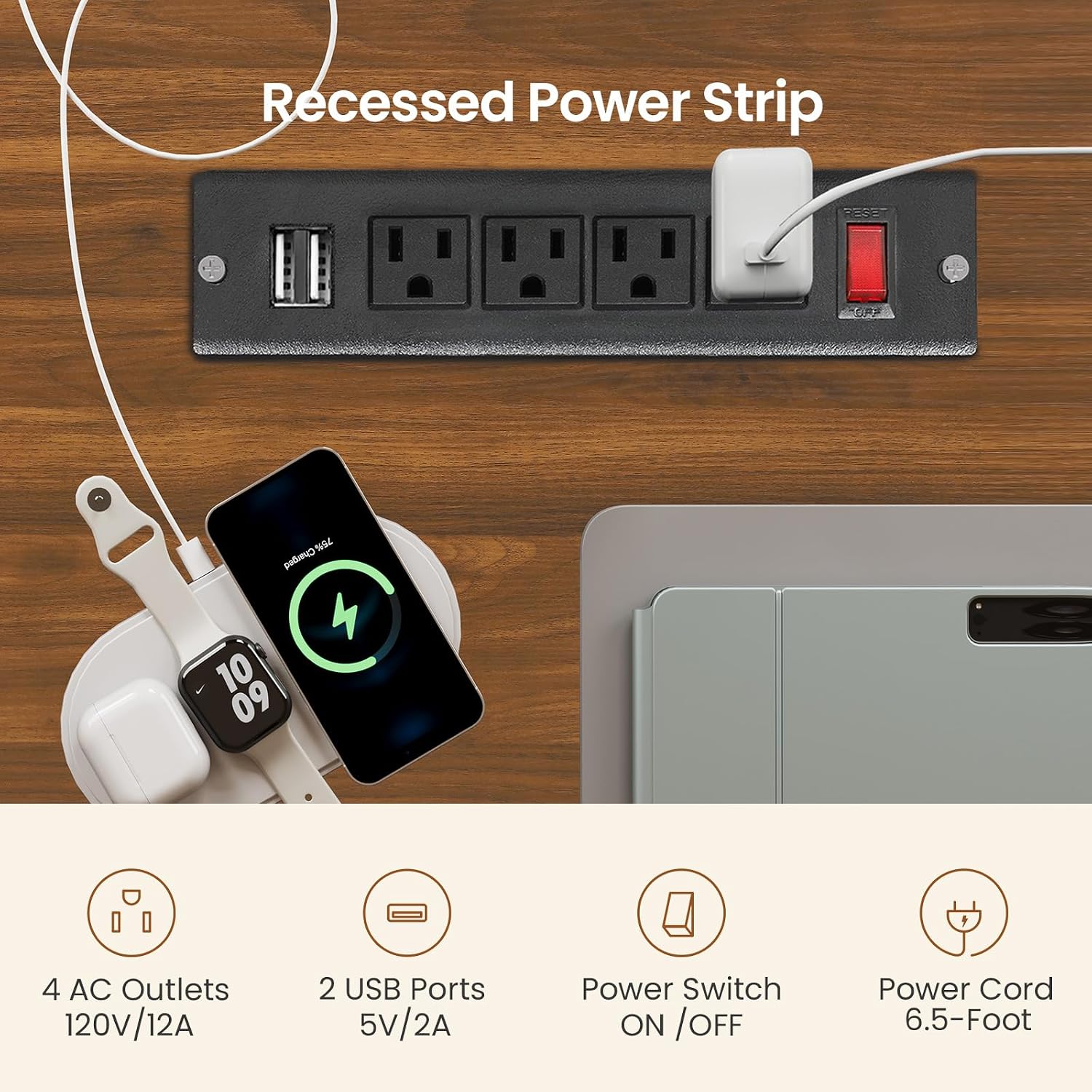
Image 5.2: Detail of the built-in power outlet, showing the AC sockets, USB ports, and power switch.
5.3. Drawers and Storage
The desk is equipped with four wood drawers and open storage shelves to help keep your workspace organized.
- File Výstavce: One drawer is designed to hold Legal, Letter, or A4 size files.
- Box Drawers: Three additional box drawers provide storage for office supplies, gaming accessories, or personal items.
- Otevřené police: Utilize the open storage shelves for books, decorative items, or frequently accessed equipment.

Image 5.3: The multifunction wood file drawer, illustrating its capacity for various document sizes and general storage.
5.4. Full-size Monitor Stand
The integrated monitor stand helps improve ergonomics and provides additional storage.
- Ergonomické výhody: Place your monitor(s) on the stand to raise them to an optimal viewvýška, čímž se snižuje zátěž krku a zad.
- Další úložný prostor: The space beneath the monitor stand can be used for small items like sticky notes, pens, or other desk accessories.

Image 5.4: The full-size monitor stand in use, demonstrating how it helps maintain correct posture and reduces neck strain.
5.5. Produktové video
Video 5.5: Oficiální video s produktemasing the SEDETA Fluted Office Desk with 4 Drawers, highlighting its features and functionality.
6. Údržba
Proper care will extend the life and appearance of your SEDETA office desk.
- Čištění: Otřete povrchy stolu reklamouamp hadříkem. Nepoužívejte agresivní chemikálie nebo abrazivní čisticí prostředky, které by mohly poškodit povrchovou úpravu.
- Rozlití: Rozlité tekutiny ihned očistěte, abyste zabránili vzniku skvrn nebo poškození dřevěného obložení.
- Kontrola hardwaru: Pravidelně kontrolujte všechny šrouby a upevňovací prvky, zda jsou pevně utažené. V případě potřeby je dotáhněte pro zachování stability.
- LED světla: If the LED lights malfunction, check the power connection and the controller. Refer to the LED light instruction sheet for specific troubleshooting.
7. Řešení problémů
| Problém | Možná příčina | Řešení |
|---|---|---|
| Stůl je vratký/nestabilní | Uvolněné upevňovací prvky; nerovná podlaha | Ensure all screws are fully tightened. Adjust floor levelers if present, or place shims under legs. |
| Zásuvky se neposouvají hladce | Incorrect slide installation; obstruction | Verify drawer slides are installed correctly and aligned. Check for any objects obstructing the drawer path. |
| LED světla nefungují | Power connection issue; controller malfunction | Check if the LED strip is properly connected to power. Ensure the power switch on the power strip is on. Refer to the LED light manual for specific troubleshooting. |
| Nefunkční elektrické zásuvky | Power strip switch off; wall outlet issue; overload | Ensure the power strip's switch is ON. Check if the wall outlet is functional. Avoid overloading the power strip. |
8. Specifikace
- Značka: SEDETA
- Model: computer desk
- Rozměry produktu: 19.7"H x 59"Š x 31.8"V
- Barva: Hnědý
- Materiál: Engineered Wood (Particle Board with PVC Surface)
- Počet zásuvek: 4 (1 file drawer, 3 box drawers)
- Počet polic: 1 (otevřený sklad)
- Hmotnost položky: 84 libry
- Speciální vlastnosti: Built-in Power Outlet (4 AC, 2 USB), RGB LED Light Strip, Full-size Monitor Stand
- Shromáždění: Required (tools and instructions included)
- Pokyny pro péči: Otřete pomocí Damp Tkanina

Image 8.1: Dimensional drawing of the SEDETA Office Desk, showing key measurements.
9. Záruka a podpora
SEDETA is committed to providing quality products. If your item arrives damaged, scratched, or with missing parts, please do not hesitate to contact our customer support team. We aim to address your concerns within 24 hours.
For further assistance or warranty inquiries, please refer to the contact information provided in your purchase documentation or on the SEDETA official webmísto.