
1. Úvod
This manual provides detailed instructions for the installation, operation, and maintenance of your JOOAN 4G Solar Security Camera. This outdoor wireless surveillance camera is designed for areas without traditional power or network infrastructure, utilizing 4G cellular connectivity and solar power for continuous operation. Please read this manual thoroughly before use to ensure proper setup and functionality.

Image 1.1: JOOAN 4G Solar Security Camera with its solar panel and a smartphone displaying the camera's live feed, highlighting its 4MP/5MP HD resolution capability.
2. Vlastnosti produktu
- 4G konektivita: Operates independently using a SIM card, ideal for remote locations.
- Solární napájení: Equipped with a solar panel for continuous charging, reducing the need for external power sources.
- Vysoké rozlišení: Zachycuje jasné videotage for effective surveillance.
- Barevné noční vidění: Offers multiple night vision modes including infrared, full-color, and smart color night vision for enhanced visibility in low-light conditions up to 10 meters.
- Lokální a cloudové úložiště: Supports up to 256GB SD card storage and optional cloud storage for recorded footage.
- Snadná instalace: Designed for straightforward setup and mounting.
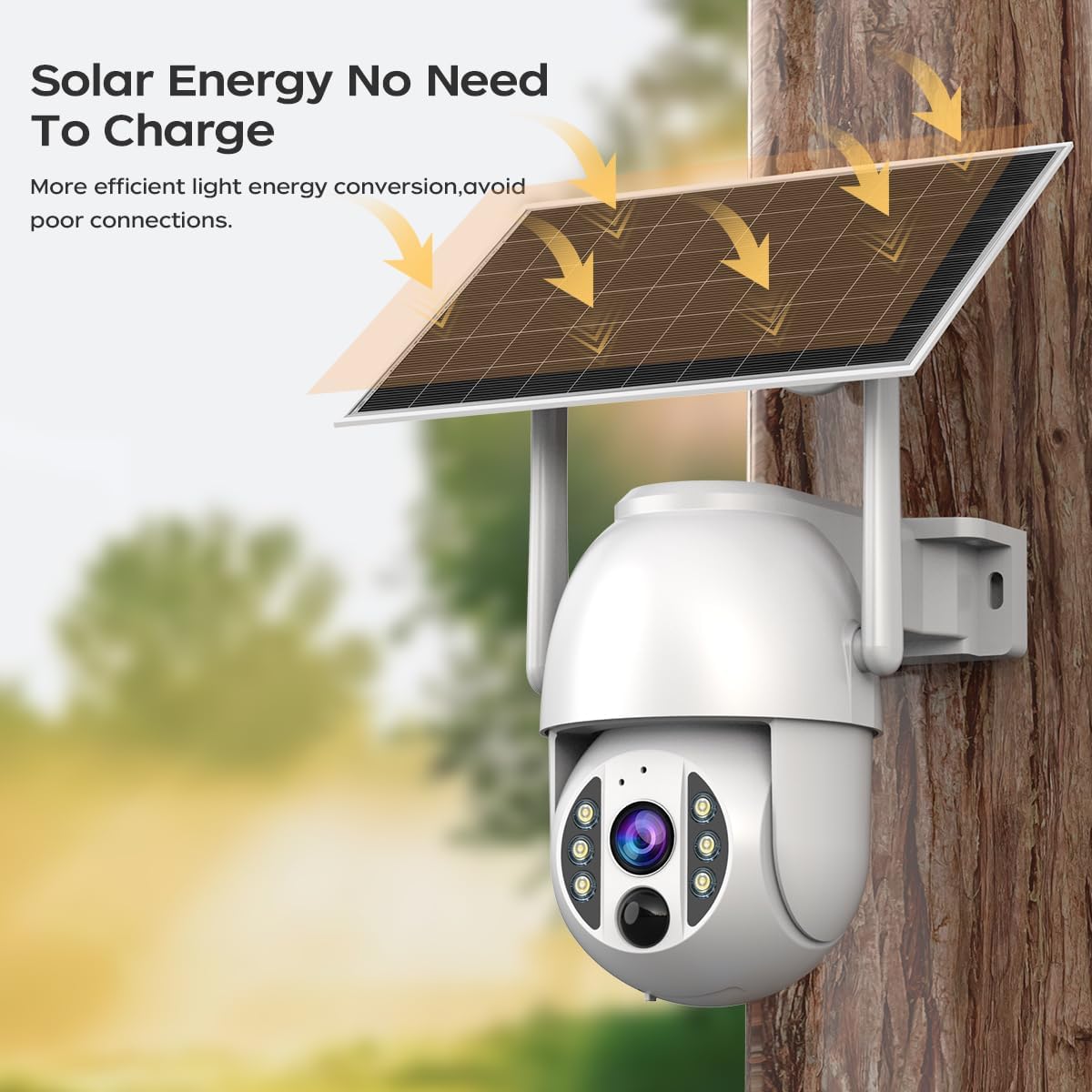
Image 2.1: The JOOAN 4G Solar Security Camera mounted with its solar panel, illustrating its solar energy capability for efficient light energy conversion and avoiding poor connections.
3. Nastavení a instalace
3.1. Instalace SIM karty a SD karty
Before mounting, install a 4G SIM card (not included) and an SD card (up to 256GB, not included) into the designated slots on the camera. Ensure the camera is powered off before inserting or removing cards.

Obrázek 3.1: Detailní záběr view of the JOOAN camera's SD card slot, indicating support for cloud storage and a maximum 256GB SD card.
3.2. Montážní kroky
- Positioning and Punching: Select a suitable location for the camera and solar panel. Mark the drilling points on the wall. Use a drill to create holes at the marked positions.
- Vložte rozpínací šrouby: Gently tap the expansion screws into the drilled holes until they are flush with the surface.
- Montáž kamery: Align the camera bracket with the expansion screws and secure it using the provided screws.
- Kompletní instalace: Attach the solar panel to the camera bracket or mount it separately in a location with ample sunlight. Ensure all connections are secure.

Image 3.2: Visual guide showing the four installation steps: 1. Positioning and punching, 2. Inserting expansion screws, 3. Mounting the camera with screws, and 4. Completing the installation with the solar panel.
3.3. Připojení aplikace
Download the official JOOAN app from your smartphone's app store. Follow the in-app instructions to add your camera. There are typically two methods:
- Add APP Phone Code: Scan the QR code displayed on your mobile phone APP with the camera lens from a distance of 20-30cm to add the distribution network.
- Add Camera Body Code: Scan the QR code located on the camera body using the mobile phone APP to add the distribution network.

Image 3.3: Illustration of the two connection methods: scanning the APP phone code or scanning the camera body code to establish a network connection.
4. Provoz
4.1. Zapnutí/vypnutí
The camera automatically powers on when sufficient solar power is available or when connected to a power source. To power off, disconnect the power source and allow the battery to deplete, or use the app if a power-off function is available.
4.2. Živě View a Nahrávání
Once connected to the app, you can access the live video feed. The camera supports continuous recording to the SD card or cloud storage (subscription may be required). You can also manually record video or capture screenshots from the live view.
4.3. Detekce pohybu a upozornění
Configure motion detection sensitivity and alert settings within the app. The camera will send notifications to your smartphone when motion is detected. Recorded events can be reviewv sekci přehrávání aplikace.
4.4. Režimy nočního vidění
The camera offers three night vision modes, selectable via the app:
- Infračervené noční vidění: Poskytuje jasný černobílý obraz v naprosté tmě.
- Plně barevné noční vidění: Využívá vestavěné reflektory pro poskytování barevného obrazu i za zhoršených světelných podmínek.
- Inteligentní barevné noční vidění: Automatically switches from infrared to full-color vision upon detection of motion or specific events.

Image 4.1: Comparison of the three night vision modes: Infrared night vision, Full color night vision, and Smart color night vision, demonstrating the camera's ability to pick out details in darkness up to 10 meters away.
5. Údržba
- Čištění objektivu: Pravidelně čistěte objektiv fotoaparátu měkkým, suchým hadříkem, abyste zajistili ostrý a kvalitní obraz. Nepoužívejte abrazivní čisticí prostředky.
- Čištění solárních panelů: Keep the solar panel free from dust, dirt, and debris to maximize charging efficiency. Clean with a damp hadříkem podle potřeby.
- Aktualizace firmwaru: Check the app periodically for available firmware updates to ensure optimal performance and security.
- Stav baterie: Ensure the solar panel receives adequate sunlight to maintain battery charge. Prolonged periods without sunlight may require temporary charging via a USB power adapter (not included).
6. Řešení problémů
6.1. Camera Not Connecting to 4G Network
- Ujistěte se, že je SIM karta správně vložena a aktivována s platným datovým tarifem.
- Check 4G signal strength at the camera's location.
- Restartujte fotoaparát krátkým odpojením a opětovným připojením napájení.
6.2. No Video Feed or Poor Quality
- Verify the camera has sufficient power.
- Check the 4G signal strength.
- Vyčistěte čočku fotoaparátu.
6.3. Solar Panel Not Charging
- Ujistěte se, že solární panel je umístěn tak, aby byl několik hodin denně vystaven přímému slunečnímu záření.
- Clean any dirt or obstructions from the solar panel surface.
- Zkontrolujte propojovací kabel mezi solárním panelem a kamerou.
6.4. SD Card Not Recording
- Ensure the SD card is correctly inserted and formatted within the app.
- Zkontrolujte, zda je na SD kartě dostatek volného místa.
- Ověřte nastavení nahrávání v aplikaci.
7. Specifikace
| Funkce | Detail |
|---|---|
| Značka | JOOAN |
| Model | B0GCFGYCLX |
| Zdroj napájení | Solární napájení |
| Protokol připojení | 4G Cellular (SIM card required), Wi-Fi (for initial setup/local access if applicable) |
| Doporučená použití | Indoor/Outdoor Surveillance |
| Speciální funkce | Snadná instalace |
| Skladování | Supports up to 256GB SD card, Cloud Storage (subscription may apply) |
8. Záruka a podpora
For warranty information and technical support, please refer to the JOOAN official webwebu nebo se obraťte přímo na jejich zákaznický servis. Uschovejte si účtenku jako doklad o koupi.
Další pomoc naleznete na adrese: Obchod JOOAN na Amazonu