
Zavedení
Thank you for choosing the Reshow Cassette Player 12. This portable device allows you to enjoy your favorite cassette tapes and convert them into digital files. This manual provides essential information for the safe and efficient use of your new cassette player.
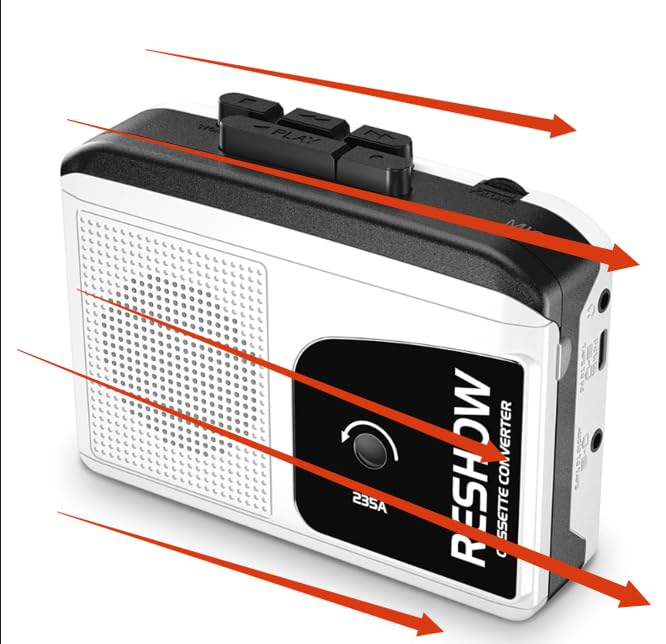
Image: Reshow Cassette Player 12
Obsah balení
- Reshow Cassette Player 12
- USB-C kabel
- Uživatelská příručka (tento dokument)
Nastavení
Napájení zařízení
The Reshow Cassette Player 12 can be powered via the included USB-C cable or by batteries (not included).
- Napájení USB-C: Connect the USB-C cable to the player's USB-C port and the other end to a compatible USB power adapter (not included) or a computer's USB port.
- Napájení baterie: Open the battery compartment (location not specified in data, typically on the back or side) and insert the required batteries, ensuring correct polarity.
Inserting a Cassette Tape
- Locate the cassette compartment door.
- Gently open the compartment door.
- Insert your cassette tape with the open edge facing the player's head mechanism.
- Close the compartment door until it clicks securely.
Návod k obsluze
Přehrávání kazety
- Ensure the cassette player is powered on and a tape is inserted.
- Stiskněte tlačítko HRÁT tlačítko pro zahájení přehrávání.
- Adjust the volume using the volume control dial (location not specified, typically on the side).
- Přehrávání zastavíte stisknutím tlačítka ZASTÁVKA tlačítko.
- Použijte RYCHLE VPŘED a ZPĚT tlačítka pro navigaci v pásku.
Using the Built-in Speaker and Headphone Jack
- Vestavěný reproduktor: Audio will play automatically through the integrated speaker when no headphones are connected.
- Sluchátkový jack: Connect standard 3.5mm headphones (not included) to the headphone jack for private listening. Connecting headphones will automatically mute the built-in speaker.
Converting Cassettes to Digital Files (MP3)
The Reshow Cassette Player 12 can convert your analog tapes to digital files using a computer and appropriate software (not included).
- Connect the cassette player to your computer using the supplied USB-C cable.
- Your computer should recognize the device as an audio input.
- Open your preferred audio recording software (e.g., Audacity, available separately).
- Configure the software to record from the USB audio input device.
- Start playback on the cassette player and begin recording in your software.
- Once recording is complete, stop playback and recording, then save your digital file (e.g., MP3 format).
Údržba
Čištění zařízení
- Vnější povrch přehrávače otřete měkkým, suchým hadříkem.
- Nepoužívejte tekuté čisticí prostředky ani abrazivní materiály.
- Periodically clean the tape head and pinch roller with a cotton swab lightly dampnapuštěno isopropylalkoholem pro zajištění optimální kvality zvuku a dlouhé životnosti pásky.
Skladování
Store the cassette player in a cool, dry place away from direct sunlight and extreme temperatures when not in use.
Odstraňování problémů
| Problém | Možná příčina | Řešení |
|---|---|---|
| Přehrávač se nezapne. | Žádné napájení nebo slabé baterie. | Check USB-C connection or replace batteries. |
| Během přehrávání není slyšet žádný zvuk. | Volume too low, headphones connected, or tape issue. | Increase volume, disconnect headphones, or check tape for damage. |
| Špatná kvalita zvuku. | Dirty tape head or worn tape. | Clean the tape head (see Maintenance). Try a different tape. |
| Tape gets stuck or chewed. | Damaged tape or dirty pinch roller. | Do not use damaged tapes. Clean the pinch roller (see Maintenance). |
| Cannot convert to digital. | Incorrect software settings or cable issue. | Ensure USB-C cable is properly connected. Verify audio input settings in your recording software. |
Specifikace
- Model: Cassette Player 12
- Výrobce: Znovu zobrazit
- Zdroj napájení: USB-C or Batteries (type not specified, typically AA or AAA)
- Zvukový výstup: Built-in speaker, 3.5mm headphone jack
- Konektivita: USB-C for power and digital conversion
- Rozměry balení: 7.52 x 4.49 x 1.81 palce
- Hmotnost položky: 10.8 unce
- ASIN: B0GCF4WMZ6
- První k dispozici: 24. prosince 2025
Záruka a podpora
Informace týkající se záruky na produkt a zákaznické podpory nebyly v dostupných datech uvedeny. Viz obal produktu nebo oficiální informace od výrobce. webstránky pro podrobnosti.