
1. Úvod
The DEPSTECH DS320 Dual Lens Borescope Camera is an advanced inspection tool designed for examining hard-to-reach areas. It features a 4.3-inch IPS screen for clear viewing, dual lenses for versatile inspection angles, IP67 waterproofing for use in wet environments, and a 16.5ft semi-rigid cable for flexible maneuverability. This manual provides essential information for the safe and effective operation and maintenance of your borescope.
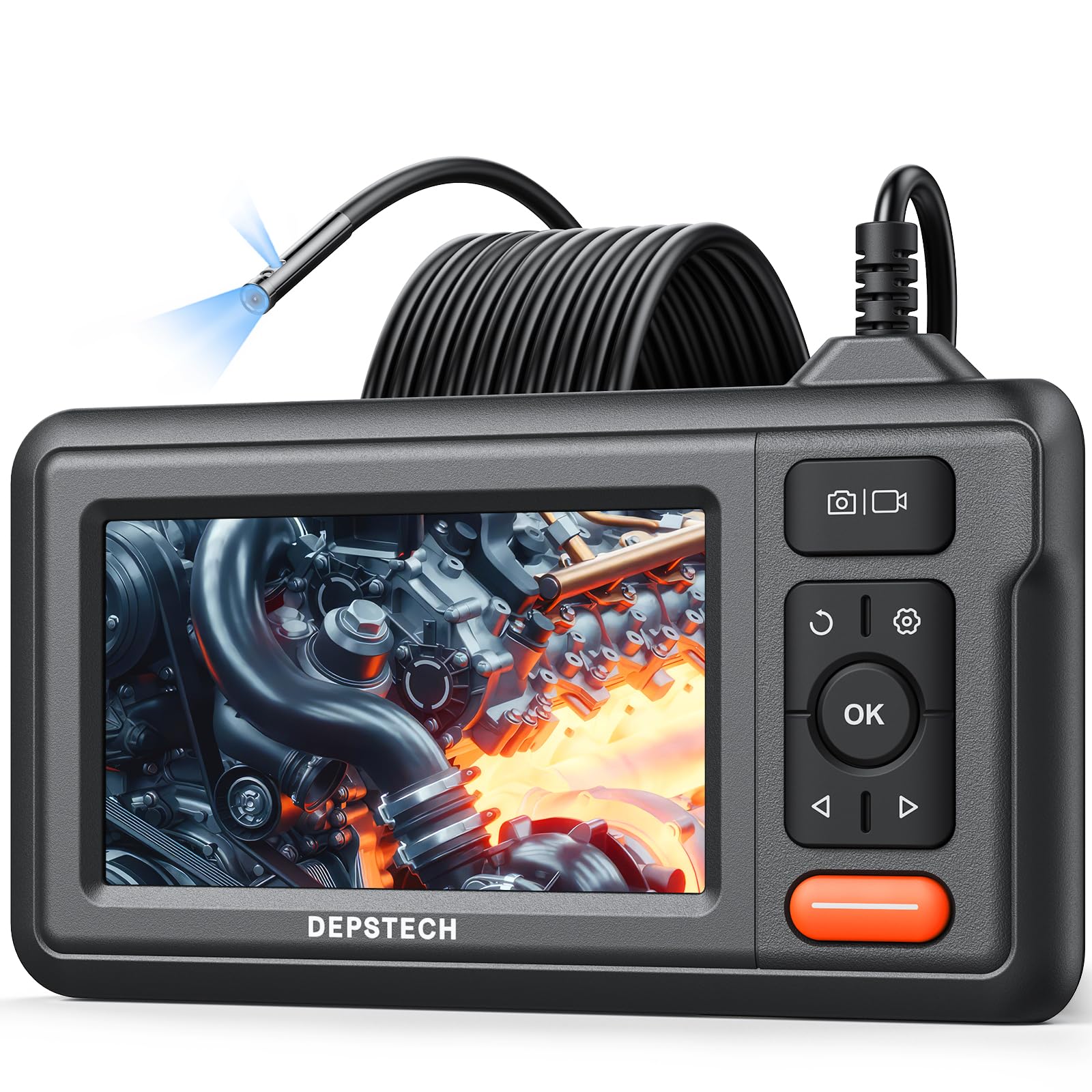
Figure 1: DEPSTECH DS320 Dual Lens Borescope Camera.
2. Bezpečnostní informace
Před použitím tohoto výrobku si prosím přečtěte a pochopte všechny bezpečnostní pokyny. Nedodržení těchto pokynů může vést k úrazu elektrickým proudem, požáru nebo vážnému zranění.
- Do not use the device in explosive atmospheres, such as in the presence of flammable liquids, gases, or dust.
- Udržujte zařízení mimo dosah dětí.
- Do not modify or disassemble the device. Repairs should only be performed by authorized personnel.
- Ensure the camera probe is clean and free from debris before and after use.
- Nevystavujte zařízení extrémním teplotám ani přímému slunečnímu záření po delší dobu.
- The camera probe is IP67 waterproof, but the main unit is not. Avoid immersing the main unit in water.
3. Obsah balení
Ověřte, zda jsou v balení přítomny všechny položky:
- DS320 Endoscope with 16.5ft Semi-Rigid Cable
- Accessory Kit (Hook and Magnet)
- Nabíjecí kabel typu C.
- Uživatelská příručka

Figure 2: Package contents including the borescope, cable, and accessories.
4. Konec produktuview
The DEPSTECH DS320 is designed for ease of use and high performance in various inspection scenarios.
4.1. Main Unit Features
- 4.3palcová IPS obrazovka: Provides a clear, high-definition display with a 178° viewing angle for real-time inspection footage.
- Intuitivní ovládání: Easy-to-use buttons for navigation, image capture, video recording, and light adjustment.
- Ergonomický design: Comfortable to hold for extended periods during inspections.
- Dlouhá výdrž baterie: Equipped with a battery providing approximately 3 hours of continuous operation.

Figure 3: The 4.3-inch IPS color display for clear viewIng.
4.2. Camera Probe Features
- Systém dvou čoček: Features a front-facing camera and a side-facing camera, allowing for comprehensive inspection without repositioning the probe.
- Bluart 3.0 Technology: Enhances image clarity, processing speed, and low-light performance for sharp and vivid images.
- IP67 voděodolný: The camera probe is resistant to water and dust, making it suitable for wet and dirty environments.
- Nastavitelná LED světla: Seven adjustable LED lights provide optimal illumination in dark areas.
- 16.5ft Semi-Rigid Cable: Offers flexibility to navigate tight spaces while maintaining its shape for precise positioning.

Figure 4: The dual lens system with front and side cameras.

Obrázek 5: Přample of 180° image rotation for easier viewIng.
5. Nastavení
5.1. Nabíjení zařízení
Before first use, fully charge the borescope. Connect the provided Type-C charging cable to the device's charging port and a suitable USB power adapter (not included). The charging indicator will show the charging status.
5.2. Attaching the Probe
The semi-rigid cable is pre-attached to the main unit. Ensure the connection is secure before use.
5.3. Zapnutí/vypnutí
Press and hold the power button (usually marked with a power symbol) for a few seconds to turn the device on or off. The screen will illuminate upon successful power-on.
6. Návod k obsluze
6.1. Základní obsluha
Once powered on, the live feed from the camera will appear on the IPS screen. Use the navigation buttons (up/down/left/right) and the OK button to interact with the menu and settings.

Figure 6: The borescope ready for immediate use.
6.2. Using Dual Lenses
The DS320 features both a front camera and a side camera. Use the dedicated button (often labeled with a camera icon or 'M' for mode) to switch between the front view, postranní view, or a split-screen display if available. This allows for comprehensive inspection of an area without needing to rotate the probe.
6.3. Nastavení jasu LED diod
The camera probe is equipped with adjustable LED lights. Use the brightness adjustment buttons (often marked with '+' and '-' or arrow icons) on the main unit to increase or decrease the illumination level. This helps in achieving optimal visibility in varying light conditions.

Obrázek 7: Voděodolná hlava kamery s krytím IP67 a nastavitelnými LED světly.
6.4. Pořizování fotografií a videí
To capture an image, press the photo button (usually a camera icon). To record video, press the video button (usually a video camera icon). Ensure a compatible memory card (not included) is inserted for saving media. The device supports recording in 720p resolution.

Figure 8: Screen interface for capturing photos and recording videos.
6.5. Použití Příslušenství
The accessory kit includes a hook and a magnet. These can be attached to the camera probe to retrieve small objects or to maneuver the probe in difficult areas. Carefully attach them to the camera head as instructed in the accessory guide.

Figure 9: Included hook and magnet accessories.
6.6. Produktové videoview
For a visual guide on the product's features and usage, please watch the official product video below.
Video 1: Official DEPSTECH Borescope Product Video, demonstrating key features and applications.
7. Údržba
7.1. Čištění
After each use, especially in dirty or wet environments, clean the camera probe with a soft, damp cloth. For stubborn dirt, a mild detergent can be used. Ensure the probe is completely dry before storage. Do not use abrasive cleaners or solvents. The main unit should be wiped with a dry cloth.
7.2. Skladování
Store the borescope in a cool, dry place, away from direct sunlight and extreme temperatures. Use the original packaging or a protective case to prevent damage to the screen and probe cable.
7.3. Péče o baterie
To prolong battery life, avoid fully discharging the battery frequently. If storing the device for an extended period, charge it to approximately 50-70% every few months.
8. Řešení problémů
| Problém | Možná příčina | Řešení |
|---|---|---|
| Zařízení se nezapne. | Slabá baterie. | Nabíjejte zařízení pomocí dodaného kabelu typu C. |
| Žádný obraz na obrazovce. | Camera cable not properly connected or damaged. | Ensure the camera cable is securely connected. If still no image, contact support. |
| Obraz je rozmazaný nebo nejasný. | Objektiv je znečištěný; nedostatečné osvětlení. | Clean the camera lens. Adjust the LED brightness using the controls on the main unit. |
| Nelze ukládat fotografie/videa. | Není vložena paměťová karta; paměťová karta je plná nebo poškozená. | Insert a compatible memory card. Check if the card has sufficient space or try formatting it (this will erase all data). |
9. Specifikace
| Funkce | Detail |
|---|---|
| Číslo modelu | DS320DL-5MM |
| Zobrazit | 4.3palcový IPS displej |
| Typ fotoaparátu | Dvojitý objektiv (přední a boční) |
| Hodnocení voděodolnosti | IP67 (pouze sonda) |
| Délka kabelu | 16.5 feet (Semi-Rigid) |
| Osvětlení | 7 nastavitelných LED světel |
| Kvalita obrazu | HD (720p for video recording) with Bluart 3.0 Technology |
| Baterie | 1 A battery required (included), approx. 3 hours operating time |
| Hmotnost položky | 1.46 libry |
| Rozměry balení | 8.31 x 6.5 x 3.07 palce |
10. Záruka a podpora
This DEPSTECH product comes with a standard manufacturer's warranty. For detailed warranty information, product support, or technical assistance, please refer to the warranty card included in your package or visit the official DEPSTECH website. You may also contact DEPSTECH customer service directly for assistance.
DEPSTECH Authorized Store: Navštivte obchod