
1. Konec produktuview
The MOBAPAD Chitu2 HD Wireless Pro Controller is designed for enhanced gaming across multiple platforms, including Nintendo Switch (2/1/Lite/OLED), PC, Android, and iOS. It features advanced TMR Glide Joysticks for zero drift, mechanical micro-switches for tactile feedback, and comprehensive motion controls.
2. Co je v krabici
- ChiTu 2 Controller ×1
- Kabel USB-C ×1
- Cross D-Pad ×1
- Uživatelská příručka × 1
- Záruční list × 1
- QC Pass ×1
3. Klíčové vlastnosti
3.1 Next-Gen TMR Glide Joysticks
The controller utilizes TMR technology with an LSR liquid silicone ring and inverted stick cap structure. This non-contact magnetic sensor design provides smoother control and zero-drift performance, ensuring precision and accuracy.

Obrázek: Podrobný view of the TMR Glide Joystick components, highlighting the TMR stick, LSR (Liquid Silicone Rubber) track, and inverted snap-fit joystick structure.
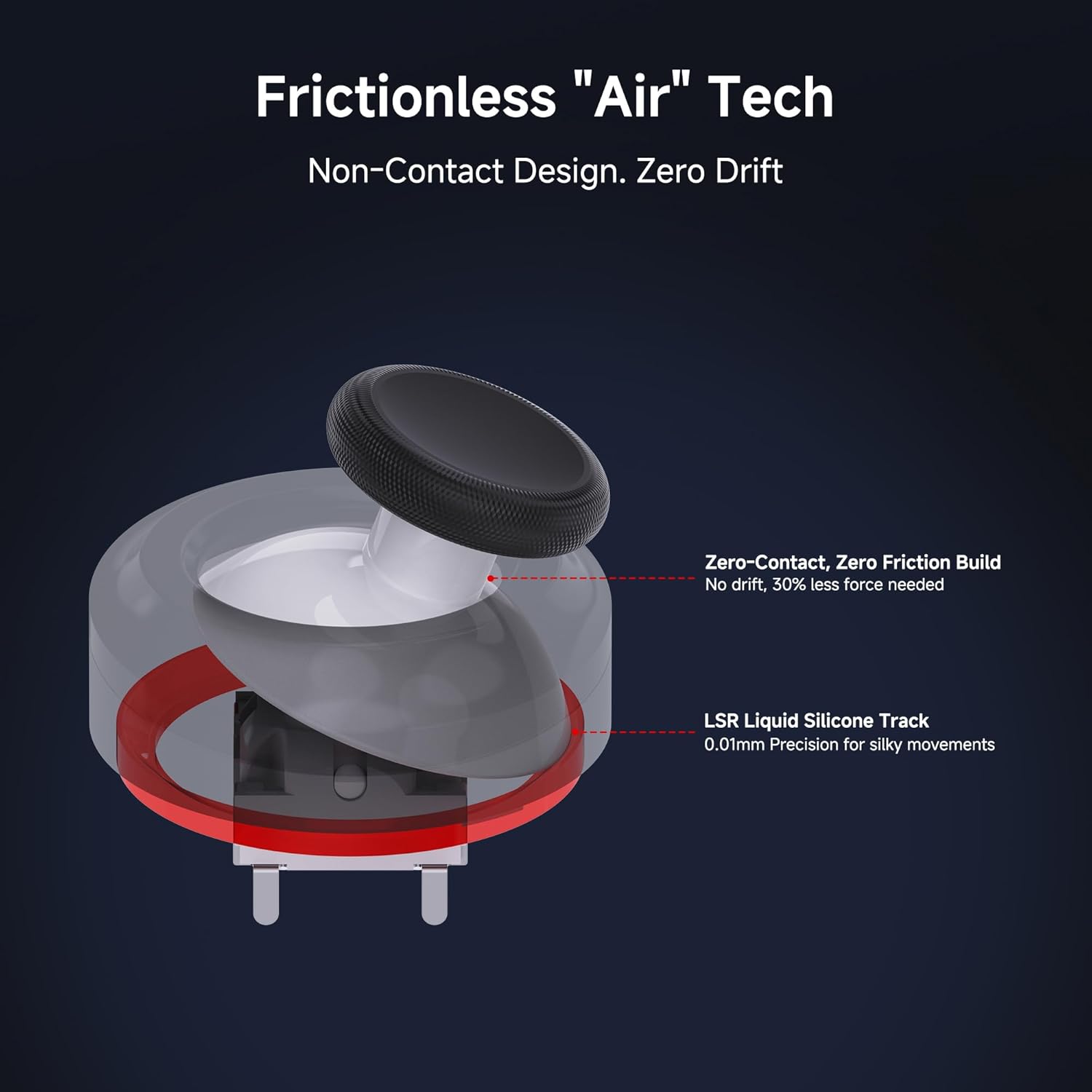
Image: Diagram showing the frictionless 'Air' Tech with zero-contact design and LSR Liquid Silicone Track for precise, silky movements.
3.2 Instant Tactile Feedback Mechanical Buttons
Equipped with premium mechanical micro-switches, the buttons offer an ultra-short 0.7mm actuation distance. This provides a crisp, 'clicky' tactile response and fast response times, with a lifespan exceeding 5 million clicks.

Obrázek: Rozložený view of the controller's buttons, showing the two-shot molded caps, silicone dome, internal support, and micro-switch for tactile feedback.

Image: Close-up showing the internal mechanism of the clicky micro-switch triggers, emphasizing their instant response and crisp feedback.
3.3 Linear HD Vibration
Dual ALPS linear vibration motors provide multi-layered and high-frequency tactile feedback, enhancing immersion with realistic physical sensations.

Image: Internal diagram of the controller highlighting the ALPS linear vibration motors and the ST 6-Axis gyroscope for HD Rumble and motion control.
3.4 NFC & 6-Axis Motion Control
An integrated NFC reader ensures 100% compatibility with amiibo figures for in-game rewards. The high-precision 6-axis gyroscope offers fluid motion tracking and immersive aim control.

Image: The controller displaying its multi-platform compatibility (Switch, PC, iOS, Android) and the NFC scanning area for amiibo figures.

Image: The controller with an overlay illustrating the 6-axis motion sensing capabilities, emphasizing precise motion control and zero-drift aiming.
3.5 1000mAh Battery & Play-While-Charging
The 1000mAh battery provides 15-20 hours of playtime on a 2.5-hour charge. The included USB-C cable allows for playing while charging.
3.6 Dual Programmable Macro Buttons
Two programmable back buttons support complete button remapping and macro recording, simplifying complex combos and multi-button sequences.

Image: The controller showcasing the Turbo function with adjustable rates and the two programmable macro buttons on the back for custom commands.

Image: The rear of the controller with M1 and M2 buttons highlighted, indicating their programmability for faster reactions and macros.
3.7 Ergonomic Grip & Swappable D-Pads
The ergonomic design ensures comfort during long gaming sessions. It includes easily swappable disc and cross-style D-pads for customization.
3.8 Universal Support
The MOBAPAD Chitu2 HD Switch Controller is compatible with Nintendo Switch (2/1/Lite/OLED), PC, Android, and iOS, offering seamless mode switching for cross-platform connectivity.
4. Nastavení a připojení
4.1 Připojení k konzoli Nintendo Switch
- Set the back toggle switch on the controller to "NS Mode".
- Hold the Home button for 3 seconds until the LED flashes fast.
- On your Switch console, go to Ovladače > Změnit Grip/Pořadí.
- The controller will pair when the LED becomes solid and you feel a short vibration.
- (First-time only) Within 20 seconds of pairing, remove and reattach a Joy-Con to activate the wake-up function.
- To wake up the Switch, short press the Home button on the controller for auto-reconnect.

Image: Visual guide detailing the four steps to connect the MOBAPAD Chitu2 controller to a Nintendo Switch console, including setting the mode switch, pairing, and activating the wake-up function.
4.2 Connecting to PC, Android, and iOS
The controller supports seamless mode switching for PC (Windows 10+), Android (9.0+), and iOS/iPadOS (16.3+). Refer to the specific pairing instructions for each device in the full user manual or the companion app.
5. Provoz
5.1 Základní ovládací prvky
The controller features standard button layouts with mechanical micro-switches for precise input and TMR Glide Joysticks for smooth, drift-free movement. Familiarize yourself with the button placement for optimal gameplay.

Image: A user holding the MOBAPAD Chitu2 controller, actively playing a game on a Nintendo Switch console, demonstrating its ergonomic design.

Image: A user holding the MOBAPAD Chitu2 controller, playing a game displayed on a monitor, showcasing its versatility across different gaming setups.
5.2 Funkce NFC
Place compatible amiibo figures over the NFC reader area on the controller to unlock in-game content or bonuses.
5.3 6-Axis Motion Control
Utilize the built-in gyroscope for motion-sensitive games, allowing for precise aiming and interactive experiences.
5.4 Funkce Turbo
Assign turbo functionality to any button. The controller supports adjustable turbo rates, allowing for rapid, repeated inputs. Refer to the companion app for detailed customization.
5.5 programovatelných makro tlačítek
The two back buttons (M1 and M2) can be programmed to execute complex button sequences or remap existing functions. Use the companion app to set up and manage your macros.
5.6 Swapping D-Pads
The controller comes with both a disc-style and a cross-style D-pad. To swap, gently remove the current D-pad and snap the desired one into place.
6. Údržba
6.1 Nabíjení ovladače
Connect the controller to a power source using the provided USB-C cable. The battery indicator lights will show charging status. A full charge takes approximately 2.5 hours.
6.2 Čištění a skladování
Wipe the controller with a soft, dry cloth. Avoid using harsh chemicals or abrasive materials. Store the controller in a cool, dry place away from direct sunlight and extreme temperatures.
7. Řešení problémů
7.1 Problémy s připojením
- Ensure the controller is in the correct mode (e.g., "NS Mode" for Switch).
- Ověřte, zda je na vašem zařízení povoleno Bluetooth.
- Try re-pairing the controller by following the setup instructions.
- Ujistěte se, že je regulátor dostatečně nabitý.
7.2 Button or Joystick Unresponsiveness
- Zkontrolujte, zda se kolem tlačítek nebo joysticků nenacházejí nějaké fyzické překážky.
- Ensure the controller's firmware is up to date via the companion app.
- If issues persist, perform a factory reset (refer to the full user manual for instructions).
7.3 Jiné záležitosti
For any other issues not covered here, please refer to the comprehensive troubleshooting guide in the full user manual or contact customer support.
8. Specifikace
| Číslo modelu | ChiTu 2 - HD |
| Rozměry | 5.79 x 3.98 x 2.64 palce |
| Hmotnost | 7.05 unce |
| Kapacita baterie | 1000mAh (1 9V battery included) |
| Doba nabíjení | Přibl. 2.5 hodin |
| Prázdno | 15-20 hodin |
| Konektivita | Bezdrátové (Bluetooth), Kabelové (USB-C) |
| Kompatibilita | Nintendo Switch (2/1/Lite/OLED), PC (Win 10+), Android (9.0+), iOS/iPadOS (16.3+) |
9. Záruka a podpora
9.1 Záruka na produkt
This product comes with a standard manufacturer's warranty. Please refer to the included Warranty Card for specific terms, conditions, and duration of coverage.
9.2 Zákaznická podpora
For technical assistance, troubleshooting, or warranty claims, please contact MOBAPAD customer support. Contact information can be found on the Warranty Card or the official MOBAPAD webmísto.
10. Oficiální produktová videa
10.1 Mobapad ChiTu Pro 2 HD Switch 2 Controller Overview
Video: Úředník u konceview of the Mobapad ChiTu Pro 2 HD Switch 2 Controller, showcasinjeho design a klíčové vlastnosti.
10.2 Mobapad ChiTu 2 HD Switch Pro Controller Feature Showcase
Video: A detailed video highlighting the various features and functionalities of the Mobapad ChiTu 2 HD Switch Pro Controller for Nintendo Switch 2.