
1. Úvod
Thank you for choosing the Skyworth 86-inch Canvas Elite™ Art TV QD-Mini LED. This television combines advanced display technology with an elegant design, offering a premium viewing and art display experience. Featuring QD-Mini LED, 4K UHD resolution, a 144Hz refresh rate, and the OmniView Matte Screen™, this TV is designed for exceptional picture quality and a glare-free art gallery aesthetic. This manual provides essential information for setting up, operating, maintaining, and troubleshooting your new television.
2. Co je v krabici
Opatrně vybalte televizor a zkontrolujte následující položky:

Obrázek: Overview of the 86-inch TV dimensions, available input/output ports, and a list of included accessories.
- Skyworth 86-inch Canvas Elite™ Art TV
- Návod k použití (tento dokument)
- Napájecí kabel
- Base Screws (for stand installation)
- Dálkové ovládání
- Baterie do dálkového ovládání (x2)
3. Nastavení
3.1 Vybalení a umístění
Remove the TV from its packaging. It is recommended that two people handle the 86-inch TV due to its size and weight. Place the TV on a stable, level surface or mount it securely on a wall.
3.2 Instalace stojanu (volitelné)
If using the included stand, attach the stand bases to the bottom of the TV using the provided screws. Ensure all screws are tightened securely to prevent the TV from tipping.
3.3 Montáž na stěnu (volitelné)
The TV is compatible with a 200x200 VESA mount standard. Use a compatible wall mount bracket (sold separately) and follow the instructions provided with the wall mount. Ensure the wall can support the TV's weight.
3.4 Připojení zařízení
Connect your external devices to the TV's input ports. Refer to the diagram below for port locations and types:
Obrázek: Podrobný view of the TV's rear panel showing various input and output ports.
- RF Input (Antenna): x1 for connecting an antenna or cable TV.
- Kompozitní (AV): x1 for older devices.
- HDMI: x3 for high-definition devices like Blu-ray players, gaming consoles, or set-top boxes.
- USB: x2 for connecting USB storage devices.
- Sluchátkový konektor: x1 for headphones.
- Ethernetový vstup: x1 for wired network connection.
- SPDIF Output (Optical/Coaxial): x1 for digital audio output to sound systems.
3.5 Připojení napájení
Connect the power cord to the TV's power input and then plug it into a wall outlet. The TV will enter standby mode.
3.6 Počáteční nastavení
Press the power button on the remote control to turn on the TV. Follow the on-screen instructions to complete the initial setup, including language selection, network connection, and Google TV account login.
4. Návod k obsluze
4.1 Rozhraní Google TV
Your Skyworth Canvas Elite™ Art TV runs on the Google TV platform, providing access to a vast library of streaming services, apps, and personalized content recommendations. Use the remote control to navigate the interface, search for content, and manage your settings.
4.2 Art Mode and OmniView Matte Screen™
Transform your TV into a gallery-quality art display with Art Mode. The OmniView Matte Screen™ technology minimizes glare and reflections, providing an authentic art viewzkušenosti.

Image: The TV in Art Mode, showcasing a painting with a description of accessing over 400 iconic free artworks.
Access the Art Gallery feature to browse and select from hundreds of iconic artworks. The TV's design also integrates seamlessly into your living space, eliminating the need for external boxes and wires.

Image: Comparison highlighting the 'All-in-One Design' of the Canvas Elite Art TV, which eliminates messy wires and separate components.
4.3 Nastavení kvality obrazu
Your TV features QD-Mini LED technology, 4K UHD resolution, and a 144Hz refresh rate for superior visuals. Adjust picture settings in the TV menu to optimize brightness, contrast, color, and motion for different content types.

Image: Visual comparison demonstrating the clarity of a 144Hz refresh rate versus 60Hz, emphasizing smooth motion for gaming and fast-paced content.
The QD-Mini LED panel with thousands of dimming zones and Quantum Dots delivers deep contrast and rich colors.
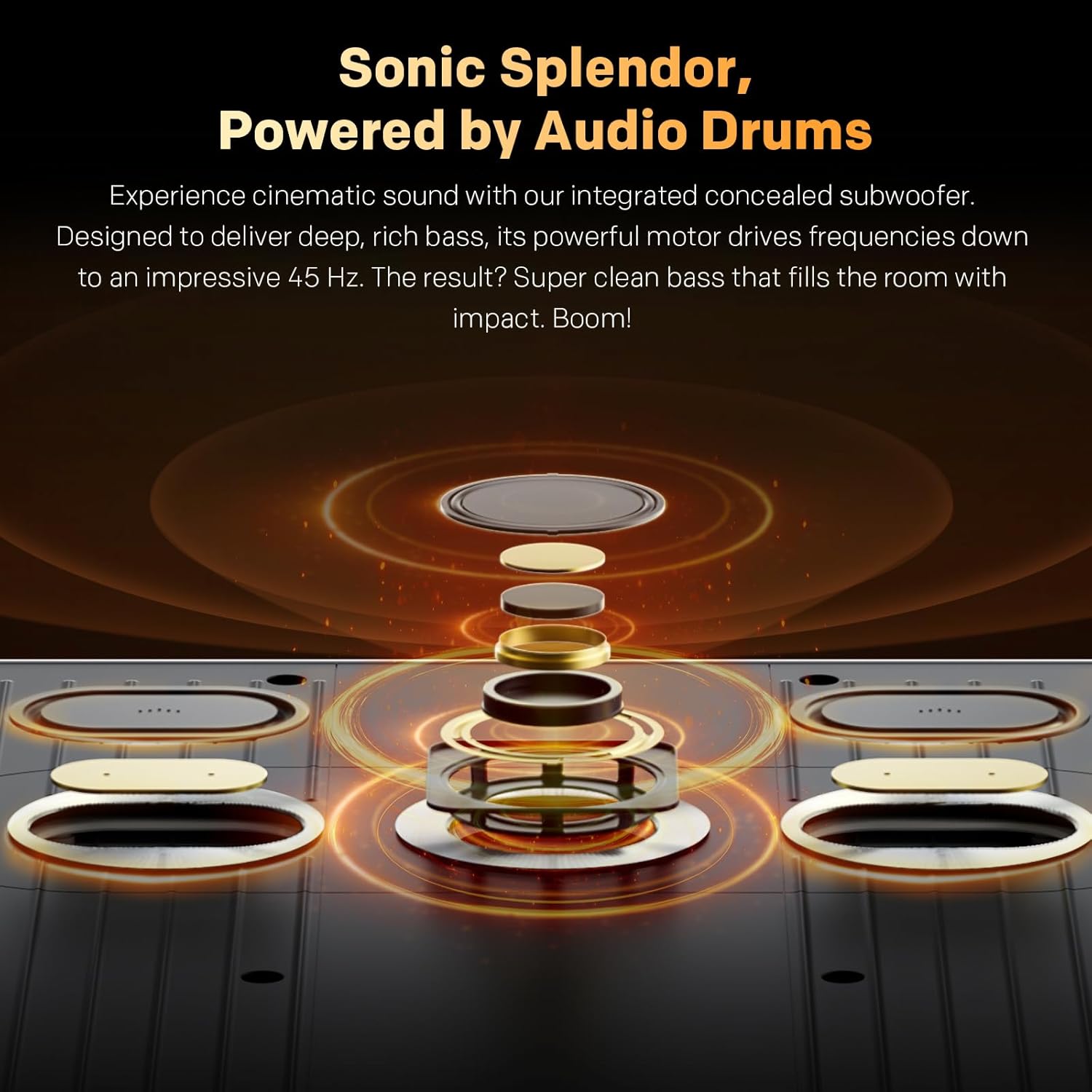
Image: Explanation of Quantum Dot Brilliance, showing how a special silica (glass-like) QD shield protects quantum dots for long-lasting vibrant colors.

Image: Illustration of QD-Mini LED technology, highlighting maximum brightness with deep contrast and the OmniView Matte Screen™ for superior viewIng.
OmniView Matte Screen™ provides an anti-glare, clear, wide-view experience, ensuring comfortable viewing from any angle and in various lighting conditions.

Image: Breakdown of the OmniView Matte Screen™ layers, explaining how it achieves true visual freedom from any seat, in any light.
4.4 Nastavení zvuku
The TV features built-in speakers with Dolby Atmos support and an integrated concealed subwoofer for cinematic sound. Adjust audio modes and equalizer settings to suit your preferences.

Image: Diagram illustrating the integrated concealed subwoofer, designed to deliver deep, rich bass down to 45 Hz.
4.5 Konektivita
Utilize Bluetooth 5.0 for connecting wireless headphones, soundbars, or other compatible accessories. Connect to your home network via Wi-Fi or the Ethernet port for internet access and streaming.
5. Údržba
5.1 Čištění obrazovky
Obrazovku jemně otřete měkkým hadříkem, který nepouští vlákna. V případě odolných skvrn ji lehce otřete.ampOtřete hadřík vodou nebo specializovaným čističem obrazovek. Nepoužívejte agresivní chemikálie, abrazivní materiály ani nestříkejte tekutiny přímo na obrazovku.
5.2 Obecná péče
- Dust the TV regularly with a soft, dry cloth.
- Zajistěte dostatečné větrání kolem televizoru, abyste zabránili přehřátí. Neblokujte větrací otvory.
- Neumísťujte televizor na přímé sluneční světlo nebo do blízkosti zdrojů tepla.
- Během bouřek nebo pokud nebudete televizor delší dobu používat, odpojte jej ze zásuvky.
6. Řešení problémů
Pokud se s televizorem setkáte s problémy, podívejte se na následující běžné problémy a jejich řešení:
- Bez napájení:
- Zkontrolujte, zda je napájecí kabel bezpečně připojen k televizoru a k elektrické zásuvce.
- Zkontrolujte, zda zásuvka funguje, zapojením jiného zařízení.
- Stiskněte tlačítko napájení na samotném televizoru, nejen na dálkovém ovladači.
- Žádný obraz ani zvuk:
- Ověřte, zda je vybrán správný vstupní zdroj (např. HDMI 1, AV).
- Zkontrolujte všechna kabelová připojení mezi televizorem a externími zařízeními.
- Ujistěte se, že hlasitost není ztlumená nebo nastavená na nulu.
- Dálkové ovládání nefunguje:
- Vyměňte baterie v dálkovém ovladači.
- Ujistěte se, že mezi dálkovým ovladačem a infračerveným senzorem televizoru nejsou žádné překážky.
- Problémy s připojením k síti:
- Restartujte router a modem.
- Zkontrolujte heslo k Wi-Fi a nastavení sítě v nabídce televizoru.
- Pokud používáte kabelové připojení, ujistěte se, že je ethernetový kabel správně připojen.
- Problémy s kvalitou obrazu (např. rozmazaný, zkreslený):
- Check the resolution settings of your external device and the TV.
- Ujistěte se, že kabely nejsou poškozené nebo uvolněné.
- Reset picture settings to default in the TV menu.
For persistent issues, please contact Skyworth customer support.
7. Specifikace
| Funkce | Specifikace |
|---|---|
| Velikost obrazovky | 86 palce |
| Značka | Skyworth |
| Technologie displeje | QD-Mini LED |
| Rezoluce | 4K UHD (2160p) |
| Obnovovací frekvence | 144 Hz |
| Špičkový jas | 2000 Nit |
| Speciální funkce | Built-In Speaker, OmniView Matte Screen™, Google TV |
| Zahrnuté komponenty | Power Adapter, Remote Control, Base Screws |
| Technologie připojení | Bluetooth 5.0, Wi-Fi, Ethernet |
| Poměr stran | 16:9 |
| Product Dimensions (without base) | 192.67 cm (Š) x 111.31 cm (V) x 3.62 cm (H) |
| Hmotnost (bez základny) | 52.9 kg |
| Standardní držák VESA | 200x200 mm |
8. Záruka a podpora
Informace o záruce naleznete v záruční kartě dodané s vaším produktem nebo navštivte oficiální webové stránky Skyworth. website. Skyworth offers customer support for any inquiries or technical assistance you may require.
For returns, a 30-day easy return policy is typically available. Please check your purchase details for specific return instructions.
Kontaktní údaje: Please visit the Skyworth NA webweb, kde najdete nejaktuálnější kontaktní údaje zákaznické podpory.