
1. Úvod
Thank you for choosing the VOCOO 15.7" Digital Wall Timer and Clock. This device is designed to provide clear time display, versatile countdown and count-up timer functions, and customizable alarm settings for various environments such as offices, homes, kitchens, gyms, and classrooms. Please read this manual carefully to ensure proper setup and operation.
2. Co je zahrnuto
Ověřte, zda jsou v balení přítomny všechny komponenty:
- VOCOO 15.7" Digital Wall Timer and Clock
- Dálkové ovládání
- Napájecí kabel 16.4 stop
- 5V/2A napájecí adaptér
- 3 x AAA Batteries (for memory backup)
- 2 x AAA baterie (pro dálkové ovládání)
- Uživatelská příručka (tento dokument)
3. Nastavení
3.1 Připojení napájení
- Connect the 16.4ft power cord to the DC 5V input port on the back of the timer.
- Plug the 5V/2A power adapter into a standard electrical outlet. The timer will power on automatically.
3.2 Memory Backup Battery Installation
The timer uses 3 AAA batteries (included) to retain settings during power outages. This ensures that time, colors, and alarms are preserved without reprogramming.
- Vyhledejte přihrádku na baterie na zadní straně časovače.
- Otevřete kryt přihrádky.
- Vložte 3 baterie typu AAA a dbejte na správnou polaritu (+/-).
- Bezpečně zavřete kryt bateriového prostoru.

Image: Illustration of memory backup battery installation. The diagram shows the timer connected to power and the location for AAA batteries to preserve settings during power loss.
3.3 Instalace baterií dálkového ovladače
The remote control requires 2 AAA batteries (included).
- Otevřete přihrádku na baterie na zadní straně dálkového ovladače.
- Vložte 2 baterie AAA, dbejte na správnou polaritu.
- Zavřete kryt přihrádky.
3.4 Montáž a umístění
The timer can be wall-mounted or placed on a desk.
- Montáž na stěnu: Use the keyhole slots on the back of the timer to hang it securely on screws (not included) in your desired wall location.
- Umístění stolu: Place the timer on a flat, stable surface.
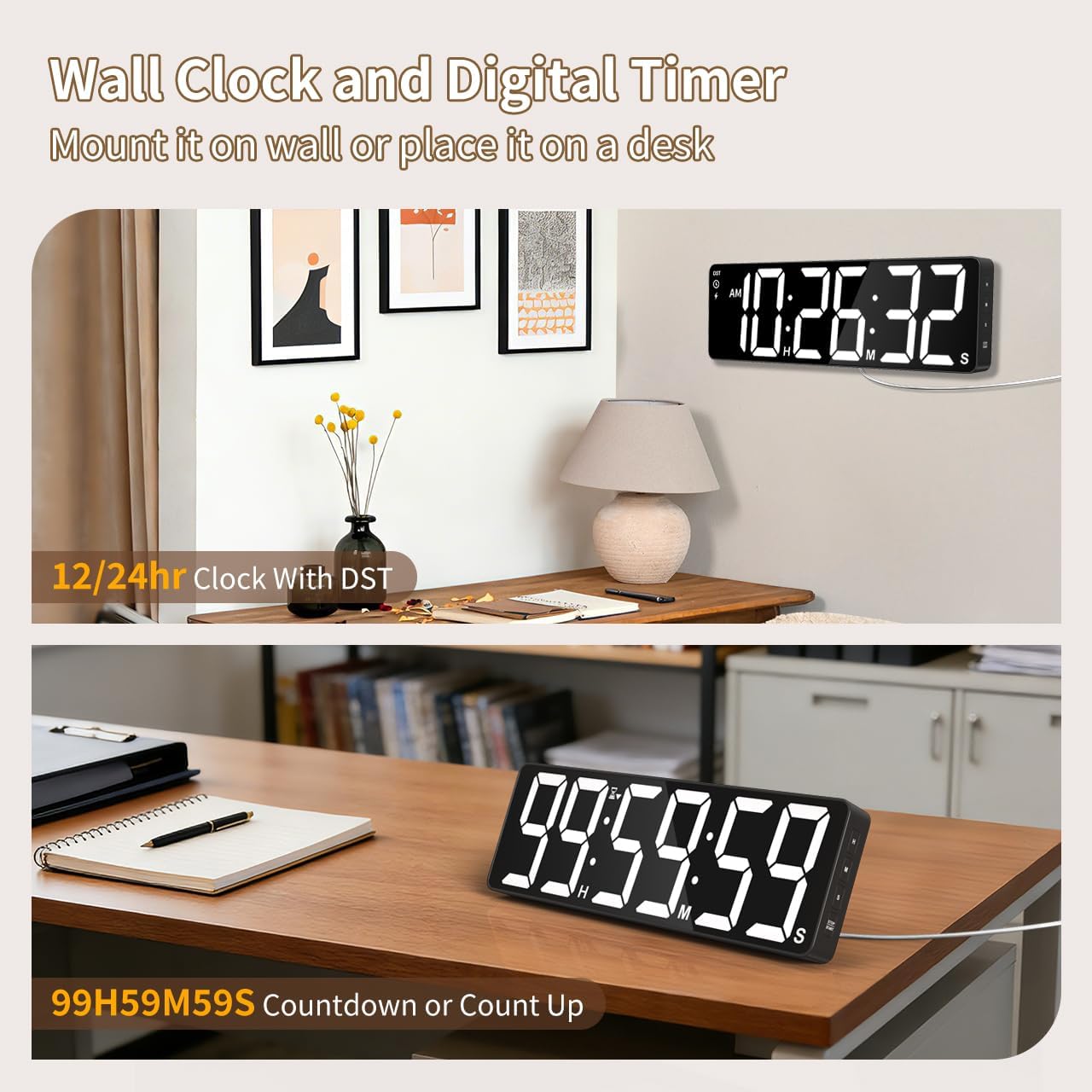
Obrázek: Přamples of the digital timer's placement, showing it mounted on a wall and resting on a desk, illustrating its versatility.
4. Návod k obsluze
The timer can be operated using the buttons on the device or the included remote control.

Obrázek: Overview of the timer's physical buttons and the remote control, highlighting their functions for easy operation.
4.1 Basic Clock Settings
Upon initial power-on or after a full power loss without backup batteries, the clock may need to be set.
- Nastavit čas: Stiskněte tlačítko SOUBOR button on the remote or device. Use the number buttons (0-9) on the remote or the NAHORU/DOLŮ buttons on the device to adjust hours and minutes. Press SOUBOR znovu pro potvrzení.
- 12/24hodinový formát: Stiskněte tlačítko 12/24 hod button on the remote to switch between 12-hour (with AM/PM indicator) and 24-hour formats.
- Letní čas (DST): The timer features automatic DST adjustment. Ensure the DST setting is enabled if your region observes it. Refer to the remote control for a dedicated DST button or a combination key press.
4.2 Nastavení jasu
The display has 3 brightness levels.
- Stiskněte tlačítko JAS button on the remote or device to cycle through the available brightness levels (Dim, Medium, Bright).
4.3 Výběr barev
Choose from 18 color options for the display digits.
- Stiskněte tlačítko SVĚTLÁ BARVA button on the remote or device to cycle through 8 solid colors, 3 RGB fixed colors, and 7 RGB gradient colors.

Image: Visual representation of the 18 color options and 3 brightness levels (Dim, Medium, Bright) available for the timer's display.
4.4 Timer Functions (Countdown/Count Up)
The timer supports both countdown and count-up modes, up to 99 hours, 59 minutes, and 59 seconds.
- Set Countdown: Stiskněte ČASOVAČ on the remote. Use the number buttons (0-9) to input the desired time (HH:MM:SS). Press START/PAUZA začít.
- Count Up (Stopwatch): Stiskněte ČASOVAČ a pak JASNÝ to set the timer to 00:00:00. Press START/PAUZA začít odpočítávat.
- Pozastavit/Pokračovat: Stiskněte START/PAUZA during an active timer to pause or resume.
- Resetovat: Stiskněte RESETOVAT to clear the current timer setting.
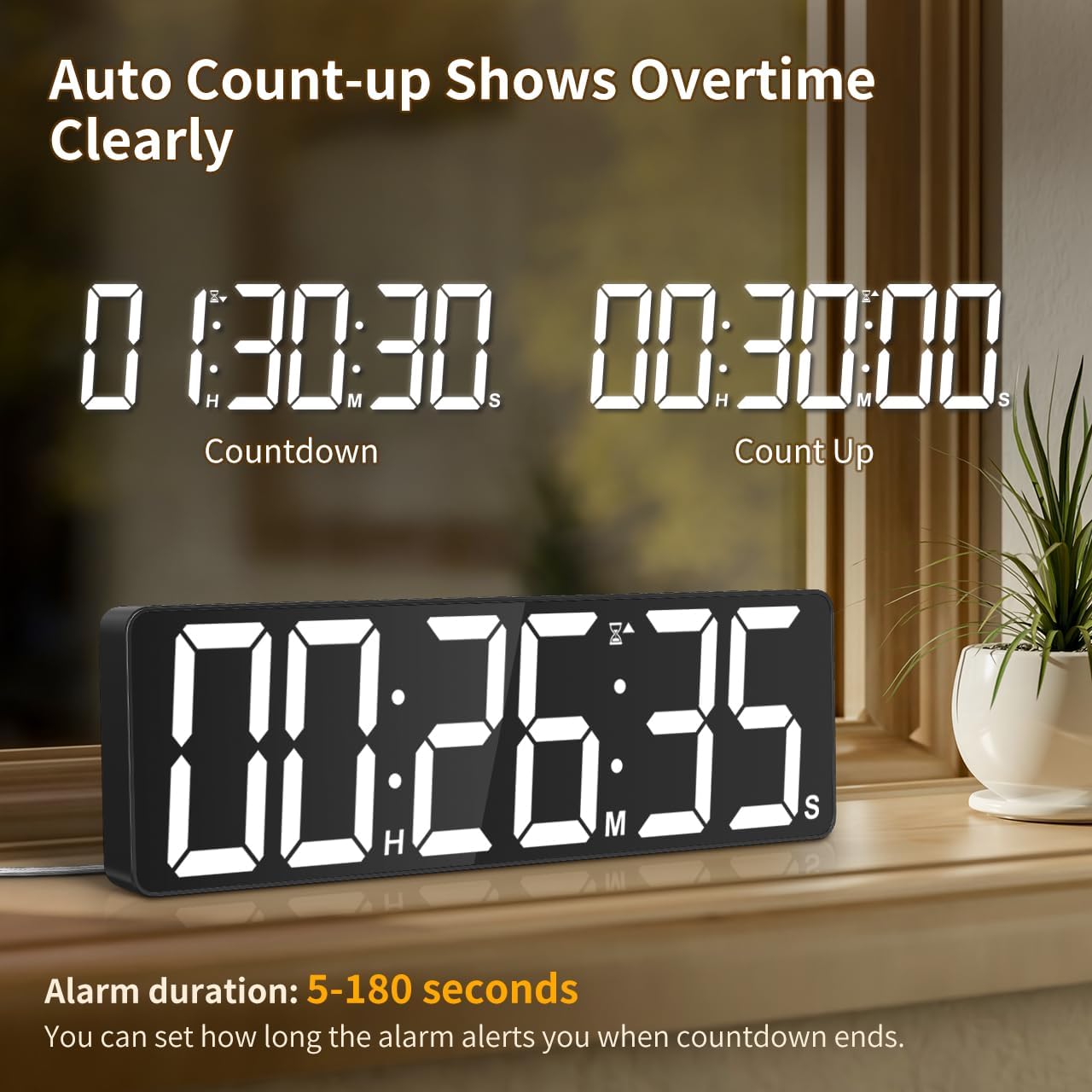
Image: The timer showing a countdown from 01:30:30 and an automatic count-up to 00:30:00 after a countdown finishes, indicating overtime tracking.
4.5 Quick-Set Shortcuts
The remote control includes 6 one-touch shortcut buttons for common timer durations:
- 3 minut
- 5 minut
- 15 minut
- 25 minut
- 30 minut
- 5 hodin
Press the desired shortcut button to instantly set and start a countdown.
4.6 Nastavení alarmu
The timer offers 6 distinct ringtones and 4 adjustable volume levels.
- Nastavit alarm: Stiskněte POPLACH on the remote. Use number buttons to set the alarm time. Press POPLACH znovu pro potvrzení.
- Select Ringtones: Stiskněte tlačítko VYZVÁNĚNÍ button on the remote to cycle through the 6 available tones (Buzzer, Melody 1-5).
- Upravit hlasitost: Stiskněte tlačítko OBJEM button on the remote to cycle through 4 volume levels (L01-L04) or L00 for silent mode (digits flash).
- Doba trvání alarmu: The alarm duration can be set from 5 to 180 seconds. Refer to the remote control for specific buttons or combination presses to adjust this setting.
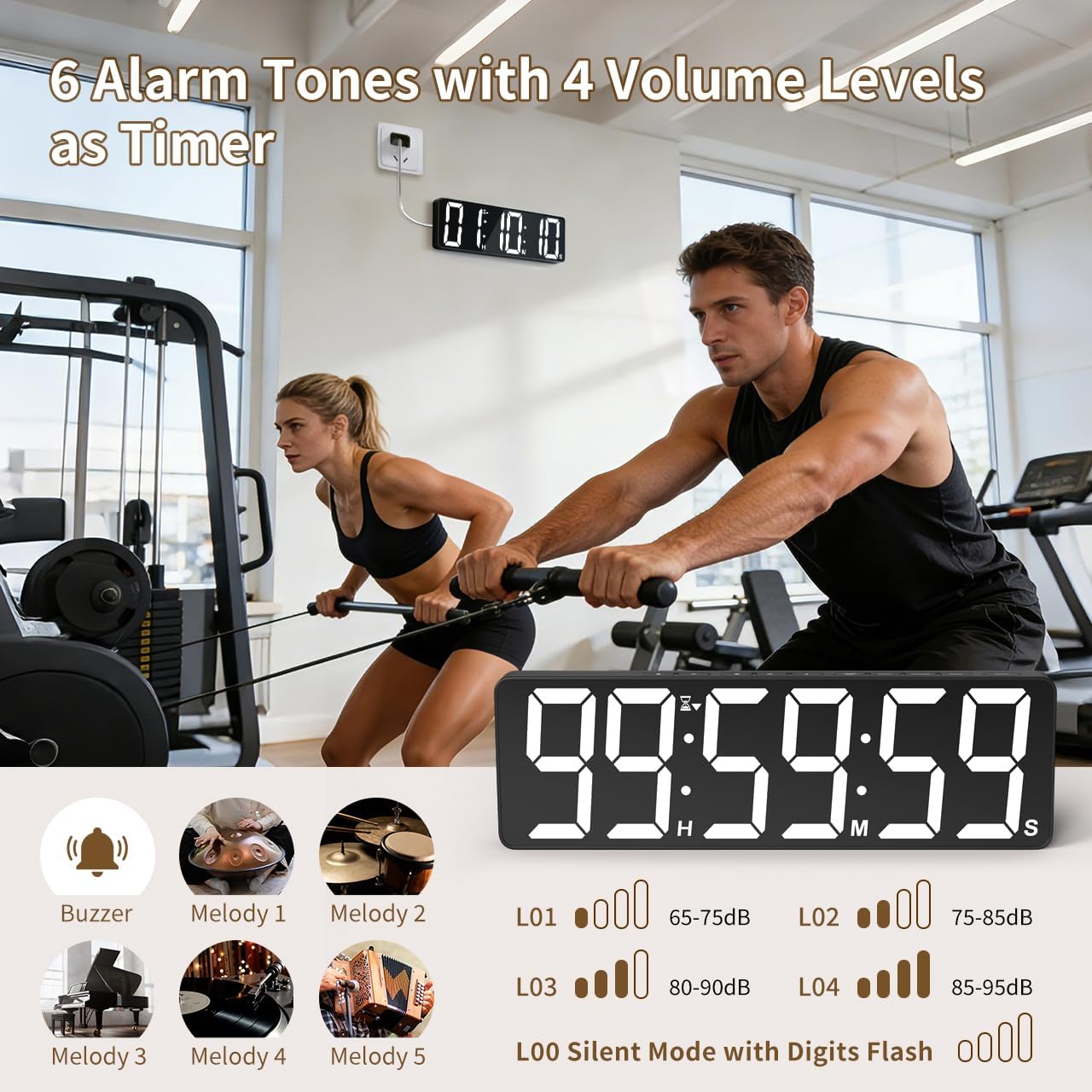
Image: Visual guide to the 6 alarm tones (Buzzer, Melody 1-5) and 4 volume levels (L01-L04), including a silent mode (L00) with flashing digits.
5. Údržba
5.1 Čištění
To clean the timer, gently wipe the display and casinměkkým, suchým hadříkem. Nepoužívejte abrazivní čisticí prostředky, rozpouštědla ani nestříkejte přímo na zařízení.
5.2 Výměna baterie
- Memory Backup Batteries: Replace the 3 AAA batteries in the main unit annually or if you notice settings are not retained during power outages.
- Baterie do dálkového ovládání: Replace the 2 AAA batteries in the remote control when its range or responsiveness decreases.
Použité baterie vždy zlikvidujte v souladu s místními předpisy.
6. Řešení problémů
- Časovač se nezapíná: Ensure the power adapter is securely connected to both the timer and a working electrical outlet. Check if the outlet is functional.
- Dálkové ovládání nefunguje: Check if the remote control batteries are correctly installed and not depleted. Ensure there are no obstructions between the remote and the timer. The remote has a range of 30ft+.
- Nastavení ztraceno po výpadku napájenítage: Verify that the 3 AAA memory backup batteries are installed correctly and are not depleted. Replace them if necessary.
- Display is dim or colors are incorrect: Upravte úroveň jasu pomocí JAS button. Cycle through color options using the SVĚTLÁ BARVA tlačítko.
- Alarm not audible: Check the alarm volume setting using the OBJEM button on the remote. Ensure it is not set to L00 (silent mode).
7. Specifikace
| Číslo modelu | 6247 |
| Typ zobrazení | LED |
| Velikost obrazovky | 15.7 palců |
| Výška číslic | 4.1 palců |
| Možnosti barev | 18 (8 solid, 3 RGB fixed, 7 RGB gradients) |
| Úrovně jasu | 3 |
| Rozsah časovače | Up to 99 hours, 59 minutes, 59 seconds |
| Vyzvánění budíku | 6 |
| Úrovně hlasitosti alarmu | 4 + Silent Mode |
| Doba trvání alarmu | 5-180 sekund |
| Vstup napájení | 5V/2A DC |
| Délka napájecího kabelu | 16.4 stop (5 metrů) |
| Zálohování paměti | 3 x AAA baterie (součástí balení) |
| Baterie dálkového ovládání | 2 x AAA baterie (součástí balení) |
| Rozsah dálkového ovládání | 30ft+ |
| Rozměry produktu (D x Š x V) | 3.7 H x 38 Š x 12 V centimetrů |
| Hmotnost položky | 820 gramů |
| Materiál | Akrylonitril-butadien-styren |
8. Záruka a podpora
For warranty information or technical support, please refer to the contact details provided with your purchase or visit the official VOCOO webmísto. Uschovejte si doklad o koupi pro případ záručních reklamací.