
1. Úvod
This manual provides instructions for the Vention Wireless HDMI Transmitter and Receiver Kit, Model 1TX to 4RX. This kit allows for wireless transmission of HDMI signals from a source device to up to four display devices, supporting 4K decoding with a crystal-clear 1080p@60Hz output. It is designed for various applications, including home entertainment, business meetings, and educational presentations.
2. Obsah balení
Prosím, ověřte, zda jsou v balení přítomny všechny položky:
- 1 x Vention Wireless HDMI Transmitter (TX Unit)
- 4 x Vention Wireless HDMI Receiver (RX Unit)
- 5 x napájecí kabely USB-C
- 1 x HDMI Extension Cable (if included)
- 1 x Mini HDMI Adapter (if included)
- 1 x Micro HDMI Adapter (if included)
- Uživatelská příručka (tento dokument)
Note: The number of adapters and cables may vary slightly based on the specific kit configuration.
3. Vlastnosti produktu
- Wireless Multi-Screen Extension: Transmit HDMI signals to up to four displays simultaneously.
- Přenos na velmi dlouhé vzdálenosti: Supports wireless transmission up to 656 feet (200 meters) for 1TX to 1RX configuration. Distances vary for multiple receivers.
- Plug and Play: Nejsou potřeba žádné ovladače ani složité nastavení.
- 4K Decoding to 1080p@60Hz Output: Decodes 4K input signals and outputs them in crystal-clear 1080p at 60Hz.
- Pokročilá bezdrátová technologie: Utilizes 2.4G and 5G dual-band Wi-Fi with MIMO & LDS technology for stable and low-latency signal transmission.
- Live Status Display: Integrated OLED screen on units shows signal strength, connection status, and error indications.
- Efektivní chlazení: Designed with integrated heat dissipation for stable long-term operation.
- Univerzální kompatibilita: Works with various HDMI source devices (laptops, PCs, game consoles, cameras) and display devices (TVs, monitors, projectors).
- Podpora HDCP: Compatible with content protected by HDCP, allowing playback from streaming services.

Obrázek: Overview of Vention Wireless HDMI Extender features, including 4K decoding to 1080p, integrated heat dissipation, and extension/mirroring modes.
4. Pokyny k nastavení
- Připojení vysílače (TX):
- Plug the Vention Wireless HDMI Transmitter (TX unit) into the HDMI output port of your source device (e.g., laptop, PC, game console).
- Connect a USB-C power cable to the TX unit and plug the other end into a 5V/2A USB power adapter (not always included) or a powered USB port on your source device. Ensure adequate power for stable operation.
- Connect the Receiver(s) (RX):
- Plug each Vention Wireless HDMI Receiver (RX unit) into an available HDMI input port on your display device(s) (e.g., TV, monitor, projector).
- Connect a USB-C power cable to each RX unit and plug the other end into a 5V/2A USB power adapter or a powered USB port on your display device.
- Zapnutí zařízení:
- Power on your source device and all connected display devices.
- Select the correct HDMI input on each display device where an RX unit is connected.
- Automatické připojení:
- The TX and RX units are designed for plug-and-play operation. They should automatically detect each other and establish a connection within a few seconds.
- The OLED screen on the units will display the connection status and signal strength.

Image: Illustration of connecting a single transmitter to multiple receivers for multi-screen extension.
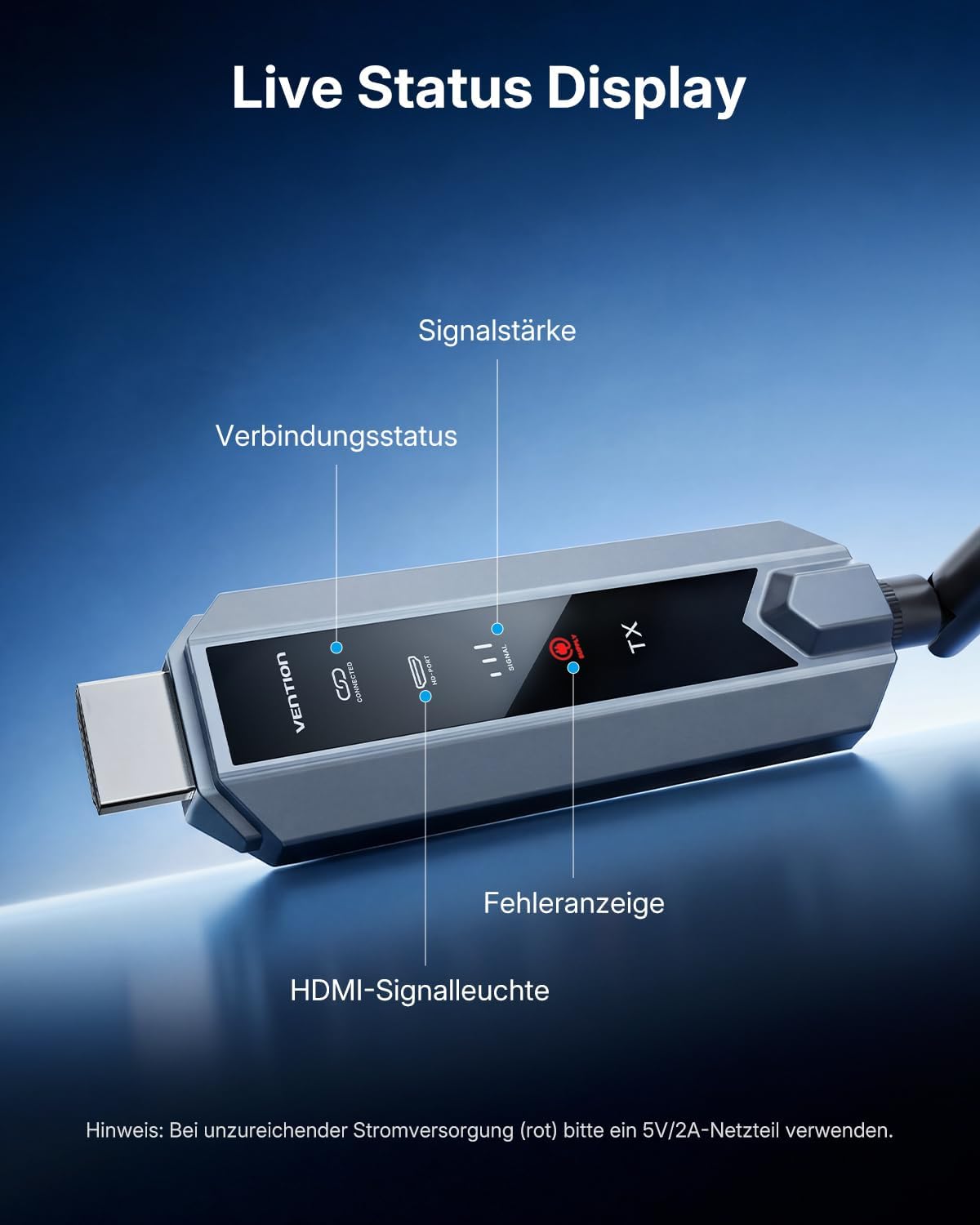
Image: Close-up of the Vention Wireless HDMI unit's OLED display showing signal strength, connection status, and error indicators. A note advises using a 5V/2A power supply if the error indicator is red.
5. Návod k obsluze
Once the TX and RX units are properly connected and powered, the system will automatically transmit the HDMI signal. No further configuration is typically required for basic operation.
- Přenos signálu: The video and audio from your source device will be mirrored or extended to all connected display devices.
- Extension and Mirroring Modes: The system supports both extending your desktop across multiple screens and mirroring the same content on all displays. The specific mode is typically controlled by your source device's display settings.
- Stav sledování: Refer to the OLED display on the TX and RX units to monitor connection status and signal strength. A stable connection is indicated by a consistent signal strength reading.

Image: Visual representation of 4K Ultra HD decoding to 1080p@60Hz crystal-clear output on a large screen from a laptop.

Image: Depiction of integrated MIMO & LDS 5G technology for strong signal reception and low latency, ensuring an instant picture.
6. Údržba
- Čištění: Use a soft, dry cloth to clean the units. Avoid liquid cleaners or abrasive materials.
- Větrání: Ensure the units are placed in a well-ventilated area to prevent overheating, especially during extended use. Do not cover the ventilation holes.
- Integrita připojení: Periodically check all cable connections (HDMI, USB-C) to ensure they are secure.
- Skladování: When not in use for extended periods, disconnect the power and store the units in a cool, dry place.
7. Řešení problémů
| Problém | Možná příčina | Řešení |
|---|---|---|
| No signal or black screen on display. |
|
|
| Flickering or unstable video. |
|
|
| Žádný zvuk nebo špatná kvalita zvuku. |
|
|
| Noticeable input lag during gaming. |
|
|
| Red error indicator on OLED screen. |
|
|
8. Specifikace
| Značka | Vention |
| Model | 1TX to 4RX (TZ-ADPH0-4-01) |
| Technologie připojení | Wi-Fi (2.4G + 5G Dual Band) |
| Typ konektoru | HDMI |
| Rozlišení videa | 4K input decoding, 1080p@60Hz output |
| Dosah bezdrátového přenosu |
|
| Video kodek | H.264, H.265/HEVC |
| Vstup napájení | USB-C (5V/2A recommended) |
| Speciální funkce | Wireless Multi-Screen Extension, Ultra-Long Distance, Plug and Play, Efficient Cooling, Universal Compatibility, Live Status Display, HDCP Support |
| Kompatibilní zařízení | Laptops, PCs, Game Consoles (PS5, Xbox), Cameras, TVs, Monitors, Projectors |

Image: Diagram illustrating the maximum wireless transmission distances for different configurations: 1TX to 1RX (200m/656ft), 1TX to 2RX (120m/394ft), 1TX to 3RX (80m/263ft), and 1TX to 4RX (80m/263ft).

Image: Visual representation of the broad compatibility of the Vention Wireless HDMI Extender, showing various sender devices (camera, TV-Box, PC, laptop, game console) and receiver devices (projector, TV, monitor).
9. Záruka a podpora
For warranty information and technical support, please refer to the documentation included with your product or visit the official Vention webmísto. Uschovejte si doklad o koupi pro případ záručních reklamací.