
1. Úvod
Thank you for choosing the FREEWOLF M87V2 Wireless Membrane Keyboard. This manual provides essential information for setting up, operating, and maintaining your keyboard. Please read it thoroughly to ensure optimal performance and longevity of your device.
2. Obsah balení
- FREEWOLF M87V2 Wireless Membrane Keyboard
- USB-C to USB-A Cable (detachable)
- 2.4GHz USB přijímač
- Uživatelská příručka
3. Konec produktuview
The FREEWOLF M87V2 is an 87-key Tenkeyless (TKL) layout keyboard designed for versatility and comfort. It features tri-mode connectivity, RGB backlighting, and durable PBT keycaps.
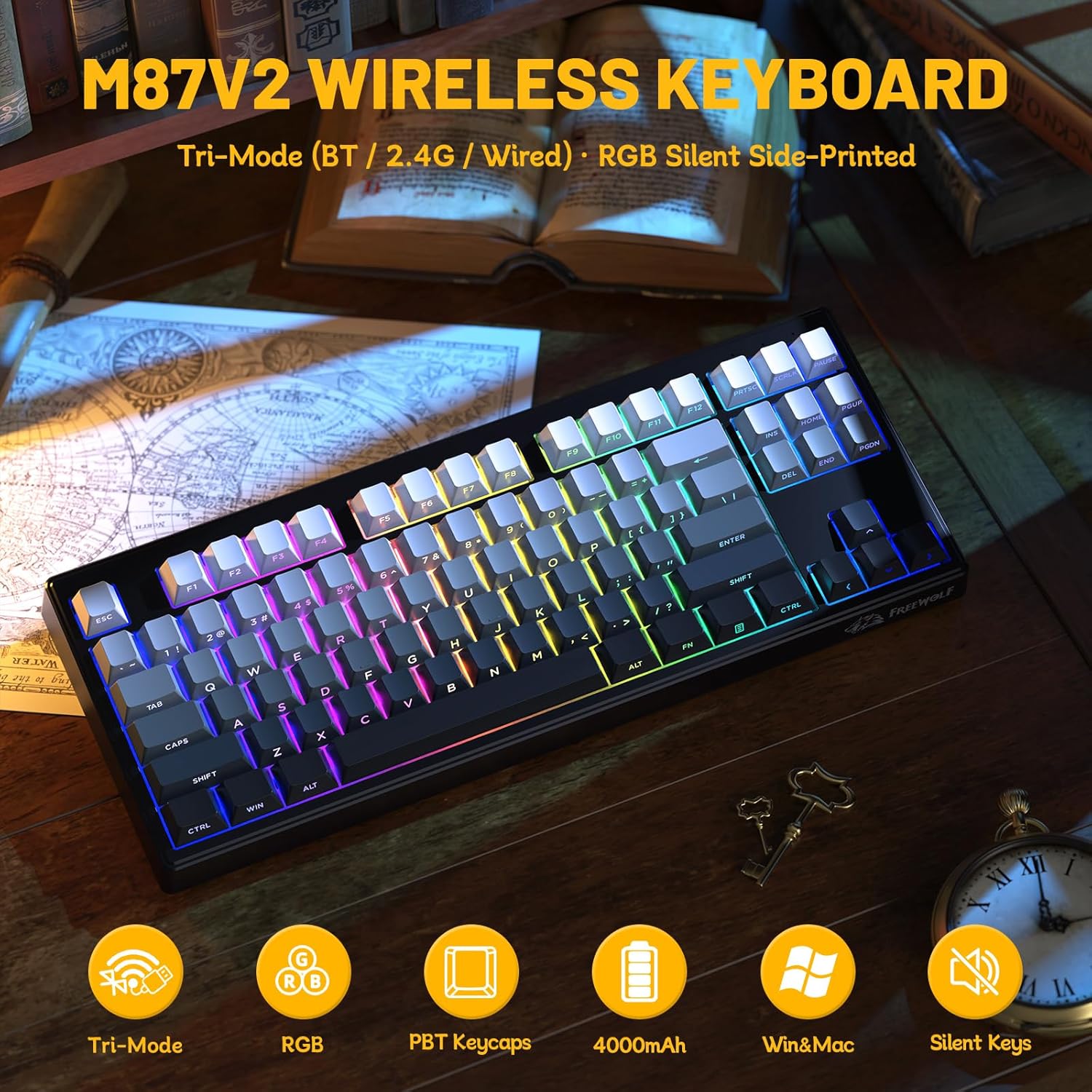
Obrázek 3.1: Konecview of the FREEWOLF M87V2 keyboard, showcasins 87 klávesami a RGB podsvícením.
3.1 Klíčové vlastnosti
- Rozložení TKL s 87 klávesami: Compact design without the numeric keypad, saving desk space.
- Třírežimové připojení: Podporuje bezdrátové připojení 2.4 GHz, Bluetooth a kabelové připojení USB-C.
- RGB podsvícení: Customizable 16.8 million color RGB lighting with various effects.
- Baterie 4000 mAh: High-capacity rechargeable battery for extended wireless use.
- PBT klávesy: Durable, fade-resistant PBT keycaps with side-printed legends.
- 26klávesová anti-ghostingová funkce: Zajišťuje přesnou registraci více současných stisknutí kláves.
- Silent Structure: Advanced silicone dampening for a quiet typing experience.

Image 3.2: Detail of the PBT side-printed keycaps, highlighting their durability and ergonomic Cherry profile.
3.2 Fyzické rozměry
- Length: Approximately 36 cm (14.2 inches)
- Width: Approximately 14 cm (5.5 inches)
- Height: Approximately 2 cm (0.8 inches)
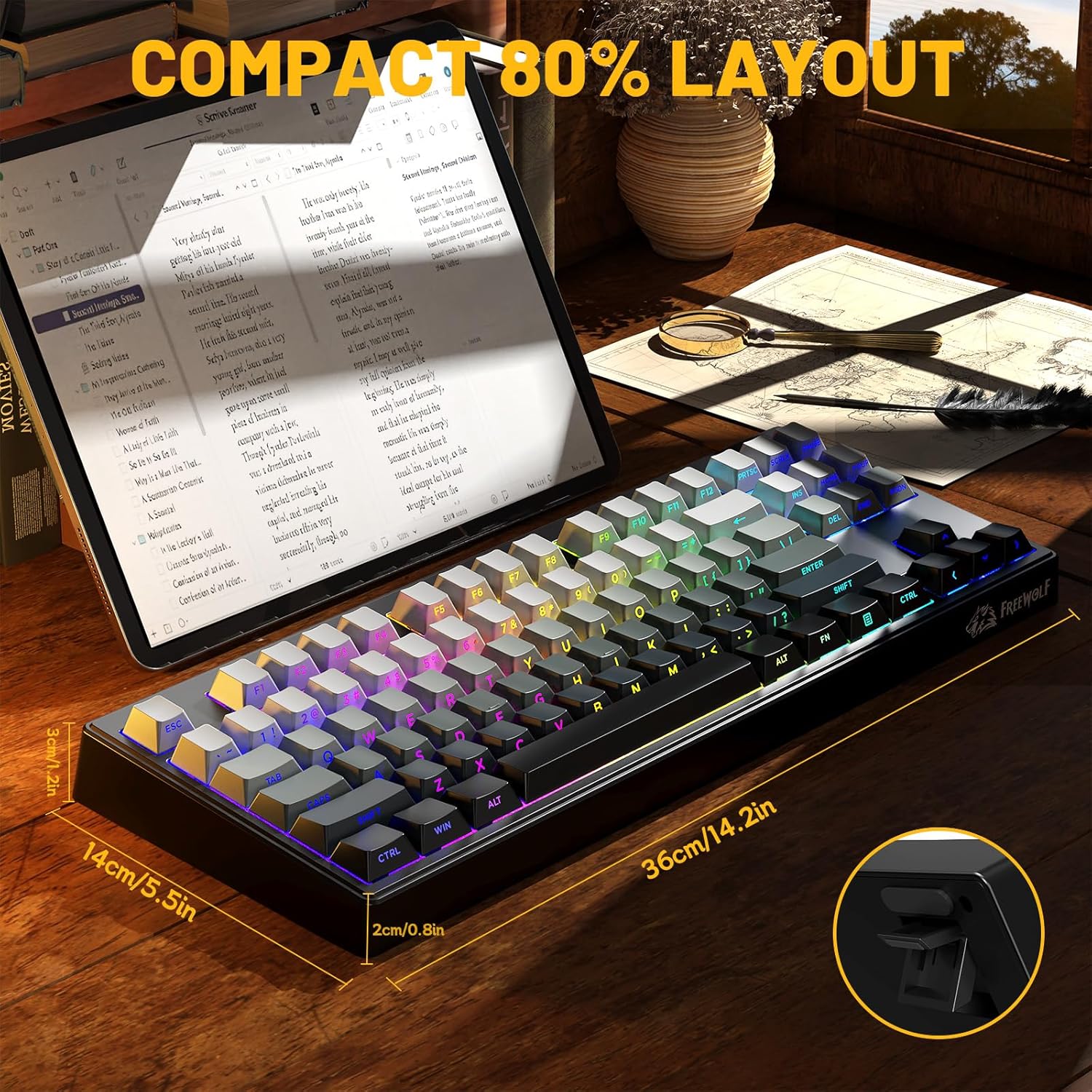
Image 3.3: The M87V2 keyboard displaying its compact 80% layout and approximate dimensions.
4. Nastavení
4.1 Nabíjení klávesnice
Before first use, it is recommended to fully charge the keyboard. Connect the provided USB-C cable to the keyboard's USB-C port and the other end to a USB power source (e.g., computer USB port, wall adapter). The indicator light will show charging status.
- Slabá baterie: Red flashing M-LED.
- Nabíjení: Solid red M-LED.
- Plně nabito: M-LED turns off or changes color (refer to specific indicator behavior).

Image 4.1: The M87V2 keyboard highlighting its 4000mAh battery capacity.

Image 4.2: Battery life estimates: approximately 210 hours with backlight off, and 32 hours with backlight on.
4.2 Režimy připojení
The M87V2 keyboard supports three connection modes: 2.4GHz Wireless, Bluetooth, and USB-C Wired. Use the mode switch located on the back of the keyboard to select your desired connection type.

Image 4.3: The M87V2 keyboard illustrating its capability to connect via Bluetooth, 2.4GHz wireless, or USB-C wired modes.
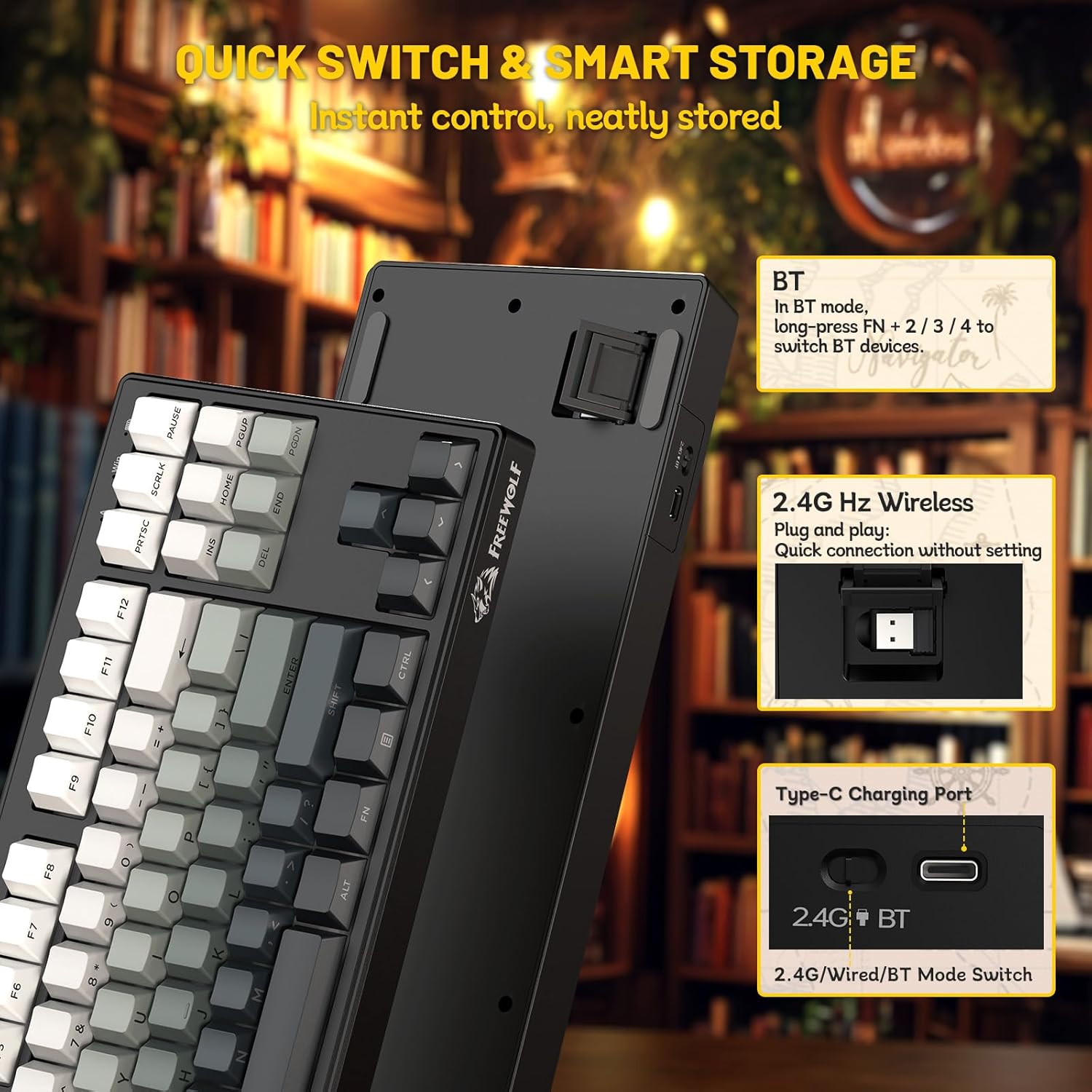
Image 4.4: Close-up of the keyboard's underside, showing the 2.4G/Wired/BT mode switch, the storage slot for the 2.4GHz receiver, and the USB-C charging port.
4.2.1 Bezdrátové připojení 2.4 GHz
- Locate the 2.4GHz USB receiver stored in the slot on the back of the keyboard.
- Zapojte USB přijímač do volného USB portu na vašem počítači.
- Set the mode switch on the back of the keyboard to the '2.4G' position.
- Klávesnice by se měla připojit automaticky.
4.2.2 Připojení Bluetooth
- Set the mode switch on the back of the keyboard to the 'BT' position.
- On the keyboard, long-press FN + 2, FN + 3nebo FN + 4 to enter pairing mode for Bluetooth device 1, 2, or 3 respectively. The indicator light will flash rapidly.
- Na svém zařízení (počítači, tabletu, chytrém telefonu) povolte Bluetooth a vyhledejte nová zařízení.
- Select 'FREEWOLF M87V2' from the list of available devices to pair.
- Once paired, the indicator light on the keyboard will stop flashing.
- To switch between paired Bluetooth devices, short-press FN + 2, FN + 3nebo FN + 4.
4.2.3 Kabelové připojení USB-C
- Připojte dodaný kabel USB-C k portu USB-C na klávesnici.
- Připojte konec kabelu USB-A k volnému portu USB v počítači.
- Set the mode switch on the back of the keyboard to the 'Wired' position.
- The keyboard will be recognized as a standard USB keyboard and is ready for use.
5. Návod k obsluze
5.1 Ovládání RGB podsvícení
The M87V2 keyboard features customizable RGB backlighting. Use the following FN (Function) key combinations to control the lighting effects:
- FN + INS: Cycle through 15 different backlight effects.
- FN + DEL: Cycle through 7 single-color modes.
- FN + ↑ / ↓: Upravte jas podsvícení.
- FN + ← / →: Adjust backlight speed/direction (for dynamic effects).
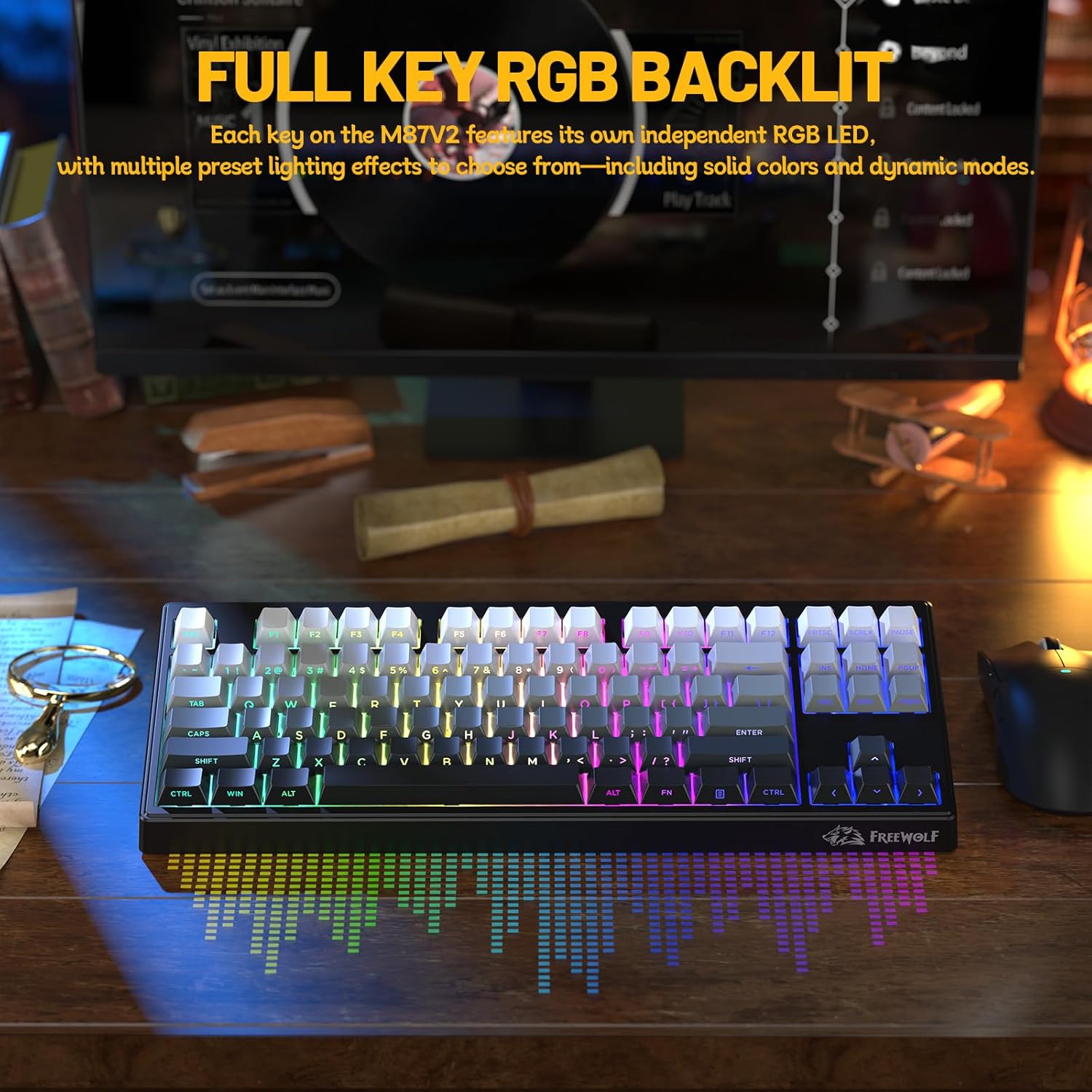
Image 5.1: The M87V2 keyboard displaying its vibrant full key RGB backlighting.

Image 5.2: Visual guide for controlling RGB backlight effects using FN + INS and FN + DEL keys.
5.2 Ochrana proti ghostingu
The M87V2 keyboard features 26-key anti-ghosting, ensuring that up to 26 simultaneous key presses are registered accurately. This is particularly beneficial for fast typing and gaming scenarios where multiple keys are often pressed at once.

Image 5.3: Representation of the 26-key anti-ghosting capability, showing multiple key presses being registered simultaneously.
5.3 Special Key Functions (FN Combinations)
The keyboard utilizes the FN key to access secondary functions printed on certain keycaps. Refer to the keycap legends for specific functions, which may include media controls, volume adjustment, and application shortcuts.
6. Údržba
6.1 Čištění
- Před čištěním odpojte klávesnici od všech zdrojů napájení.
- Použijte měkký hadřík, který nepouští vlákna dampKlávesy a povrch otřete vodou nebo jemným čisticím roztokem.
- Nepoužívejte agresivní chemikálie, abrazivní čisticí prostředky ani nestříkejte tekutiny přímo na klávesnici.
- K odstranění prachu a nečistot z prostoru mezi klávesami použijte stlačený vzduch.
6.2 Skladování
When not in use for extended periods, store the keyboard in a cool, dry place away from direct sunlight and extreme temperatures. Ensure the keyboard is fully charged before storing to maintain battery health.
7. Řešení problémů
7.1 Klávesnice nereaguje
- Zkontrolujte napájení: Ensure the keyboard is charged or connected via USB-C cable.
- Přepínač režimu: Verify the mode switch on the back of the keyboard is set to the correct position (2.4G, BT, or Wired).
- Připojení 2.4 GHz: Ensure the USB receiver is securely plugged into your computer and the keyboard is in 2.4G mode. Try a different USB port.
- Připojení Bluetooth: Re-pair the keyboard with your device. Ensure Bluetooth is enabled on your device and the keyboard is in BT mode and pairing correctly (FN+2/3/4).
- Kabelové připojení: Zkuste jiný kabel USB-C nebo port USB v počítači.
7.2 Podsvícení nefunguje nebo je nesprávné
- Jas: Upravte jas pomocí FN + ↑ / ↓.
- Effect Cycle: Cycle through effects using FN + INS or FN + DEL.
- Úroveň baterie: Nízký stav baterie může ovlivnit výkon podsvícení. Nabijte klávesnici.
7.3 Intermittent Connectivity
- Rušení: Move the keyboard closer to the receiver/device, or away from other wireless devices that might cause interference.
- Baterie: Ensure the keyboard has sufficient charge.
- Ovladače: For PC, ensure your operating system's Bluetooth or USB drivers are up to date.
8. Specifikace
| Funkce | Detail |
|---|---|
| Model | M87V2 |
| Rozložení | 87 kláves (bezklíčový) |
| Materiál krytky klíče | PBT (Side-Printed) |
| Konektivita | Bezdrátové připojení 2.4 GHz, Bluetooth, kabelové připojení USB-C |
| Kapacita baterie | 4000 XNUMX mAh |
| Podsvícení | RGB |
| Anti-Ghosting | 26-Key Rollover |
| Kompatibilita | Windows, macOS, Linux, iOS, Android |
| Rozměry (D x Š x V) | 14.2 x 5.5 x 0.8 palce (36 x 14 x 2 cm) |
| Hmotnost položky | 1.83 libry |
9. Záruka a podpora
The FREEWOLF M87V2 keyboard comes with a standard manufacturer's warranty. For detailed warranty information, please refer to the warranty card included in your package or contact FREEWOLF customer support.
If you encounter any issues not covered in this manual, or require further assistance, please contact FREEWOLF customer support through their official webna webu nebo u prodejce, kde byl produkt zakoupen.