
1. Úvod
Thank you for choosing the Audio Array AI-13 4-Channel Hybrid USB Audio Mixer. This compact mixer is designed for a variety of audio applications, including podcasting, streaming, live sessions, and home studio setups. It features 4 analog and 2 digital channels, supporting microphones, instruments, and playback devices in a streamlined interface. This manual provides detailed instructions for setup, operation, maintenance, and troubleshooting to ensure optimal performance of your device.

Image 1.1: User operating the AI-13 mixer in a studio environment.
2. Vlastnosti produktu
The Audio Array AI-13 mixer offers a range of features for versatile audio control:
- Hybrid 4-Channel Control: Combines 4 analog and 2 digital channels for flexible input management.
- Studio-Ready Inputs: Dual XLR mic inputs with switchable +48V phantom power for condenser microphones, plus Hi-Z support for guitars and instruments.
- Built-in 2-Band EQ: Each channel includes a 2-band equalizer for precise sound shaping.
- Nízká hlučnost: Features a signal-to-noise ratio of ≥90dB for clean audio with minimal interference.
- USB Recording & Monitoring: Integrated USB return, RCA REC output, and headphone monitoring for recording and playback.
- Portable USB-C Power: Lightweight design powered via USB-C, suitable for mobile and desktop setups.
- Vysoce kvalitní Preamps: Mic and line preamps deliver a 20Hz–20kHz frequency response and up to 100dB dynamic range.
- Powerful Headphone Output: 200mW headphone output for clear and accurate monitoring.

Obrázek 2.1: Konecview of the AI-13 mixer's multi-functionality.

Image 2.2: Key features of the AI-13 mixer.
3. Nastavení
Follow these steps to set up your Audio Array AI-13 mixer:
- Připojení napájení: Connect the mixer to a power source using the provided USB-C cable. Ensure the power source provides stable 5V power.
- Připojení mikrofonu/nástroje:
- For microphones, connect XLR cables to the CH1 or CH2 inputs. Activate +48V phantom power if using condenser microphones.
- For instruments (e.g., guitar), connect to the Hi-Z inputs.
- Výstupní připojení: Connect your headphones to the PHONES jack for monitoring. Connect main outputs to your amplifier or recording device as needed.
- USB připojení: For computer recording or playback, connect the mixer to your computer via the USB port.
4. Controls and Routing
Understanding the controls is essential for effective use of your mixer.

Image 4.1: Routing functionality overview of the AI-13 mixer.

Image 4.2: Detailed routing and control labels.
4.1 Vstupní sekce
- Přepínač HI-Z: Engages high impedance input for instruments like guitars.
- +48V fantomové napájení: Activates phantom power for condenser microphones on XLR inputs.
- Knoflík GAIN: Upravuje vstupní úroveň pro každý kanál.
- Ekvalizér s vysokými/nízkými tóny: 2-band equalizer to adjust treble and bass frequencies for each channel.
- EFF (Effect Send): Řídí množství signálu odeslaného do vestavěného efektového procesoru.
- Knoflík LEVEL: Upravuje výstupní hlasitost pro jednotlivé kanály.
4.2 Output & Monitoring Section
- MAIN Volume Knob: Ovládá celkovou výstupní hlasitost mixážního pultu.
- PHONES Volume Knob: Upravuje hlasitost pro sluchátkový výstup.
- REC Output (RCA): Provides an output for recording devices.
- USB Return: Allows audio playback from a connected computer.
4.3 USB/MP3 Player Controls

Image 4.3: USB/MP3 player controls.
- Tlačítko MODE: Short press to switch mode (USB/Bluetooth). Long press for recording.
- Tlačítko PLAY/PAUSE: Short press to play or pause. Long press for cycle conversion.
- PREVIOUS/VOL- Button: Krátkým stisknutím přejdete na předchozí skladbu. Dlouhým stisknutím snížíte hlasitost.
- NEXT/VOL+ Button: Krátkým stisknutím spustíte další skladbu. Dlouhým stisknutím zvýšíte hlasitost.

Image 4.4: TAPE OUT and USB PC connection controls.
- TAPE OUT Jacks: Used for connecting to recording applications.
- USB PC Interface: When pressed, the device connects to MP3. Otherwise, it connects to a PC for playing computer songs and recordings.
5. Možnosti připojení
The AI-13 mixer offers diverse connectivity for various audio sources and destinations.

Obrázek 5.1: Konecview of connectivity options.

Obrázek 5.2: Detailní view of input and output connections.
- Vstupy: XLR (for microphones), TRS (for stereo line-in), Hi-Z (for instruments), USB (for digital audio from PC/pendrive).
- výstupy: Main TRS Out, RCA REC Out, Headphone Out (TRS), Amp Ven.
- Digitální: USB-C for power and data, USB 2.0 for pendrive.
6. DSP efekty
The AI-13 includes built-in Digital Signal Processing (DSP) effects to enhance your audio.

Image 6.1: Built-in DSP effects section.
- Reverb: Adds spatial depth to your sound.
- Zpoždění: Creates echo effects.
- Use the dedicated knobs to adjust the repeat and delay parameters of the effects.
7. Požadavky na napájení
The AI-13 mixer is designed for efficient power consumption and is powered via USB-C.
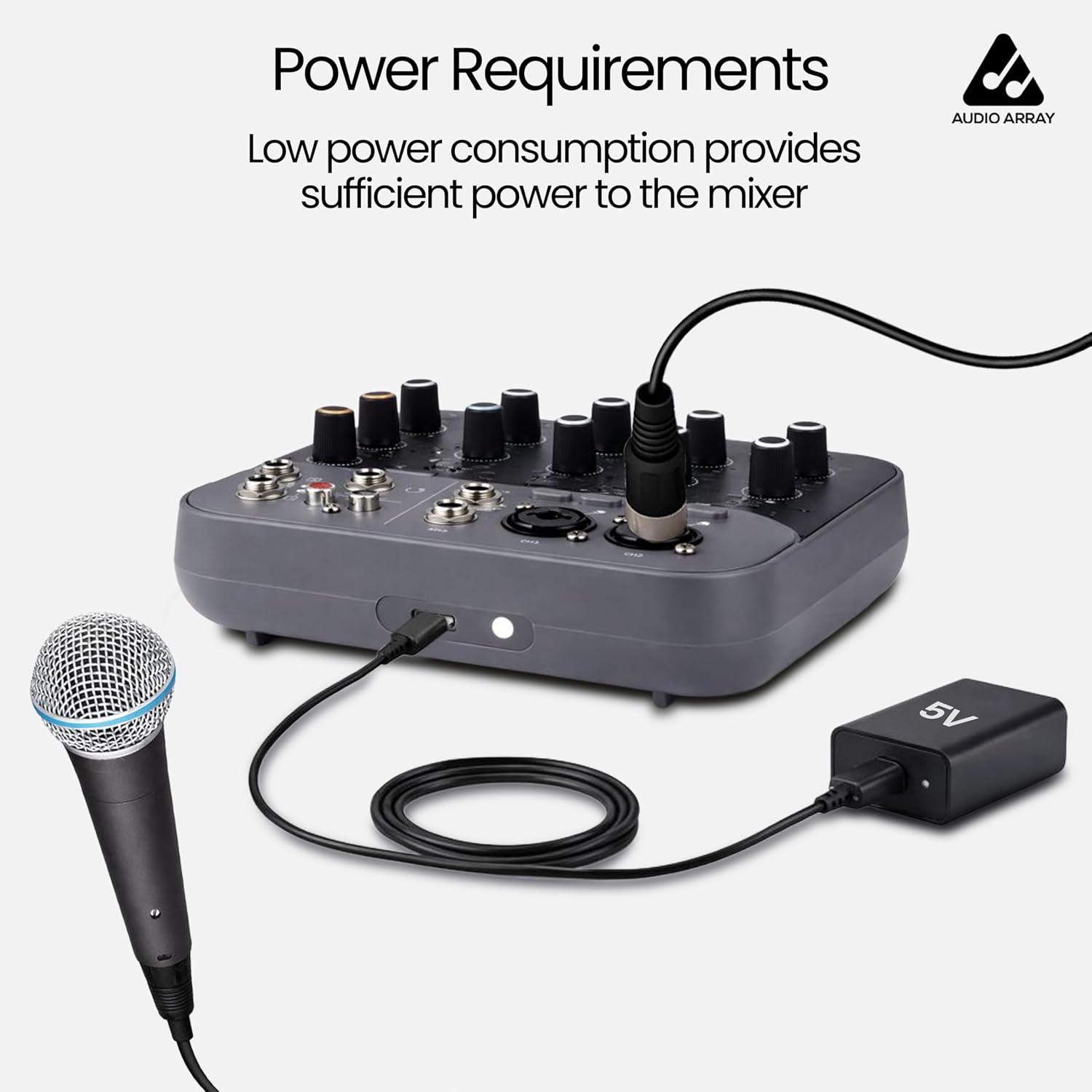
Image 7.1: Power connection via USB-C.
- Zdroj napájení: USB Type-C (5V).
- Ensure you use a compatible 5V USB power adapter or a power bank for stable operation.
8. Kompatibilní zařízení
The AI-13 mixer is compatible with a wide range of audio and computing devices.

Image 8.1: Compatible devices overview.

Image 8.2: Expanded view of compatible devices in a studio setting.
- Mikrofony: Dynamic and Condenser (with +48V phantom power).
- Nástroje: Guitars, keyboards, etc.
- Přehrávací zařízení: MP3 players, USB pendrives, smartphones (via Bluetooth or USB).
- Výstupní zařízení: Amplifiers, powered speakers, headphones, recording interfaces.
- Počítače: Laptops, desktops for USB audio interface functionality.
9. Monitorování v reálném čase
The AI-13 allows for real-time monitoring of your audio output.

Image 9.1: Real-time monitoring setup.
Connect your headphones to the PHONES jack to monitor your mix in real-time. This allows you to hear the sound feedback and make adjustments as needed during recording or live sessions.
10. Návod k obsluze
General guidelines for operating your mixer:
- Zapnutí: Connect the USB-C power cable. The mixer will power on automatically.
- Nastavení vstupního zesílení: For each connected microphone or instrument, slowly increase the GAIN knob until the signal is strong but does not clip (indicated by the CLIP LED).
- Apply EQ: Use the HIGH and LOW EQ knobs to shape the tone of each channel.
- Přidat efekty: Turn the EFF knob on a channel to send signal to the built-in effects. Adjust the REPEAT and DELAY knobs in the master section to control the effect parameters.
- Nastavení úrovní kanálů: Use the LEVEL knobs for each channel to balance the mix.
- Hlavní hlasitost: Adjust the MAIN volume knob for the overall output level.
- Monitor with Headphones: Use the PHONES volume knob to set your monitoring level.
- USB/Bluetooth Playback: Use the MP3 player controls to play audio from a USB drive or a Bluetooth-connected device.
11. Údržba
Proper maintenance ensures the longevity and performance of your mixer:
- Čištění: Use a soft, dry cloth to clean the exterior of the mixer. Avoid liquid cleaners or abrasive materials.
- Skladování: Mixér skladujte na chladném a suchém místě mimo dosah přímého slunečního záření a extrémních teplot.
- Péče o kabely: Handle cables carefully. Avoid bending or twisting them excessively, which can damage internal wiring.
- Větrání: Zajistěte správné větrání kolem mixéru, abyste zabránili přehřátí.
12. Řešení problémů
If you encounter issues with your AI-13 mixer, refer to the following common problems and solutions:
| Problém | Možná příčina | Řešení |
|---|---|---|
| Žádná síla | Faulty USB-C cable or power adapter; loose connection. | Check USB-C cable and power adapter. Try a different 5V USB-C power source. Ensure connections are secure. |
| Žádný zvukový výstup | Volume knobs too low; incorrect input/output connections; muted channels. | Increase MAIN and PHONES volume. Verify all cables are correctly connected. Check channel LEVEL knobs. |
| Mikrofon nefunguje | Phantom power off (for condenser mics); incorrect gain; faulty mic/cable. | Activate +48V phantom power if using a condenser microphone. Increase GAIN knob. Test with a different microphone or cable. |
| Zkreslený zvuk | Input gain too high; output volume too high. | Reduce input GAIN. Lower channel LEVEL and MAIN volume. |
| Nahrávání na USB nefunguje | Incorrect USB PC mode; driver issues; software settings. | Ensure the USB PC button is correctly set. Check computer's sound settings and recording software. |
13. Specifikace
Detailed technical specifications for the Audio Array AI-13 mixer:

Image 13.1: General specifications.

Image 13.2: Detailed audio specifications.
| Funkce | Detail |
|---|---|
| Značka | Zvukové pole |
| Číslo modelu | AI-13 |
| Počet kanálů | 4 |
| Rozměry produktu (D x Š x V) | 16H x 14Š x 4V centimetrů |
| Hmotnost položky | 680 gramů |
| Technologie připojení | XLR / TRS In, TRS / TS In, RCA REC Out, Main TRS Out, Headphones, USB 2.0 Pendrive, Wired Headphone, USB Type C |
| Typ zdroje napájení | USB TYP C |
| Frekvenční odezva | 20 Hz - 20 kHz |
| Typ výstupního konektoru | 1 x Main Output, 2 x TRS, 1 x Phone (TRS), REC, RCA |
| Zvukový vstup | 2x XLR, 4x TRS |
| Úroveň hluku | 90 decibelů |
| Země původu | Čína |
14. Záruka
The Audio Array AI-13 mixer comes with a manufacturer's warranty.
- Záruční doba: 1 rok záruka výrobce.
- For warranty claims or service, please contact Audio Array customer support.
15. Podpora
For any assistance, feedback, or technical support, please contact Audio Array using the details below:

Image 15.1: Service details and contact information.

Image 15.2: Customer Support contact details.
- Telefon: +91 79961 35111
- WhatsApp: +91 72082 64674
- E-mail: podpora@audioarray.in
- Adresa: Cambium Retail Private Limited, 109, Hubtown Solaris, Professor NS Phadke Rd, Andheri East, Mumbai, Maharashtra 400069, India.
You can also scan the QR codes in Image 15.1 for direct access to support channels.