
1. Úvod
The ACECONN ACE11 is a versatile streaming TV box designed to deliver a high-quality entertainment experience. Running on Android 11 TV OS and Linux, it supports 4K Ultra HD resolution at 60fps, HDR10+, and features dual-band Wi-Fi for stable connectivity. This manual provides essential information for setting up, operating, and maintaining your device.
2. Obsah balení
Ověřte, zda jsou všechny níže uvedené položky součástí balení. Pokud některé položky chybí nebo jsou poškozené, kontaktujte zákaznickou podporu.

The package includes the ACE11 TV Box, a Bluetooth Voice Remote, a Power Adapter, an HDMI Cable, an IR Extender, and a Quick User Guide.
- ACECONN ACE11 TV Box
- Bluetooth hlasové dálkové ovládání
- Napájecí adaptér (5V/2A)
- HDMI kabel
- IR Sensor / Extender
- Rychlá uživatelská příručka
3. Konec produktuview
Familiarize yourself with the ports and indicators on your ACECONN ACE11 TV Box.
This image displays the ACECONN ACE11 TV Box from two angles, highlighting its various ports and indicators. The front features status lights and a recovery button, while the rear includes power input, optical audio, LAN, HDMI, and USB ports.
Přední panel
- Indikátory stavu: Lights indicating power, Wi-Fi, and other operational statuses.
- Tlačítko obnovení: Used for system recovery or firmware updates.
Zadní panel
- Příkon: Connect the provided 5V/2A power adapter.
- AV výstup: For older televisions (if applicable, not explicitly listed but common).
- LAN port: Pro kabelové ethernetové připojení.
- Port HDMI 2.1: Connect to your TV or display for video and audio output.
- SPDIF: Digitální audio výstup.
- IR Port: Connect the IR extender for remote control functionality if the box is out of direct line of sight.
- USB Ports (USB 2.0 & USB 3.0): For connecting external storage devices, keyboards, or other peripherals.
- Slot na kartu TF: For expandable storage via a MicroSD card.
Rozměry

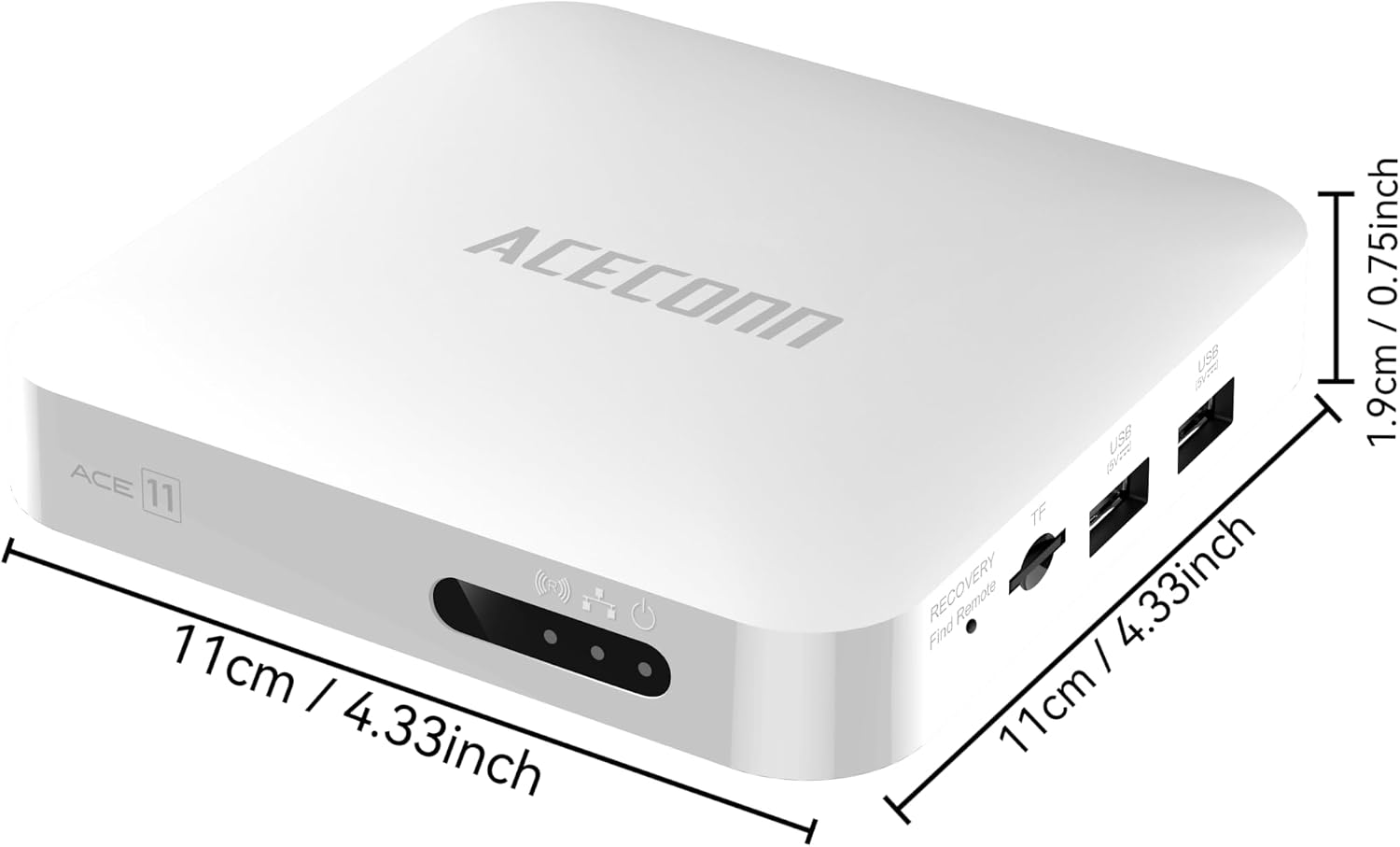
The ACECONN ACE11 TV Box measures approximately 11cm (4.33 inches) in length and width, and 1.9cm (0.75 inches) in height.
4. Dálkové ovládání Overview
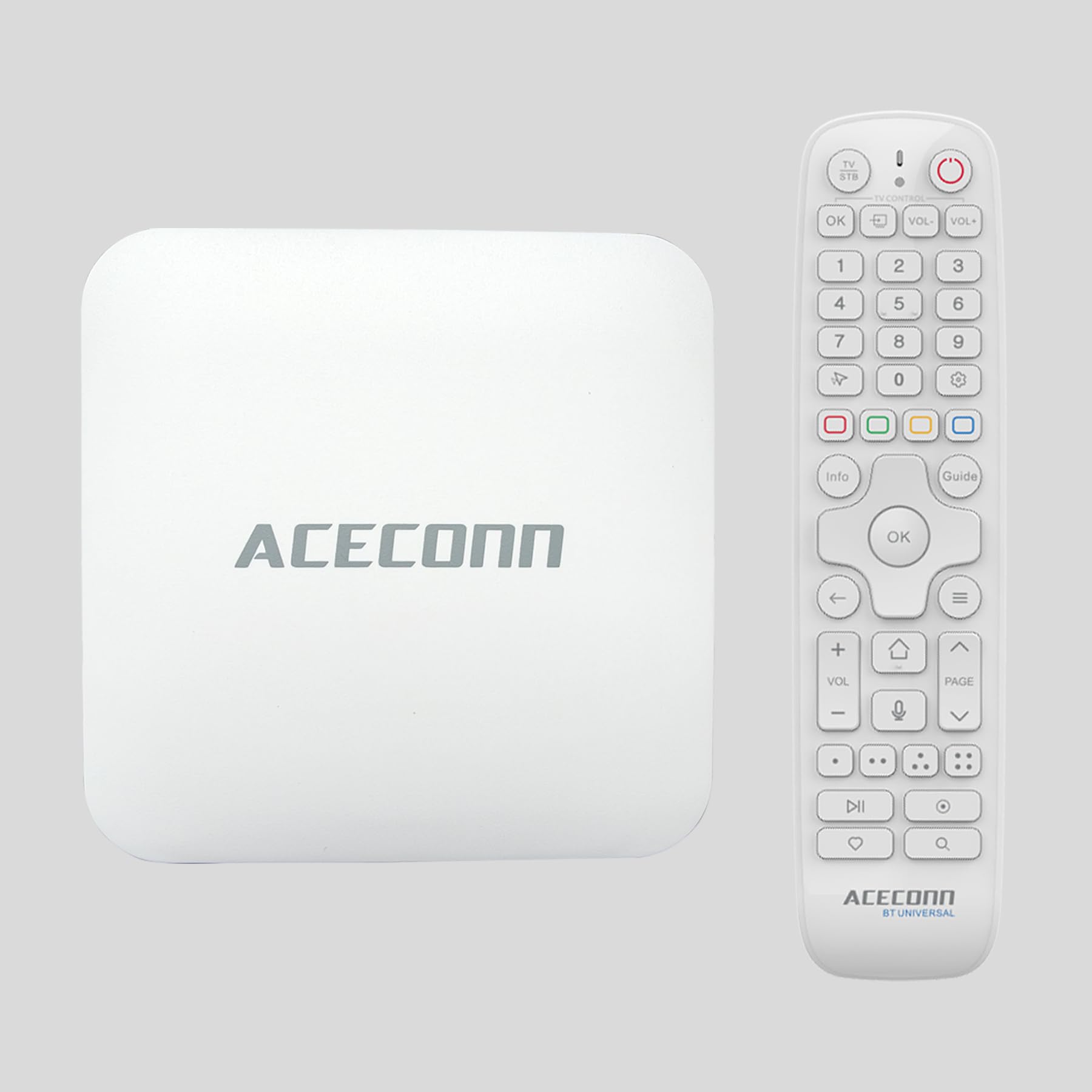
The ACECONN ACE11 comes with a Bluetooth Voice Remote Control featuring an Air Mouse function and auto-learning hotkeys. This section details the functions of the remote control buttons.
This diagram illustrates the layout of the Bluetooth Voice Remote Control, with labels pointing to each button and its corresponding function, including power, volume, navigation, voice assistant, and hotkeys.
- TV Power On/Off: Controls your television's power.
- STB Power On/Off: Controls the TV box power.
- OK Key for TV Source: Vybere vstupní zdroj televizoru.
- TV Volume +/-: Adjusts television volume.
- Číselné klávesy (0-9): For direct input.
- Myš: Activates/deactivates Air Mouse function.
- Možnosti: Access additional menu options.
- Color Keys: Functionality may vary by application.
- Information (Info): Displays program or system information.
- Open TV Guide (Guide): Přístup k elektronickému programovému průvodci.
- Nahoru/dolů/vlevo/vpravo: Navigační tlačítka.
- Confirm/Select (OK): Potvrzuje výběr.
- Menu: Otevře hlavní nabídku.
- Výstup: Returns to the previous screen or exits an application.
- Domov: Vrátí se na domovskou obrazovku.
- Hlasitost +/-: Adjusts TV box volume.
- Page Up/Down, Channel Up/Down: Navigates through pages or channels.
- Hlasový asistent: Activates voice control for commands and search.
- Horké klávesy: Přizpůsobitelná tlačítka zkratek.
- Přehrát/pozastavit: Ovládání přehrávání médií.
- Záznam: Initiates recording (if supported by application/service).
- Setup Favorite: Assigns favorite channels or apps.
- Vyhledávání: Opens search function.
5. Nastavení
Follow these steps to connect and power on your ACECONN ACE11 TV Box.
5.1 Připojení televizního přijímače
- Připojte kabel HDMI: Insert one end of the HDMI cable into the HDMI 2.1 port on the back of the ACE11 TV Box and the other end into an available HDMI input on your television.
- (Optional) Connect IR Extender: If the TV box will be placed out of direct line of sight, connect the IR extender to the IR port on the TV box and position the extender's sensor where it can receive signals from the remote.
- (Optional) Connect Ethernet Cable: For a wired internet connection, connect an Ethernet cable from your router to the LAN port on the TV box.
- Připojte napájecí adaptér: Zapojte napájecí adaptér do portu DC IN na televizním přijímači a poté zapojte adaptér do zásuvky ve zdi.
5.2 Zapnutí a počáteční nastavení
- Zapnutí: The TV box should power on automatically once connected to power. If not, press the STB Power On/Off button on the remote control.
- Vyberte vstup: Use your TV remote to select the correct HDMI input source for the TV box.
- Párování dálkového ovladače Bluetooth: Follow the on-screen instructions to pair your Bluetooth Voice Remote Control. This usually involves holding down specific buttons on the remote until a pairing confirmation appears.
- Jazyk a region: Vyberte preferovaný jazyk a region.
- Internetové připojení: If you are not using a wired Ethernet connection, select your Wi-Fi network from the list and enter the password. The ACE11 supports dual-band 2.4G and 5G Wi-Fi for optimal performance.

The ACE11 supports dual-band 2.4G and 5G Wi-Fi, providing faster and more stable wireless connectivity for streaming.
- Přihlášení k účtu Google: Log in with your Google account to access the Google Play Store and other Google services.
- Kompletní nastavení: Follow any remaining on-screen prompts to complete the initial setup process.
6. Návod k obsluze
This section covers basic operation and key features of your ACECONN ACE11 TV Box.
6.1 Navigace
- Použijte Nahoru/dolů/vlevo/vpravo buttons on the remote to navigate through menus and applications.
- Stiskněte tlačítko OK tlačítko pro výběr položky.
- Stiskněte tlačítko Domov button to return to the main Android TV home screen at any time.
- Aktivujte Air Mouse function for pointer-based navigation, similar to a computer mouse.
6.2 Používání hlasového ovládání
The Bluetooth Voice Remote allows for convenient voice commands.

The ACE11 supports smart voice control, allowing users to issue commands and search content using the dedicated voice assistant button on the remote.
- Stiskněte tlačítko Hlasový asistent tlačítko na dálkovém ovladači.
- Speak clearly into the remote's microphone. You can ask to open apps, search for content, check weather, and more.
6.3 Instalace aplikací
The ACE11 comes with the Google Play Store and ACECONN exclusive app store pre-installed.
- Z domovské obrazovky přejděte na Aplikace sekce.
- Vybrat Obchod Google Play nebo ACECONN App Store.
- Browse or search for desired applications and select Instalovat.
6.4 Media Playback and 4K HDR
The ACE11 supports 4K Ultra HD resolution at 60fps and HDR10+ for enhanced visual quality.

The ACE11 supports 4K video streaming up to 3840x2160 at 60Hz, with Dynamic HDR for enhanced contrast and color, and AV1 format decoding.
- Ensure your television is 4K and HDR compatible and that the HDMI cable is connected to an HDMI 2.1 port on your TV for optimal performance.
- Stream 4K content from supported applications like YouTube, Netflix, and TVONAIR3+.
- The device supports AV1/HEVC/H.265 video decoding for efficient high-quality streaming.
7. Údržba
Proper maintenance ensures the longevity and optimal performance of your TV box.
7.1 Aktualizace systému (OTA)
The ACE11 supports Over-The-Air (OTA) updates for both the system and applications.
- Pravidelně kontrolujte v nastavení zařízení aktualizace systému, abyste měli jistotu, že máte nejnovější funkce a bezpečnostní záplaty.
- Follow on-screen instructions to download and install updates. Do not power off the device during an update.
7.2 Čištění
- Před čištěním odpojte napájecí adaptér.
- Use a soft, dry cloth to wipe the exterior of the TV box.
- Nepoužívejte tekuté čisticí prostředky ani abrazivní materiály.
8. Řešení problémů
If you encounter issues with your ACECONN ACE11 TV Box, refer to the following common solutions.
- Bez napájení:
- Ensure the power adapter is securely connected to the TV box and a working power outlet.
- Zkuste jinou zásuvku.
- Žádný obraz/signál:
- Verify the HDMI cable is securely connected to both the TV box and the TV.
- Ujistěte se, že je váš televizor nastaven na správný vstupní zdroj HDMI.
- Zkuste jiný kabel HDMI nebo televizní port.
- Dálkové ovládání nefunguje:
- Ensure the remote's batteries are correctly inserted and have sufficient charge.
- Re-pair the Bluetooth remote control by following the initial setup instructions.
- If using the IR extender, ensure it is properly connected and positioned.
- Žádné internetové připojení:
- For Wi-Fi, check your network settings and ensure the correct password is entered.
- For wired connection, ensure the Ethernet cable is properly connected to both the TV box and the router.
- Restart your router and the TV box.
- Zamrzání/pád aplikace:
- Zavřete a restartujte aplikaci.
- Vymažte mezipaměť a data aplikace v nastavení zařízení (Nastavení > Aplikace > [Název aplikace] > Vymazat mezipaměť/Vymazat data).
- Ujistěte se, že je aplikace aktualizována na nejnovější verzi.
9. Specifikace
| Funkce | Specifikace |
|---|---|
| Model | ACE11 |
| Operační systém | Android 11 TV OS, Linux |
| Rezoluce | 4Kx2k@60fps |
| Podpora HDR | HDR10+ |
| BERAN | 2 GB |
| Interní úložiště | 32 GB (rozšiřitelné pomocí TF karty) |
| Wi-Fi | Dual-Band (2.4G/5G) MIMO |
| Bluetooth | Bluetooth 5.1 |
| Dekódování videa | AV1/HEVC/H.265 |
| HDMI | HDMI 2.1 |
| USB porty | USB 2.0, USB 3.0 |
| Technologie připojení | Bluetooth, HDMI, IR, USB, Wi-Fi |
| Rozměry (D x Š x V) | 11.18 x 11.18 x 2.03 cm (přibližně 4.4 x 4.4 x 0.8 palce) |
| Podporované internetové služby | Browser, Skype, TV ONAIR, YouTube |
10. Záruka a podpora
For warranty information and technical support, please refer to the documentation included with your purchase or visit the official ACECONN webUschovejte si doklad o koupi pro případ reklamace.